The Most Comprehensive AI Trading Journal, Led by AI Coach
AI Coach runs 21 deterministic checks, ranks up to 8 findings by dollar impact and shows you what to fix next. Then AI Query, AI Chat, AI Summary, AI Notes, AI Daily Insights and AI Widgets take over, on top of 600+ exact stats and analytics.
-
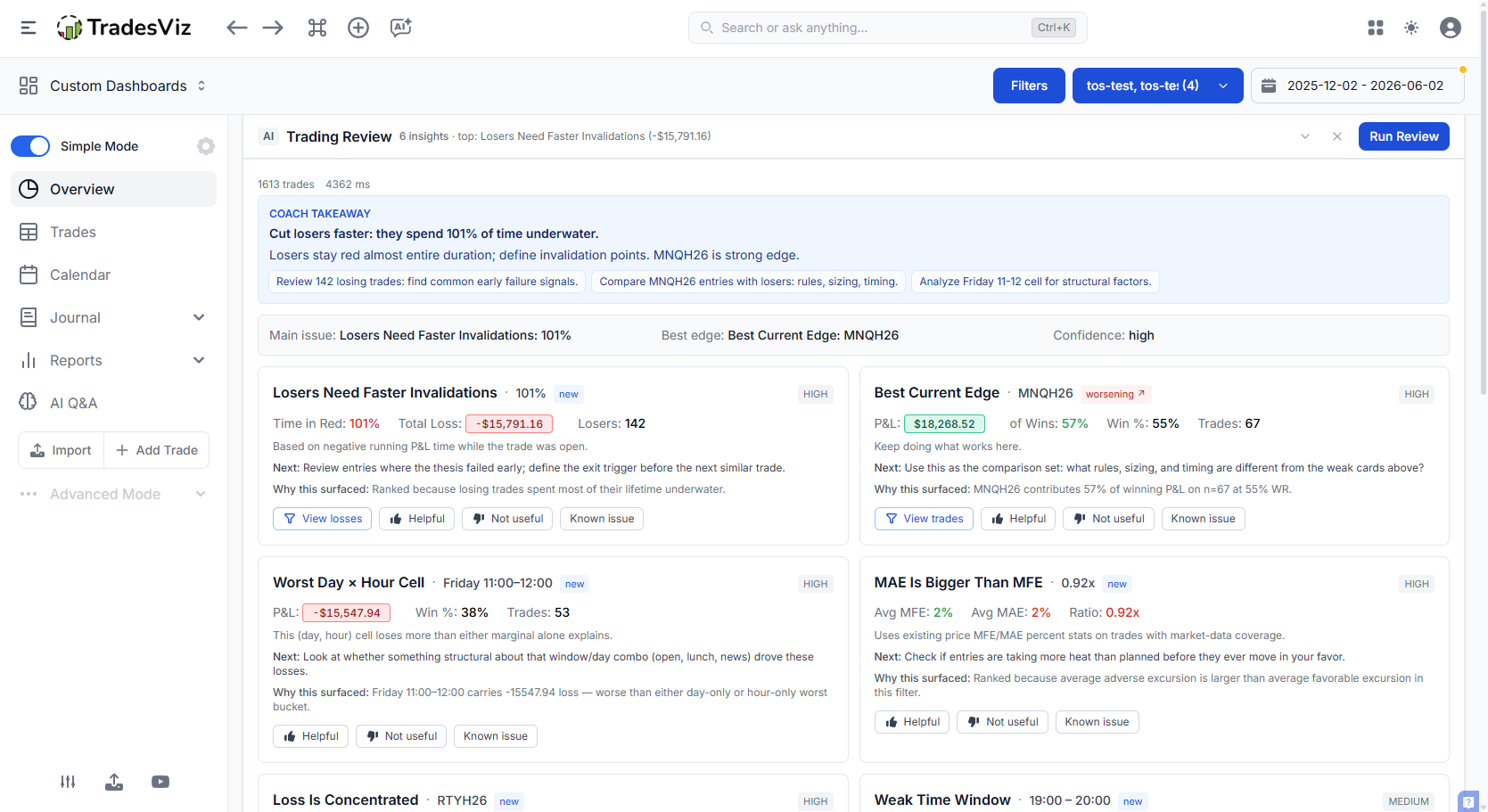
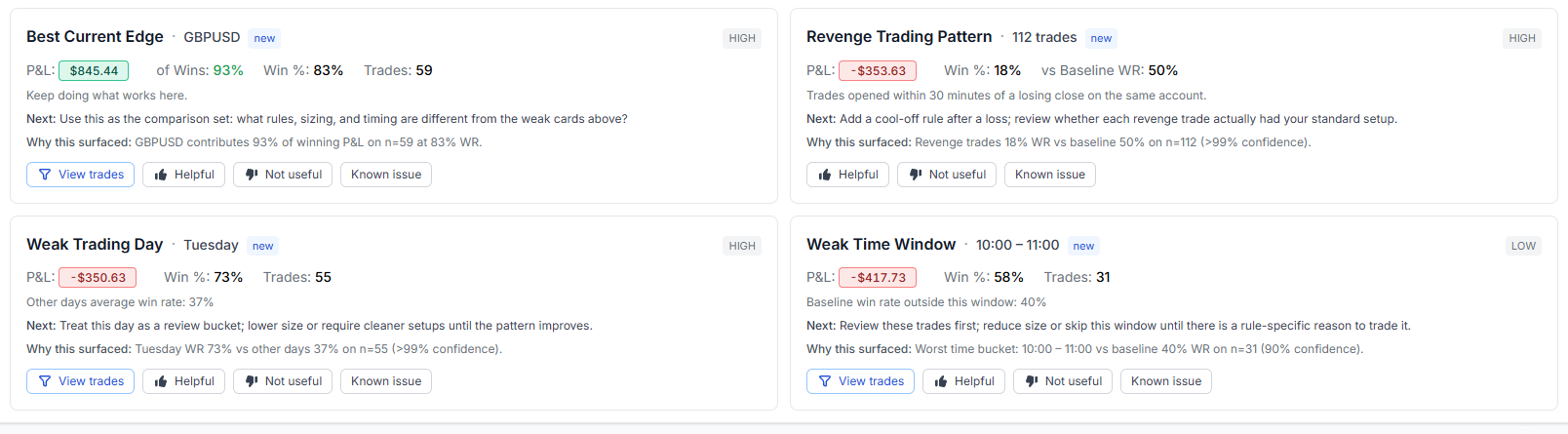
The AI Coach runs 21 deterministic checks and shows up to 8 findings ranked by dollar impact, including exit-quality checks that name the edges worth protecting.
-
AI Summary and AI Notes write the qualitative half of your journal, the part nobody has time to type.
-
AI Query and AI Chat turn natural language into charts, tables and answers about your own trades.
-
Numbers come from a database, not a model. AI Query keeps your trade data fully inside TradesViz.
What "AI" actually means in this journal
A lot of trading apps put "AI" on the box and stop there. Usually it is a single chat window bolted onto a basic dashboard, and when you ask it for a number it cheerfully makes one up. TradesViz took the opposite approach. We shipped our first AI feature in 2023, before most journals were even talking about it, and to date traders have run more than 30,000 unique AI queries through the platform.
The rule we hold to is simple. Your performance numbers are computed in code from your broker fills: pnl, MFE/MAE, R-value, win rate, drawdown, exit efficiency, Exit Insights, prop firm rule status. Those are deterministic and reproducible. The AI sits on top of that layer to do the things language models are genuinely good at: translating a question into a query, writing a readable summary, spotting patterns in your notes, and explaining what the deterministic detectors found.
That split matters because it decides whether you can trust the journal on the day it counts. The numbers come from the database. The AI reads them. For a longer take on where AI helps trade review and where it hurts, see our TradesViz vs an AI-only trading journal comparison. For the broader category view, see the trading journal comparison.
Seven AI tools, seven different jobs, led by AI Coach
AI Coach identifies and ranks what to fix first. AI Query, AI Chat, AI Summary, AI Notes, AI Daily Insights and AI Widgets each solve a problem the others do not. Below is the short version; each tool has its own deep dive further down the page.
AI Coach
Flagship feature · deterministic · runs in-house
21 deterministic checks rank up to 8 findings by dollar impact, confidence, trend and importance, covering both costly leaks and the edges worth protecting.
AI Chat
Consent required
An open conversation with your trades, with memory across the chat. Best for subjective, exploratory questions a structured query cannot answer.
AI Summary
Consent required
One click on any pnl chart or filtered table writes a neutral, plain summary of what it shows. Best for a fast read of a specific view.
AI Notes
Consent required
Auto-generate qualitative notes for a single trade: trend, volatility, candlestick and chart patterns, support and resistance, and what-if exits.
AI Query
No trade data sent outside
Ask a precise, objective question and get a chart and table back. Best for custom analytics, grouping, binning and your own formulas.
Plus: Daily Insights and AI Widgets
AI Daily Insights prepares you before the open, and AI Widgets drop any AI Query result straight onto a custom dashboard.
When to use which AI tool
The most common question we get is "which one do I use for this?". Here is the plain-English split.
| Tool | Use it when you want to | Data leaves TradesViz? | Best for |
|---|---|---|---|
| AI Coach | See up to 8 highest-priority findings across your selected account and filters, ranked by dollar impact | No* | Finding costly leaks, protecting proven edges and deciding what to fix first |
| AI Chat | Ask open-ended or subjective "why" and "how" questions with follow-ups | Yes (consent) | Exploration, brainstorming, coaching-style conversation |
| AI Summary | Read a neutral written summary of a chart or filtered table | Yes (consent) | A fast read of one specific view you are already looking at |
| AI Notes | Auto-write qualitative notes for one specific trade | Yes (consent) | Per-trade journaling: patterns, what-ifs, support and resistance |
| AI Query | Get an exact chart or number from a precise, objective question | No | Custom analytics, grouping, binning, your own formulas |
| AI Daily Insights | Get a briefing of ten observations before the market opens | Yes (consent) | Session prep, reminding yourself of recent pitfalls |
| AI Widgets | Save an AI Query chart or table to a custom dashboard | No | Keeping custom AI-built analytics visible every time you review |
* The AI Coach detectors run entirely inside TradesViz. Only the optional one-paragraph "Coach Takeaway" uses an external language model, and it sees the already-computed card summaries, not your raw trades.
A simple mental model: AI Coach tells you what to fix first, AI Query and AI Chat are for asking, AI Summary and AI Notes are for writing things down, and AI Daily Insights and AI Widgets keep it all in front of you.
AI Query: ask your journal anything, get a chart back
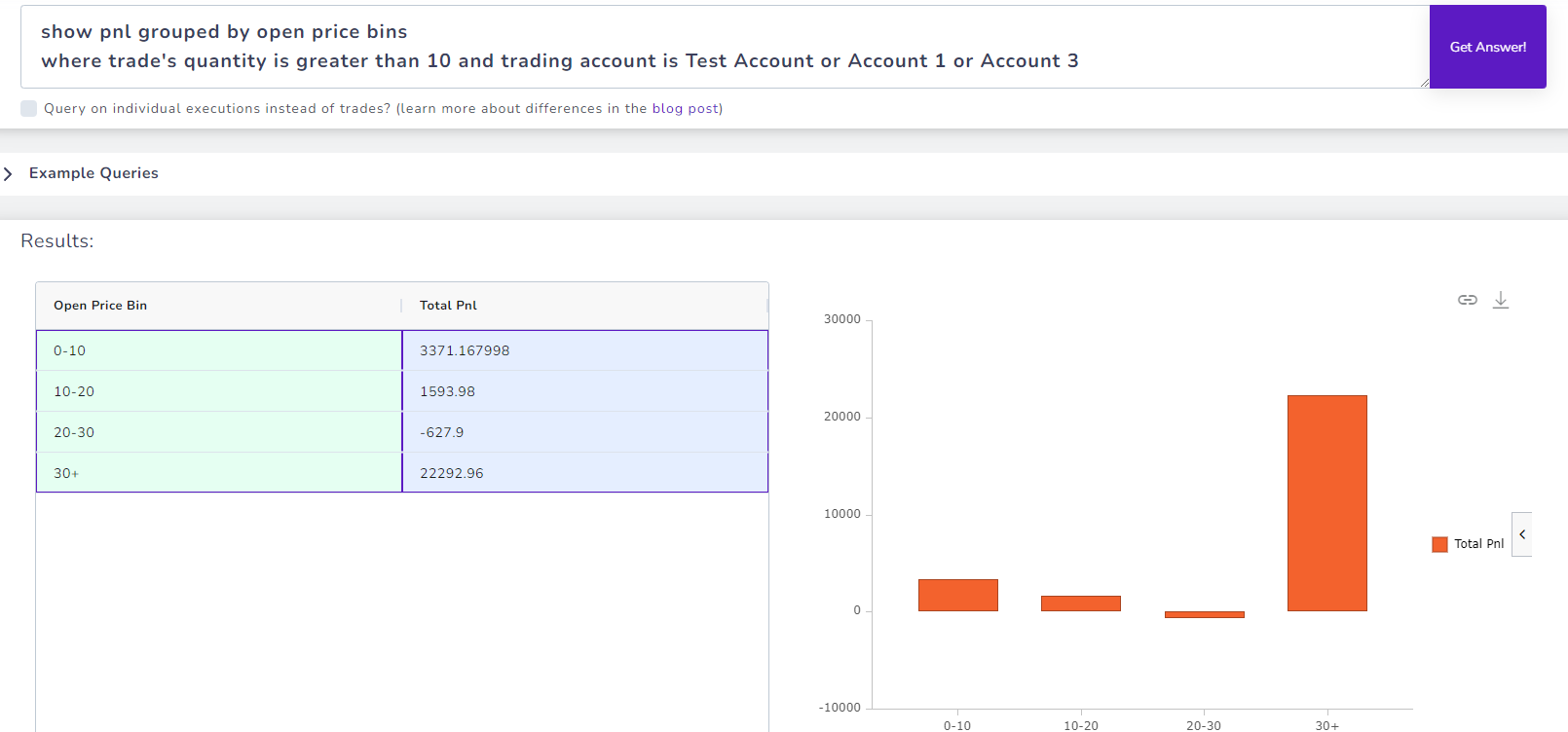
AI Query was our first AI feature and it is still the one traders open most. Type a question in plain English and the system turns it into a database query, runs it against your trades, and hands you a sortable table plus a chart you can re-visualize. No filtering, grouping or pivot-building by hand.
Some questions are simply not reachable with normal charts. "Show pnl of my last 20 trades", "total return grouped by month assuming a 10,000 starting balance", or your own profit factor formula built from winning and losing pnl. AI Query handles grouping, binning, filtering and multi-step queries, so it behaves like a spreadsheet without the learning curve.
The important part for privacy: only your question text is sent to the model to translate it into a query. The query then runs inside our database. Your actual trade data never leaves TradesViz. Re-running a query you already ran successfully is cached and does not use up your daily quota.
Learn more: AI Q&A introduction, query cheatsheet, advanced query guide.
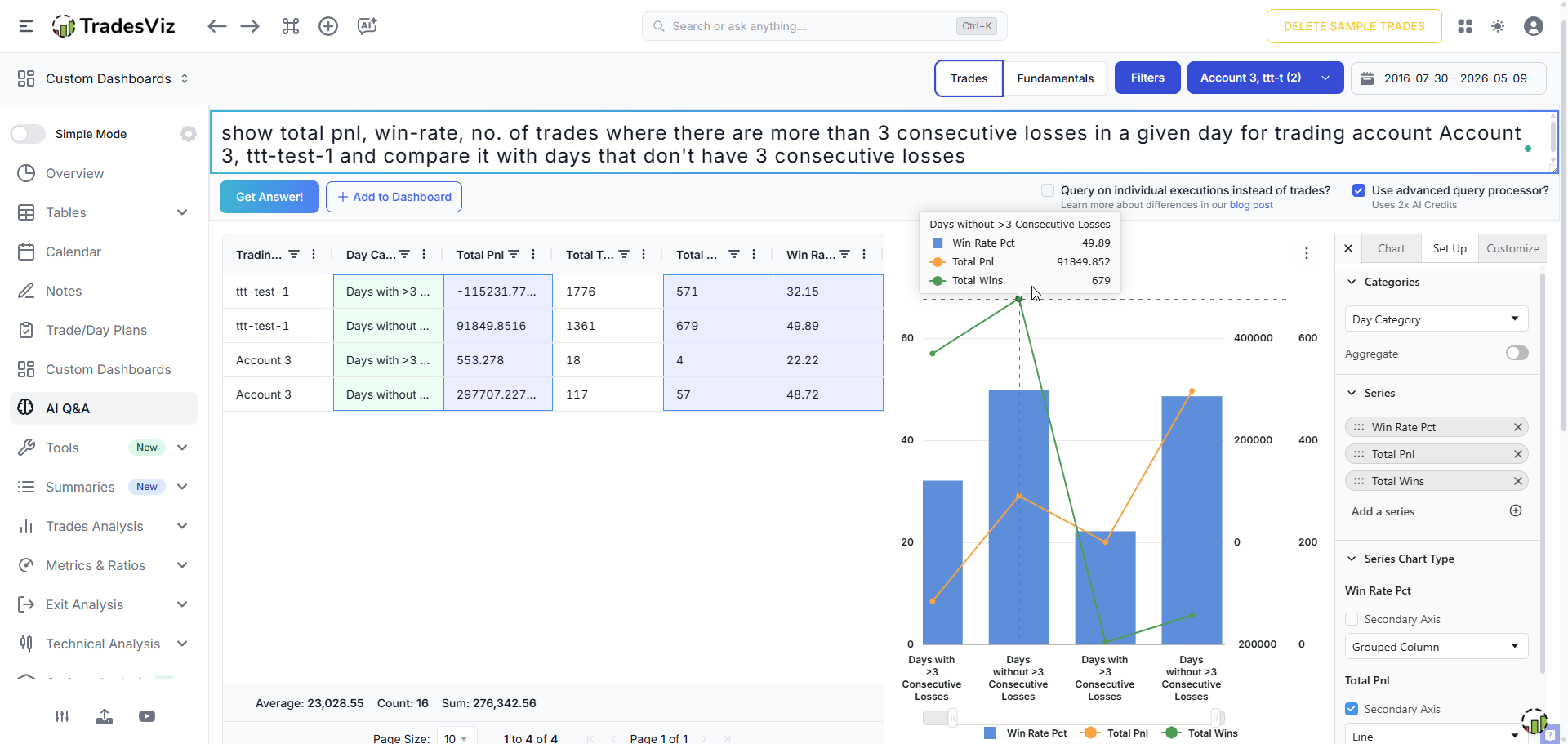
Example: "Show total pnl, win-rate of trades where there are more than 3 consecutive losses in a given day" returns the exact chart you asked for.
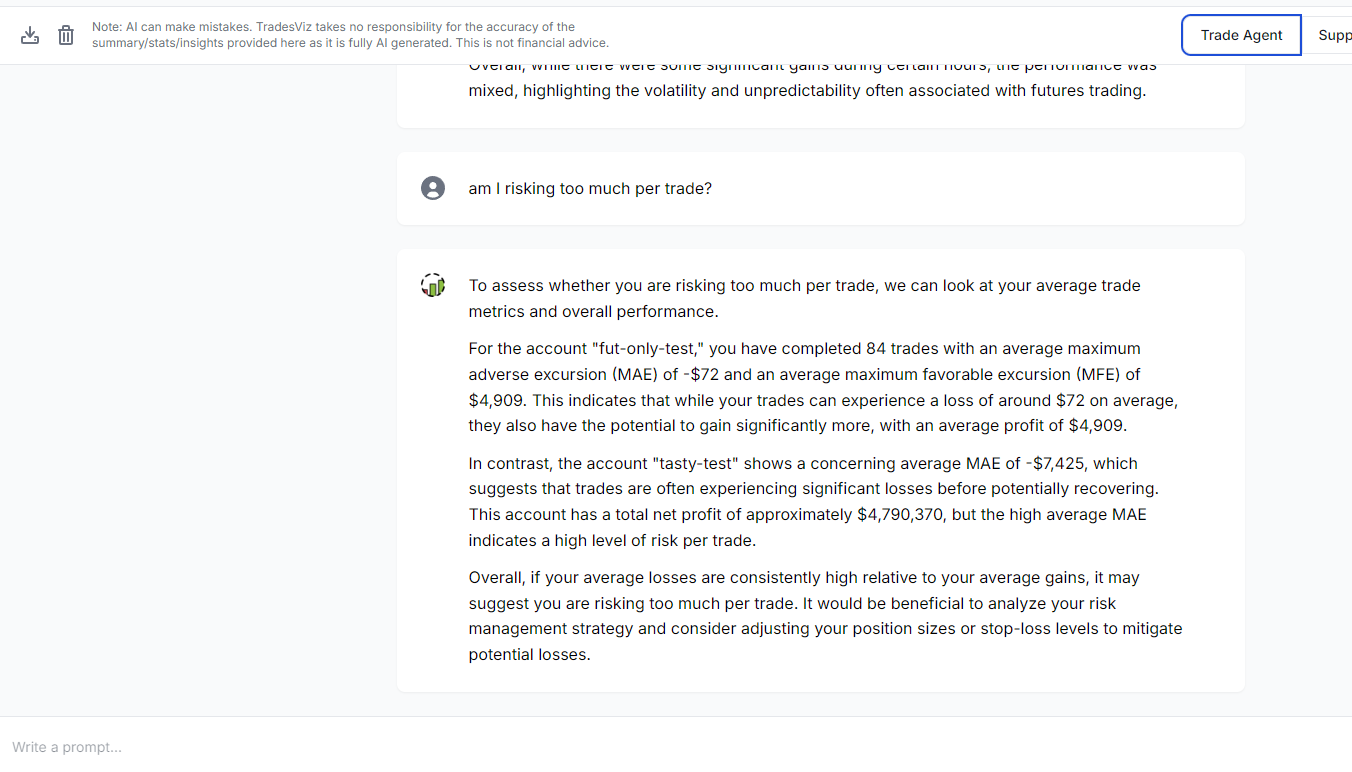
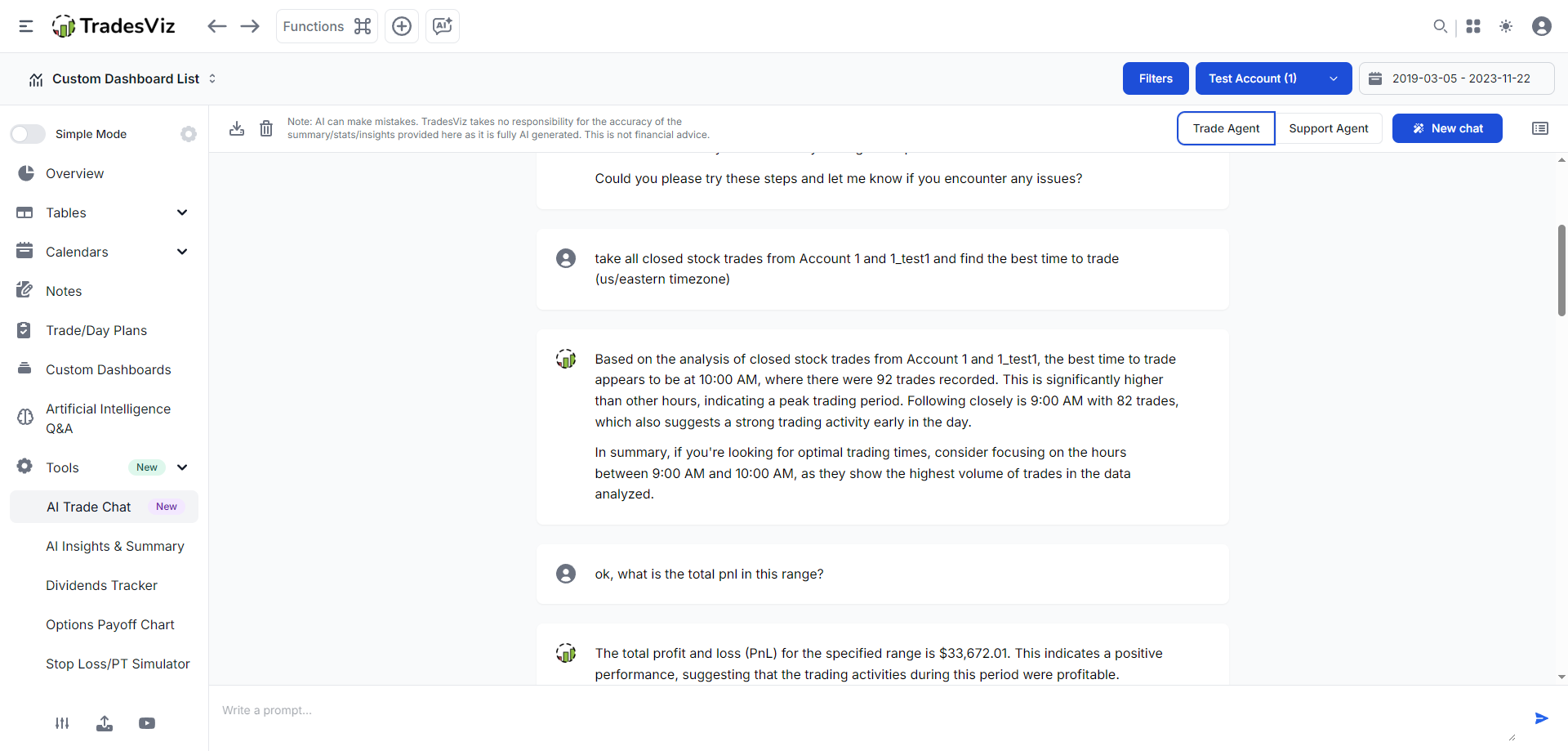
Two agents in one window: a Trade agent that knows your data, and a Support agent that knows every TradesViz feature.
AI Chat: an open conversation with your trades
AI Query is precise but strictly objective. It cannot answer "what is my worst habit" or "what should I work on". AI Chat removes that limit. It is a familiar chat interface that retains conversational context across the thread, so you can ask follow-ups while keeping the same account and trade context.
There are two agents you can switch between in the same chat. The Trade agent knows your trading stats and data structure but nothing about the rest of the product. The Support agent knows every TradesViz feature but cannot see your trades. They do not share context, which keeps each one focused.
Because the conversation needs your trade data as context, this feature sends that data to an external model, so it requires the "Consent to send data externally" setting in your account. You can opt out at any time.
Learn more: AI Trade Chat guide.
AI Summary: one click to read any chart or table
Sometimes you do not have a question, you just want someone to read the chart for you. AI Summary does that. On the pnl charts under Trades Analysis, click the light bulb icon at the top right and you get a neutral, plain-English summary of what the chart shows. On the Tables section (trades, symbol, tag, day and executions tables) open the actions dropdown and pick AI Summary to summarize exactly the rows currently in view.
Because it summarizes the current view, you can filter a table down to very specific data first, then summarize only that. You can save any summary to your Notes tab with the note-pencil icon, so the write-up becomes part of your journal rather than a throwaway.
AI Summary is deliberately neutral. It highlights patterns and interesting data points, it does not give trading advice. It runs on the same chat system, so the same data handling and consent apply, and each summary uses one AI chat credit. For a pre-market briefing rather than a single view, use AI Daily Insights, which generates ten observations from your recent trades for a chosen date.
Learn more: AI Summary on charts and tables, AI Daily Insights.
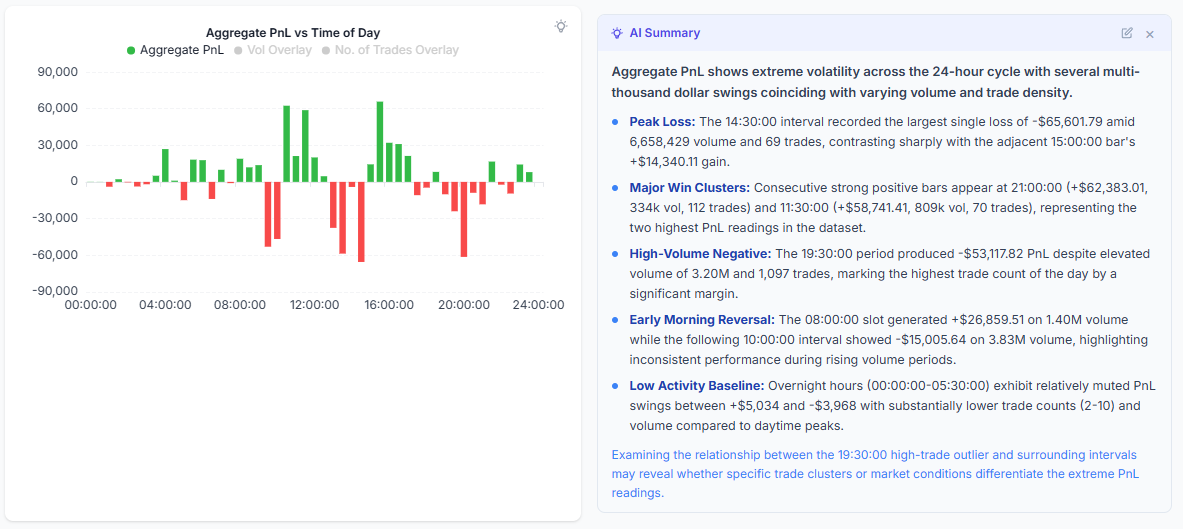
A neutral written read of the chart in front of you, saveable to your Notes tab in one click.
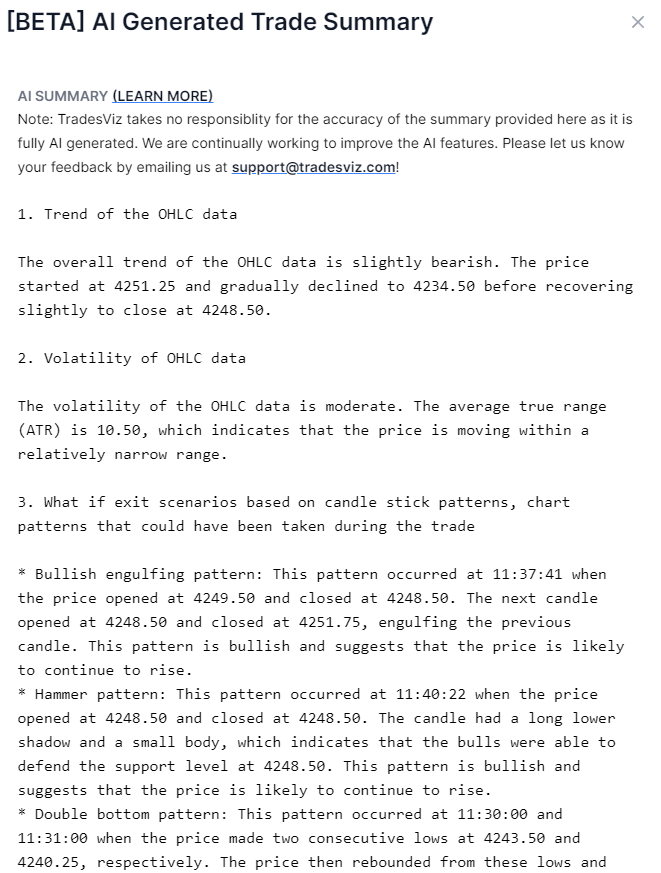
Generated for one trade: trend and volatility, candlestick and chart patterns, support and resistance, and what-if exits.
AI Notes: the qualitative half of journaling, written for you
Quantitative review is easy to automate. The qualitative side, writing down what the chart was doing when you took the trade, is the part most traders skip because it takes too long. AI Notes fills that gap. On the trade explore page, click the "AI notes" button at the top of the notes section and within a few seconds you get a written summary you can add straight to that trade's notes.
Each summary covers the trend and volatility of the underlying when you entered, candlestick patterns and chart patterns in the OHLC data, support and resistance levels, and what-if exit scenarios you could have taken. Build those notes across repeated reviews and you get a searchable book of your trading without typing every observation yourself.
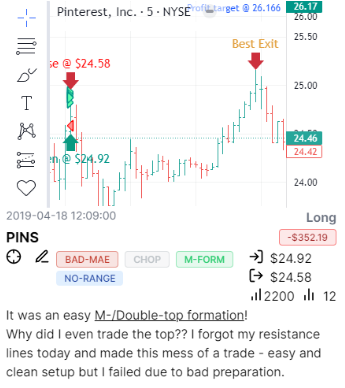
Because notes are searchable, you can later search a phrase like "double top" and pull up every trade where one formed. AI Notes covers stocks, futures, forex, CFDs and, since January 2026, options, on US, IN, AU and CA exchanges. Only the trade data for the note you are generating is sent outside, nothing else, and consent is required.
Learn more: AI Notes guide, the Notes tab.
AI Coach: your highest-impact findings, ranked by dollars
Most traders do not lack data; they have too much of it. You log in to 600+ stats and analytics and need to know which findings matter most right now. The AI Coach Trading Review answers exactly that. It runs 21 deterministic checks against your selected account and filters, ranks the findings by dollar impact, and shows up to 8 cards so you can attack costly leaks and protect proven edges without wading through noise.
The detectors map to the most common and most fixable mistakes: risk/reward leaks, letting losers take extra heat, cutting winners early, revenge trading within 30 minutes of a loss, size escalation after losses, weak time windows and weekdays, loss concentration in one symbol, and a positive card that names your current best edge.
Every card tells you four things: what the pattern is, its dollar impact, why it surfaced (the bucket, sample size and statistical confidence from a two-proportion z-test), and where to investigate it with a one-click link into the right tab and filter. Trend arrows show whether each finding is getting better or worse since your last review.
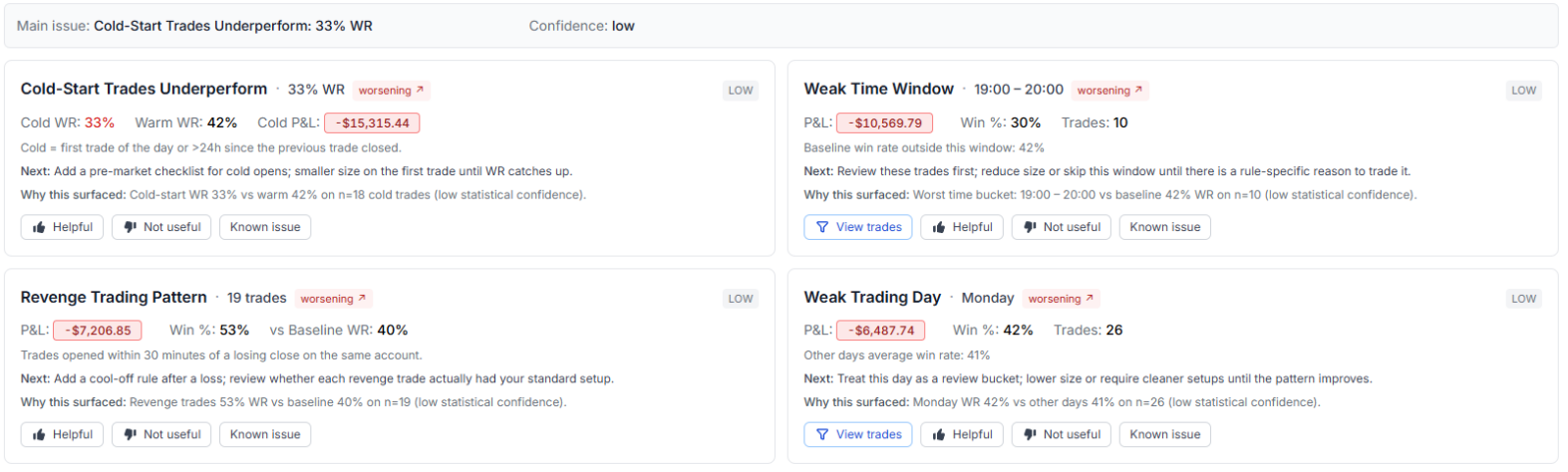
This is not a dump of your trades into an LLM. The findings are deterministic, computed from your fills and gated by statistical significance, so weak signals get marked "low confidence" instead of shown as headline findings. An optional one-paragraph "Coach Takeaway" uses a language model to summarize the cards; it sees only the computed findings, not raw trade rows, and cannot change the underlying math.
Runs as often as you like, with no separate quota. Learn more: AI Coach Trading Review.
How your data is handled
We are deliberately specific about this, because "AI" and "your private trading data" are two words that should never be vague together.
Stays inside TradesViz
- AI Query: only your question text is sent to translate it into a database query. The query runs internally; trade data never leaves.
- AI Coach detectors: computed entirely in-house from your fills. Only the optional takeaway paragraph touches a model, using computed summaries, not raw trades.
Sends trade data to an external model (consent required)
- AI Chat, AI Summary, AI Notes and AI Daily Insights send the relevant trade data to OpenAI or Google models to work.
- These require the "Consent to send data externally" setting in your account. Only you can enable it, and you can opt out at any time.
- Only the trade data needed for the request is sent. No other account details or personal info.
A note on accuracy: anything generated by a language model can be wrong, and none of it is financial advice. TradesViz keeps your pnl, MFE/MAE, R-value, win rate, drawdown and Exit Insights deterministic so the AI never has to guess them. Treat AI summaries and insights as a starting point for your own review, not the final word.
Why we built real AI, not an AI sticker
A note from PK, Founder of TradesViz
AI Coach is the clearest expression of how we build AI: exact checks first, dollar-impact ranking second, and an optional readable takeaway only after the math is done. When we shipped AI Query in 2023, we used the same principle to remove the learning curve from analytics without sending your trades anywhere.
Everything since has followed that rule. AI Coach prioritizes the findings; AI Query, AI Chat, AI Summary, AI Notes, AI Daily Insights and AI Widgets help you investigate, write the review, prepare the next session and keep custom answers visible. The numbers are computed in code so you can trust them; language models do the supporting work on top.
- PK, Founder of TradesViz
See AI Coach, AI Query, AI Chat and AI Notes in action
AI Trading Journal FAQ
What is an AI trading journal?
A trade journal that adds AI tools on top of your imported trades so you can analyze them in plain English instead of building charts by hand. TradesViz was the first trading journal to ship real AI features back in 2023, and now runs seven: AI Coach, AI Query, AI Chat, AI Summary, AI Notes, AI Daily Insights and AI Widgets. Your performance numbers stay deterministic and are computed from your broker fills; the AI reads those numbers, it does not invent them.
What AI features does TradesViz have?
AI Coach is the centerpiece: it runs 21 deterministic checks and ranks up to 8 findings by dollar impact, covering both costly leaks and the edges worth protecting. AI Query turns natural-language questions into charts and tables. AI Chat supports open-ended conversations with your trades. AI Summary writes a one-click summary of a chart or filtered table. AI Notes generates qualitative notes for a single trade. AI Daily Insights supports session preparation, and AI Widgets put AI Query results on custom dashboards.
Does TradesViz send my trading data to external AI models?
It depends on the tool. AI Query sends only your question text; no trade data leaves TradesViz. AI Chat, AI Summary, AI Notes and AI Daily Insights send the relevant trade data to OpenAI or Google models, so they require the "Consent to send data externally" setting, which you can opt out of any time. The AI Coach runs inside TradesViz; only its optional takeaway uses a model, and it sees computed summaries, not raw trade rows.
What is the difference between AI Query and AI Chat?
AI Query is for precise, objective questions and returns a chart and table you can sort and re-visualize. No data leaves TradesViz. AI Chat is for open-ended and subjective questions and holds memory across the conversation, but it sends trade data to an external model and needs consent.
When should I use AI Notes versus the AI Coach?
Use AI Notes on a single trade to capture qualitative context: trend, volatility, candlestick and chart patterns, support and resistance, and what-if exits. Use AI Coach to audit your selected account and filters: it ranks up to 8 findings by dollar impact and links each one to the right tab and filter.
Can AI make mistakes in a trading journal?
Yes. Any output from a language model can be wrong, and none of it is financial advice. That is why TradesViz keeps the math deterministic: pnl, MFE/MAE, R-value, win rate, drawdown, Exit Insights and prop firm rule status are computed in code from your fills. The AI summarizes and discusses those numbers, it does not produce them.
Which plans include the AI features?
All seven AI tools are available on Pro and Platinum. Pro includes AI Coach with 16 core deterministic checks, plus AI Query, AI Chat, AI Summary, AI Notes, AI Daily Insights and AI Widgets. Platinum adds 5 more, the 2 positive exit-quality checks plus the trade-plan adherence checks, for 21 total AI Coach checks, with the same full set of AI tools.
Can I use the AI trading journal for stocks, options, futures, forex and crypto?
Yes. AI Query and AI Chat work across every asset class in your journal. AI Notes covers stocks, futures, forex, CFDs and options on US, IN, AU and CA exchanges. The AI Coach runs on whatever filter and account you select. Stock journaling is free, and the paid plans add options, futures, forex, crypto and the full set of AI tools.
Is the AI trading journal included in the free trial?
Yes. Start a free trial, import trades by CSV or auto-sync, and try the AI tools on the trial. No card is needed for the free stock plan.
Explore more of TradesViz
Trustworthy numbers, plus AI that reads them right.
Import your trades, let AI Coach rank what is costing you the most, then dig in with AI Query, AI Chat, AI Summary and AI Notes. The stock journal is free, and all seven AI tools are on every paid plan.
All-in-One Platform for All Traders
TradesViz is designed to be used by traders just starting out all the way to professional traders. The level of customizability and versatility is unmatched by any similar platform.
Replay, Simulate and Backtest Trades
You can simulate Stocks, forex, futures and even options on TradesViz. On top of this, you can even replay your trade second-by-second and backtest options using options executions simulator.
Trade Plans & Mistakes Analysis
Add trade plans to each trade and trading day to see what rules you break and how they affect your trading. Zoom in on your trading behaviour from a data-driven perspective.
Charting customizability
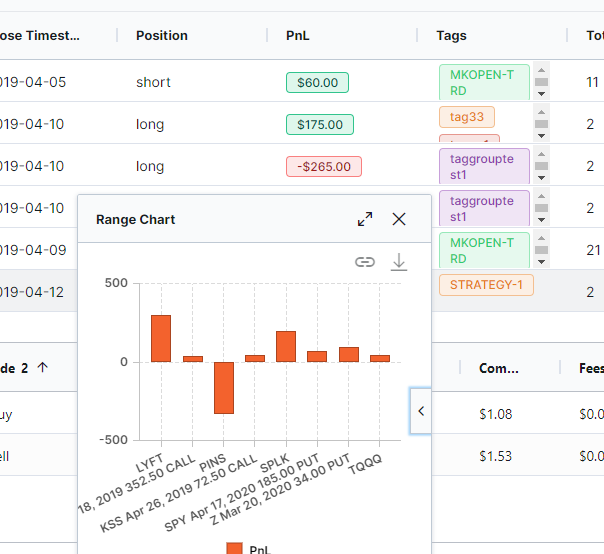
Add multiple static image charts, setup custom TradingView charts with your executions, MFE/MAE targets and more automatically plotted for all your imported trades!
Unlimited Reports and Analytics with AI
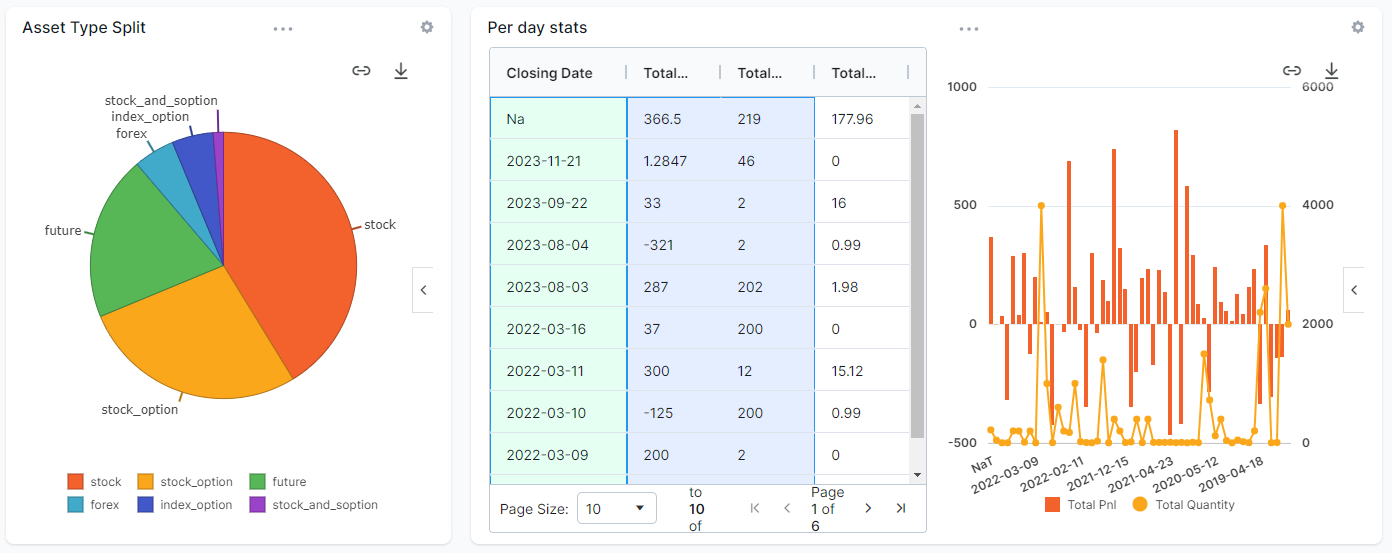
Gone are the days of fixed charts you cannot Customize. With AI Q&A, you can now ask any question about your data and get charts, tables and even add them as custom widgets to your dashboard!
Dedicated Note Taking + AI
Write notes, tag your notes, search your notes and even ask the AI to generate trade summaries as notes for your trades. TradesViz has a dedicated note tab for all notes management.
Advanced Statistics
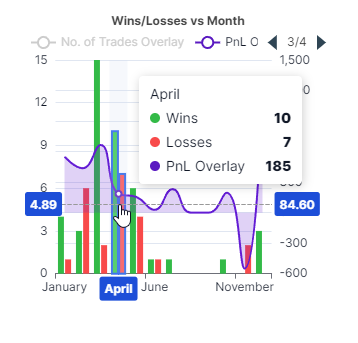
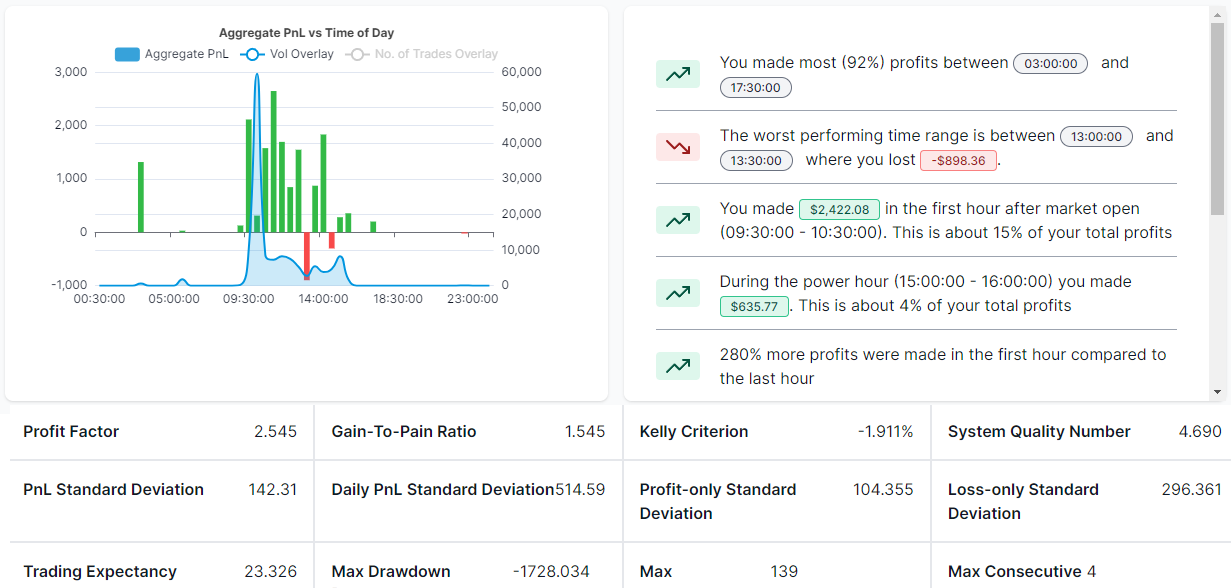
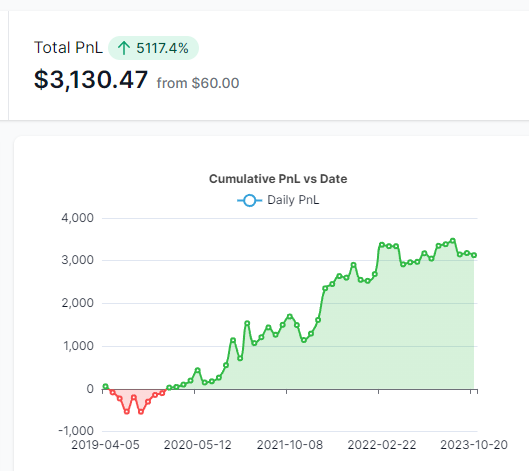
MFE/MAE, R/R ratios, Exit Insights, Best/EOD Exit, Multi-Timeframe exit, Market-TA-Comparison, Running PnL analytics, Options greeks analysis and more - all of these on top of existing PnL charts make ~600+ charts on TradesViz.
Not just another journal. We pushed the boundaries of journaling.
With a team of data scientists, researchers and veteran traders TradesViz is built with a singular focus of improving trading performance in a data-driven way.
160+ Blog Posts of In-depth Journaling Guides + Always-on Support
We didn't skip the most important part out: Education. We update and launch new educational blog posts every few weeks + Post plenty of tips, tricks, trading news/info and journaling knowledge on our Twitter/X feed!

 Artificial Intelligence Q&A and Custom Widgets
Watch “Artificial Intelligence Q&A and Custom Widgets” on YouTube
Artificial Intelligence Q&A and Custom Widgets
Watch “Artificial Intelligence Q&A and Custom Widgets” on YouTube
 How to setup Interactive Brokers (IBKR) Flex Query for Auto-sync
Watch “How to setup Interactive Brokers (IBKR) Flex Query for Auto-sync” on YouTube
How to setup Interactive Brokers (IBKR) Flex Query for Auto-sync
Watch “How to setup Interactive Brokers (IBKR) Flex Query for Auto-sync” on YouTube
Not just a trading journal -
A Trading Partner for all markets!
TradesViz is a unified trading analysis platform that offers not just the world's best trade journaling capabilities, but also other tools that are tightly integrated to provide a 360 degree support (via tools) to traders looking forward to mastering the market.
- Trading Simulator & Multi-Chart Simulator
- Options Flow & Screener
- Real-Time Screener NEW
- Technical Analysis Backtester
- Fundamental Analysis/SEC13F Visualization
- Seasonality Analysis
- Side-by-Side Strategy Comparison
Value worth of $300+ per month is available to all traders of TradesViz at less than 1/10th the cost.
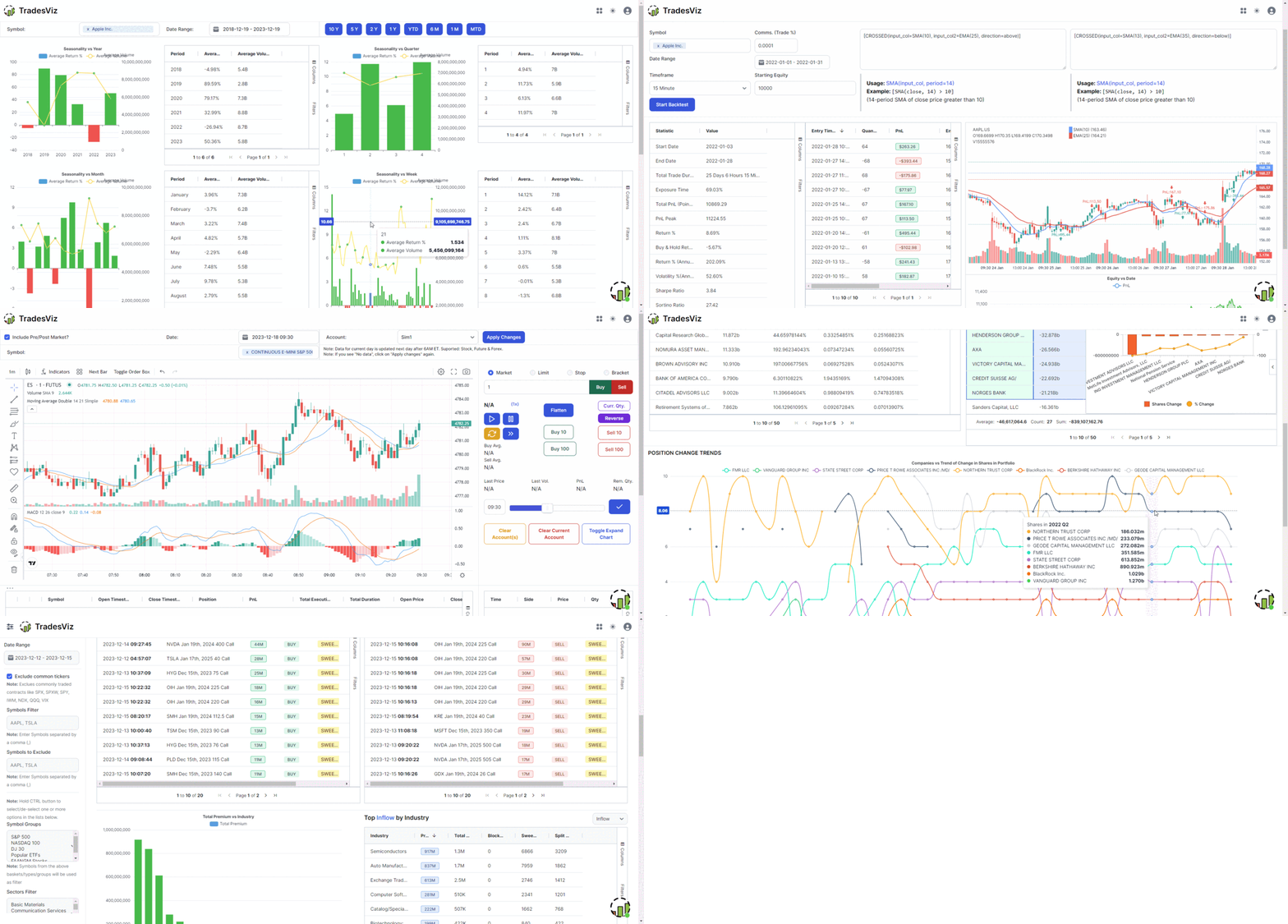
Highest value per dollar on the market
At TradesViz we focus on value and utility provided to traders. That's why we're still #1 when it comes to the value and features offered on an online trading journal.
Our guarantee: You will not find a better, more versatile, constantly up-to-date trading journal even at 2x or 3x our price. View Full Pricing.
Basic
For beginner traders to get started with journaling.
- Import 3000 executions/ month
- 50+ Performance Visualizations
- Basic auto-generated charts
- All basic trade management features and trade charts
Pro
All asset type import + 100s of charts & powerful grid features.
- Unlimited imports + All asset type support
- 400+ Performance Visualizations
- Multiple auto-generated + Interactive stock charts
- Multiple trading accounts
- Artificial Intelligence Question & Answer
- Artificial Intelligence Trade Summary, Notes & Coach
Platinum
All-in-one journaling, simulation and advanced analysis platform.
- Every feature in Pro
- Real-time Screener
- Unlimited Custom Dashboards
- Advanced Options flow analysis + Footprint research + Options Payoff Charts
- Exit Insights + Multi-Timeframe/EOD/Best Exit Analysis charts
- Trading Simulator (Stock + Options + Futures + Forex + Prop Firm)
- Pivot/Grid Charting (Most powerful analytics feature online)
- Trade/Day Plans & Checklist analysis
- Backtesting (70+ Indicators/Any Symbol)
- Dividend Tracker
What Trading Experts Say
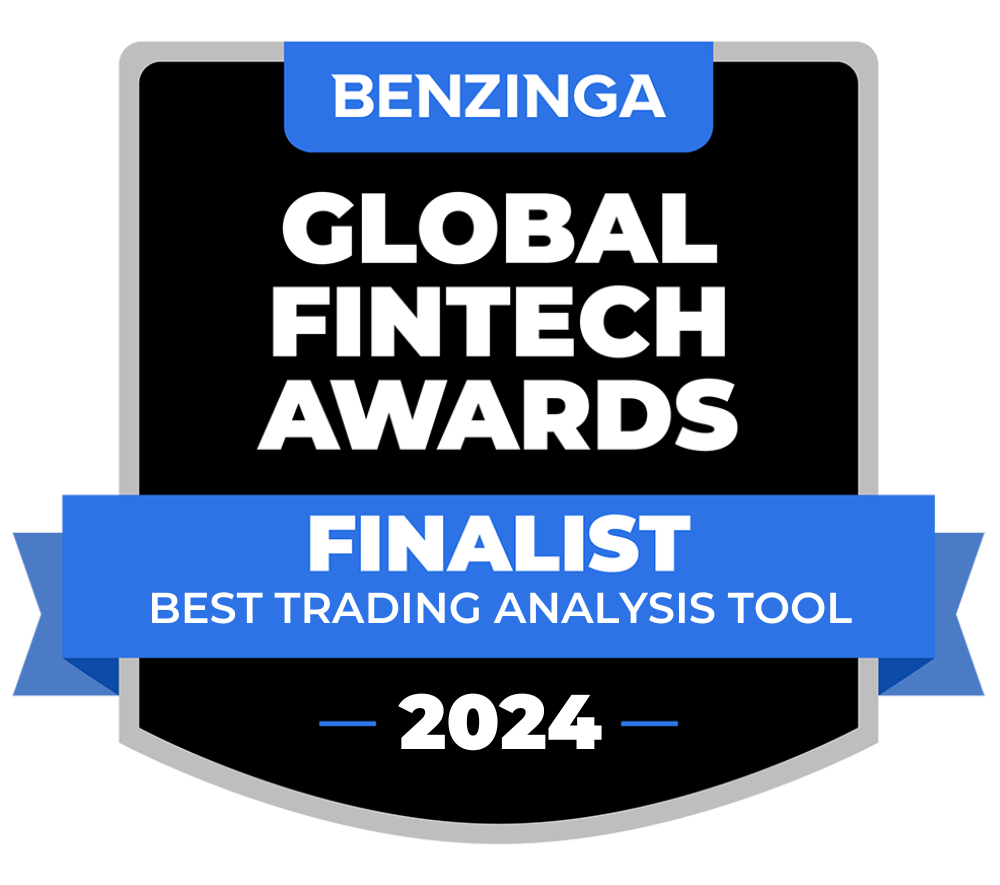
TradesViz is the only trading journal in the world to be recognized internationallyby the popular Benzinga FinTech Awards Competition as a
Finalist in Best Data Analysis tool and Best Portfolio Tracker categories!

TradesViz is the most useful trading journal on the market for finding and quantifying your edge. An all in one trading journal tool for traders.

Trader, Author, and founder of NewTraderU.com
PK and the whole team at TradesViz.com have put together an outstanding product with exceptional features. PK provides the most excellent support in the chat help. And if something really isn't working quite right or as expected, they get busy to make it better. I originally signed up for TradesViz to have the simulator function which also gave me the statistical analysis I could use to improve my trading. I had been using a simulator which had almost no analysis. When TradesViz added the simulator function I gave it a try. At first I had a hard time making it work, but with patient explanation from PK and with some tweaking on functionality from the coders on the backend, they have delivered a super trading simulator. The trade analysis part of TradesViz is second to none. I've gained the insight into my trading weaknesses and strengths to be able to trade much better in my live account. This is the service you need!
I definitely recommend Tradesviz especially for new traders the way it tracks your stats is no short of amazing especially for me personally by best exit and and of the stats that tell you how long you usually are in drawdown and you are usually in profit. If you want to build confidence in your strategy and edge this journal is the way to go for sure!
TradesViz has made a huge difference in my trading and has positively impacted my trading for the better in psychology and profit.
I use it DAILY and have noticed the vast improvements being made, not only in profit but also in my mental approach to trading.
This is a must-have tool and is more important than any indicator you could ever use.
I've subscribed, at different times, to various reporting programs, and trialed several others.
Yours is night and day over them all. I particularly appreciate the degree of available customization and your quick, ever-patient response to support requests.
I have a small trading account. Thank you for offering such a sophisticated program at an affordable price.
TradesViz is a true leader in Trade Journaling Software. They offer extensive statistical data at an amazing price that almost seems too good to be true. You have access to an amazing support team that seems to be active at all hours of the day. My support agent helped me through a complex import issue and had it solved within 24 hours. I can't tell you how blown away I am with their software and their service. I'm more than happy with my experience and so excited to see what new features they bring to the table as they continue to grow their business. If you're on the fence, I encourage you to jump right over and take it for a spin with their risk-free trial. Thanks to all the TradesViz team members who continue to make my Trade Journaling efficient and effective.
Day Trader
GREAT PRODUCT AND EVEN BETTER CUSTOMER SUPPORT!
I have been using TradesViz for a few months and it is a fantastic tool. Prior to subscribing, I was spending hours on xls trying different tables and layouts and only getting frustrated (or overcomplicating things!). Now I have everything in one place (I have multiple trading accounts), and I have probably only explored 10% of the tools and data analytics!
BUT, what has really impressed me is the support: I have NEVER in the last 10 years had such instant, professional support from a company at (almost) anytime of the day or night!
Clearly this is a team that is passionate about their product and that will always translates into innovation and better experience & value to the customer.
Well done to the team!!
After only a short time of using TradesViz, I can confirm that this platform is exactly what I have been looking for. It takes the chore out of journaling – the number of stats, data, and information available on my trades is a complete game-changer. The importing process via MT4 file is extremely easy and the automated charts with entries are amazing. The whole process is extremely easy and helps to keep me accountable for my trading by having a professional system to manage my business. The platform is very comprehensive and takes a bit of time to get used to, but they have many videos on their YouTube to help with this as well as their support team.
Their support is exemplary and gets back to all my queries in well under 30 minutes with comprehensive answers and solutions to my questions.
This platform is absolutely essential for any trader and I would highly recommend it to any of my trader friends looking for a journal. If you don’t have this platform, you are seriously missing a trick here…
Thanks, PK from TradesViz for being extremely helpful and patient in resolving my syncing issue. Certainly one of the best online support I have ever experienced. Even though it took a while for me to get my settings right, I never felt rushed...I appreciate that. Hope to stay with you guys for a long time. Certainly would like to learn how to utilize most of the features on TradeViz.
In my opinion, the TradesViz platform is truly the Ferrari of journaling software available today. Once you are under the hood, you begin to realize that in fact what sets it so far apart is all the advanced analysis at your fingertips. Such as the ability to combine multiple portfolios, live charting, and much more. Their support is world-class, in my case personally, I needed integration with Trend Spider’s backtesting engine. What I imagined might take weeks was literally accomplished overnight. Factor in rock bottom prices and you have all you need for whatever you're searching for. Newer traders will find that one of the most basic recipes for success is meticulous record keeping, simply observing your account profit and loss go up, or just down as the case may be, is the first step on the road to ruin if your serious about trading.
Trader
I'm writing this testimonial as appreciation for this surprisingly pleasant
conversation.
Upon my initial support request, TradesViz's support was impressively swift. A response appeared every single time as soon as I closed my email tab. Not only did I receive incredibly helpful information about features I wasn't aware of, but the team was also genuinely enthusiastic about discussing my feature requests and ideas about the industry. Truly awesome people!
In terms of raw analytics, comparison, and filtering capabilities, there is no match for TradesViz. I also don't know of any other trading journals that offer so much for the price, their free version has pretty much everything you would need if you trade stocks and offer so many of the paid features that are on other websites for free. They have templates for almost every broker and if it's not there, their support team is only 1 email or message away and will work with you to include your broker on their platform. By far the best support I have gotten from any trading journal as they are open to feedback and feature requests and are very active on their chat for any questions. A trading journal built by traders, for traders.
Professional Futures Day Trader
I wish I had TradesViz when I started to trade ten years ago. I had to learn the hard way. It provides everything you need to maximize your wins and minimize your losses.
There’s a learning curve but once you get past that your trading will surely be taken to the next level.
Founder of ChartLearning.com
As a full-time trader, the first pivot point in my trading results came after I started to learn from Mark Minervini - this is when I stopped losing $$$. The second pivot point came after I started to analyze my results - this is when I started to be consistently profitable $$$.
I love that TradesViz works for Options, Stocks, Crypto! It has automated and manual uploads. It has all the important metrics and analysis that you will need and it is fully customizable.
I have tried pretty much most of the products out there, and TradesViz wins by a mile - highly recommend it! Thanks to PK and the team!
Thanks, @MightySoldiers for turning me on to @tradesviz. I'm loving the customized dashboard. The level of detail and ability to really dig deep on metrics is unparalleled. This tool has helped me so much in defining my trading strategy and where my edge is.
Trader
I was looking for a solution to journal my trades on multiple platforms to keep track of my PNL. I stumbled upon TradesViz and I have nothing but positive to say about their service. Not only does their product make it so easy to see how you are doing on your trades with the various graphs and filtering options, getting your account synced is super intuitive. Best of all their customer service is top-notch. Every time I have asked a question, they have responded within a few hours with a solution, and sometimes that involved programming custom solutions for me to make my life easier. It's a no-brainer for me to pay for the yearly service. Do it, you won't regret it.
E-commerce Analyst and Trader