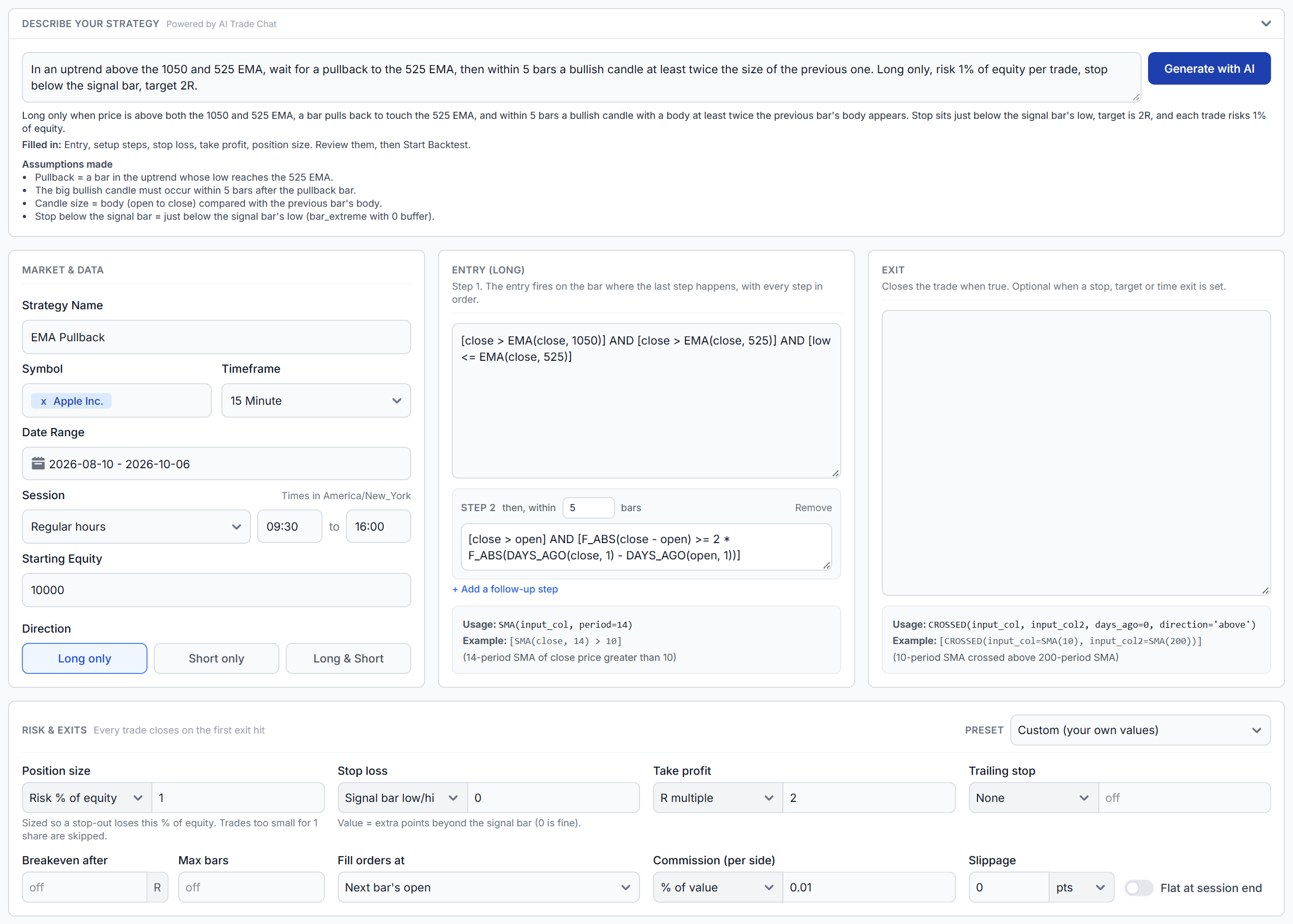
Describe it, AI drafts the rules
Generate with AI, powered by AI Trade Chat, fills in entries, follow-up steps, stops, targets and sizing, lists its assumptions, and checks that the rules compile before applying them.
Practice real market scenarios on stocks, futures, forex and options, review every execution with institutional-grade analytics, and turn simulator sessions into measurable performance improvements instead of random screen time. Autosaved sessions let you continue after a reload in the single and multi-chart simulators.
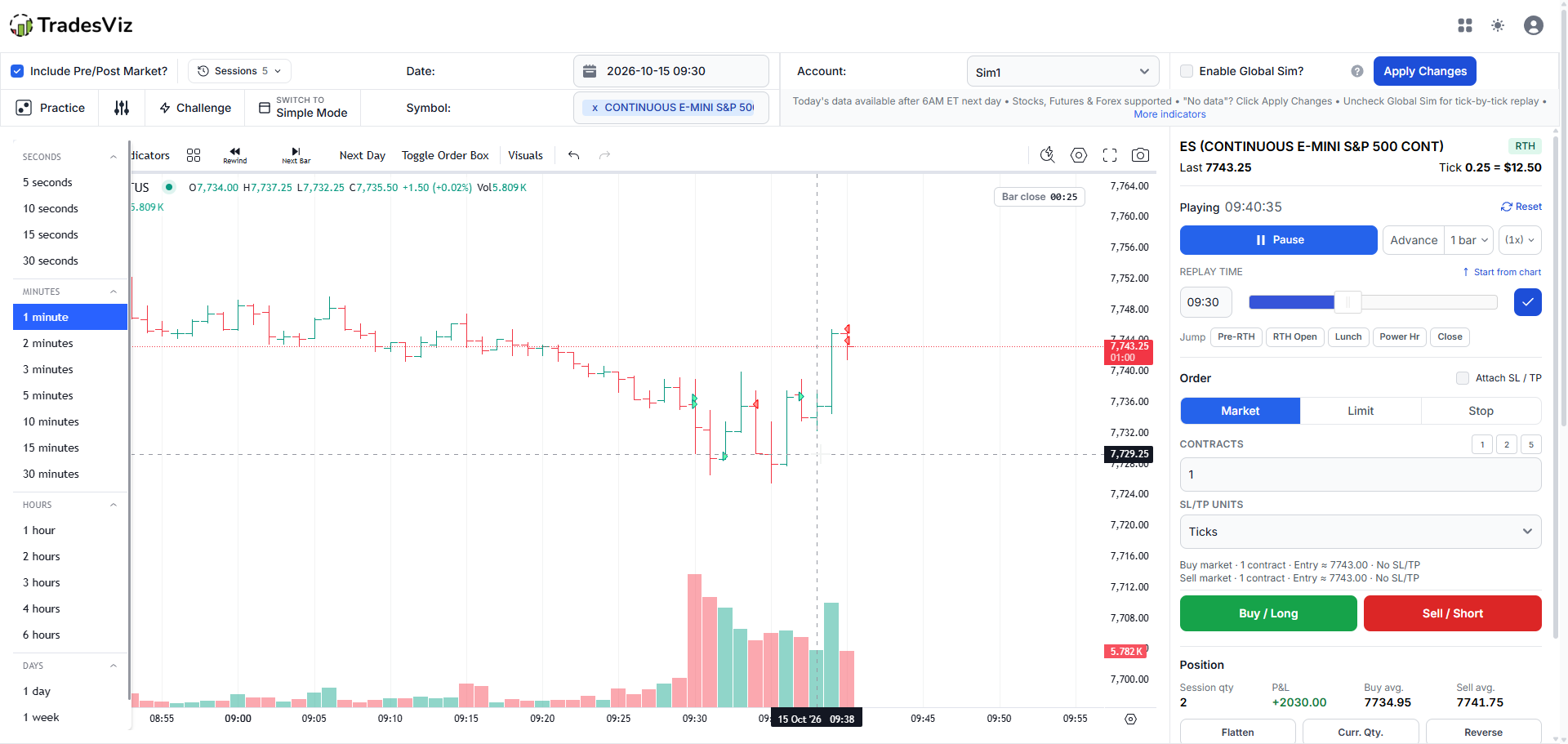
A free trading simulator is on every plan: the Daily Drill, one hidden market day a day. The full simulators are on Platinum: see pricing or read the simulator guide.
Every day TradesViz hides the date on a real market session. Trade it, then see which day it was. Free account, no card.
The Platinum trading simulator, with a free trial:
Build a library of practice sessions inside your trading journal. Both the single and multi-chart simulators save your place automatically, so a page reload does not end your practice.
Sessions are saved in this browser for your login. Return using the same browser and device; clearing browser storage removes these saves.
See how to save and resume simulator sessions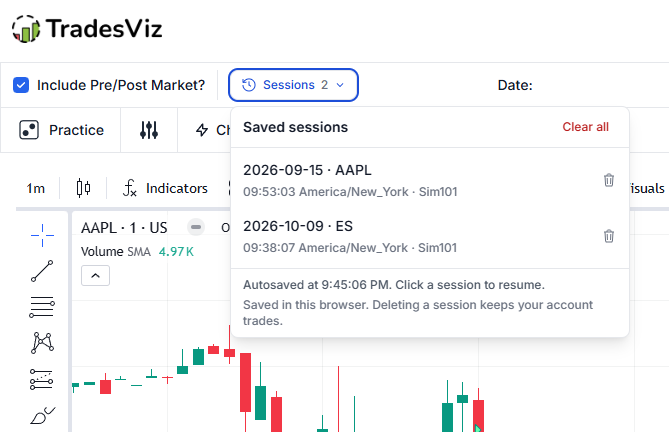
The order panel now automatically detects whether you're trading stocks, futures, or forex and adapts the entire interface accordingly. No manual switching needed. The right inputs, the right units, the right context, every time.

To closely replicate what traders see and use in trading terminals, we create the multi-trading simulator. TradesViz is the first and the only online trading journal to support a simulator capable of streaming 4 unique symbols each at different timeframes and allow the user to trade all of them at once. On top of this, you can choose from over 10 unique layouts to bring the simulator as close to your real trading platform's experience as possible.

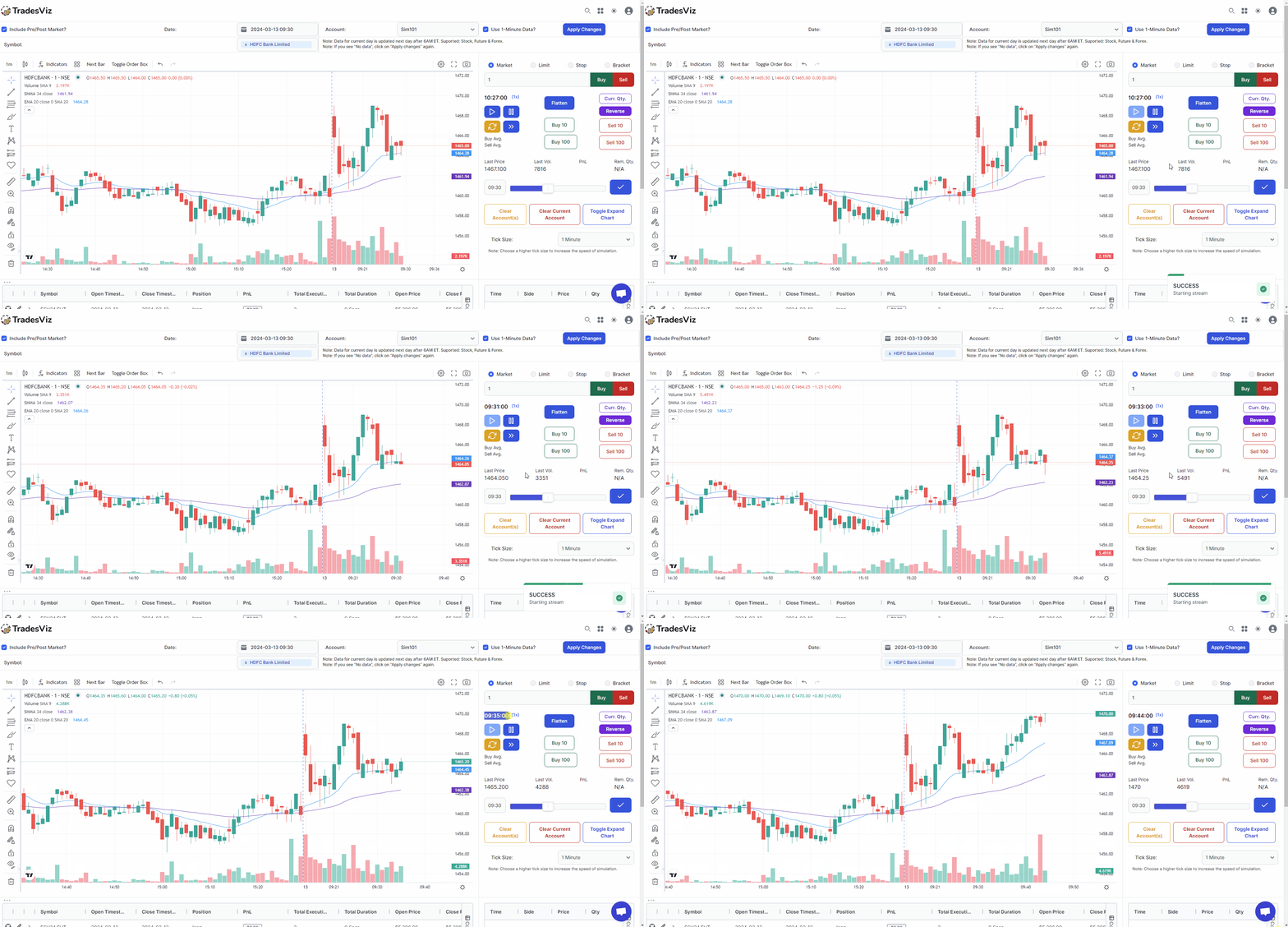
TradesViz can help you practice nearly any symbol with the world's first universal trading simulator.
Practice swing trading, intraday trading from 1x to 100x speed with all order features as normal simulator!
Every trade in your journal is replay-ready. Press Replay and the chart rolls forward from just before your first entry, with your real fills drawn at the second they executed. Then trade the same session again to see what a different exit would have paid.
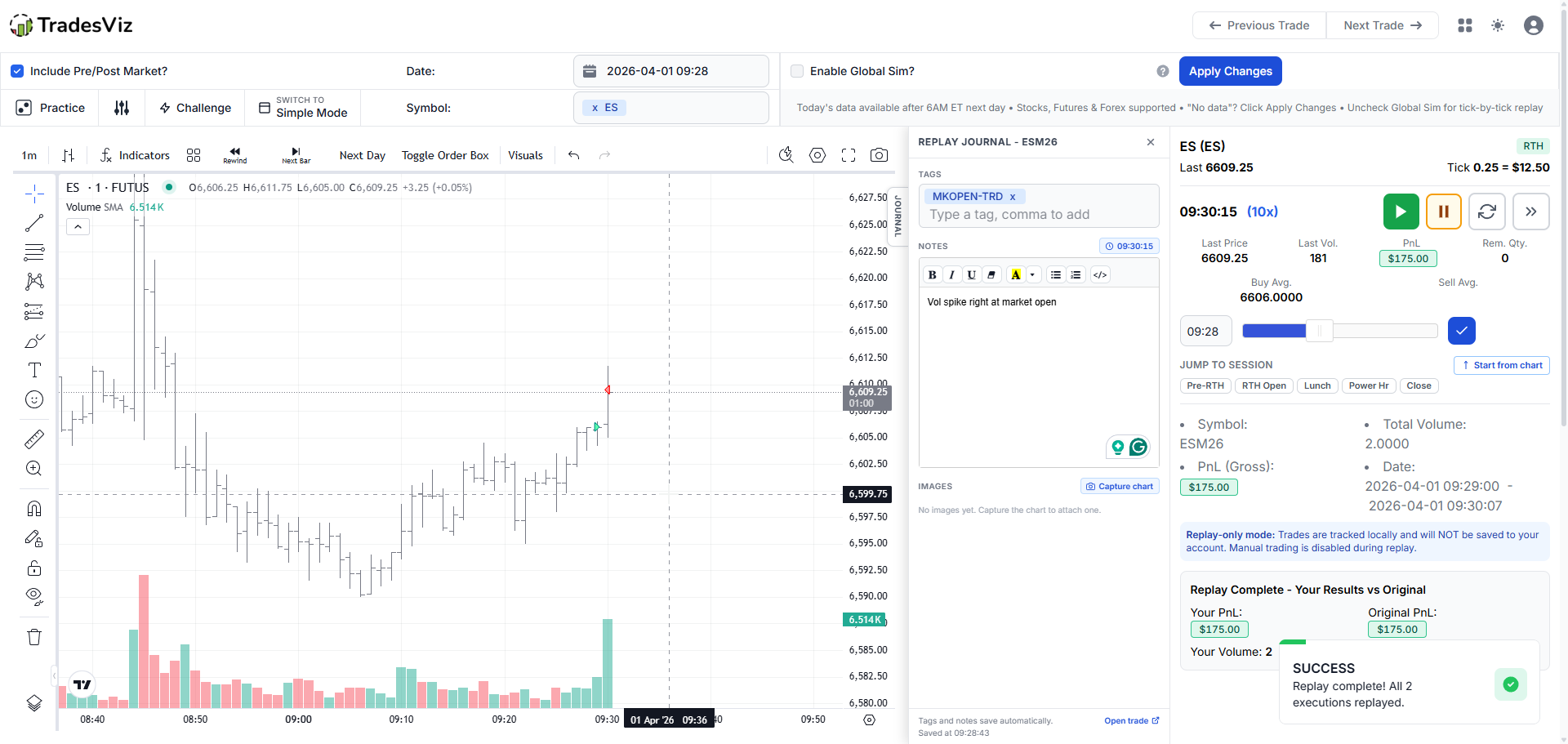
Imported from one of 250+ brokers and platforms, auto-synced or entered by hand, the trade replays on the original tape, with the stop and target from your first execution on the chart.
Review mode disables order entry, so history stays intact. Turn on Persist Replay Trades to place market, limit, stop and bracket orders during the replay and journal the alternate trade next to the original.
The replay journal saves tags, notes and chart captures to the trade while the tape runs, so the review is written at the moment you spot the mistake, not reconstructed later.
Choose Multi-chart from the Replay button and the trade plays across every chart in your layout at the same moment. TradesViz is the first and only trading journal with multi-chart trade replay (US stocks, futures and forex).
From Day Explore, replay every execution you made in a symbol that day, in order, to see how you handled the ticker across the full session instead of one grouped trade.
Pause, step one bar at a time, fast-forward up to 100x, or jump straight to the open, lunch, power hour or close. Bars from 5 seconds to 60 minutes with your indicators applied.
We didn't forget about the options traders... We created the a full-fledged online-based options trading simulator (full options chain) to replicate exactly what you see on your platform. This is the first of it's kind and it's rapidly gaining attention among intraday options traders.
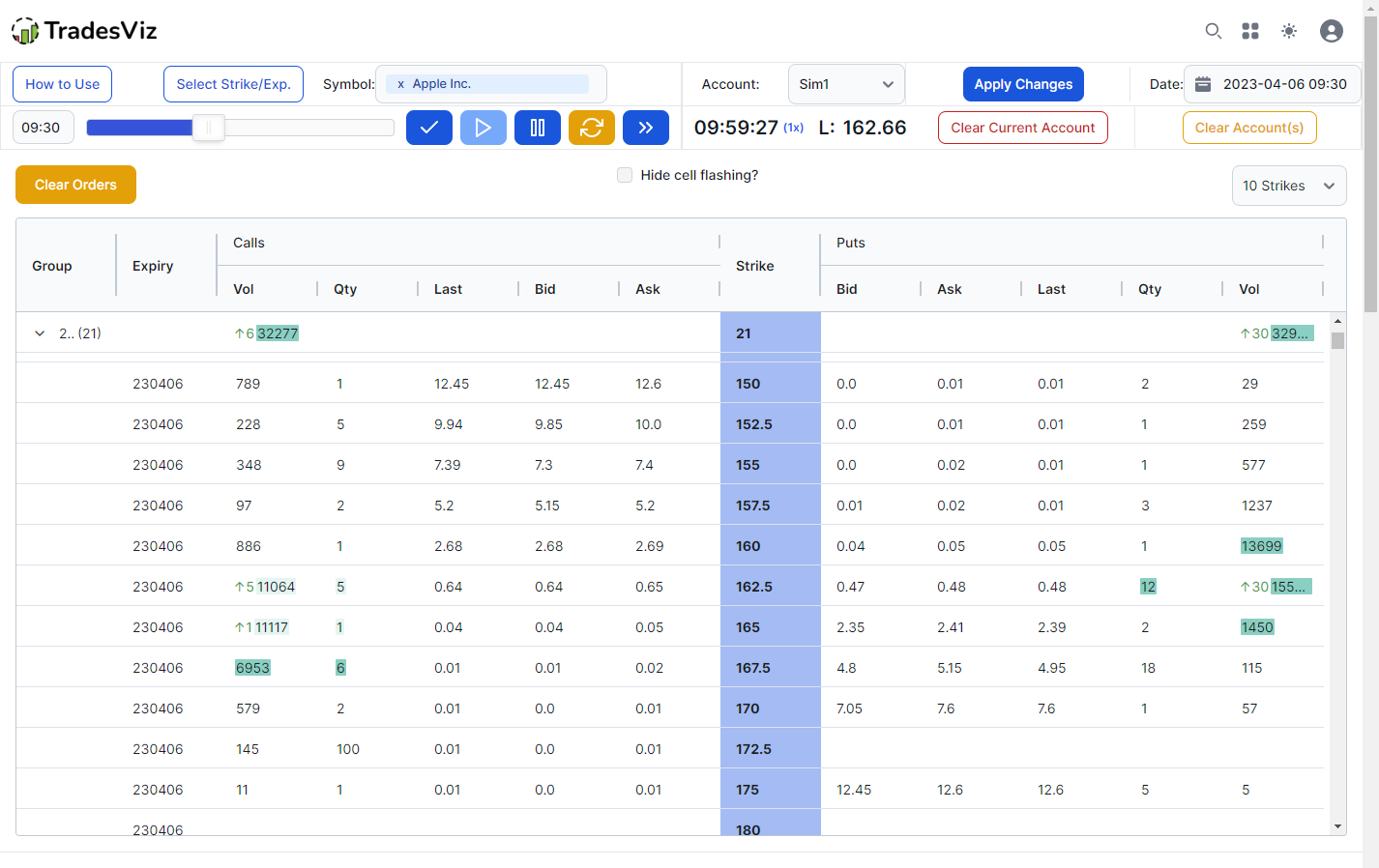
Practice spreads, butterflies and iron condors as complete positions. Choose a preset, option root, expiry, strikes, wing width and quantity, then click Add strategy to stage every leg for review.
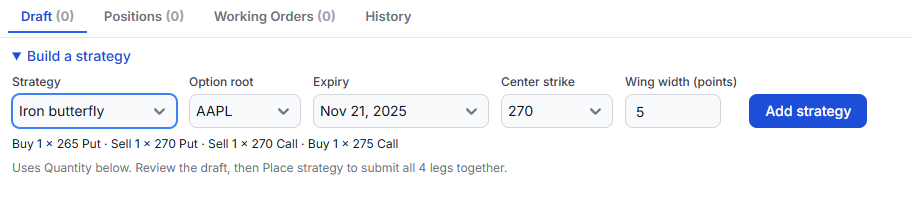
Step 1
Pick a preset and the contracts. Strategies support 2 to 8 distinct legs with the same option root and expiry, including 0DTE contracts when available.
Step 2
Place strategy submits a market or net-limit order. Every leg fills together when quotes and the combined price qualify, while the replay keeps running.
Step 3
Track the position's combined live PnL, expand its legs, and click Close strategy to submit the full exit. Confirmed fills are recorded in your journal.
Simulation builds execution skill, replay audits the trades you took, and backtesting tells you whether a rule set deserves your screen time. Backtester v2 tests rule-based strategies on stocks, ETFs, futures, forex, crypto and indices from 1-minute to daily bars, with 80+ indicators and no coding.
Describe a strategy in plain English and Generate with AI drafts the rules. Every run gets realistic fills, a verdict with a luck check, and a one-click robustness check on earlier periods, other symbols and nearby settings.
Dedicated pages for stock, futures and forex backtesting. New to the terms? Read backtest vs replay vs simulation.
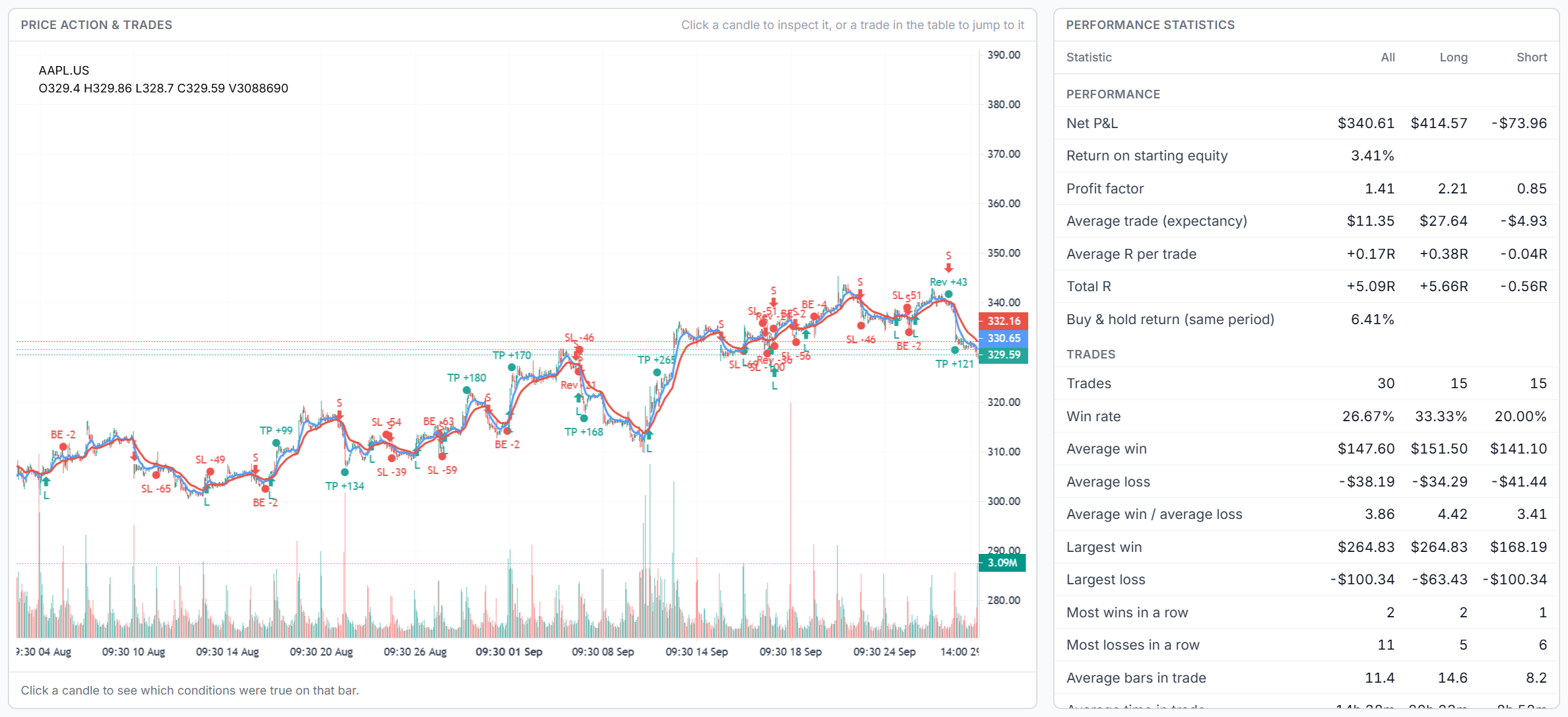
Generate with AI, powered by AI Trade Chat, fills in entries, follow-up steps, stops, targets and sizing, lists its assumptions, and checks that the rules compile before applying them.
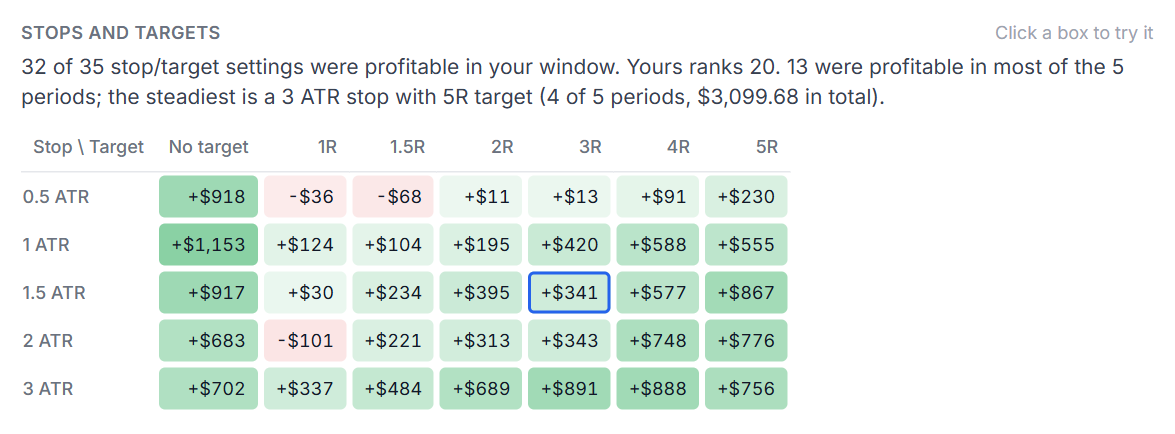
The robustness check re-runs the same rules on earlier periods and up to 8 other symbols, and scores grids of stops, targets and condition numbers across periods, so you do not just keep the luckiest setting.
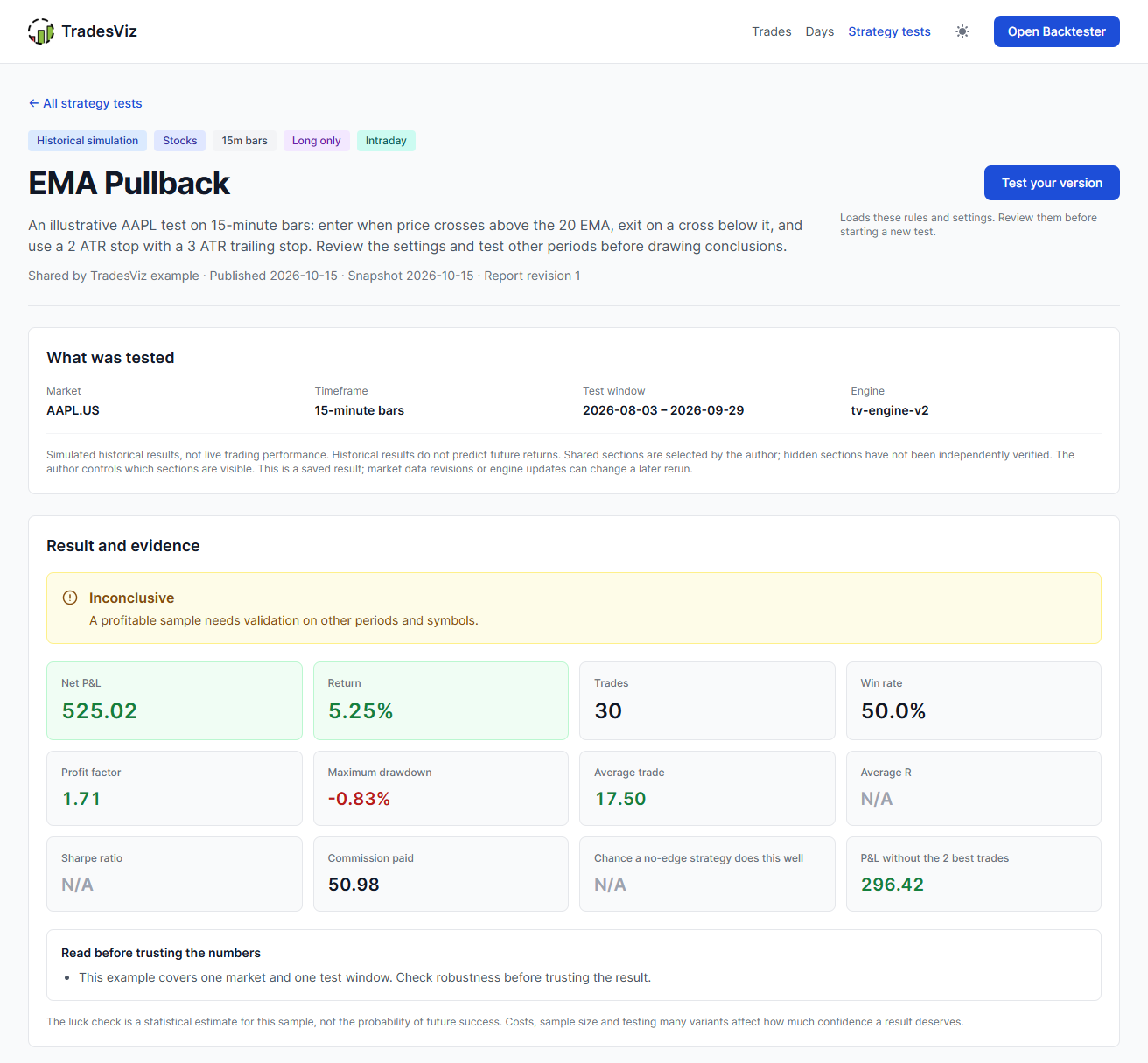
Publish a saved run with the sections you choose. Anyone can read it without an account, and readers can load your rules into their own Backtester to test a variation.
Feature comparison based on publicly available information. Last verified October 2026.
The influencer-founded journal in this table, from its own pricing page:
New in TradesViz in 2026, at the price we have charged since 2020:
| Feature | TradesViz | Influencer-Founded Journal | Forex Replay Tool | Basic Trade Tracker |
|---|---|---|---|---|
| Asset coverage | ||||
| US stock simulator | ✓Second-level replay, 30,000+ symbols | ✓Narrower universe | ✗ | ✗ |
| Global stocks, indices and crypto | ✓US, IN, CA, AU, indices, crypto | Crypto onlyNo global stocks or indices listed | ✗ | ✗ |
| Futures simulator | ✓Majors, micros, tick values built in | ✓Limited contract handling | ✓Replay-focused | ✗ |
| Forex simulator | ✓Majors, minors, exotics | ✗CFDs only, no forex pairs listed | ✓Forex-first | ✗ |
| Options chain simulator | ✓Real historical chain + Greeks | ✗ | ✗ | ✗ |
| Prop-firm challenge simulator | ✓Rules, targets, drawdown limits | ✗ | ✗ | ✗ |
| Replay and execution controls | ||||
| Trade replay from journaled trades | ✓Original fills on the original tape | Removed from $35 planNow Pro only, $59/mo | ✗ | ✗ |
| Replay with alternate simulated trades | ✓Persist replay trades to compare outcomes | ✗ | ✗ | ✗ |
| Multi-chart trade replay | ✓One trade on every chart in your layout | ✗ | ✗ | ✗ |
| Multi-chart simulator | ✓4 charts, symbols and timeframes at once | ✗ | ✗ | ✗ |
| Playback speed | 1x to 100x | Basic | Replay speed | ✗ |
| Timeframes and precision | 5-sec to 60-min | Limited | Forex-focused | ✗ |
| Order types | ✓Market, limit, stop, bracket | Basic | Basic | ✗ |
| Asset-class-aware order panel | ✓Shares, contracts, lots, option legs | ✗ | ✗ | ✗ |
| Backtesting and options depth | ||||
| Automated rule-based backtester | ✓80+ indicators, no coding, unmetered runs | ✓Metered: 10 runs/mo on Pro | ✗ | ✗ |
| Options execution backtest | ✓Historical chain, legs and Greeks | ✗ | ✗ | ✗ |
| Options payoff / risk charts | ✓ | ✗ | ✗ | ✗ |
| Options flow and scanner | ✓Dashboard, scanner, unusual flow | ✗ | ✗ | ✗ |
| Journal, analytics and workflow | ||||
| Simulator trades recorded to journal | ✓Same account and analytics engine | Partial | ✗ | ✗ |
| 600+ analytics on simulator and live trades | ✓ | Smaller metric set | ✗ | Basic reports |
| Prop-firm rule tracking | ✓Daily loss, trailing drawdown, targets | ✗ | ✗ | ✗ |
| Real-time screener connected to journal | ✓Live ideas, charts, journal workflow | ✗ | ✗ | ✗ |
| AI analytics | ✓Q&A, Trade Chat, Auto Insights | ✓Per-trade insights | ✗ | ✗ |
| Monthly price | $29.99/moEvery simulator, replay and the backtester | $35/moReplay and automated runs from $59 | $17.99/moFutures and seconds data on $35 Pro | $29.95/moNo simulator |
Information sourced from publicly available product pages. If any detail needs correction, contact [email protected].
Want the named version of this table? See the full head-to-head comparisons: TradesViz vs TradeZella, vs TraderSync, vs Tradervue, vs FXReplay, the FX Replay alternatives list, or all comparisons.
TradesViz offers the best online trading simulator for stocks, futures, forex, and options. Features include second-by-second data, 100x speed playback, all major indicators, automatic trade recording to your journal, multiple timeframe charts, and more.
Yes, TradesViz's trading simulator lets you practice with historical market data. Place market, limit, stop, and bracket orders on real past price action to develop and test your strategies risk-free.
TradesViz simulator supports Market, Limit, Stop, and Bracket orders with high customization. You can set stop-loss, take-profit, and practice scaling in/out of positions.
Yes, all trades executed in the simulator are automatically recorded to your TradesViz journal for future review, allowing you to analyze your simulated performance with the same 600+ analytics as live trades.
TradesViz simulator offers second-by-second precision with bars from 5-second to 60-minute intervals. Control the exact precision of your practice sessions.
Yes, TradesViz simulator supports Pause, Play, and Fast-forward up to 100x speed. Practice efficiently without waiting through slow market periods.
TradesViz simulator includes all major technical indicators including Moving Averages, RSI, MACD, Bollinger Bands, VWAP, and 70+ more indicators for comprehensive strategy testing.
TradesViz supports simulation for US stocks, global indices, all major forex pairs, US futures, options and cryptocurrencies with historical data available for practice trading. You can also practice prop firm evaluations with Challenge Mode.
Yes, TradesViz simulator supports multiple timeframe charts so you can view different perspectives of the market simultaneously while practicing your trades.
Yes. TradesViz is the first and only trading journal to offer multi-chart trade replay: pick Multi-chart from the Replay button on any trade, and its executions play back across every chart in your saved layout simultaneously, at the same simulated moment, on whatever timeframes you have set up. It is playback only, so there is no order entry during the replay, and it currently supports US stocks, US futures and forex.
Yes. Open any trade in your journal and press Replay. The chart loads just before your first entry and your real fills appear at the second they executed. Replay can be review only, or you can turn on Persist Replay Trades to place new orders during the replay and journal the alternate trade next to the original. The replay journal lets you add tags, notes and chart captures to the trade while it plays, and Day Explore replays every execution for one symbol across a whole day. See Trade Replay.
Yes. Backtester v2 runs rule-based strategies on stocks, ETFs, futures, forex, crypto and indices from 1-minute to daily bars, with 80+ indicators and no coding. Generate with AI turns a plain-English description into rules, every run gets realistic fills and a luck check, and the robustness check re-tests the rules on earlier periods, other symbols and nearby settings. Completed runs can be shared as public strategy tests. See Backtester v2.
The risk simulator lets you run 'what-if' scenarios on your past trades with different stop-loss and profit-target levels to see how changes would have affected your overall performance.
Yes, you can select any historical date to replay. Practice trading during earnings announcements, FOMC days, or any market event to improve your skills in specific scenarios.
Yes. The Daily Drill is free on every plan, including the free trading journal plan: one hidden futures, stock or forex day to trade every day. The full trading simulator, with any symbol on any date, multi-chart replay and prop firm challenge mode, is on the Platinum plan, which you can try with a free trial.
Yes. The single and multi-chart simulators automatically save playback progress by date and symbol, or by the set of symbols in multi-chart mode. Open Sessions beside Include Pre/Post Market, select a saved session, then press Play to continue from the saved position with your chart setup, open positions and pending orders restored.
Sessions are stored in this browser for your TradesViz login, with separate saves for trading accounts and simulator modes. Use the same browser and device to resume; clearing browser storage removes the saves. Delete an individual session with its trash button or use Clear all to empty the current simulator's saved list. Neither action deletes trades from your trading account.
Use Python, scripts or your own applications to read and search your TradesViz accounts, trades and executions, build custom reports, and manage notes and tags. With the required permissions, you can import supported executions, edit journal entries, update trade risk settings, split or merge trades, and delete selected journal data. Execution imports currently support eligible USD US stocks and fixed-multiplier USD futures, not every asset supported by the website.
Yes. Connect a compatible ChatGPT, Claude or other MCP client to the hosted TradesViz MCP server using browser sign-in; no local MCP server or REST API key is needed. Ask your assistant to summarize recent trades, compare results from retrieved trades, find trades by symbol or tag, or save a review note. Editing and other journal changes require the matching permissions. Connector availability depends on your AI client and workspace settings.
You select the trading accounts and permissions each API key or MCP connection can use. Start with read access and grant editing or deletion separately when needed. Day notes, day tags and general journal notes require a separate opt-in. You can revoke access from the API/MCP dashboard. These tools manage your journal; they cannot place, change or cancel broker orders. AI responses can contain mistakes, so review proposed changes before approving them.
A note from PK, Founder of TradesViz
Most online trading simulators are disconnected from the rest of your trading life. You practice in one tab, journal in another, and never get a clean signal on whether the simulator sessions are actually changing your live results.
Sims have always had the same blind spot. They let you click buy and sell, but you can't tag, note or properly record a session in the same place you trade it. TradesViz broke that limitation early on. We were the first trading journal to ship a multi-simulator setup, the first to ship a real options trading sim, the first to launch a true global multi-asset sim, and the first to replay one trade across every chart in a multi-chart layout at once. Years later, no other solution has all four. Inside TradesViz every sim trade lives next to your real trades, with the same 600+ analytics, Exit Insights, MFE/MAE, R-multiple, time-of-day buckets and best-exit overlays. So 'practice' stops being a vague feeling and becomes a measurable comparison between what you did in sim and what you do live.
- PK, Founder of TradesViz
TradesViz is designed to be used by traders just starting out all the way to professional traders. The level of customizability and versatility is unmatched by any similar platform.
You can simulate Stocks, forex, futures and even options on TradesViz. On top of this, you can even replay your trade second-by-second and backtest options using options executions simulator.
Add trade plans to each trade and trading day to see what rules you break and how they affect your trading. Zoom in on your trading behaviour from a data-driven perspective.
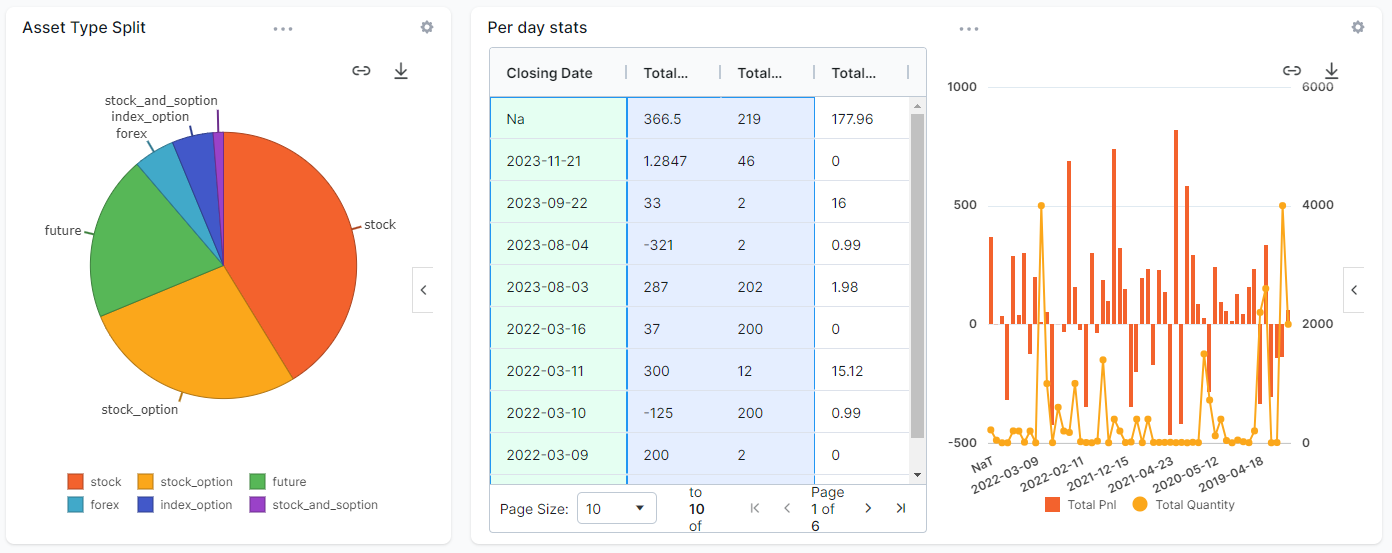
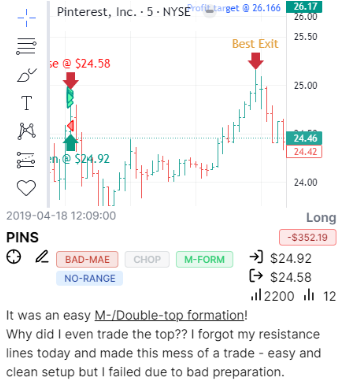
Add multiple static image charts, setup custom TradingView charts with your executions, MFE/MAE targets and more automatically plotted for all your imported trades!
Gone are the days of fixed charts you cannot Customize. With AI Q&A, you can now ask any question about your data and get charts, tables and even add them as custom widgets to your dashboard!
Write notes, tag your notes, search your notes and even ask the AI to generate trade summaries as notes for your trades. TradesViz has a dedicated note tab for all notes management.
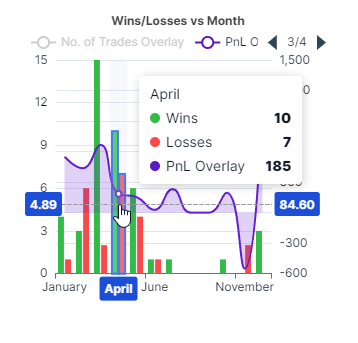
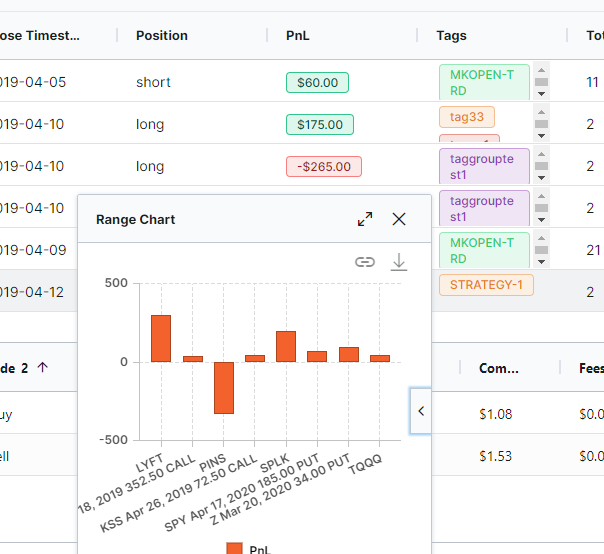
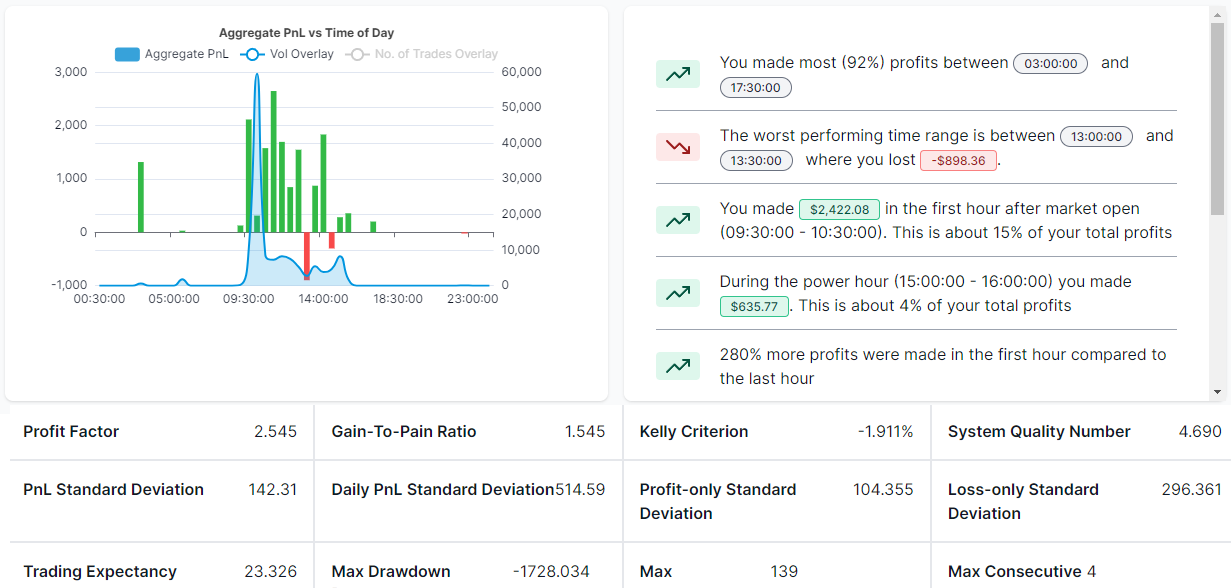
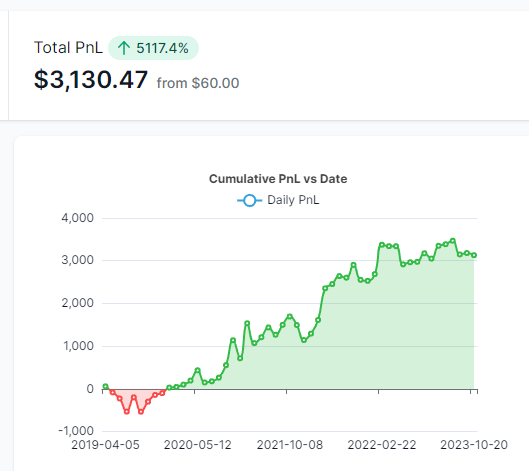
MFE/MAE, R/R ratios, Exit Insights, Best/EOD Exit, Multi-Timeframe exit, Market-TA-Comparison, Running PnL analytics, Options greeks analysis and more - all of these on top of existing PnL charts make ~600+ charts on TradesViz.
With a team of data scientists, researchers and veteran traders TradesViz is built with a singular focus of improving trading performance in a data-driven way.
We didn't skip the most important part out: Education. We update and launch new educational blog posts every few weeks + Post plenty of tips, tricks, trading news/info and journaling knowledge on our Twitter/X feed!
 Artificial Intelligence Q&A and Custom Widgets
Watch “Artificial Intelligence Q&A and Custom Widgets” on YouTube
 How to setup Interactive Brokers (IBKR) Flex Query for Auto-sync
Watch “How to setup Interactive Brokers (IBKR) Flex Query for Auto-sync” on YouTube
TradesViz is a unified trading analysis platform that offers not just the world's best trade journaling capabilities, but also other tools that are tightly integrated to provide a 360 degree support (via tools) to traders looking forward to mastering the market.
Value worth of $300+ per month is available to all traders of TradesViz at less than 1/10th the cost.
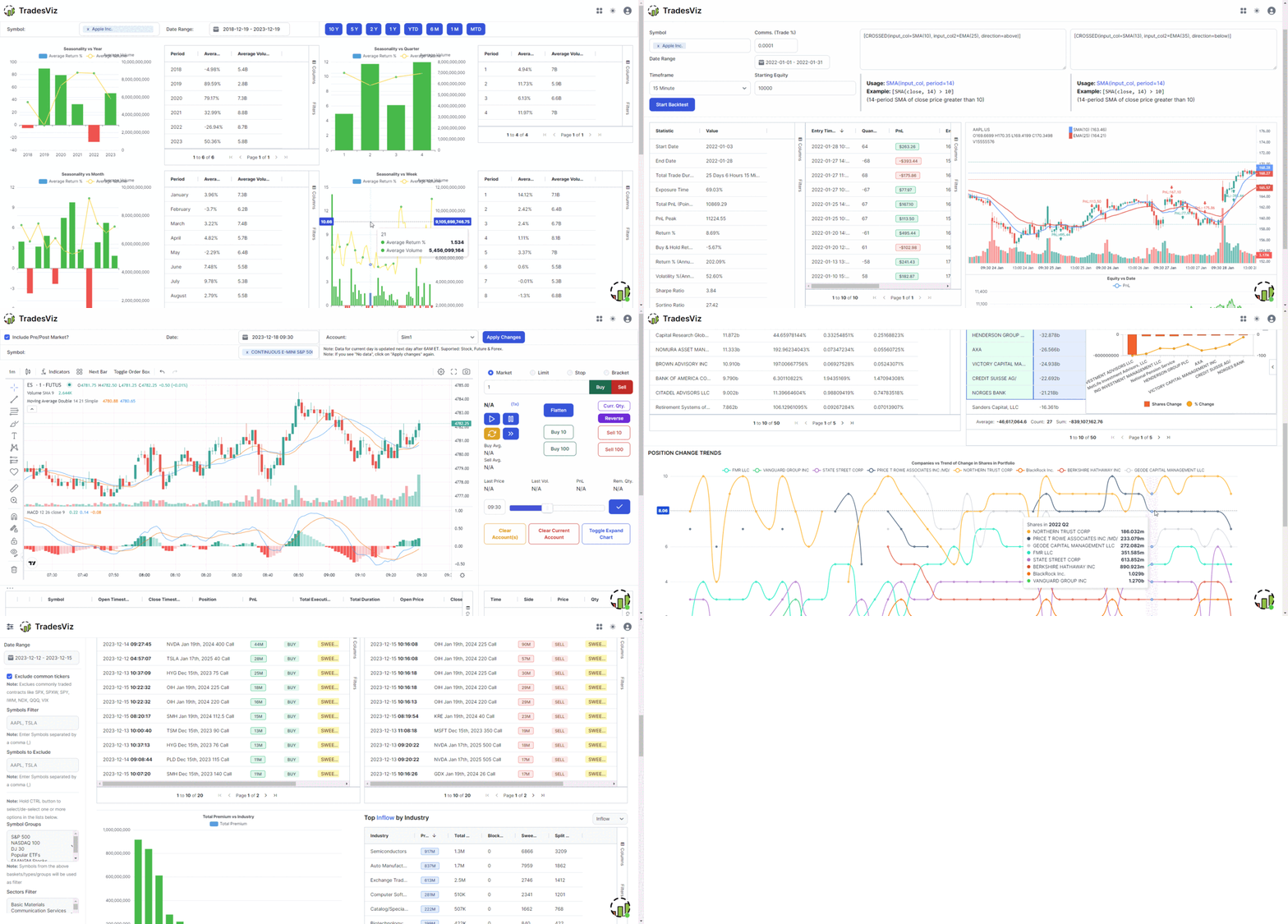
At TradesViz we focus on value and utility provided to traders. That's why we're still #1 when it comes to the value and features offered on an online trading journal.
For beginner traders to get started with journaling.
All asset type import + 100s of charts & powerful grid features.
All-in-one journaling, simulation and advanced analysis platform.



TradesViz is the most useful trading journal on the market for finding and quantifying your edge. An all in one trading journal tool for traders.

Trader, Author, and founder of NewTraderU.com
PK and the whole team at TradesViz.com have put together an outstanding product with exceptional features. PK provides the most excellent support in the chat help. And if something really isn't working quite right or as expected, they get busy to make it better. I originally signed up for TradesViz to have the simulator function which also gave me the statistical analysis I could use to improve my trading. I had been using a simulator which had almost no analysis. When TradesViz added the simulator function I gave it a try. At first I had a hard time making it work, but with patient explanation from PK and with some tweaking on functionality from the coders on the backend, they have delivered a super trading simulator. The trade analysis part of TradesViz is second to none. I've gained the insight into my trading weaknesses and strengths to be able to trade much better in my live account. This is the service you need!
I definitely recommend Tradesviz especially for new traders the way it tracks your stats is no short of amazing especially for me personally by best exit and and of the stats that tell you how long you usually are in drawdown and you are usually in profit. If you want to build confidence in your strategy and edge this journal is the way to go for sure!
TradesViz has made a huge difference in my trading and has positively impacted my trading for the better in psychology and profit.
I use it DAILY and have noticed the vast improvements being made, not only in profit but also in my mental approach to trading.
This is a must-have tool and is more important than any indicator you could ever use.
I've subscribed, at different times, to various reporting programs, and trialed several others.
Yours is night and day over them all. I particularly appreciate the degree of available customization and your quick, ever-patient response to support requests.
I have a small trading account. Thank you for offering such a sophisticated program at an affordable price.
TradesViz is a true leader in Trade Journaling Software. They offer extensive statistical data at an amazing price that almost seems too good to be true. You have access to an amazing support team that seems to be active at all hours of the day. My support agent helped me through a complex import issue and had it solved within 24 hours. I can't tell you how blown away I am with their software and their service. I'm more than happy with my experience and so excited to see what new features they bring to the table as they continue to grow their business. If you're on the fence, I encourage you to jump right over and take it for a spin with their risk-free trial. Thanks to all the TradesViz team members who continue to make my Trade Journaling efficient and effective.
Day Trader
GREAT PRODUCT AND EVEN BETTER CUSTOMER SUPPORT!
I have been using TradesViz for a few months and it is a fantastic tool. Prior to subscribing, I was spending hours on xls trying different tables and layouts and only getting frustrated (or overcomplicating things!). Now I have everything in one place (I have multiple trading accounts), and I have probably only explored 10% of the tools and data analytics!
BUT, what has really impressed me is the support: I have NEVER in the last 10 years had such instant, professional support from a company at (almost) anytime of the day or night!
Clearly this is a team that is passionate about their product and that will always translates into innovation and better experience & value to the customer.
Well done to the team!!
After only a short time of using TradesViz, I can confirm that this platform is exactly what I have been looking for. It takes the chore out of journaling – the number of stats, data, and information available on my trades is a complete game-changer. The importing process via MT4 file is extremely easy and the automated charts with entries are amazing. The whole process is extremely easy and helps to keep me accountable for my trading by having a professional system to manage my business. The platform is very comprehensive and takes a bit of time to get used to, but they have many videos on their YouTube to help with this as well as their support team.
Their support is exemplary and gets back to all my queries in well under 30 minutes with comprehensive answers and solutions to my questions.
This platform is absolutely essential for any trader and I would highly recommend it to any of my trader friends looking for a journal. If you don’t have this platform, you are seriously missing a trick here…
Thanks, PK from TradesViz for being extremely helpful and patient in resolving my syncing issue. Certainly one of the best online support I have ever experienced. Even though it took a while for me to get my settings right, I never felt rushed...I appreciate that. Hope to stay with you guys for a long time. Certainly would like to learn how to utilize most of the features on TradeViz.
In my opinion, the TradesViz platform is truly the Ferrari of journaling software available today. Once you are under the hood, you begin to realize that in fact what sets it so far apart is all the advanced analysis at your fingertips. Such as the ability to combine multiple portfolios, live charting, and much more. Their support is world-class, in my case personally, I needed integration with Trend Spider’s backtesting engine. What I imagined might take weeks was literally accomplished overnight. Factor in rock bottom prices and you have all you need for whatever you're searching for. Newer traders will find that one of the most basic recipes for success is meticulous record keeping, simply observing your account profit and loss go up, or just down as the case may be, is the first step on the road to ruin if your serious about trading.
Trader
I'm writing this testimonial as appreciation for this surprisingly pleasant
conversation.
Upon my initial support request, TradesViz's support was impressively swift. A response appeared every single time as soon as I closed my email tab. Not only did I receive incredibly helpful information about features I wasn't aware of, but the team was also genuinely enthusiastic about discussing my feature requests and ideas about the industry. Truly awesome people!
In terms of raw analytics, comparison, and filtering capabilities, there is no match for TradesViz. I also don't know of any other trading journals that offer so much for the price, their free version has pretty much everything you would need if you trade stocks and offer so many of the paid features that are on other websites for free. They have templates for almost every broker and if it's not there, their support team is only 1 email or message away and will work with you to include your broker on their platform. By far the best support I have gotten from any trading journal as they are open to feedback and feature requests and are very active on their chat for any questions. A trading journal built by traders, for traders.
Professional Futures Day Trader
I wish I had TradesViz when I started to trade ten years ago. I had to learn the hard way. It provides everything you need to maximize your wins and minimize your losses.
There’s a learning curve but once you get past that your trading will surely be taken to the next level.
Founder of ChartLearning.com
As a full-time trader, the first pivot point in my trading results came after I started to learn from Mark Minervini - this is when I stopped losing $$$. The second pivot point came after I started to analyze my results - this is when I started to be consistently profitable $$$.
I love that TradesViz works for Options, Stocks, Crypto! It has automated and manual uploads. It has all the important metrics and analysis that you will need and it is fully customizable.
I have tried pretty much most of the products out there, and TradesViz wins by a mile - highly recommend it! Thanks to PK and the team!
Thanks, @MightySoldiers for turning me on to @tradesviz. I'm loving the customized dashboard. The level of detail and ability to really dig deep on metrics is unparalleled. This tool has helped me so much in defining my trading strategy and where my edge is.
Trader
I was looking for a solution to journal my trades on multiple platforms to keep track of my PNL. I stumbled upon TradesViz and I have nothing but positive to say about their service. Not only does their product make it so easy to see how you are doing on your trades with the various graphs and filtering options, getting your account synced is super intuitive. Best of all their customer service is top-notch. Every time I have asked a question, they have responded within a few hours with a solution, and sometimes that involved programming custom solutions for me to make my life easier. It's a no-brainer for me to pay for the yearly service. Do it, you won't regret it.
E-commerce Analyst and Trader