Read the session in context
Compare a symbol with its own history. See gross versus net, spread-leg share, contract concentration and past signals with their confirmation status.
Turn the US options tape into research you can act on and review. Group multi-leg orders, find activity that is unusual for each symbol, and follow the evidence from the market to the contracts to your own trading journal.
Included in Platinum · Daily OPRA data · Each session available the following morning
01 / Understand the order
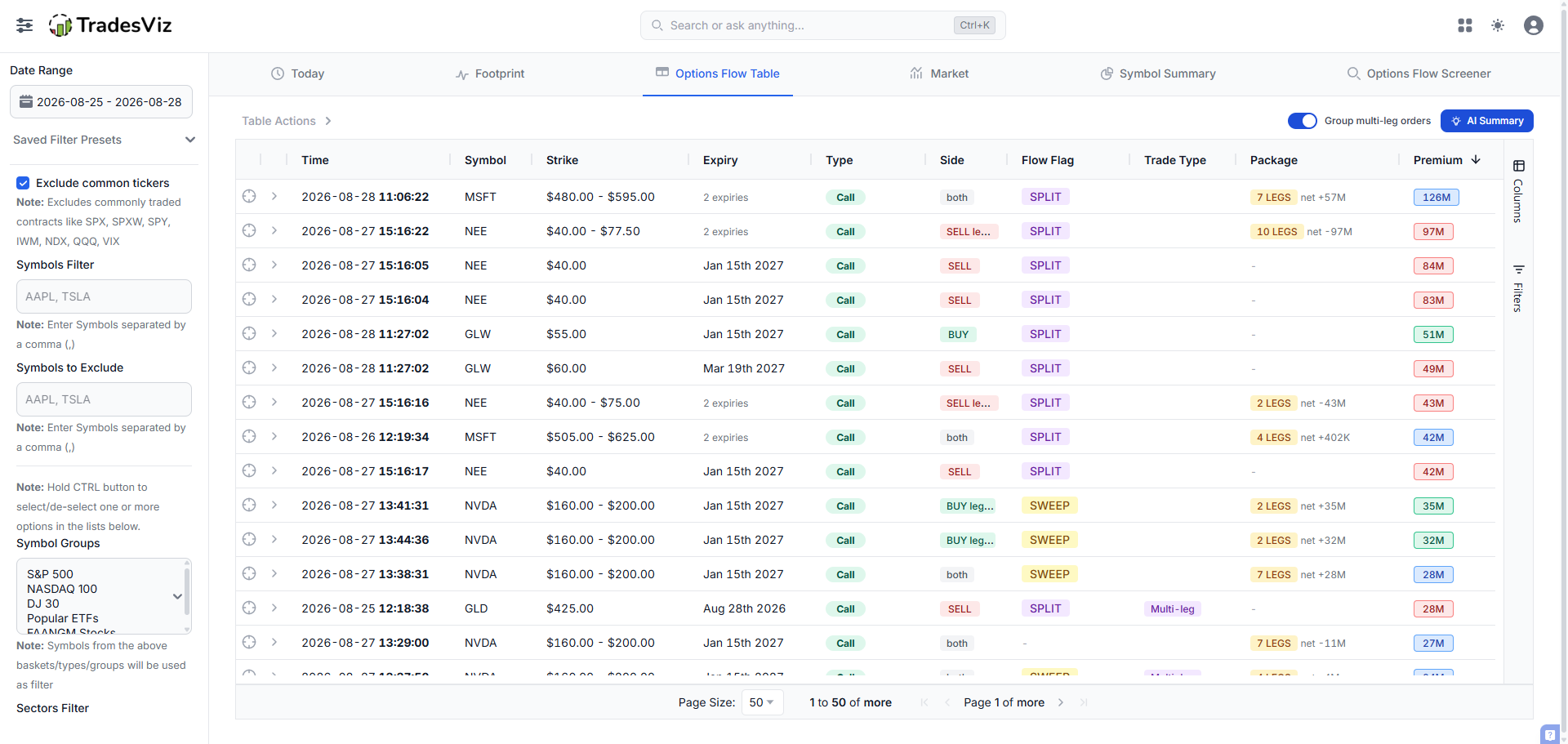
A premium-sorted feed can make each leg of a spread look like a separate bet. Turn on Group multi-leg orders to see the package, its leg count and signed net premium. Expand a row to inspect the underlying legs.
02 / Find what stands out
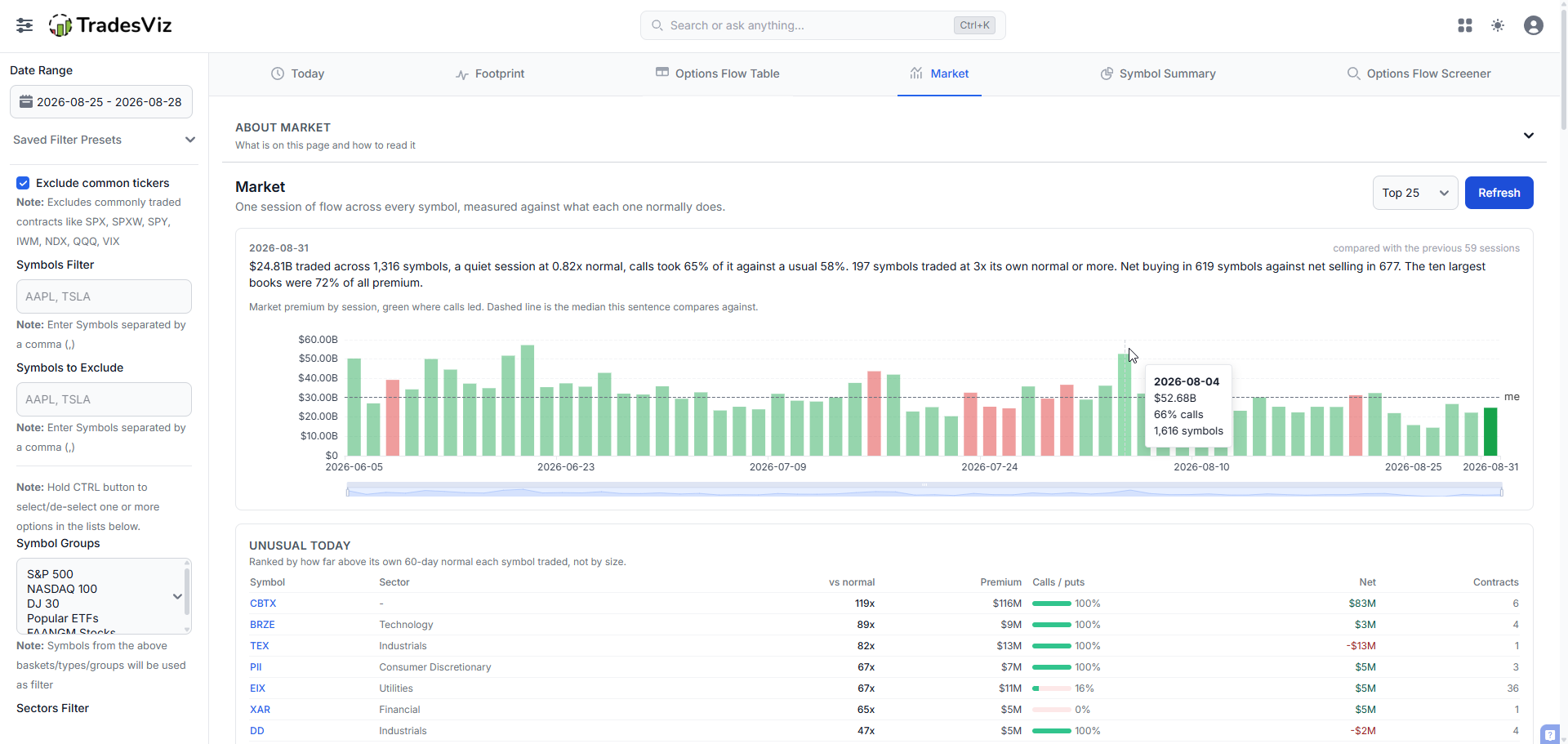
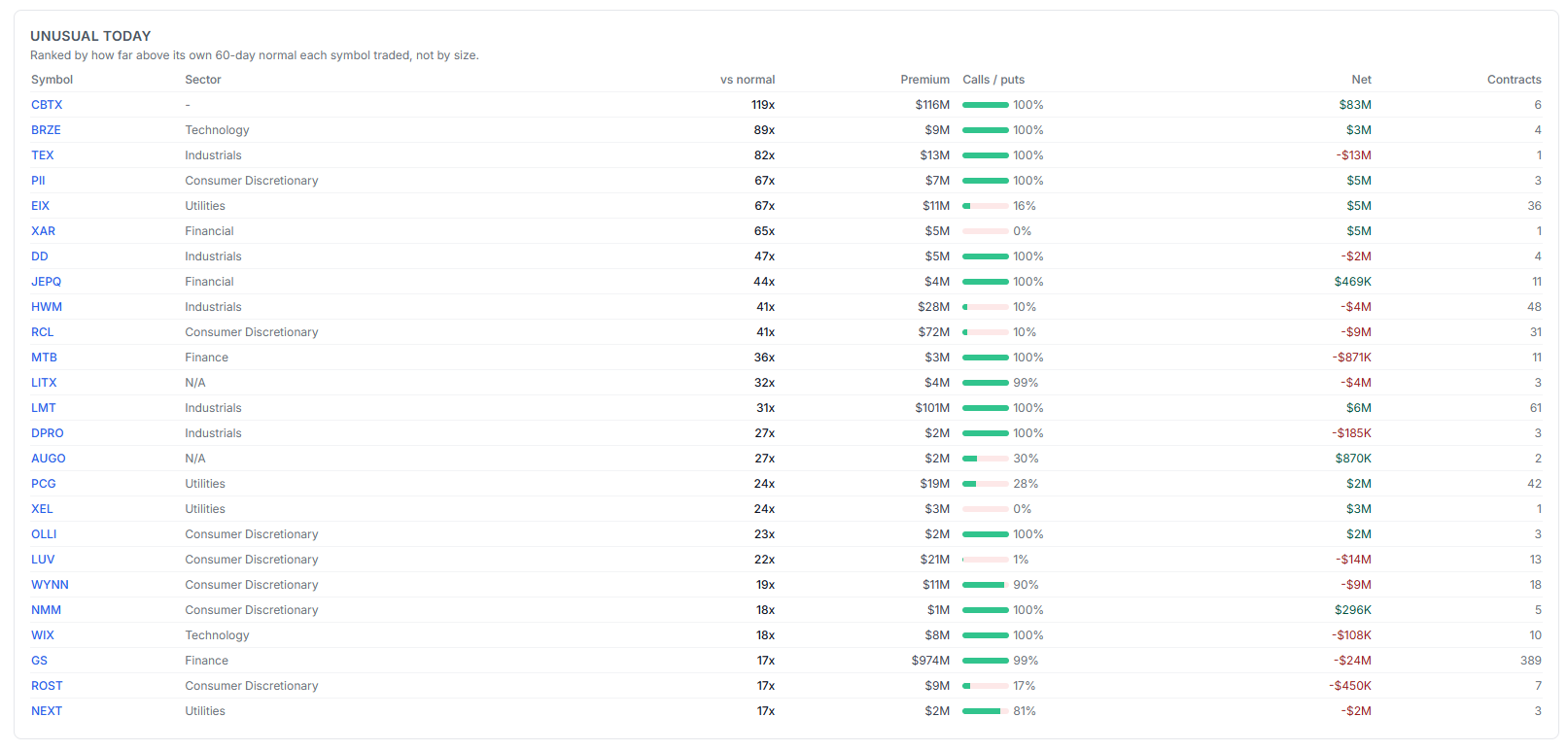
A billion dollars in a busy index can be an ordinary day. A smaller name trading far above its recent normal deserves a closer look. The Market tab makes that distinction visible.
Market research / Time horizon & structure
A call/put ratio compresses an entire market into one number. TradesViz shows where the session's premium landed across expiries, then compares the time-to-expiry and execution mix with what the market normally does.
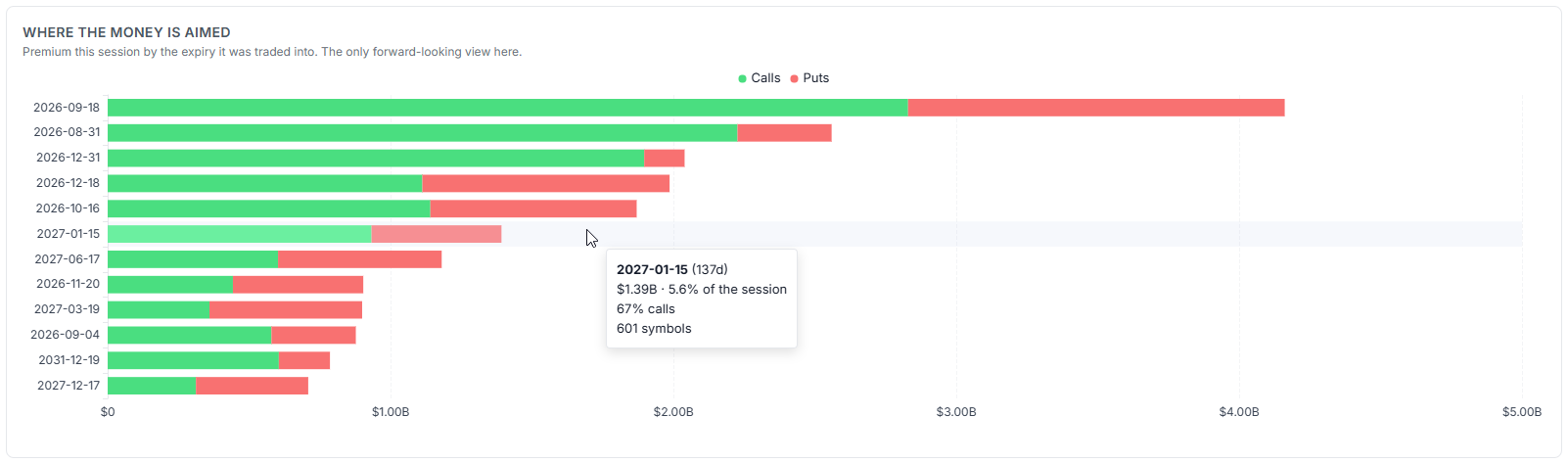
Premium grouped by the expiry it traded into, split into calls and puts. The tooltip adds days to expiry, the session share and the number of symbols involved.
Find an expiry that stands out, then investigate the names and contracts behind it. Check whether the activity sits near your research timeframe or much further out.
A short-dated burst and a long-dated package can have similar premium. Seeing their time horizons gives you a more useful starting point than a dollar leaderboard alone.
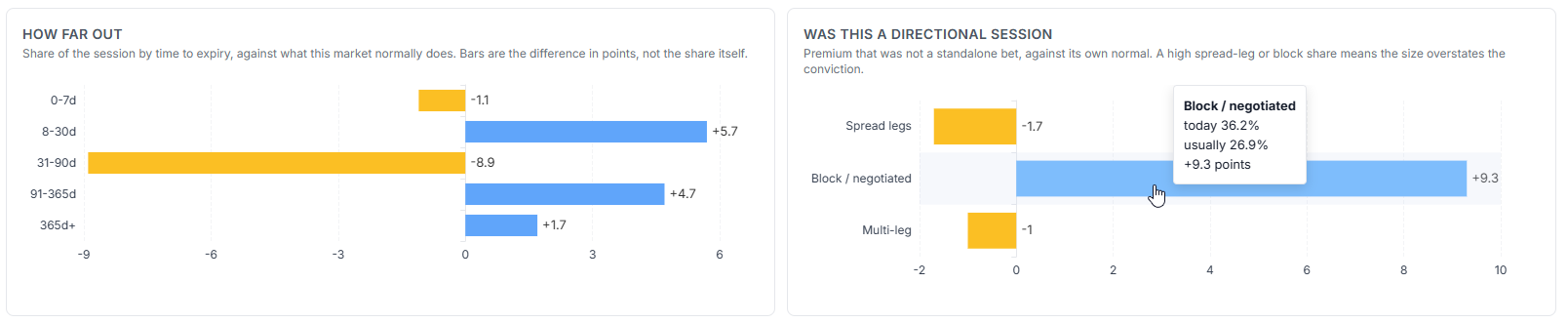
The next view measures differences from the market's usual mix in percentage points. In this example, 31–90 day expiries were 8.9 points light, while block/negotiated activity was 9.3 points heavy. Those observations help explain the session before you select a symbol.
Market research / Breadth & concentration
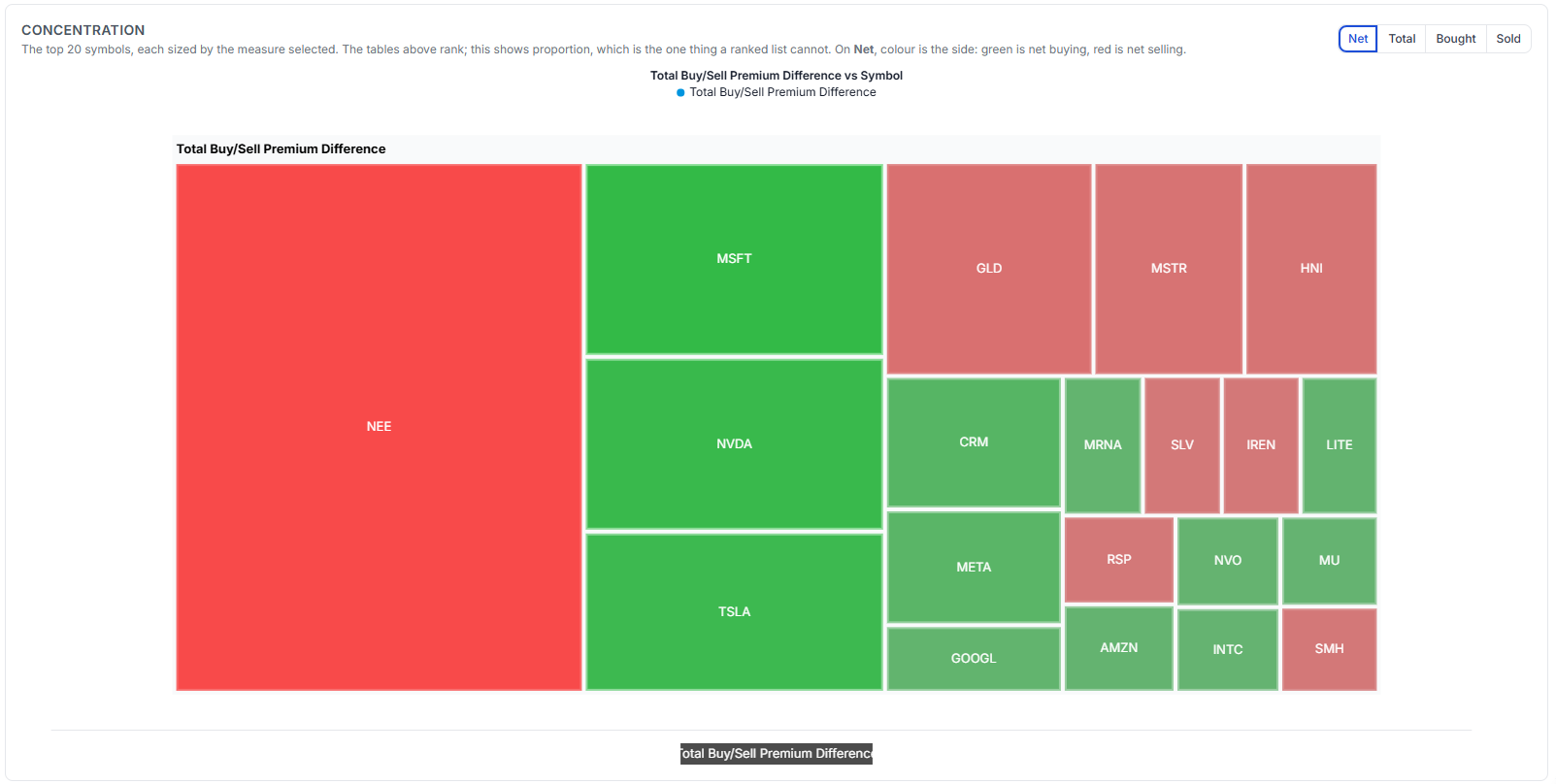
The concentration treemap shows the relative weight of the largest symbols. Switch between Net, Total, Bought and Sold to ask different questions of the same session. In the Net view, green represents net buying and red represents net selling.
In the guide's example, NEE dominates the net-premium map. Its large call premium also appears on the outflow leaderboard. Seeing those views together tells you to inspect the package before treating “large calls” as a directional conclusion.
03 / Follow the contracts
Symbol Summary connects the session's gross and net premium, signal history and multi-session footprint with the contracts behind them. Inspect strike, expiry and open interest alongside price.
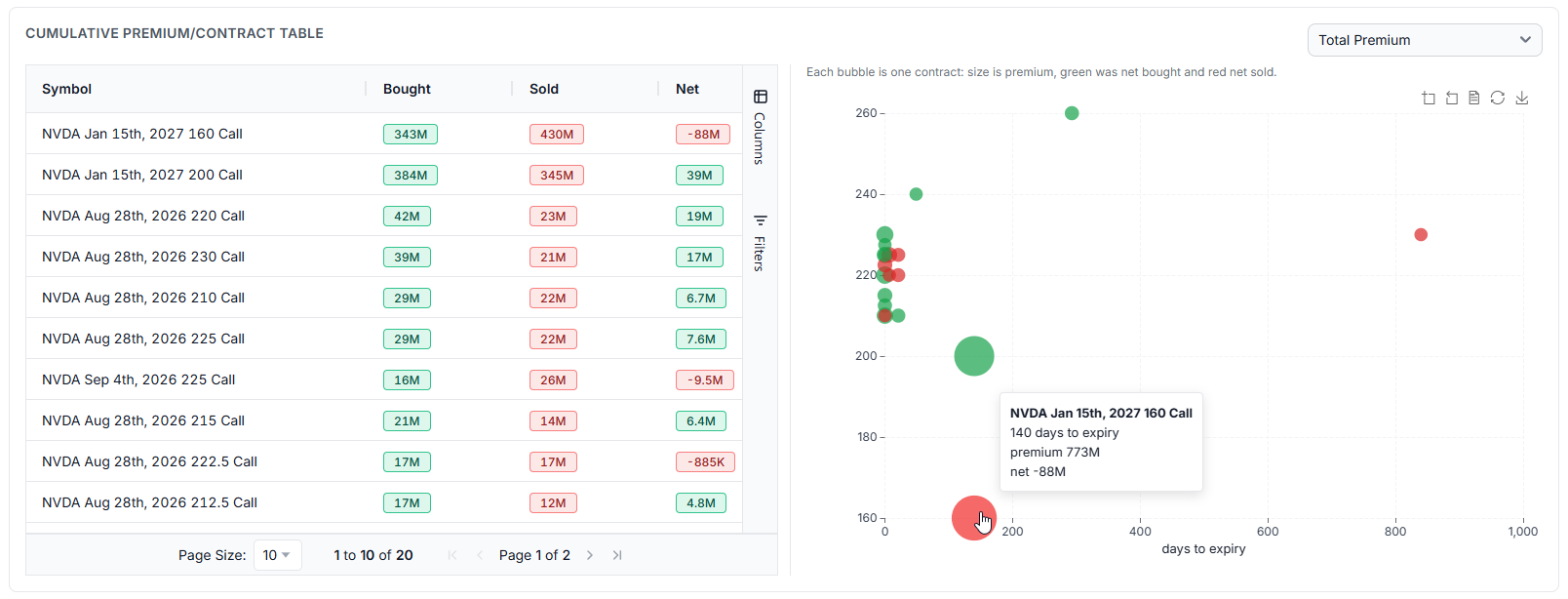
Compare a symbol with its own history. See gross versus net, spread-leg share, contract concentration and past signals with their confirmation status.
Use contract maps, treemaps and volume/premium heatmaps to locate activity. Quantile color scales keep one oversized contract from hiding the rest.
Compare flow with the existing options book and the underlying price. A cumulative premium line shows turnover; open-interest changes add context about contracts remaining open.
Symbol research / A baseline for every headline
Symbol Summary answers that question immediately. The session header places gross and net premium beside the symbol's own history, contract count, expiry count, spread-leg share and concentration. Signal history then shows the previous sessions that cleared a detector.
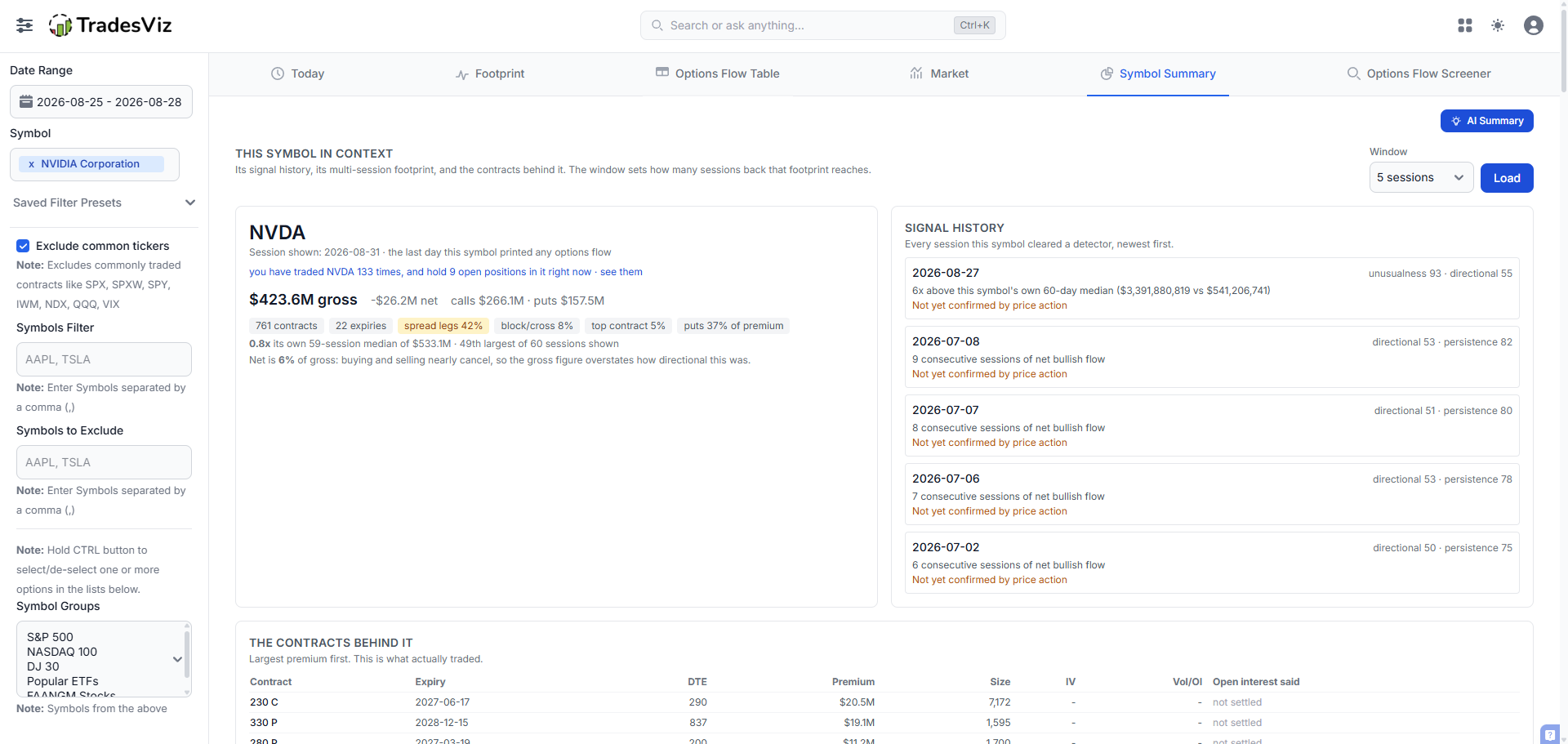
How to read it: compare the baseline first, inspect how much of the gross remains as net, then open the contracts and relevant signal dates. This puts a premium headline into context before it becomes a trade idea. Figures shown are historical examples from the guide.
Contract research / Strike & expiry heatmaps
Explore activity across two dimensions at once: strike price and expiration date. Read the volume and premium heatmaps together to distinguish high contract counts from high dollar turnover.
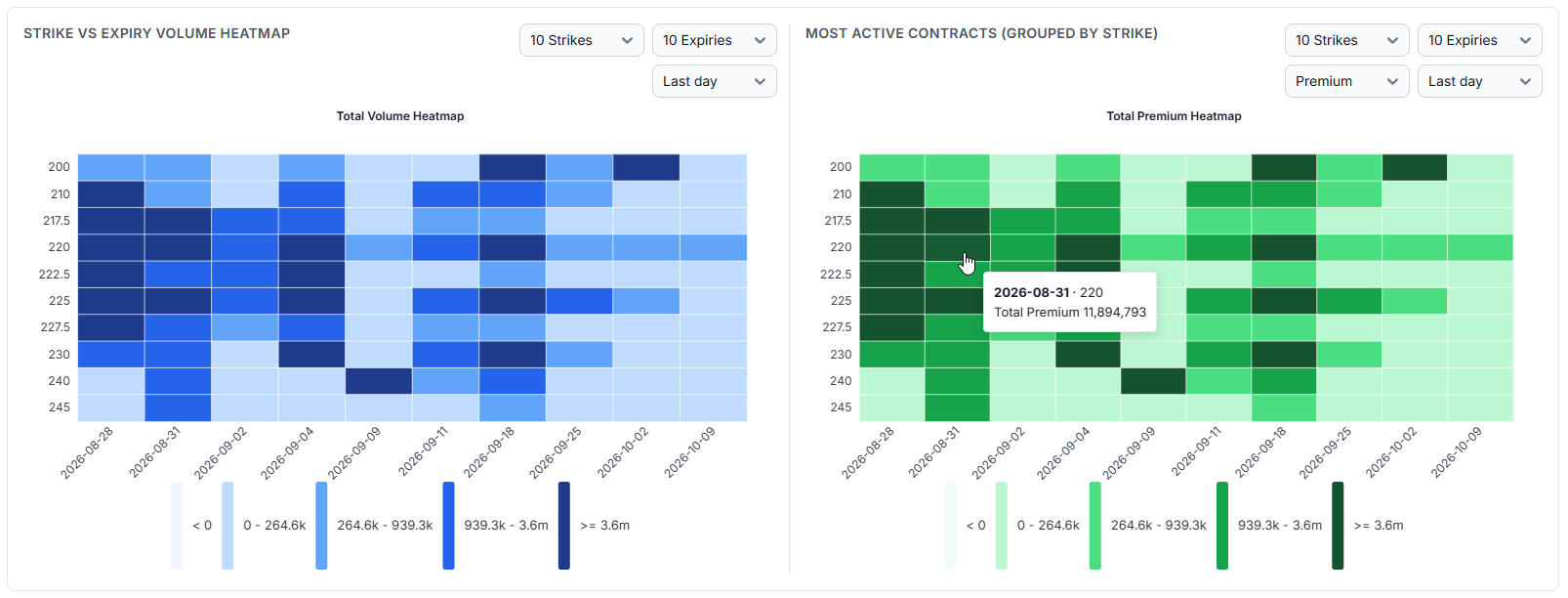
Choose the strikes, expiries and period you want to examine. Look for neighboring cells or a particular expiration carrying concentrated activity.
A cell strong on volume but lighter on premium can reflect lower-priced contracts. A cell strong on both has substantial contract activity and premium turnover.
Quantile color bands keep a single enormous contract from washing out the rest of the grid. The legend exposes the actual ranges behind the colors.
Positioning / The existing options book
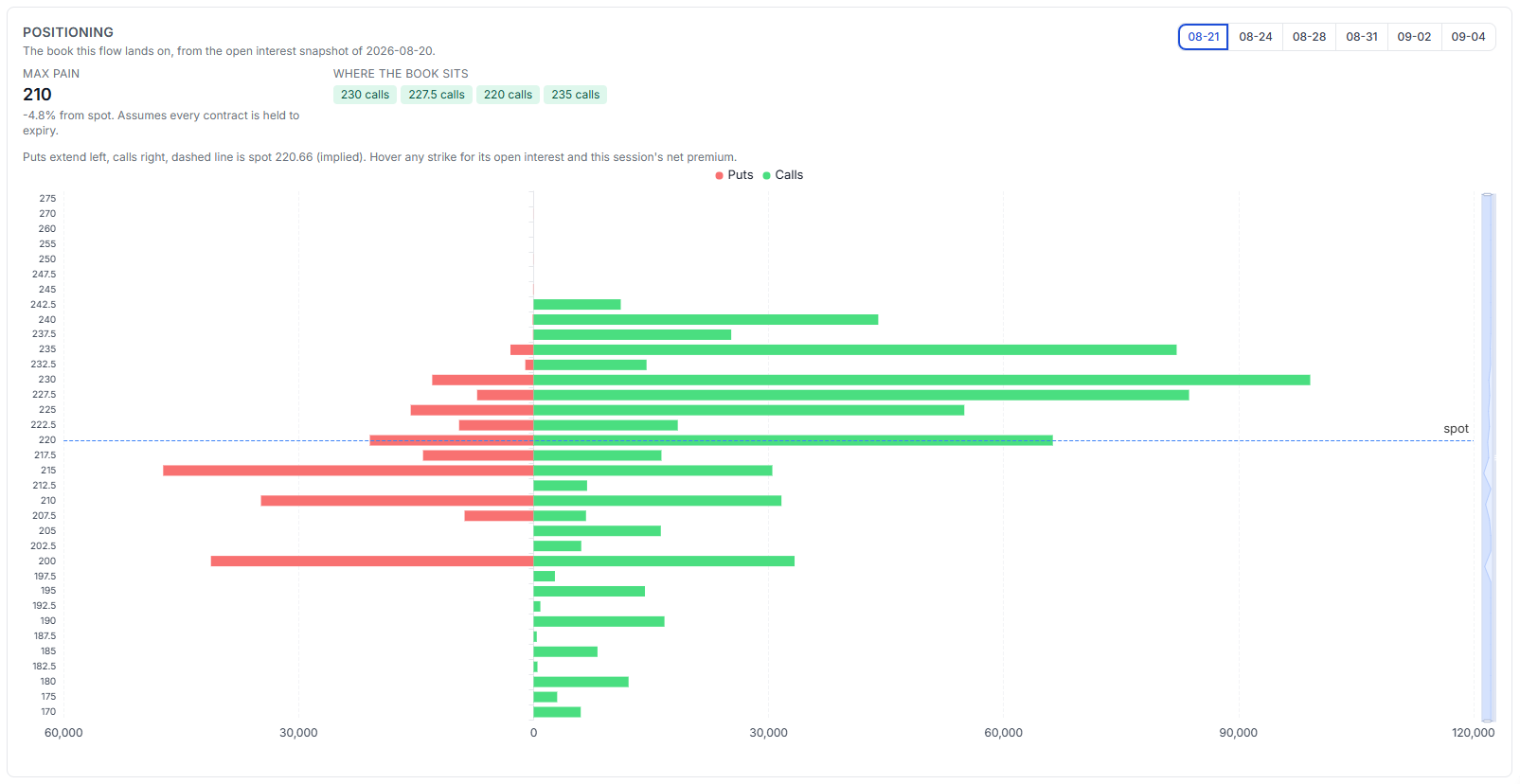
Flow describes what traded. The positioning map adds the outstanding contracts from the displayed open-interest snapshot, organized by strike and expiry, with puts extending left and calls right.
The map also displays max pain with its stated assumption. Treat it as a description of the selected book, rather than a price target. A later open-interest change adds evidence about the series, without identifying who holds a particular print.
Time-based research / Premium against price
Start with daily premium and the underlying price to locate the sessions worth inspecting. Then use the intraday cumulative view to see where in those sessions the selected flow arrived.
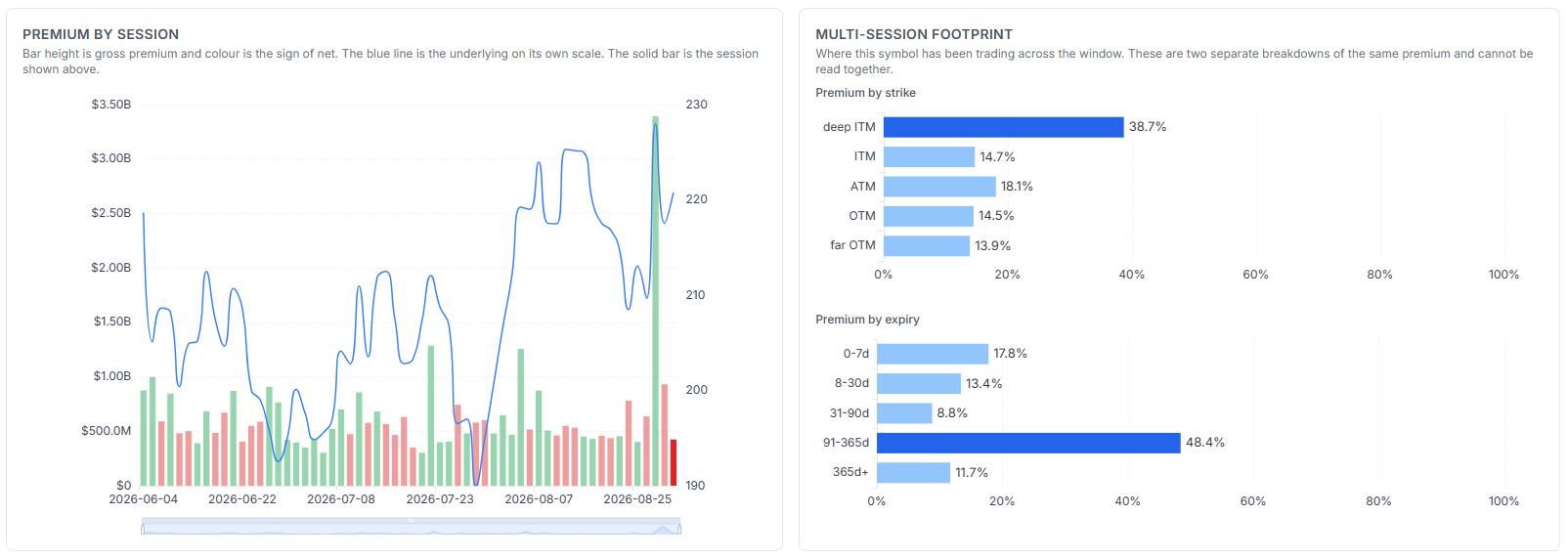
Compare like-for-like sessions. Identify premium spikes, quiet periods or a mismatch between the selected flow measure and price.
Read the moneyness and expiry distributions separately, then use the contract list to check which strikes and expirations actually traded together.
Write down why that activity matters for your timeframe. Use subsequent price behavior and available open-interest evidence to revisit the hypothesis.
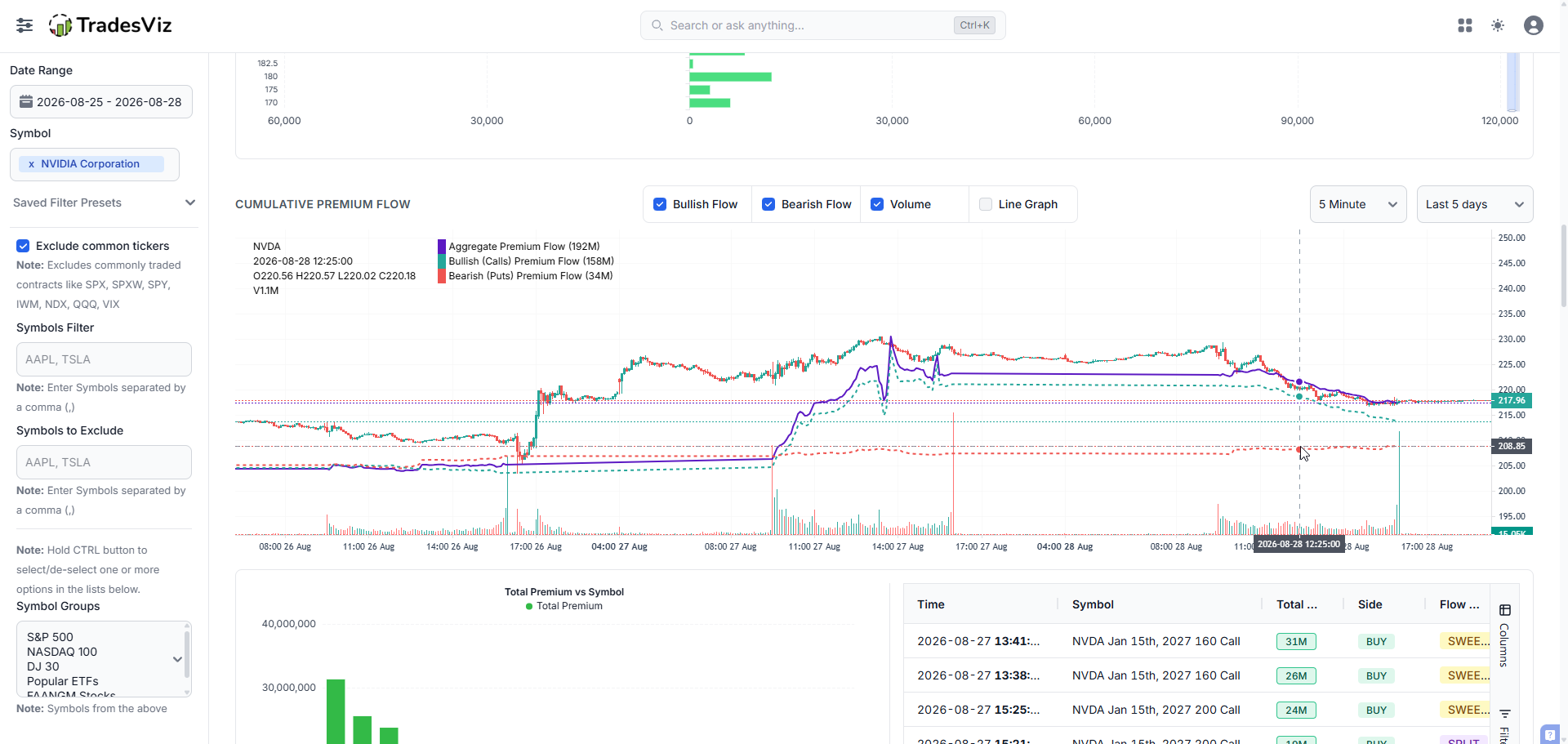
The advantage over a cumulative line alone: you can inspect the component flows, price candles and the underlying contracts. Cumulative premium measures turnover; repeated buying and selling can increase it without proving that a position was accumulated.
Execution research / Sweeps, blocks & splits
The daily execution breakdown reveals whether a spike came mainly through sweeps, blocks or splits. Compare the unusual session with the surrounding days before deciding how to interpret it.
In the guide's August 27 example, sweep premium reaches $2.07B, alongside $831M in blocks and $491M in splits. That is a very different execution mix from a day dominated by negotiated blocks.
Use the chart to choose the session to investigate, then filter the table and inspect the packages. A sweep describes rapid multi-venue execution; it does not establish the participant's identity or whether the trade was right.
Understand options sweep orders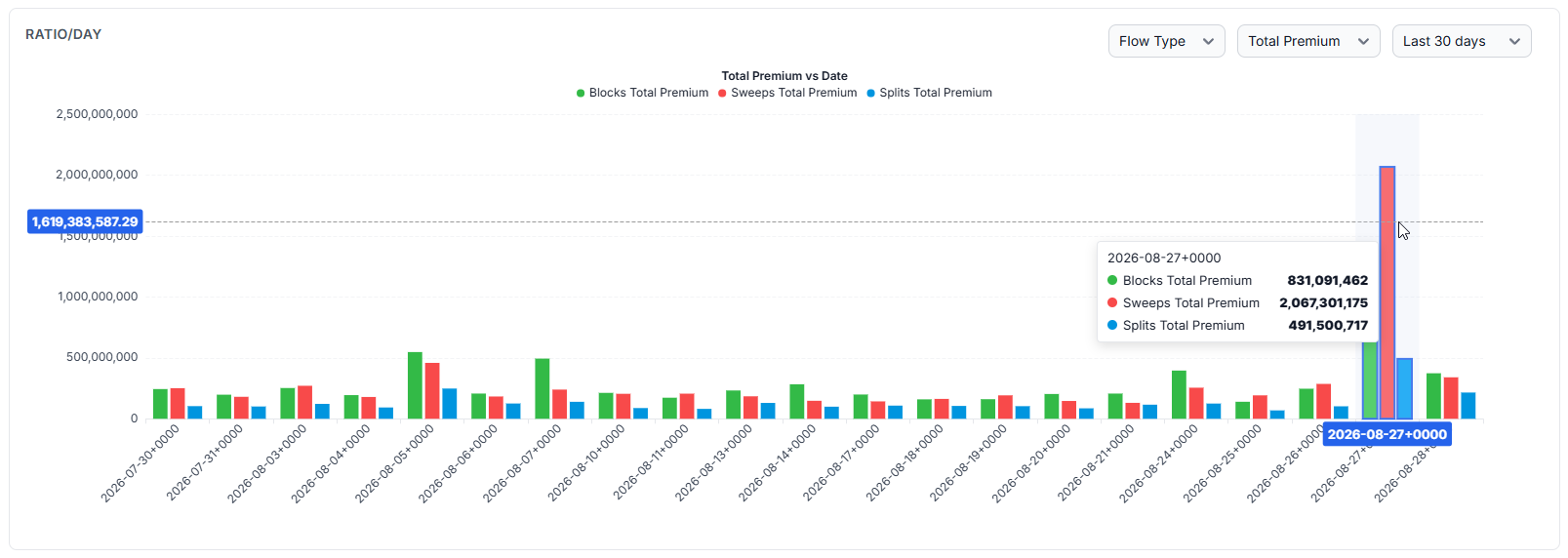
04 / Look across sessions
The Footprint tab organizes multi-session activity by behavior: rotation toward nearer or later expiries, concentration in one contract, rolls, and volume with or without open-interest support.
Open a card to see the contracts carrying the window and how many sessions each appeared in. Separate persistent activity from a single oversized event.
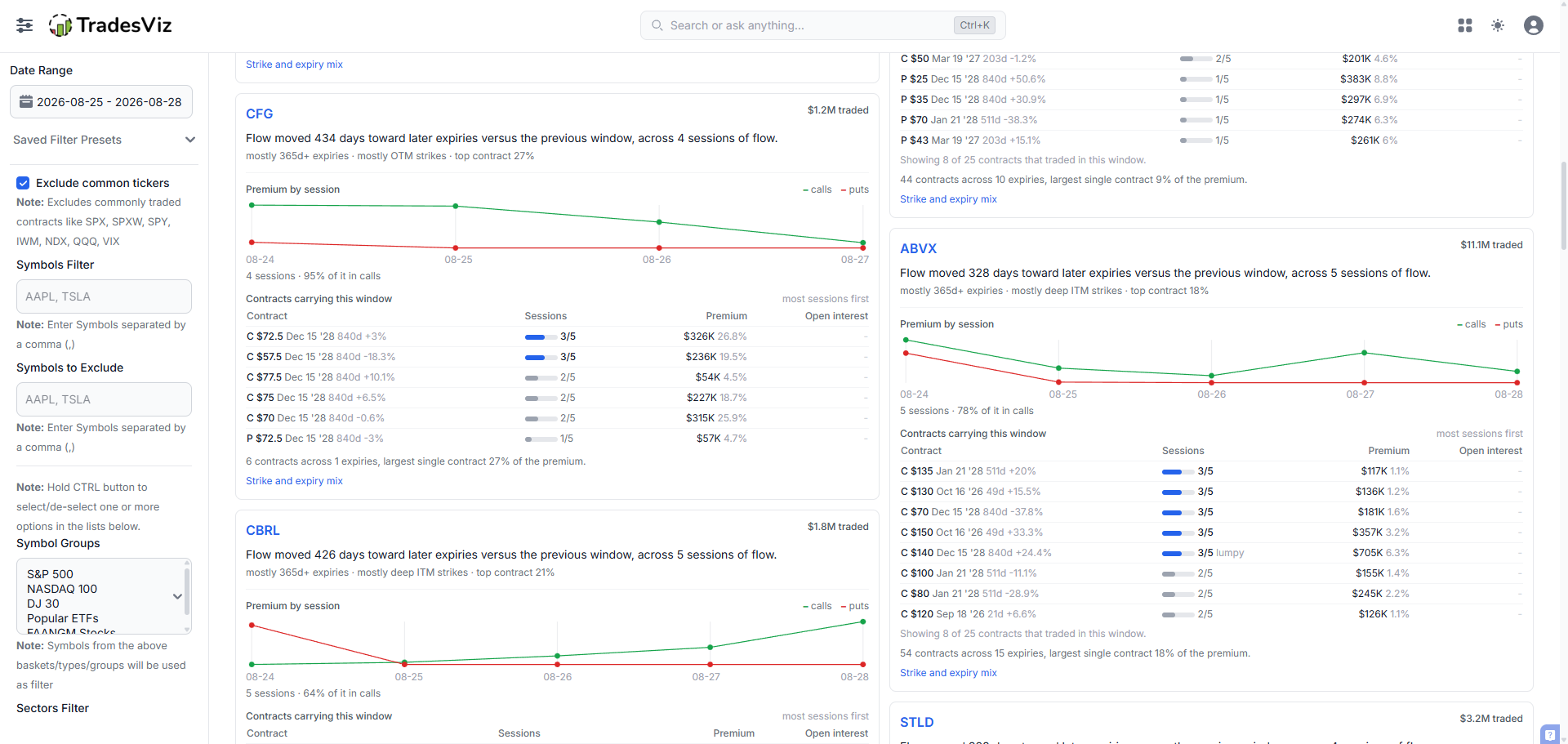
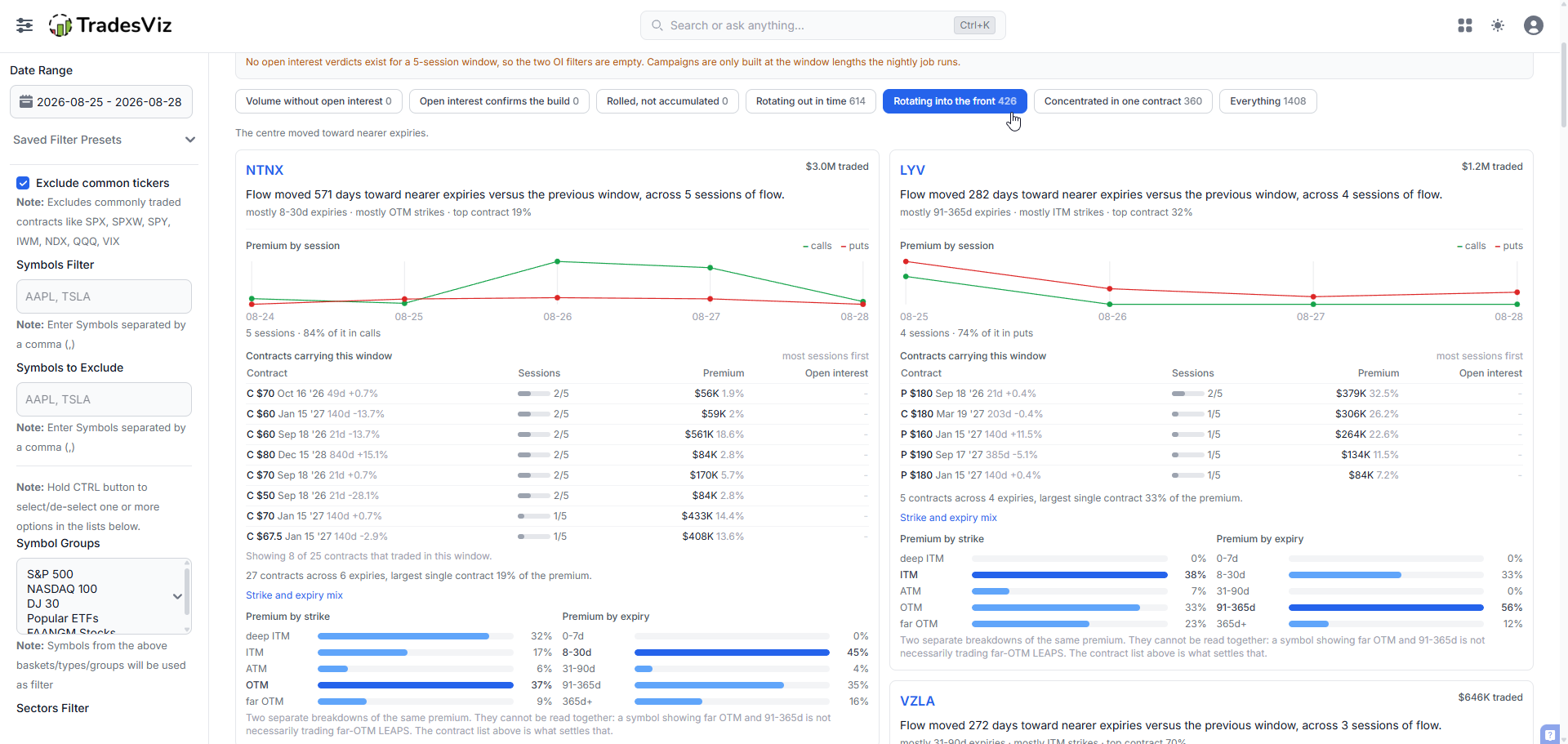
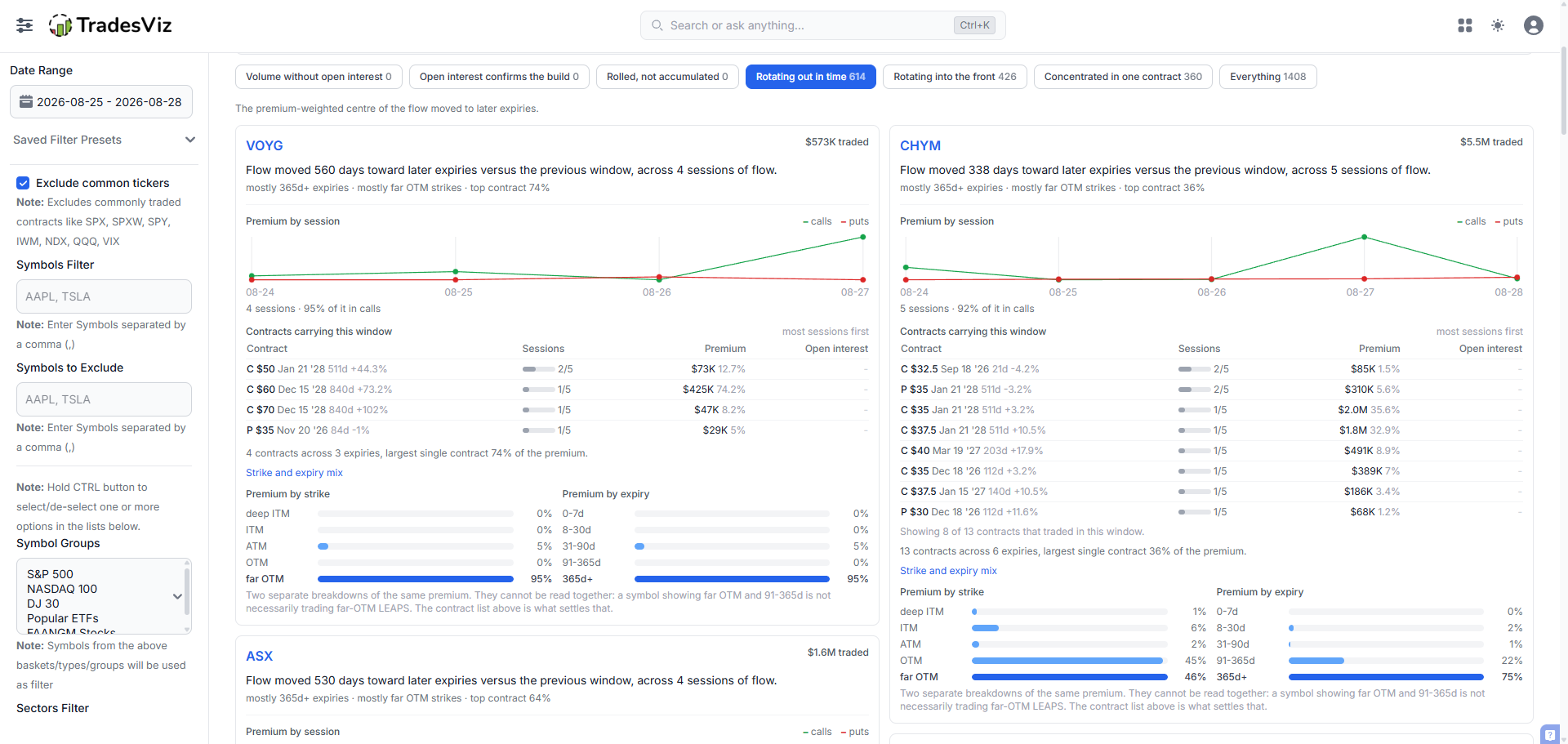
The expiry-rotation presets show whether the premium-weighted center of activity moved nearer or further out. Choose the behavior, open a symbol, then check the contracts and session counts that produced the shift.
NTNX moved 571 days nearer across five sessions in this example. Inspect whether several contracts contributed or one event drove the change.
VOYG moved 560 days later, with one contract carrying 74% of the premium. That concentration changes how you should read the aggregate.
05 / Make the research your own
Apply research filters across the dashboard and save combinations as presets. Narrow the market by symbol, group, sector, premium, quantity, strike, expiry, open interest, implied volatility, moneyness and execution type.
Go deeper with custom sweep and split definitions. Set execution duration, exchange count for sweeps, number of executions and whether to use the OPRA condition code.
Explore the complete filter walkthrough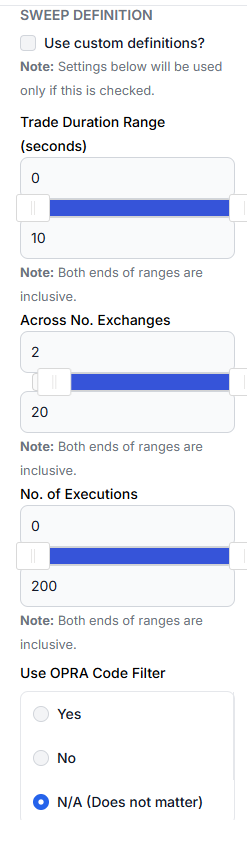
Start with your universe, narrow the activity and set the contract criteria. Saving that combination makes it easier to compare sessions using the same research rules.
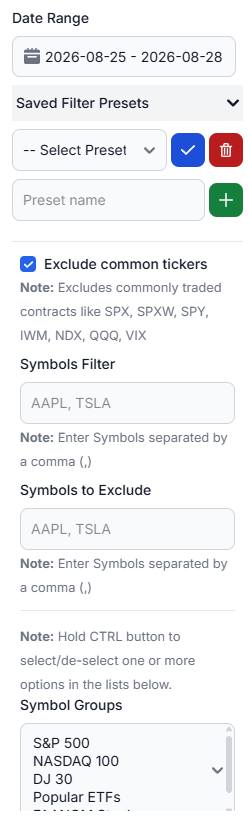
Set the dates, include or exclude symbols, select a symbol group and save the combination as a named preset.
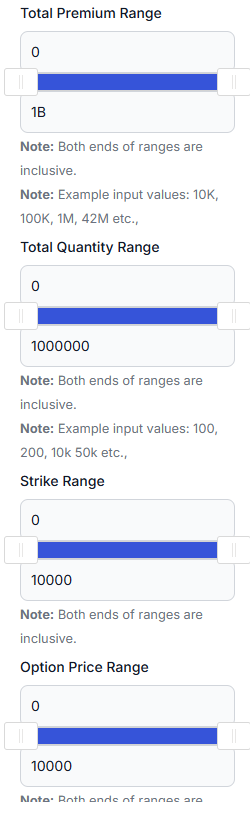
Filter premium and quantity separately. Add strike and option-price ranges to focus on the contracts relevant to your research.
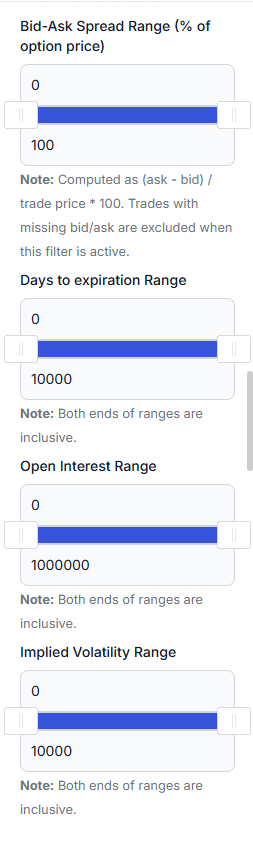
Narrow days to expiry, open interest, implied volatility and bid-ask spread. Review missing-data behavior when applying a filter.
Read faster. Keep the reasoning.
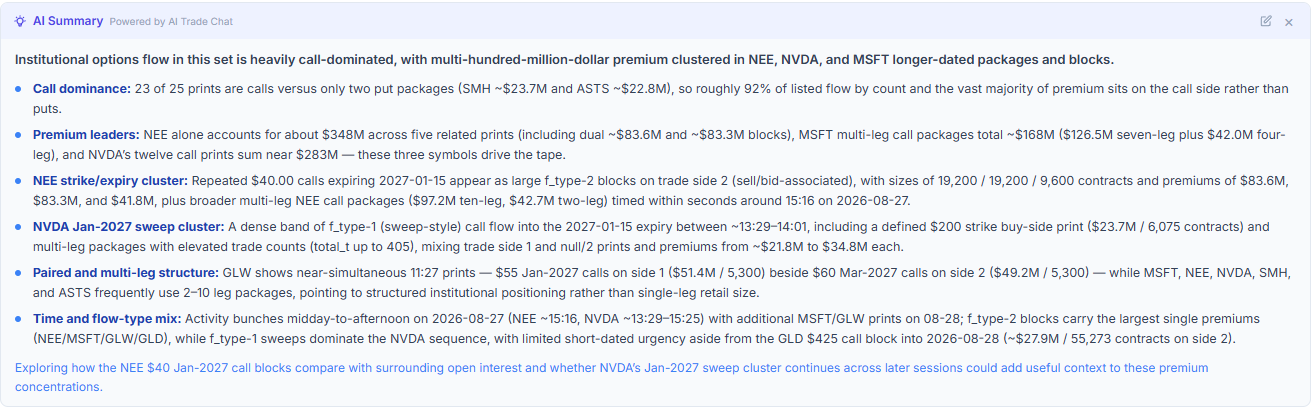
Every tab includes an AI Summary. On the flow table, it reads the visible rows with your filters applied, highlights premium leaders and contract clusters, and suggests what to investigate next. Use it to navigate the evidence and check the contracts yourself.
Why TradesViz / More questions answered
A feed is useful for finding prints. Research requires understanding the package, the baseline and the contracts—and having a way to review what you did with that information. Here is what you gain when those steps live together.
| Your research question | If your tool stops at individual prints | What TradesViz adds |
|---|---|---|
| Is this one trade or several legs? | A premium ranking can scatter related legs across the feed. | Grouped multi-leg packages with leg counts, gross/net premium and expandable contracts. |
| Is this actually unusual? | A fixed premium threshold favors frequently traded, high-turnover names. | A baseline for each symbol and Unusual Today rankings against its own 60-day normal. |
| Where is the activity concentrated? | Separate rows make strike, expiry and market concentration harder to see. | Contract maps, heatmaps and treemaps that reveal distribution and relationships. |
| Was this repeated across sessions? | Individual alerts do not show how the whole window was distributed. | Footprint and contract ladders with session counts, rotation and lumpy-event context. |
| What remained open? | Traded volume alone cannot answer a question about outstanding contracts. | Open-interest positioning and supported Footprint verdicts, with snapshot and window context. |
| Can I inspect the classification? | A fixed sweep/split label limits how you define your research universe. | Configurable execution criteria for duration, exchanges, execution count and OPRA-code handling. |
| Did this research improve my decisions? | The feed ends with the market data; your own trading results live elsewhere. | Trade plans, tags and journal analytics to review the outcomes of your flow-related trades. |
TradesViz options flow is available the following morning. Its strength is the depth of the research and the connection to your journal. If your workflow requires live options execution alerts, account for that timing when choosing your tools.
From research to review
Keep your research, trade plans and performance analysis in the same platform. Build a review process around the decisions you actually made.
Use a trade plan to record the structure you observed, your reasoning and what would invalidate the idea.
Add a tag such as flow:unusual or flow:sweep-cluster so you can find those decisions later.
Filter your journal by those tags to compare win rate and expectancy, then refine your process using your own trades.
A clearer starting point
Learn the data, understand the limitations, and build a repeatable research workflow.
Read the full guideOptions flow organizes options trades reported through OPRA by contract, premium, execution type and likely aggressor side. TradesViz connects that tape to market context, symbol history and contract-level research. The public tape does not identify the account behind a trade or its purpose.
TradesViz options flow is daily research data. Each completed session is available the following morning. Use it to review the market, investigate historical activity and prepare your next trading session.
Grouping brings related legs into a package so you can inspect the leg count, strike and expiry range, gross premium and signed net premium together. Expand the row to inspect its legs. Net premium is the package cash debit or credit; it does not by itself establish maximum risk or direction.
Start with Unusual Today in the Market tab, which ranks symbols against their own 60-day normal. Then check net versus gross premium, contract concentration and the underlying legs. The Footprint tab adds multi-session research into expiry rotation, repeated activity and open-interest support where available.
No. Cumulative premium records turnover over time. The same contracts can trade repeatedly without increasing outstanding positions. A next-day rise in open interest shows that net new contracts remained open in that series, but does not identify who holds them or prove that a particular print opened a position.
Strike and expiry heatmaps show where volume and premium traded. The positioning map adds outstanding contracts from the displayed open-interest snapshot, organized by strike and selected expiry. Compare the traded activity with the existing book, then inspect the individual contracts and grouped packages before forming an interpretation.
TradesViz adds grouped order structure, each symbol's historical baseline, contract maps, heatmaps, positioning, signal history and multi-session Footprint research. Shared filters and AI summaries help investigate the data. Trade plans, tags and journal analytics then let you review the results of the trades you took for flow-related reasons.
You can filter by dates, symbols, groups, sectors, premium, quantity, strike, expiry, open interest, implied volatility, moneyness and execution type, then save presets. Custom sweep and split definitions let you adjust execution criteria. On the flow table, AI Summary describes the visible rows with your filters applied.
The Options Flow Screener is being rebuilt separately. The current walkthrough covers the flow table, Market, Symbol Summary, Footprint, shared filters and AI summaries. Use Market and Footprint to discover names and investigate their contracts.
Options flow is included in TradesViz Platinum. Start a free trial to explore it alongside your journal. Record a hypothesis in a trade plan, tag trades taken for flow-related reasons, then filter your journal by those tags to review win rate and expectancy.
Use Python, scripts or your own applications to read and search your TradesViz accounts, trades and executions, build custom reports, and manage notes and tags. With the required permissions, you can import supported executions, edit journal entries, update trade risk settings, split or merge trades, and delete selected journal data. Execution imports currently support eligible USD US stocks and fixed-multiplier USD futures, not every asset supported by the website.
Yes. Connect a compatible ChatGPT, Claude or other MCP client to the hosted TradesViz MCP server using browser sign-in; no local MCP server or REST API key is needed. Ask your assistant to summarize recent trades, compare results from retrieved trades, find trades by symbol or tag, or save a review note. Editing and other journal changes require the matching permissions. Connector availability depends on your AI client and workspace settings.
You select the trading accounts and permissions each API key or MCP connection can use. Start with read access and grant editing or deletion separately when needed. Day notes, day tags and general journal notes require a separate opt-in. You can revoke access from the API/MCP dashboard. These tools manage your journal; they cannot place, change or cancel broker orders. AI responses can contain mistakes, so review proposed changes before approving them.
API & MCP overview · REST API documentation · MCP connection guide · API/MCP dashboard
At TradesViz we focus on value and utility provided to traders. That's why we're still #1 when it comes to the value and features offered on an online trading journal.
For beginner traders to get started with journaling.
All asset type import + 100s of charts & powerful grid features.
All-in-one journaling, simulation and advanced analysis platform.



TradesViz is the most useful trading journal on the market for finding and quantifying your edge. An all in one trading journal tool for traders.

Trader, Author, and founder of NewTraderU.com
PK and the whole team at TradesViz.com have put together an outstanding product with exceptional features. PK provides the most excellent support in the chat help. And if something really isn't working quite right or as expected, they get busy to make it better. I originally signed up for TradesViz to have the simulator function which also gave me the statistical analysis I could use to improve my trading. I had been using a simulator which had almost no analysis. When TradesViz added the simulator function I gave it a try. At first I had a hard time making it work, but with patient explanation from PK and with some tweaking on functionality from the coders on the backend, they have delivered a super trading simulator. The trade analysis part of TradesViz is second to none. I've gained the insight into my trading weaknesses and strengths to be able to trade much better in my live account. This is the service you need!
I definitely recommend Tradesviz especially for new traders the way it tracks your stats is no short of amazing especially for me personally by best exit and and of the stats that tell you how long you usually are in drawdown and you are usually in profit. If you want to build confidence in your strategy and edge this journal is the way to go for sure!
TradesViz has made a huge difference in my trading and has positively impacted my trading for the better in psychology and profit.
I use it DAILY and have noticed the vast improvements being made, not only in profit but also in my mental approach to trading.
This is a must-have tool and is more important than any indicator you could ever use.
I've subscribed, at different times, to various reporting programs, and trialed several others.
Yours is night and day over them all. I particularly appreciate the degree of available customization and your quick, ever-patient response to support requests.
I have a small trading account. Thank you for offering such a sophisticated program at an affordable price.
TradesViz is a true leader in Trade Journaling Software. They offer extensive statistical data at an amazing price that almost seems too good to be true. You have access to an amazing support team that seems to be active at all hours of the day. My support agent helped me through a complex import issue and had it solved within 24 hours. I can't tell you how blown away I am with their software and their service. I'm more than happy with my experience and so excited to see what new features they bring to the table as they continue to grow their business. If you're on the fence, I encourage you to jump right over and take it for a spin with their risk-free trial. Thanks to all the TradesViz team members who continue to make my Trade Journaling efficient and effective.
Day Trader
GREAT PRODUCT AND EVEN BETTER CUSTOMER SUPPORT!
I have been using TradesViz for a few months and it is a fantastic tool. Prior to subscribing, I was spending hours on xls trying different tables and layouts and only getting frustrated (or overcomplicating things!). Now I have everything in one place (I have multiple trading accounts), and I have probably only explored 10% of the tools and data analytics!
BUT, what has really impressed me is the support: I have NEVER in the last 10 years had such instant, professional support from a company at (almost) anytime of the day or night!
Clearly this is a team that is passionate about their product and that will always translates into innovation and better experience & value to the customer.
Well done to the team!!
After only a short time of using TradesViz, I can confirm that this platform is exactly what I have been looking for. It takes the chore out of journaling – the number of stats, data, and information available on my trades is a complete game-changer. The importing process via MT4 file is extremely easy and the automated charts with entries are amazing. The whole process is extremely easy and helps to keep me accountable for my trading by having a professional system to manage my business. The platform is very comprehensive and takes a bit of time to get used to, but they have many videos on their YouTube to help with this as well as their support team.
Their support is exemplary and gets back to all my queries in well under 30 minutes with comprehensive answers and solutions to my questions.
This platform is absolutely essential for any trader and I would highly recommend it to any of my trader friends looking for a journal. If you don’t have this platform, you are seriously missing a trick here…
Thanks, PK from TradesViz for being extremely helpful and patient in resolving my syncing issue. Certainly one of the best online support I have ever experienced. Even though it took a while for me to get my settings right, I never felt rushed...I appreciate that. Hope to stay with you guys for a long time. Certainly would like to learn how to utilize most of the features on TradeViz.
In my opinion, the TradesViz platform is truly the Ferrari of journaling software available today. Once you are under the hood, you begin to realize that in fact what sets it so far apart is all the advanced analysis at your fingertips. Such as the ability to combine multiple portfolios, live charting, and much more. Their support is world-class, in my case personally, I needed integration with Trend Spider’s backtesting engine. What I imagined might take weeks was literally accomplished overnight. Factor in rock bottom prices and you have all you need for whatever you're searching for. Newer traders will find that one of the most basic recipes for success is meticulous record keeping, simply observing your account profit and loss go up, or just down as the case may be, is the first step on the road to ruin if your serious about trading.
Trader
I'm writing this testimonial as appreciation for this surprisingly pleasant
conversation.
Upon my initial support request, TradesViz's support was impressively swift. A response appeared every single time as soon as I closed my email tab. Not only did I receive incredibly helpful information about features I wasn't aware of, but the team was also genuinely enthusiastic about discussing my feature requests and ideas about the industry. Truly awesome people!
In terms of raw analytics, comparison, and filtering capabilities, there is no match for TradesViz. I also don't know of any other trading journals that offer so much for the price, their free version has pretty much everything you would need if you trade stocks and offer so many of the paid features that are on other websites for free. They have templates for almost every broker and if it's not there, their support team is only 1 email or message away and will work with you to include your broker on their platform. By far the best support I have gotten from any trading journal as they are open to feedback and feature requests and are very active on their chat for any questions. A trading journal built by traders, for traders.
Professional Futures Day Trader
I wish I had TradesViz when I started to trade ten years ago. I had to learn the hard way. It provides everything you need to maximize your wins and minimize your losses.
There’s a learning curve but once you get past that your trading will surely be taken to the next level.
Founder of ChartLearning.com
As a full-time trader, the first pivot point in my trading results came after I started to learn from Mark Minervini - this is when I stopped losing $$$. The second pivot point came after I started to analyze my results - this is when I started to be consistently profitable $$$.
I love that TradesViz works for Options, Stocks, Crypto! It has automated and manual uploads. It has all the important metrics and analysis that you will need and it is fully customizable.
I have tried pretty much most of the products out there, and TradesViz wins by a mile - highly recommend it! Thanks to PK and the team!
Thanks, @MightySoldiers for turning me on to @tradesviz. I'm loving the customized dashboard. The level of detail and ability to really dig deep on metrics is unparalleled. This tool has helped me so much in defining my trading strategy and where my edge is.
Trader
I was looking for a solution to journal my trades on multiple platforms to keep track of my PNL. I stumbled upon TradesViz and I have nothing but positive to say about their service. Not only does their product make it so easy to see how you are doing on your trades with the various graphs and filtering options, getting your account synced is super intuitive. Best of all their customer service is top-notch. Every time I have asked a question, they have responded within a few hours with a solution, and sometimes that involved programming custom solutions for me to make my life easier. It's a no-brainer for me to pay for the yearly service. Do it, you won't regret it.
E-commerce Analyst and Trader