The free trading journal that does not stop at a PnL number
The same engine 200,000+ traders use on 100M+ journaled trades. On the free plan you get 3,000 executions a month, automatic broker sync, 80+ performance charts, unlimited tags and notes and a daily PnL calendar. Without a credit card.
- 200,000+
- Traders
- 100M+
- Trades journaled
- 80+
- Charts, on the free plan
- US$0
- Forever, no card
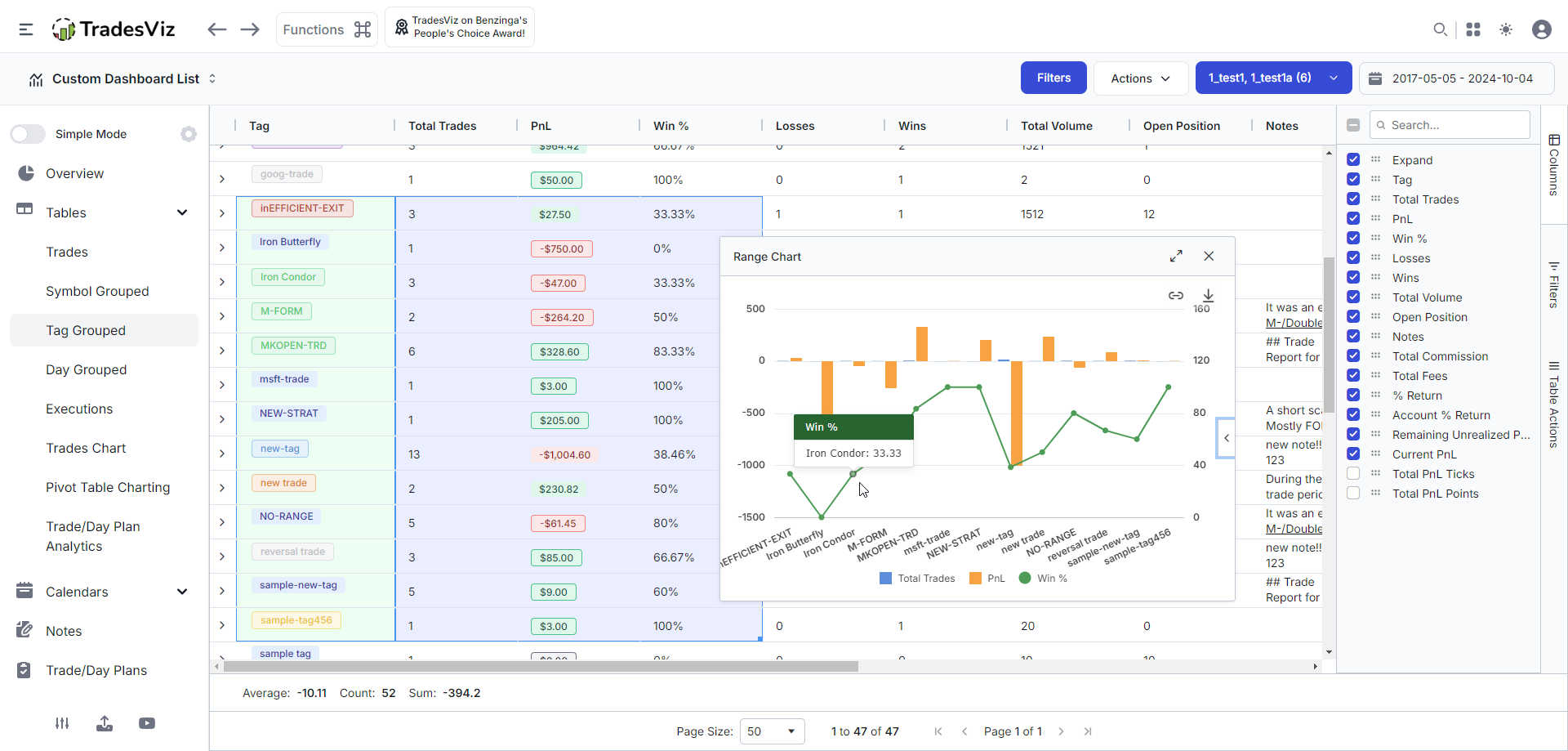




Everything in the free plan
Not a demo, not a sandbox, not a seven day countdown. This is the working journal, and it stays yours.
3,000 executions a month
Counted as individual broker fills, so scaling in and out is counted honestly. For most stock traders that is several hundred round trips a month.
See plan limits80+ performance charts
Profit and loss, win rate, volume, trade count, symbols, tags and sectors, plus every date-based breakdown. Most free journals ship a handful of summary tiles.
See the charts viewDaily PnL calendar
Month, week and year views with per-day profit, trade count, win and loss counts, so consistency is visible at a glance instead of buried in a table.
Explore the PnL calendarUnlimited tags
Tag setups, mistakes, emotions or anything else. Tags are not decoration here: they drive their own charts and a grouped table, so you can see what a tag actually costs you.
Read the tagging guideUnlimited notes
Rich notes on every trade and every day, with formatting and images. Write the thesis before the trade and the post mortem after it, in the same place as the data.
Read the notes guideBroker file import
Prefer files? Upload a trade history export and TradesViz reconstructs raw fills into real trades across 250+ broker formats.
See 250+ supported formatsCharts on every trade
Candlestick charts with your entries and exits plotted on them, two per trade with two indicators each, generated automatically at import.
How trade charts are generatedGrouped trades tables
See the same trades grouped by symbol, by tag, by day or as raw executions, each with its own PnL, win rate and volume totals.
Read the grid guideSymbol and sector breakdowns
Find out which tickers and which sectors actually carry your account, and which ones you keep trading out of habit.
Browse the chart referenceDay and trade views
Drill from a calendar day into the trades that made it, then into a single trade with its executions, charts, tags and notes on one screen.
Explore a trading dayAutomatic broker sync
Connect your broker once and new fills arrive on their own. Not a paid add-on here, and not a manual CSV chore either. Competing free plans charge for this.
How auto-sync worksUnrealized PnL tracking
Open positions are valued too, so the account number you are looking at is the real one rather than realized-only.
See the trade explore viewDeposits and withdrawals
Log cash in and cash out so your equity curve reflects the account rather than just the trading.
Track deposits and withdrawalsSymbol research and fundamentals
A research dashboard and stock fundamental analysis on every ticker, alongside the journal instead of in another tab.
See fundamental dataNo credit card, ever
Sign up with an email address. Nothing expires, nothing locks, and nobody asks for card details unless you decide to upgrade.
Compare every planA free trading simulator
The Daily Drill: every day, one real futures, stock or forex session with the date hidden. Replay it, trade it with market, limit, stop and bracket orders, then see which day it was.
Play today's drillYour data stays yours
Stop using the free plan and your trades are still there when you come back. No hostage-taking, no export fee, no read-only downgrade wall.
Import and export guideIncluded free
Tags that do real work
Tag a setup, a mistake or a mood, then rank every tag you use by PnL, win rate or trade count. Your best and worst tags surface on their own, so you find out what a habit is actually costing you.
- Every tag ranked by PnL, win rate or trade count
- Best tag, worst tag and best win rate surfaced for you
- Minimum-trades filter so small samples do not skew it
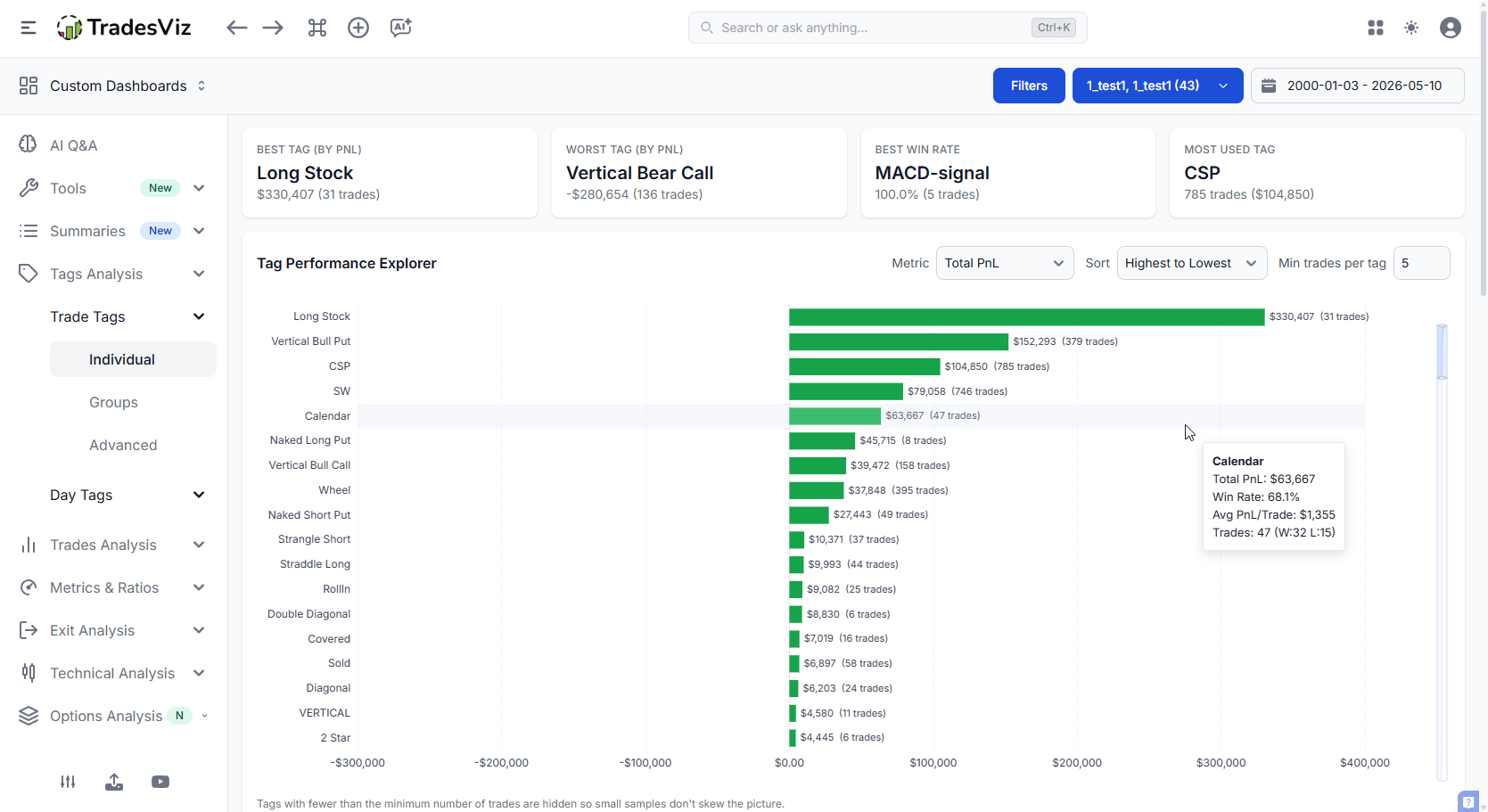
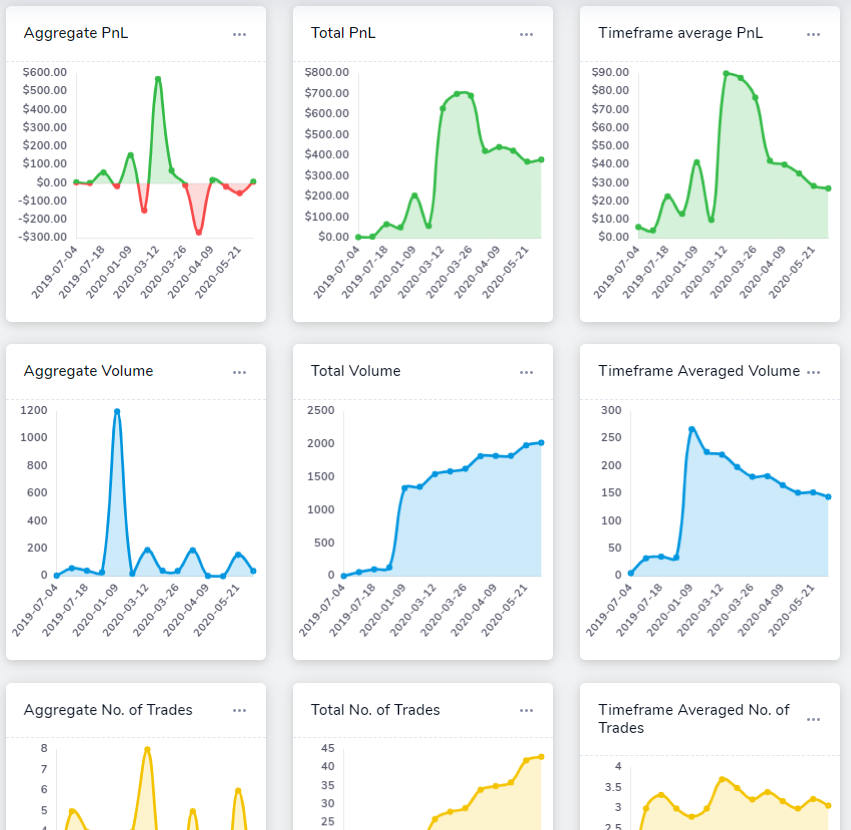
Win-rate charts with the free chart families in the sidebar. The insights panel on the right is a Pro feature.
Included free
80+ charts, not 8 stat tiles
The free plan includes the trade analysis and date chart families in full. That is where an edge actually shows up: not in one equity curve, but in the same performance sliced eight different ways.
Included free
A PnL calendar you can actually read a month from
Every day shows profit, trade count, wins, losses and volume, with month, week and year views. Click any day to open the trades behind it.
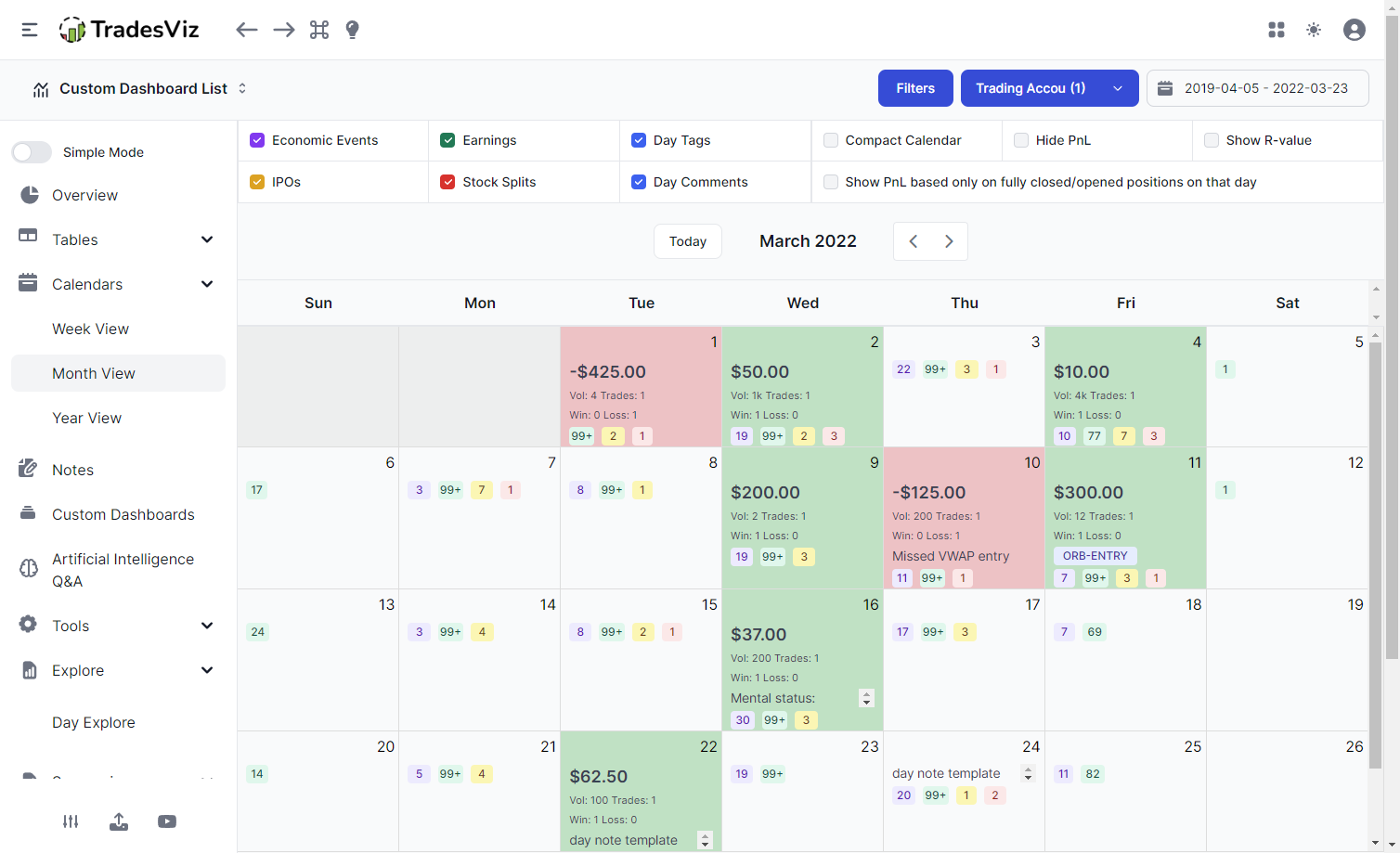
Shown with optional overlays. Daily PnL, trade counts and day notes are on the free plan; the earnings, IPO and split overlays come with Pro.
Included free
Import your history, do not retype it
Export a trade history file from your broker and upload it. TradesViz knows 250+ broker and platform formats, and rebuilds raw fills into complete trades with entries, exits, fees and PnL.
See supported brokers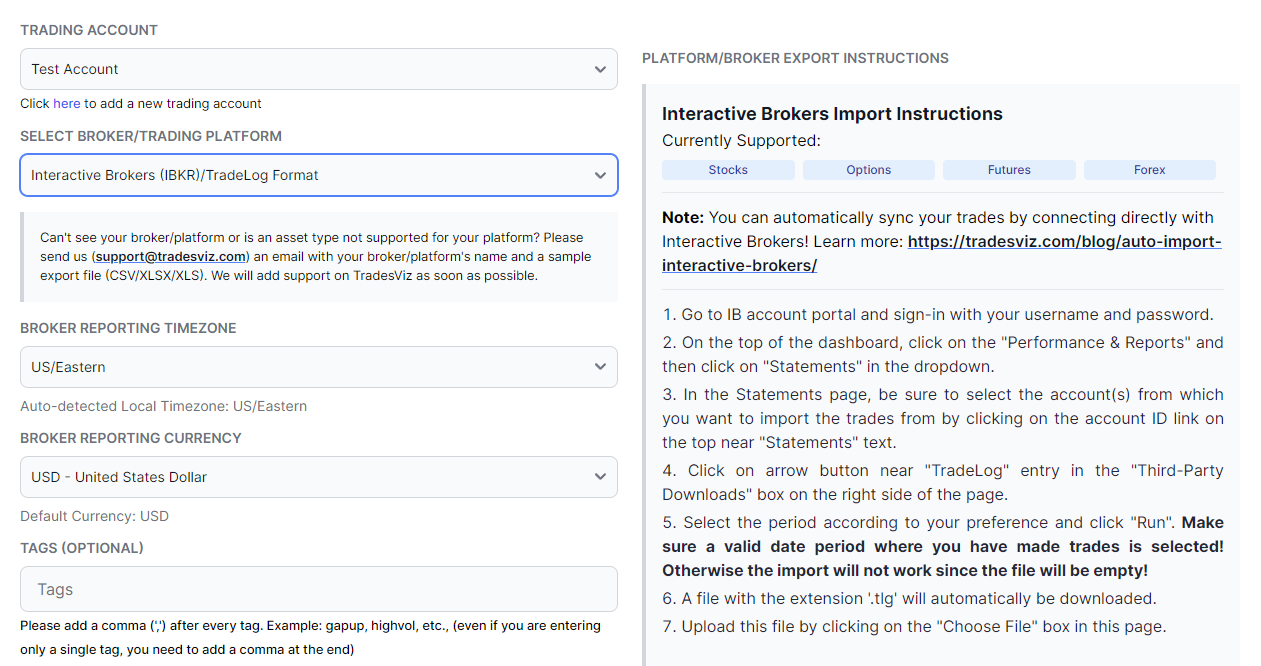
The free plan, in numbers
Plain specs, so you know exactly what you are signing up for.
| Price | US$0, forever |
|---|---|
| Credit card | Not required |
| Executions per month | 3,000 |
| Markets | Stocks |
| Trading accounts | 1 |
| Performance charts | 80+ |
| Charts per trade | 2 candlestick, 2 indicators each |
| Calendar | Daily PnL, month / week / year |
| Tags and notes | Unlimited |
| Automatic broker sync | Included |
| Broker file import | Included, 250+ formats |
| Expires | Never |
And when you outgrow it
Pro unlocks every asset type, unlimited executions and the AI Coach. Platinum adds the simulators, trade replay, TradingView charts, exit analysis, options flow and the real-time screener.
Basic
Free foreverUS$0
No credit card
Everything on this page: 3,000 executions a month, auto broker sync, 80+ charts, unlimited tags and notes, PnL calendar and a free trading simulator (the Daily Drill).
Start freePro
7-day trialUS$14.99
Per month, billed annually
Unlimited executions, every asset type, 10 accounts, AI Coach, custom dashboards, the full 600+ stats, and REST API + hosted MCP access.
See all plansPlatinum
Best valueUS$22.49
Per month, billed annually
Everything in Pro, including REST API + hosted MCP access, plus the simulators, trade replay, TradingView charts, exit analysis, options flow and the real-time screener.
See all plansThe part nobody advertises
A free trading journal still costs somebody something
A journal is not a static website. Brokers change their export formats and their APIs without telling anyone. Tickers split, merge and get delisted. Futures contracts roll. Exchanges move their session hours. Every one of those quietly breaks an import, and somebody has to fix it before you notice your PnL is wrong.
When a journal is free because nobody is funding that work, you are the one paying. In broken imports, in numbers you cannot trust, and eventually in an abandoned product with your trading history locked inside it.
1,100+
Import fixes in 12 months
Changes to broker import code alone, in the past year. That is what keeping 250+ formats working actually costs.
2,900+
Product changes in 12 months
Across the whole platform. Not a launch, a landing page, and then silence.
70+
Live broker connections
Each one an API that can change under us, and regularly does. Maintained for the free plan too.
100M+
Trades already journaled
A platform 200,000+ traders have handed their history to, still here and still shipping.
Market data is not free either
Every candlestick on your trades, every symbol lookup, every fundamentals panel is licensed data. A journal that plots real charts is paying for them whether or not it charges you.
Analysis is not a stat tile
Counting wins and losses is an afternoon of work. Reconstructing partial fills into real trades, handling splits, assignments and expiries, and getting the numbers right across every asset class is the actual product.
Someone has to answer you
When an import looks wrong, the difference between a journal and a dead app is whether a human reads your message. Support covers the free plan.
TradesViz Basic is free because 200,000+ traders use it and some of them upgrade, and that pays for the work above. A free plan with something behind it is a different product from a free plan with nothing behind it.
Free trading journal FAQ
Are there any free trading journals?
Yes. The TradesViz Basic plan is free forever with no credit card required. It includes 3,000 stock executions a month, automatic broker sync, 80+ performance charts, a daily PnL calendar, unlimited tags and notes and candlestick charts on every trade.
Does the free plan sync with my broker?
Yes. Automatic broker sync is on the free plan, not held back for paid tiers. Connect your account once and new fills arrive on their own. You can also upload a broker trade history file instead, across 250+ supported broker and platform formats.
Is the TradesViz free plan a trial?
No. Basic is a permanent plan, not a countdown. It does not expire and it never asks for a card. There is a separate optional 7-day trial of the paid plans, but you never have to start it to keep journaling.
How many trades can I journal for free?
3,000 executions a month. Executions are individual broker fills, so a trade you scaled into over four fills and out of over three counts as seven. For most stock traders that is several hundred round-trip trades every month.
What can I analyze on the free trading journal?
80+ performance charts across profit and loss, win rate, volume, trade count, symbols, tags, sectors and every date-based breakdown, plus a daily PnL calendar and a grouped trades table. You can slice performance by symbol, by tag, by sector, by day of week and by time period.
Do I need a credit card for the free plan?
No. Signing up needs an email address only. A card is requested only if you later choose to subscribe to a paid plan.
How do I create my trading journal?
Create a free account, then import a trade history file from your broker or add trades by hand. TradesViz groups raw executions into trades automatically, so within a few minutes you have a populated journal with charts, a PnL calendar and performance breakdowns instead of an empty spreadsheet.
Can I tag and take notes on trades for free?
Yes. Tags and notes are part of the free plan, and both feed the analytics: tag a setup or a mistake and the tag charts show you what that tag costs or earns you across every trade carrying it.
What can I do with the TradesViz REST API?
Use Python, scripts or your own applications to read and search your TradesViz accounts, trades and executions, build custom reports, and manage notes and tags. With the required permissions, you can import supported executions, edit journal entries, update trade risk settings, split or merge trades, and delete selected journal data. Execution imports currently support eligible USD US stocks and fixed-multiplier USD futures, not every asset supported by the website.
Can I connect ChatGPT or Claude to my TradesViz journal using MCP?
Yes. Connect a compatible ChatGPT, Claude or other MCP client to the hosted TradesViz MCP server using browser sign-in; no local MCP server or REST API key is needed. Ask your assistant to summarize recent trades, compare results from retrieved trades, find trades by symbol or tag, or save a review note. Editing and other journal changes require the matching permissions. Connector availability depends on your AI client and workspace settings.
How do API and MCP permissions protect my trading journal?
You select the trading accounts and permissions each API key or MCP connection can use. Start with read access and grant editing or deletion separately when needed. Day notes, day tags and general journal notes require a separate opt-in. You can revoke access from the API/MCP dashboard. These tools manage your journal; they cannot place, change or cancel broker orders. AI responses can contain mistakes, so review proposed changes before approving them.
Start journaling for US$0
An email address is the whole sign-up. Join 200,000+ traders, import your stock history, and see 80+ charts of it in the next ten minutes.
Why the free plan is this good
A note from PK, Founder of TradesViz
A free trading journal that only shows you a PnL number is not a journal, it is a receipt. The point of journaling is finding the pattern you cannot see from inside the trade, and that needs charts, tags, notes and history in one place.
So the free plan gets the real analysis engine: 80+ charts, the grouped tables, the calendar, unlimited tags and notes, and automatic broker sync, which most competitors charge for. Traders who outgrow it upgrade because they want options and futures or the simulators, not because we crippled the free tier to force the decision.
- PK, Founder of TradesViz
What traders say
PK and the whole team at TradesViz.com have put together an outstanding product with exceptional features. PK provides the most excellent support in the chat help. And if something really isn't working quite right or as expected, they get busy to make it better. I …
TradesViz is the most useful trading journal on the market for finding and quantifying your edge. An all in one trading journal tool for traders.
TradesViz has made a huge difference in my trading and has positively impacted my trading for the better in psychology and profit. I use it DAILY and have noticed the vast improvements being made, not only in profit but also in my mental approach to …