JPM.USStocksDaily barsLong onlyOvernight allowed
JPM: Rate-of-change zero cross, daily (profile 2) - training
2022-10-10 to 2025-10-09
Promising
- Net P&L
- 5,395.40
- Return
- 21.58%
- Trades
- 42
- Win rate
- 50.0%
By pk78View test
Backtester v2 tests rule-based strategies on stocks, ETFs, futures, forex, crypto and indices with 80+ indicators and no coding. Realistic fills, a luck check on every run, and a robustness check that re-tests your rules on earlier periods and other symbols. It lives inside your trading journal, so a strategy you like can go straight into an account for review.
Reading public strategy tests is free and needs no account.
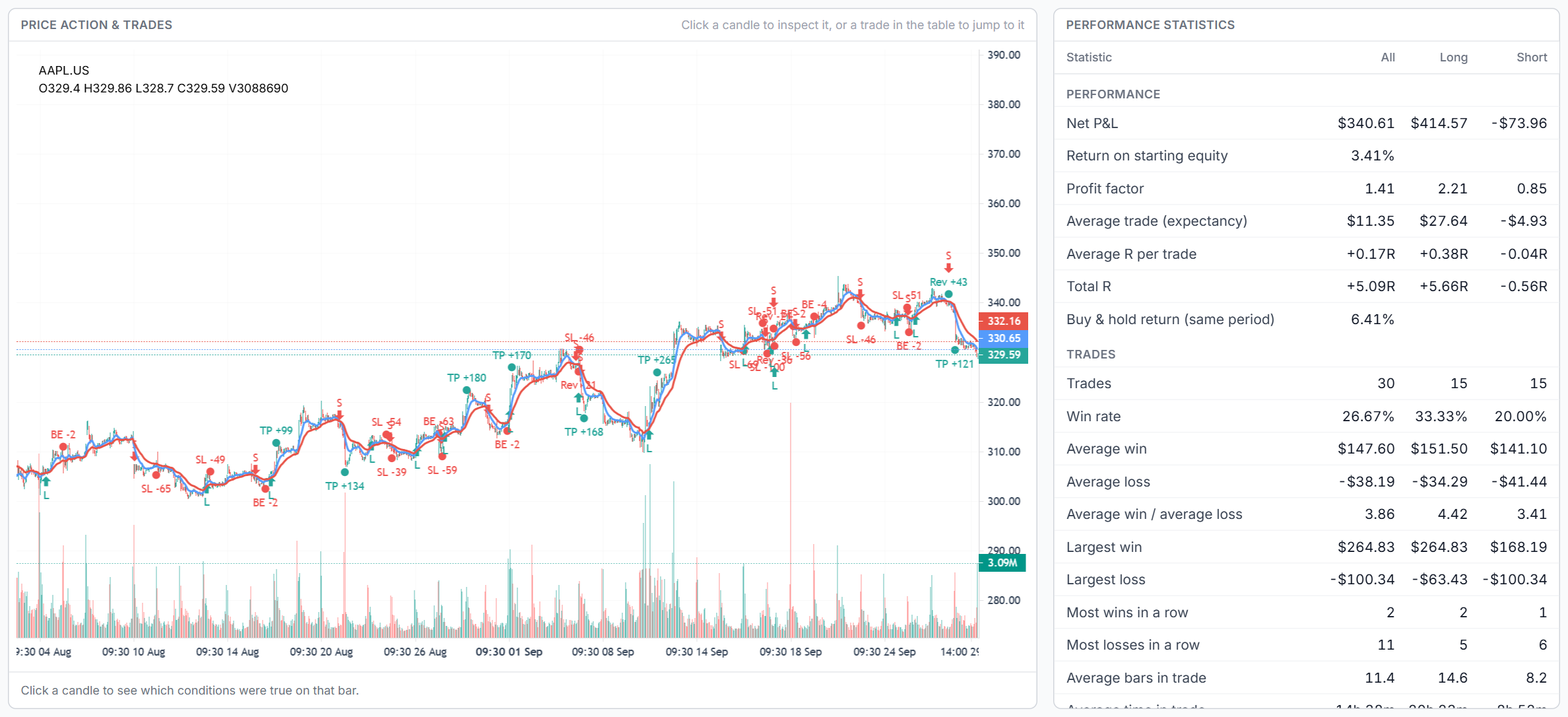
One page, read top to bottom in the order you build a test.
Step 1
Symbol, timeframe, date range, trading session and starting equity. Sessions use the exchange's own time zone.
Step 2
Type entry and exit conditions, start from a template, or describe the strategy and press Generate with AI.
Step 3
Stop, target, trailing stop, breakeven, sizing, fills, commission and slippage. A one-line readback shows exactly what will run.
Step 4
Check the verdict and the luck check, inspect any bar, run the robustness check, then share the run or copy it to your journal.
Conditions are short bracketed expressions such as [RSI(14) < 30] or a crossover of two moving averages, combined with AND and OR. No programming language to learn.
Generate with AI, powered by AI Trade Chat, turns a plain-English description into entry rules, follow-up steps, stops, targets and sizing. It lists the assumptions it made and compiles every condition before anything is applied, so you review a working draft instead of debugging one.
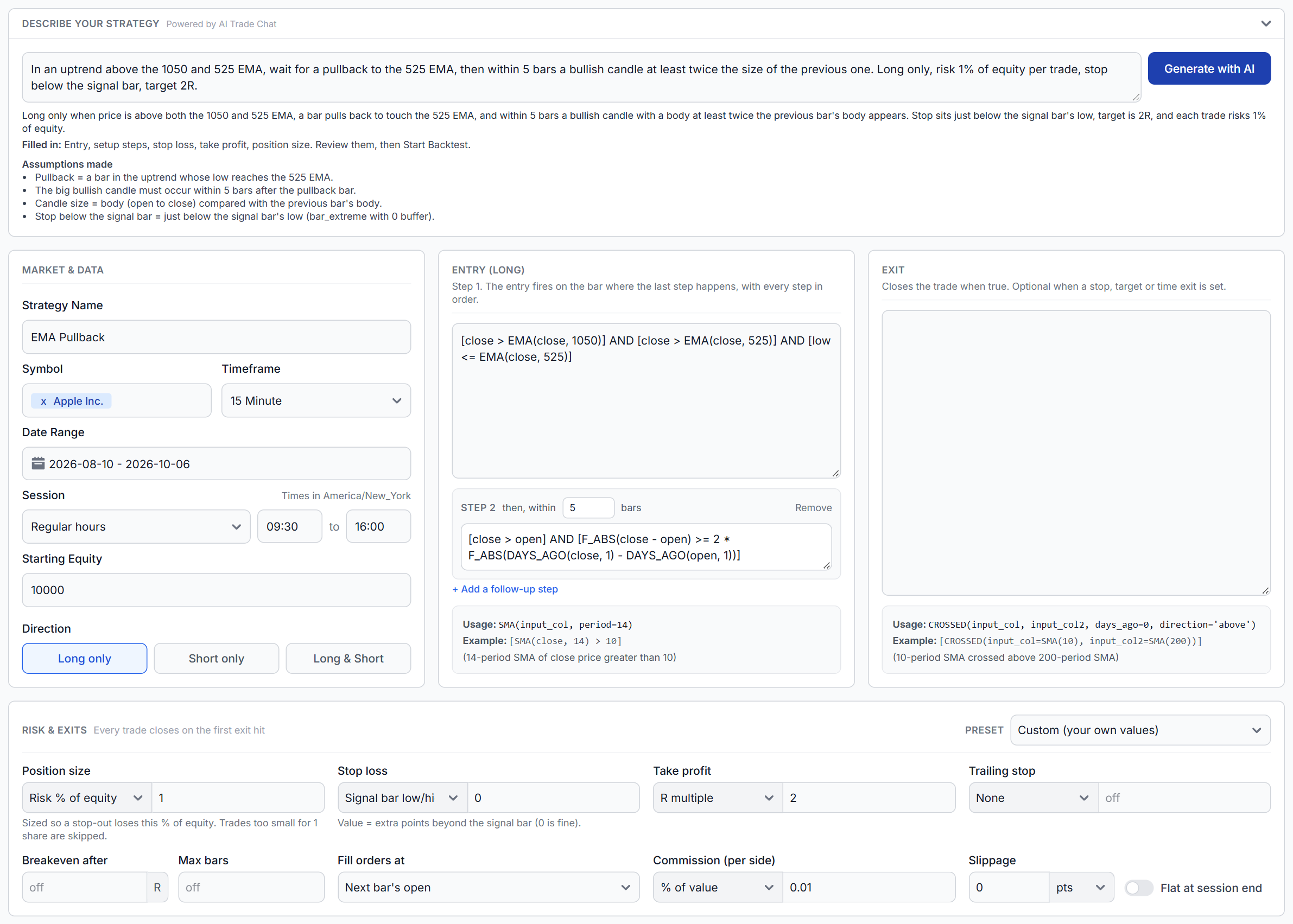
Every trade closes on the first exit hit. Start from a risk preset or set each field yourself.
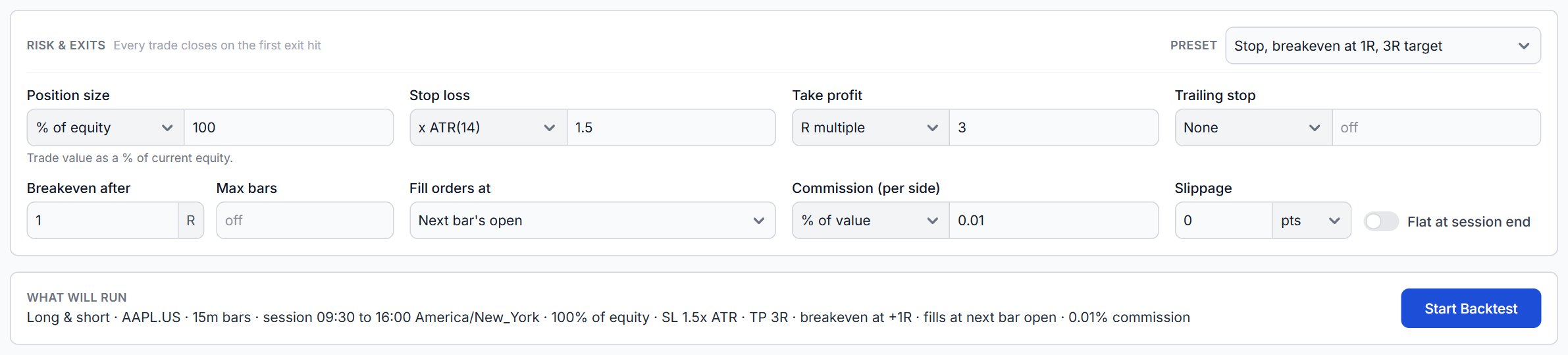
Stops in points, ticks, percent, ATR multiples or beyond the signal bar. Targets in R multiples. Trailing stops, breakeven after a set R, max bars in trade and flat at session end.
Fixed size, a percent of equity, or risk a percent or dollar amount per trade sized from the stop distance. Trades too small to size are skipped, never forced to one contract.
Commission as a percent of value or a fixed amount per share or contract, per side, plus slippage in points or ticks. The report warns you when both are zero.
Most backtests look better than live trading because of a handful of shortcuts. Backtester v2 handles each one.
Conditions are checked at a bar's close and orders fill at the next bar's open by default, so a rule never trades at a price it learned about afterwards.
A stop loss is a stop-market order. If the next bar opens beyond it, the trade exits at that open, and the report counts those trades and the worst R they cost.
Finer data decides which was hit first, for example 5-minute bars under a 15-minute test. If even that cannot tell, the stop is assumed first, never the target.
Stop, target and trailing levels are rounded to the instrument's tick, such as $0.01 for stocks or 0.25 points for E-mini futures.
Trailing and breakeven stops move only at a bar's close and apply from the next bar, so a bar's high can never move a stop its own low then hits.
P&L uses each contract's point value, so one NQ makes ten times one MNQ. Extra history loads before the start date so every indicator is ready on day one.
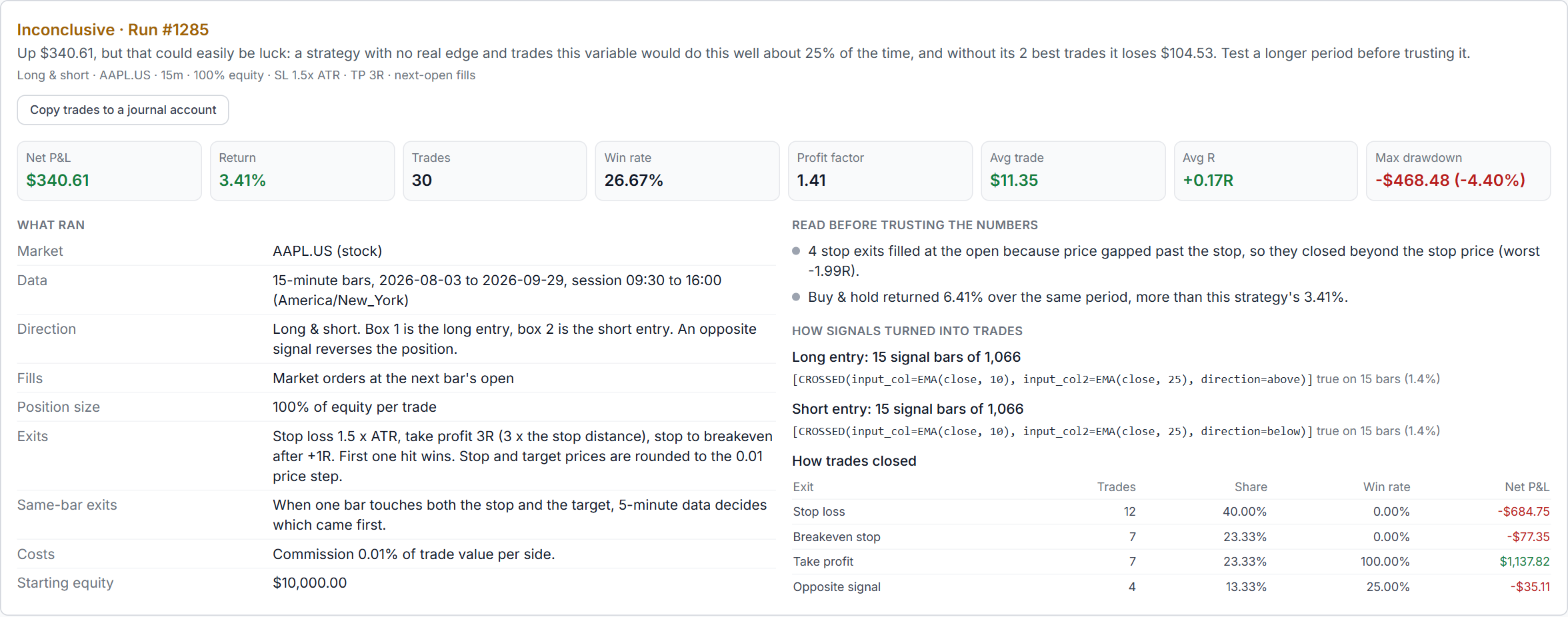
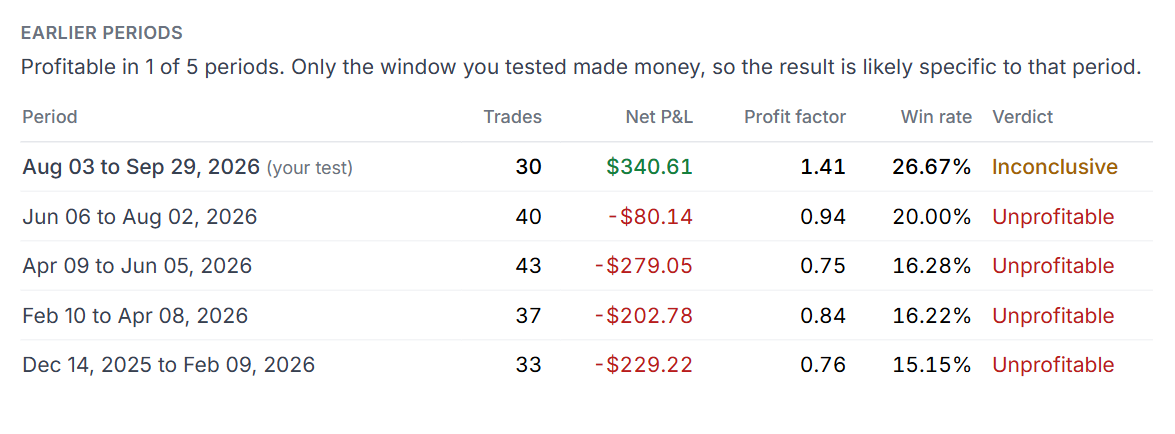
A profit factor of 1.41 over 30 trades looks like a working strategy. The run report may still call it Inconclusive, because a strategy with no edge and trades that variable would do as well about one time in four, and without its two best trades it loses money.
That luck check runs on every backtest. The report is written from your settings, not by AI: a readback of exactly what ran, warnings to read first, and how signals turned into trades and how trades closed.
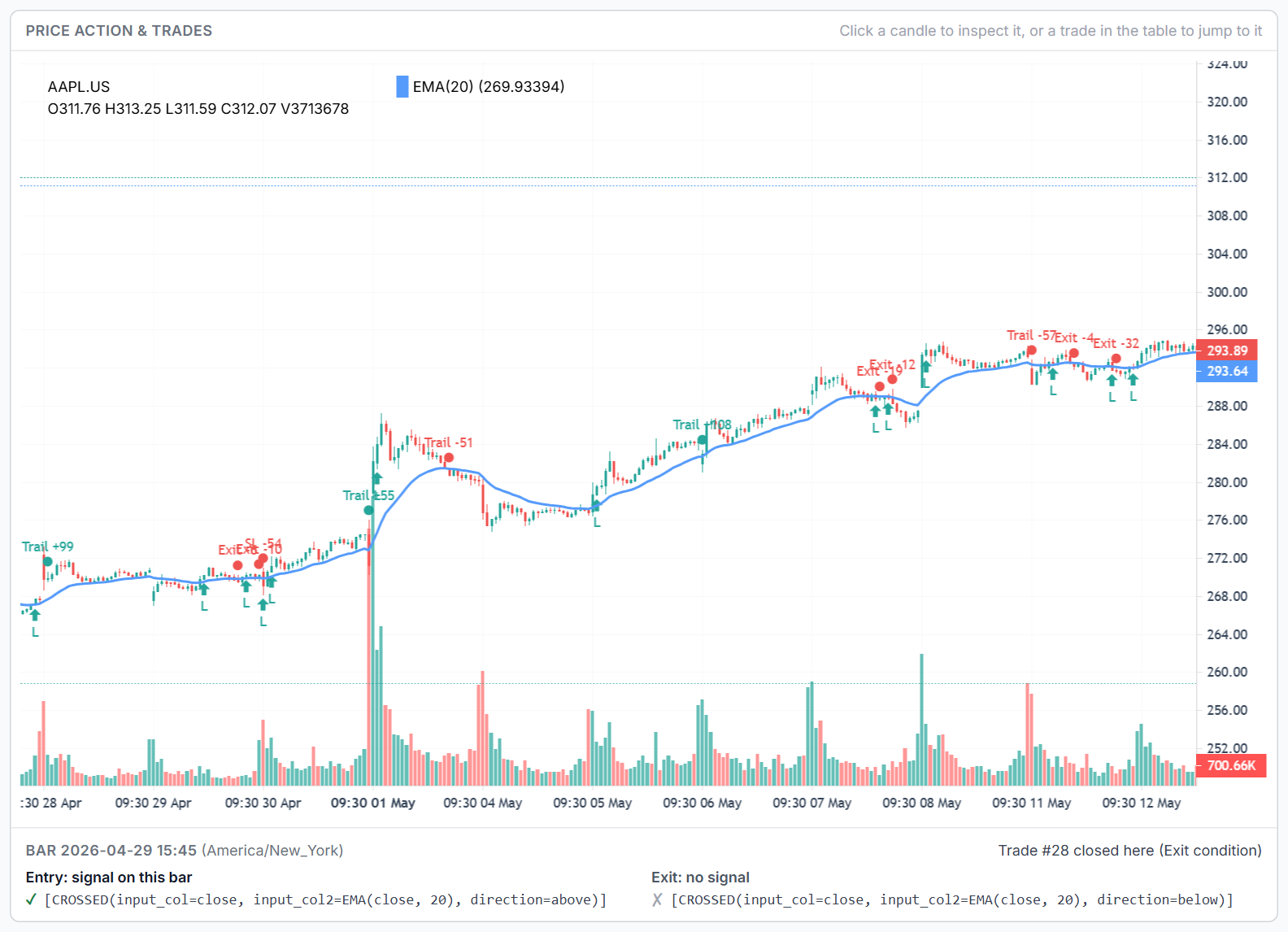
The bar inspector shows what the backtester saw on any bar: each condition true or false, whether each step of a multi-step setup completed there, whether a trade entered, and if a signal fired but was not taken, why.
The simulated trade list shows every entry and exit with its exit reason, gapped stops, R multiple, MAE and MFE, and each trade is marked on the price chart. Click a trade to jump to it.
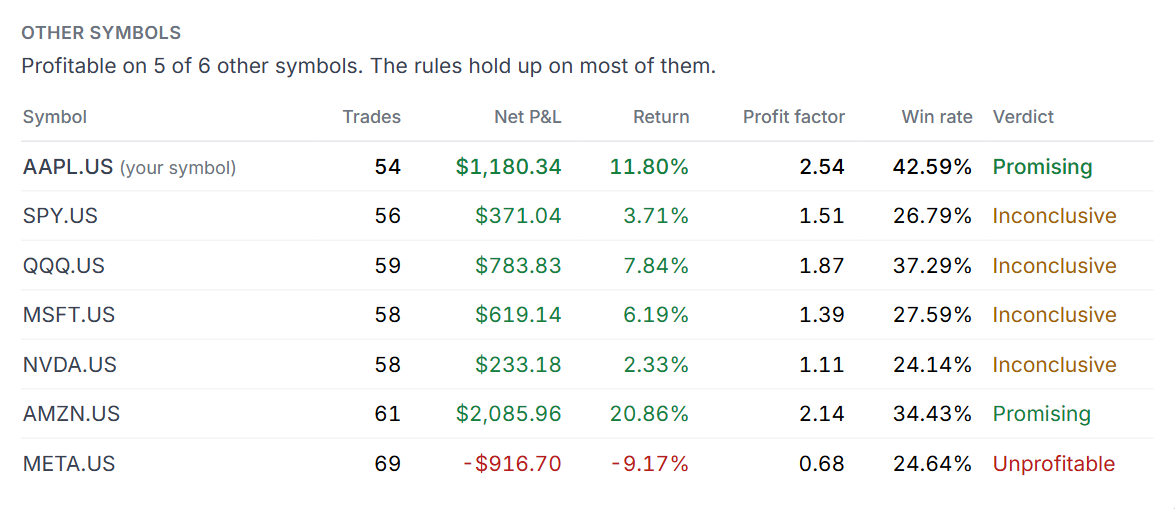
A backtest on one symbol over one window is a single sample. Tweak settings until that window looks good and you have fitted the noise. One button re-tests the same rules four ways and scores every setting across periods, so you do not just keep the luckiest one.
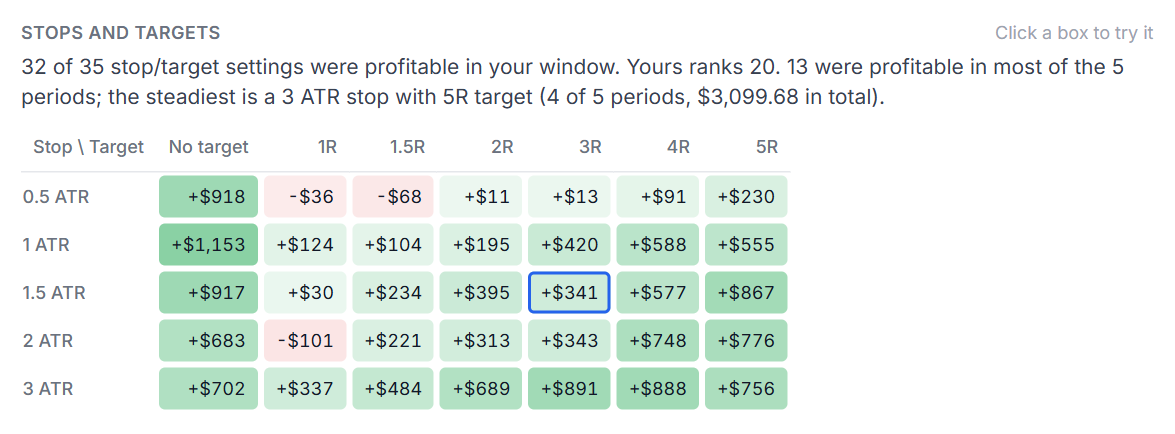
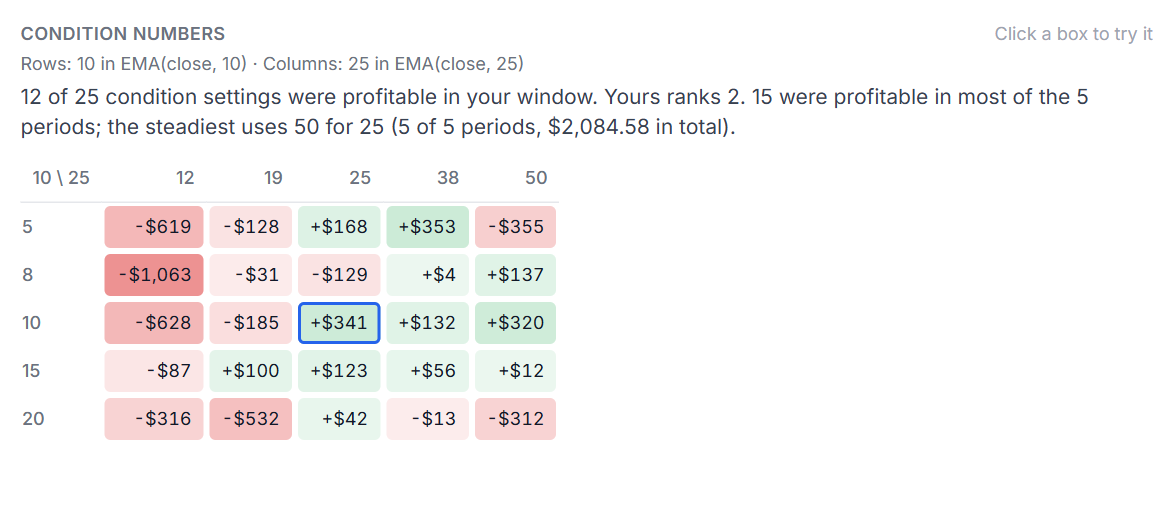
Pick the cells you want to try and they collect in a Changes to test list. Nothing in your strategy changes until you run the next backtest with them.
Turn a completed Backtester v2 run into a saved report. Share a link with another trader or publish it in the strategy test library, where anyone can read it without an account.
Reading is free. Running your own version requires signing in and Backtester plan access. Link-only reports stay out of the library. You can change included sections, replace the link or stop sharing at any time.
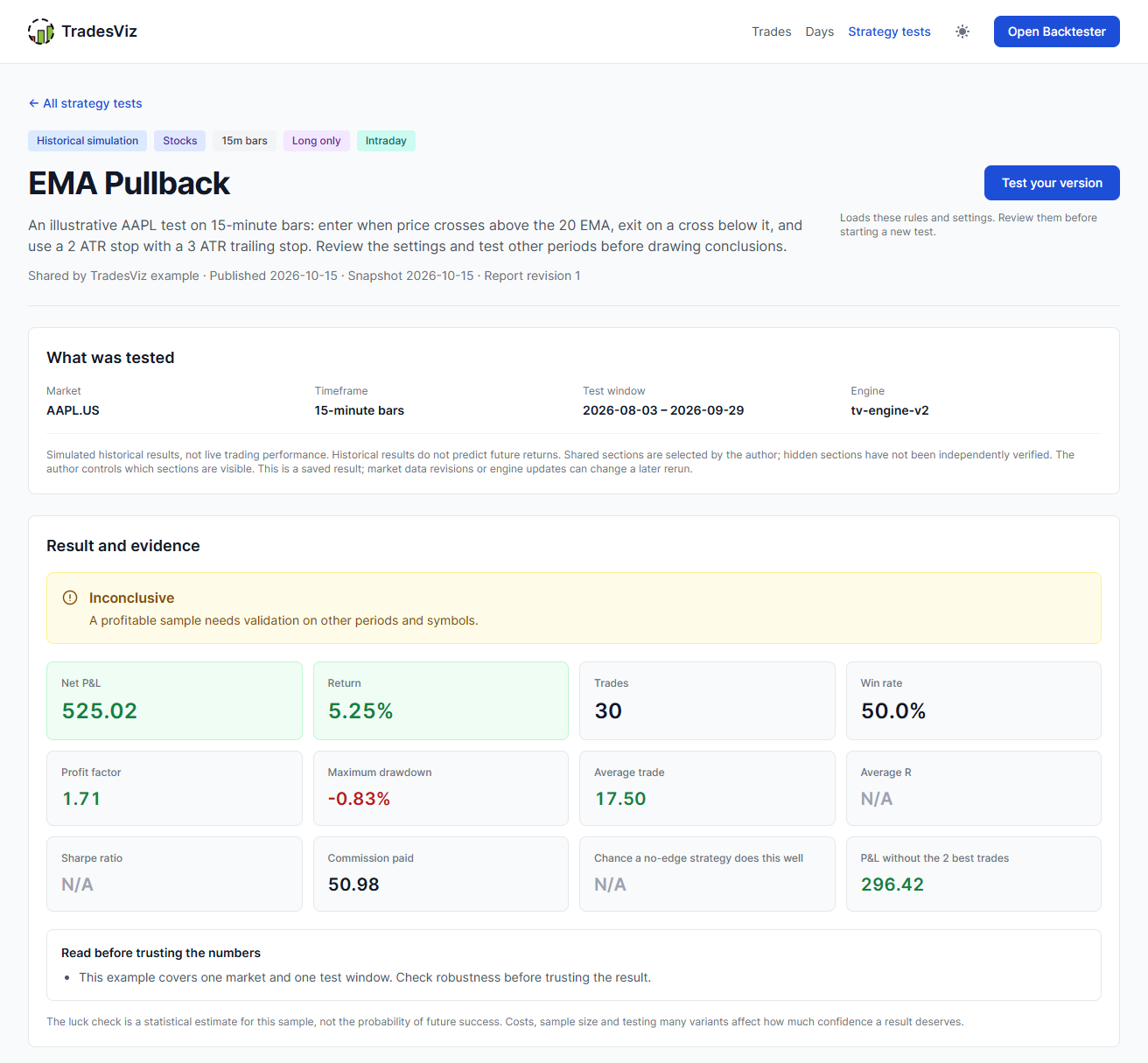
Shared by TradesViz traders. Read the rules, assumptions and results, then test your own version.
2022-10-10 to 2025-10-09
Promising
2026-07-20 to 2026-10-17
Too few trades
2025-10-12 to 2026-07-12
Inconclusive
Historical simulations, not live trading results. Past results do not predict future returns.
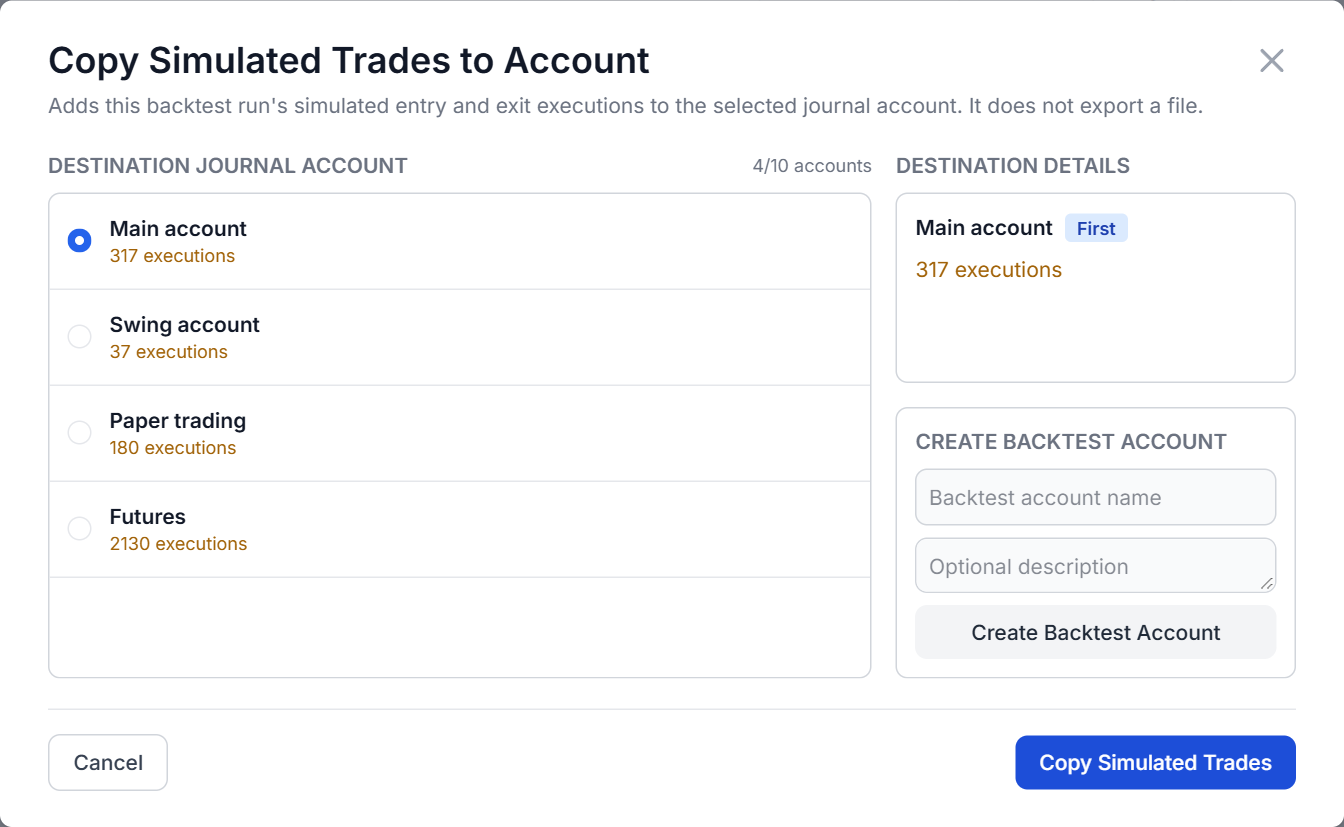
Copy a run's simulated trades into any journal account and review them with the same 600+ stats, MFE/MAE, time-of-day breakdowns and custom dashboards you use for live trades. Runs are saved with their notes and can be rerun on new data.
Then close the loop: practice the setup by hand in the trading simulator, and once it is live, rewatch your real fills with trade replay.
1-minute to daily bars, with sessions in the exchange's own time zone, including overnight futures sessions and daylight saving changes.
Backtesting software runs a fixed set of trading rules over historical price data and reports what would have happened: every simulated trade, the profit or loss after costs, the drawdown and the statistics behind it. TradesViz Backtester v2 does this for stocks, ETFs, futures, forex, crypto and indices, then checks whether the result could be luck and whether it holds up on other periods and symbols.
Yes. Conditions are short expressions such as [RSI(14) < 30] built from 80+ indicators and functions, five ready-made templates cover common strategies, and Generate with AI turns a plain-English description into entry rules, follow-up steps and risk settings. The AI draft is compiled and checked before it is applied, and a draft that fails to compile is never applied.
Stocks and ETFs, futures, forex, crypto and indices, on 1-minute to daily bars. Sessions are set in the exchange's own time zone, including overnight futures sessions and daylight saving changes, and futures P&L uses each contract's point value.
Conditions are evaluated at a bar's close and orders fill at the next bar's open by default, so a rule never trades at a price it could not have known. Stop losses are stop-market orders that fill at the open when price gaps through them. When one bar touches both the stop and the target, finer data decides which came first, and if it cannot, the stop is assumed hit first. Prices are rounded to the instrument's tick, trailing stops move only at bar closes, and commission and slippage apply to every fill.
Every run gets a verdict: Too few trades, Unprofitable, Inconclusive, Thin edge or Promising. The luck check behind it estimates how often a strategy with no real edge and the same spread of wins and losses would do as well, and re-checks the profit without the two best trades. A profitable run that a no-edge strategy would match 5% of the time or more is labelled Inconclusive.
The robustness check re-runs the same rules on up to four earlier periods of the same length and on up to eight other symbols, and builds grids of stop and target settings and of up to two numbers in your conditions. Settings are scored across periods, so you can see whether a result holds up or is one lucky window. Changes you pick from the grids are applied only when you run the next backtest.
Yes. Share a completed run by link or list it in the public strategy test library. You choose which sections readers see: rules, execution settings, performance, equity curve, simulated trades, robustness results, notes and your display name. Anyone can read a shared report without an account, and when you allow it, Test your version loads the rules into the reader's backtester for review without starting a run.
Yes. Copy a run's simulated trades into any journal account and review them with the same 600+ stats, charts and dashboards as your live trades. Runs are saved with their notes and can be rerun on new data.
Each backtest runs on one symbol and one timeframe. The robustness check then runs the same rules on up to eight other symbols. Conditions on a second timeframe are not supported yet.
Yes. Backtester v2 is part of the Platinum plan and is included in the free trial, along with the trading simulators and trade replay. Reading public strategy tests is free and needs no account.
Use Python, scripts or your own applications to read and search your TradesViz accounts, trades and executions, build custom reports, and manage notes and tags. With the required permissions, you can import supported executions, edit journal entries, update trade risk settings, split or merge trades, and delete selected journal data. Execution imports currently support eligible USD US stocks and fixed-multiplier USD futures, not every asset supported by the website.
Yes. Connect a compatible ChatGPT, Claude or other MCP client to the hosted TradesViz MCP server using browser sign-in; no local MCP server or REST API key is needed. Ask your assistant to summarize recent trades, compare results from retrieved trades, find trades by symbol or tag, or save a review note. Editing and other journal changes require the matching permissions. Connector availability depends on your AI client and workspace settings.
You select the trading accounts and permissions each API key or MCP connection can use. Start with read access and grant editing or deletion separately when needed. Day notes, day tags and general journal notes require a separate opt-in. You can revoke access from the API/MCP dashboard. These tools manage your journal; they cannot place, change or cancel broker orders. AI responses can contain mistakes, so review proposed changes before approving them.
Build it, test it with realistic fills, try to break it, then review it in your trading journal.
At TradesViz we focus on value and utility provided to traders. That's why we're still #1 when it comes to the value and features offered on an online trading journal.
For beginner traders to get started with journaling.
All asset type import + 100s of charts & powerful grid features.
All-in-one journaling, simulation and advanced analysis platform.



TradesViz is the most useful trading journal on the market for finding and quantifying your edge. An all in one trading journal tool for traders.

Trader, Author, and founder of NewTraderU.com
PK and the whole team at TradesViz.com have put together an outstanding product with exceptional features. PK provides the most excellent support in the chat help. And if something really isn't working quite right or as expected, they get busy to make it better. I originally signed up for TradesViz to have the simulator function which also gave me the statistical analysis I could use to improve my trading. I had been using a simulator which had almost no analysis. When TradesViz added the simulator function I gave it a try. At first I had a hard time making it work, but with patient explanation from PK and with some tweaking on functionality from the coders on the backend, they have delivered a super trading simulator. The trade analysis part of TradesViz is second to none. I've gained the insight into my trading weaknesses and strengths to be able to trade much better in my live account. This is the service you need!
I definitely recommend Tradesviz especially for new traders the way it tracks your stats is no short of amazing especially for me personally by best exit and and of the stats that tell you how long you usually are in drawdown and you are usually in profit. If you want to build confidence in your strategy and edge this journal is the way to go for sure!
TradesViz has made a huge difference in my trading and has positively impacted my trading for the better in psychology and profit.
I use it DAILY and have noticed the vast improvements being made, not only in profit but also in my mental approach to trading.
This is a must-have tool and is more important than any indicator you could ever use.
I've subscribed, at different times, to various reporting programs, and trialed several others.
Yours is night and day over them all. I particularly appreciate the degree of available customization and your quick, ever-patient response to support requests.
I have a small trading account. Thank you for offering such a sophisticated program at an affordable price.
TradesViz is a true leader in Trade Journaling Software. They offer extensive statistical data at an amazing price that almost seems too good to be true. You have access to an amazing support team that seems to be active at all hours of the day. My support agent helped me through a complex import issue and had it solved within 24 hours. I can't tell you how blown away I am with their software and their service. I'm more than happy with my experience and so excited to see what new features they bring to the table as they continue to grow their business. If you're on the fence, I encourage you to jump right over and take it for a spin with their risk-free trial. Thanks to all the TradesViz team members who continue to make my Trade Journaling efficient and effective.
Day Trader
GREAT PRODUCT AND EVEN BETTER CUSTOMER SUPPORT!
I have been using TradesViz for a few months and it is a fantastic tool. Prior to subscribing, I was spending hours on xls trying different tables and layouts and only getting frustrated (or overcomplicating things!). Now I have everything in one place (I have multiple trading accounts), and I have probably only explored 10% of the tools and data analytics!
BUT, what has really impressed me is the support: I have NEVER in the last 10 years had such instant, professional support from a company at (almost) anytime of the day or night!
Clearly this is a team that is passionate about their product and that will always translates into innovation and better experience & value to the customer.
Well done to the team!!
After only a short time of using TradesViz, I can confirm that this platform is exactly what I have been looking for. It takes the chore out of journaling – the number of stats, data, and information available on my trades is a complete game-changer. The importing process via MT4 file is extremely easy and the automated charts with entries are amazing. The whole process is extremely easy and helps to keep me accountable for my trading by having a professional system to manage my business. The platform is very comprehensive and takes a bit of time to get used to, but they have many videos on their YouTube to help with this as well as their support team.
Their support is exemplary and gets back to all my queries in well under 30 minutes with comprehensive answers and solutions to my questions.
This platform is absolutely essential for any trader and I would highly recommend it to any of my trader friends looking for a journal. If you don’t have this platform, you are seriously missing a trick here…
Thanks, PK from TradesViz for being extremely helpful and patient in resolving my syncing issue. Certainly one of the best online support I have ever experienced. Even though it took a while for me to get my settings right, I never felt rushed...I appreciate that. Hope to stay with you guys for a long time. Certainly would like to learn how to utilize most of the features on TradeViz.
In my opinion, the TradesViz platform is truly the Ferrari of journaling software available today. Once you are under the hood, you begin to realize that in fact what sets it so far apart is all the advanced analysis at your fingertips. Such as the ability to combine multiple portfolios, live charting, and much more. Their support is world-class, in my case personally, I needed integration with Trend Spider’s backtesting engine. What I imagined might take weeks was literally accomplished overnight. Factor in rock bottom prices and you have all you need for whatever you're searching for. Newer traders will find that one of the most basic recipes for success is meticulous record keeping, simply observing your account profit and loss go up, or just down as the case may be, is the first step on the road to ruin if your serious about trading.
Trader
I'm writing this testimonial as appreciation for this surprisingly pleasant
conversation.
Upon my initial support request, TradesViz's support was impressively swift. A response appeared every single time as soon as I closed my email tab. Not only did I receive incredibly helpful information about features I wasn't aware of, but the team was also genuinely enthusiastic about discussing my feature requests and ideas about the industry. Truly awesome people!
In terms of raw analytics, comparison, and filtering capabilities, there is no match for TradesViz. I also don't know of any other trading journals that offer so much for the price, their free version has pretty much everything you would need if you trade stocks and offer so many of the paid features that are on other websites for free. They have templates for almost every broker and if it's not there, their support team is only 1 email or message away and will work with you to include your broker on their platform. By far the best support I have gotten from any trading journal as they are open to feedback and feature requests and are very active on their chat for any questions. A trading journal built by traders, for traders.
Professional Futures Day Trader
I wish I had TradesViz when I started to trade ten years ago. I had to learn the hard way. It provides everything you need to maximize your wins and minimize your losses.
There’s a learning curve but once you get past that your trading will surely be taken to the next level.
Founder of ChartLearning.com
As a full-time trader, the first pivot point in my trading results came after I started to learn from Mark Minervini - this is when I stopped losing $$$. The second pivot point came after I started to analyze my results - this is when I started to be consistently profitable $$$.
I love that TradesViz works for Options, Stocks, Crypto! It has automated and manual uploads. It has all the important metrics and analysis that you will need and it is fully customizable.
I have tried pretty much most of the products out there, and TradesViz wins by a mile - highly recommend it! Thanks to PK and the team!
Thanks, @MightySoldiers for turning me on to @tradesviz. I'm loving the customized dashboard. The level of detail and ability to really dig deep on metrics is unparalleled. This tool has helped me so much in defining my trading strategy and where my edge is.
Trader
I was looking for a solution to journal my trades on multiple platforms to keep track of my PNL. I stumbled upon TradesViz and I have nothing but positive to say about their service. Not only does their product make it so easy to see how you are doing on your trades with the various graphs and filtering options, getting your account synced is super intuitive. Best of all their customer service is top-notch. Every time I have asked a question, they have responded within a few hours with a solution, and sometimes that involved programming custom solutions for me to make my life easier. It's a no-brainer for me to pay for the yearly service. Do it, you won't regret it.
E-commerce Analyst and Trader