Trading journal API & MCP. Your journal, connected to your AI.
Bring your trades, executions, notes and tags into ChatGPT, Claude or a compatible AI agent. Build the analysis, dashboard or review workflow you want on top of the journal you already use.
Hosted MCP for compatible assistants. REST API for your own software. You choose the accounts and permissions.
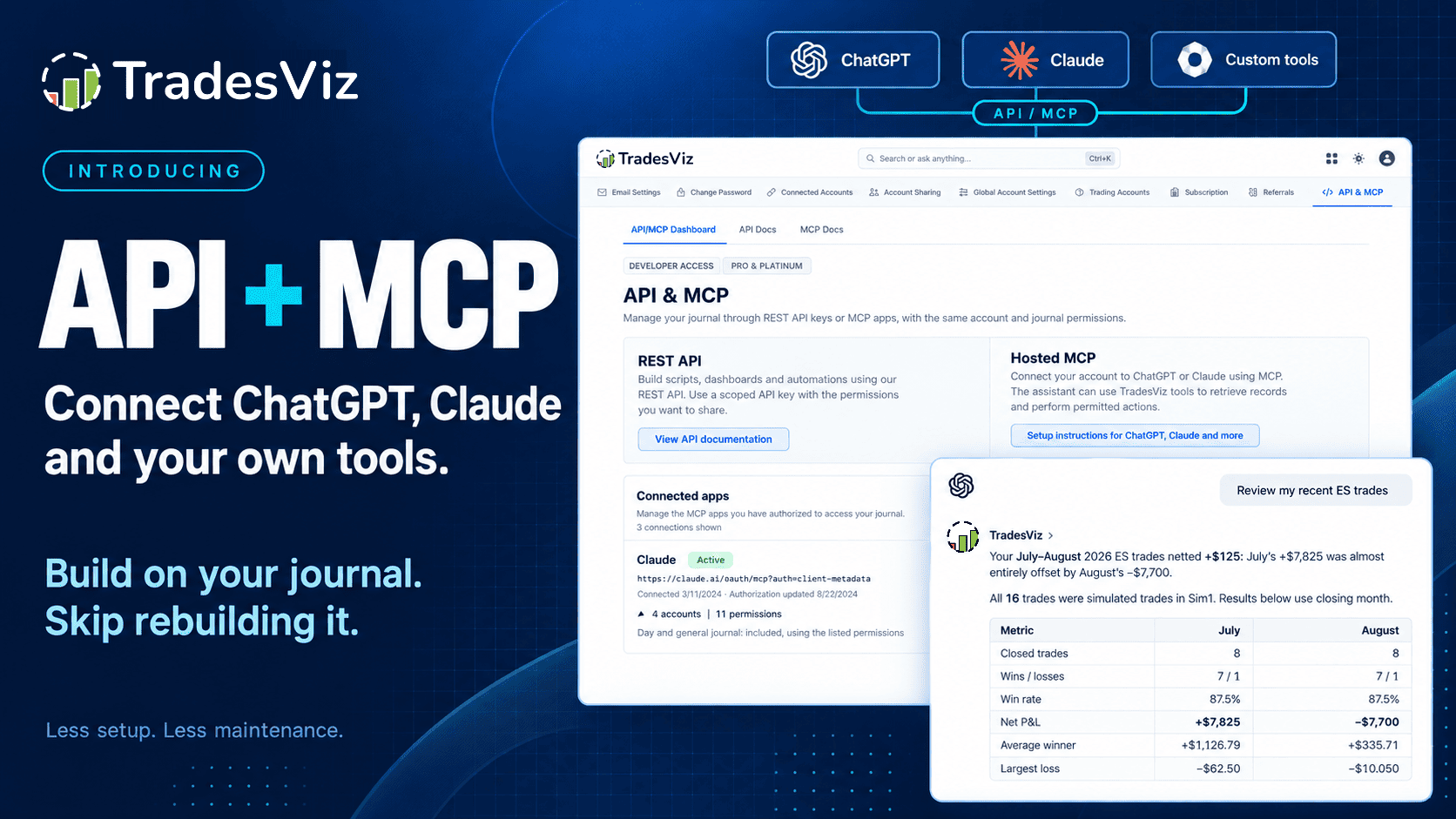
Product illustration. The example trade review uses simulated trades, not live performance.
Review actual records
Ask a question, inspect its supporting trades and keep the conclusion.
Build your own workflow
Custom analysis, reports and integrations using documented journal data.
Keep access under your control
Selected accounts, separate permissions and revocable connections.
A journal you can build on
What does MCP change about trade journaling?
A trading journal is useful because it keeps your execution history, costs and review context together. MCP makes that context available to an assistant through defined tools. Instead of repeatedly exporting a file and explaining its columns, you can authorize a connection to the records you want to review.
MCP means Model Context Protocol. It is a way for an AI client to discover tools, request data and perform permitted actions. TradesViz runs the hosted server. Your assistant supplies the reasoning and any additional coding or charting capabilities. The connection does not make a model's interpretation automatically correct.
Conversational access
Hosted MCP
Connect an assistant, sign in through TradesViz and approve access. Ask it to find trades, inspect fills, read notes or perform a specific authorized journal action. There is no local MCP server to run and no REST API key to paste into a chat.
Use a scoped key from your application or script. Retrieve documented records, calculate your own reports, manage notes or import supported executions. Your application supplies its interface, scheduling and delivery.
These are two interfaces to the same journal, with separate credentials. You can review trades conversationally through MCP and run a scheduled Python report through REST without maintaining two independent trading histories.
Build the part that is different.
A specialized chart or review process does not automatically require a new broker importer, trade database, note editor and account system. Use TradesViz for the journal and build the workflow above it.
Connect ChatGPT, Claude, Grok or your own agent
Start with the current connection guide for your client. Custom MCP support, menus and workspace approvals differ between providers. A model supporting tool calls is not, by itself, proof that its app supports the required remote connection and authentication.
Add the hosted connection. Use the server URL and browser sign-in flow in the MCP guide. For a custom agent, confirm that its MCP client supports the required transport and authorization.
Choose one account first. Begin with read access. Review the requesting app and only approve the data it needs. An active Pro or Platinum subscription is required; see current access and pricing.
Check a known result. Ask for the authorized accounts and inspect a familiar trade, including its fills and costs. Add write permissions only after the read workflow works.
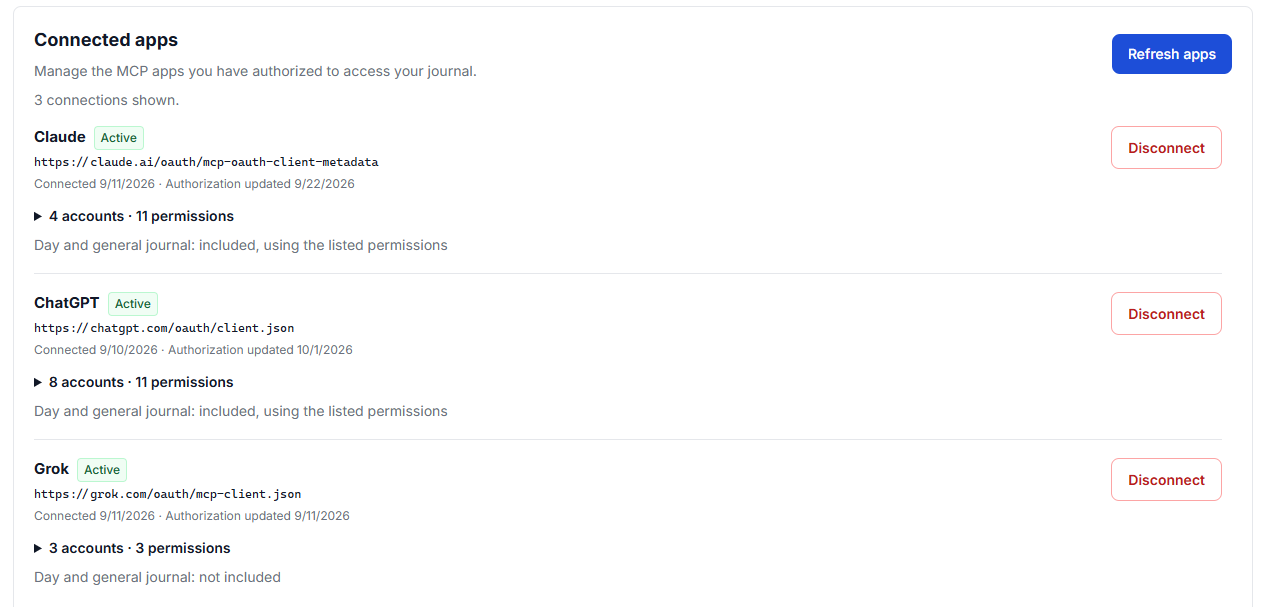
Each app has its own authorization. Connecting one assistant does not give every other assistant access.
For ChatGPT, use the provider's current connection instructions alongside the TradesViz guide. For Claude and Grok, the client-specific setup is linked from MCP Docs. Availability depends on your account and workspace, not just the model name.
From a question to a review
Query your trading journal in plain English
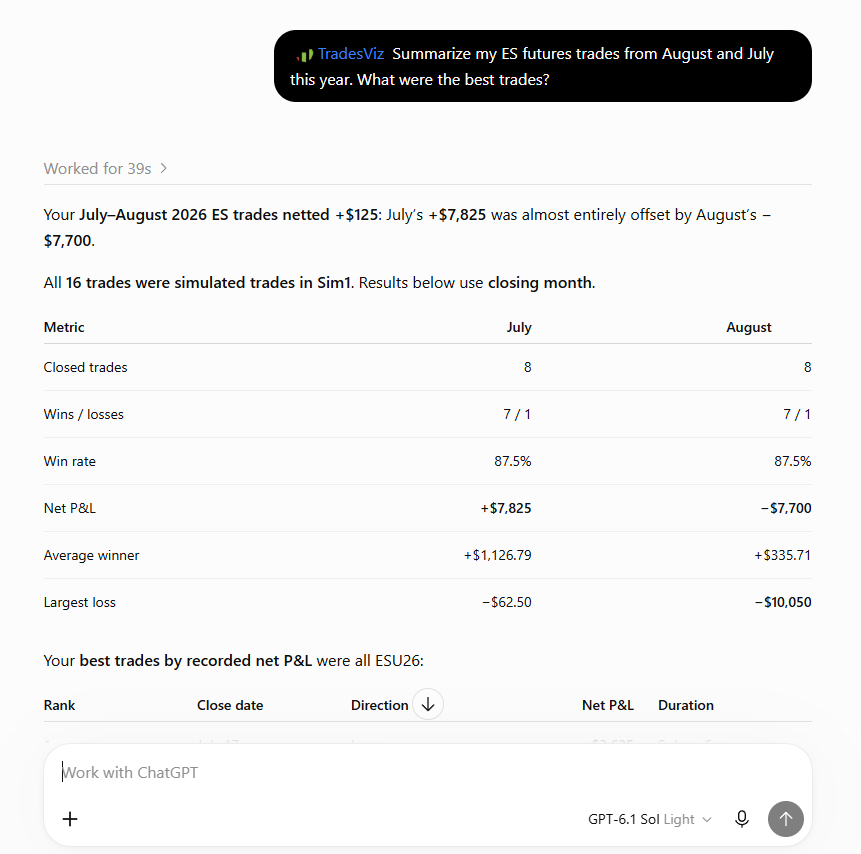
Useful trade journaling starts with a precise population. Ask for one account, a period and the type of trades you want to examine. Search can use exact symbol, opening-time range, open or closed status, side, asset type, P&L range, tag and simulated status. Then inspect the executions behind a selected trade rather than guessing from its total P&L.
For a weekly review, include trade counts, wins and losses, net P&L, commissions and fees. Follow up on the trades that drove the result. Were there several fills? Did the recorded costs change the conclusion? What did your original note say? The goal is a list of records you can investigate, not a confident story with no evidence.
Try a read-only review
Review my closed trades in [account] for [date range and timezone]. Retrieve all relevant pages and use closing date for this report, even if retrieval requires a broader opening-date range. Separate simulated and live trades. Show trade count, net P&L and costs, then identify three trades worth reviewing with their returned references. Distinguish facts from interpretations. Do not change anything.
A follow-up can be more useful than a new report
After the first answer, narrow the question: compare two tags, inspect a losing short trade or read the note attached to the largest loss. Keep the filters and trade references in the conversation so the next answer uses the same evidence.
Ask for missing data explicitly. Zero recorded commission is not necessarily proof that trading was free. A first page of results is not your complete history.
Example using simulated trades. The response states its sample and closing-month basis. Verify the underlying records; this is not a performance promise.
Use advanced AI agents for custom trading analysis
A capable reasoning or coding agent can do more than summarize a table. It can retrieve permitted records, write a calculation, produce a chart and help test whether its conclusion survives a different slice of the data. The important distinction is that the agent builds the analysis from available fields. MCP does not turn every website statistic into an endpoint.
Setup and execution research
Compare trades tagged breakout and pullback. Separate long and short trades. Examine holding duration, execution count or stored R values where available. Show sample sizes, costs and outliers beside averages.
Fee impact and account comparisons
Calculate gross versus net results, costs per execution or the contribution of a few large trades. Compare accounts separately before combining them, and never silently add amounts in different currencies.
Give the agent a method, not just a goal
For calculations that matter, ask for executable code, the formula, the exact filters and the retrieved record count. Check a small result against TradesViz. Reserve a later period to test an idea before treating a pattern in your existing sample as a reliable edge. A more powerful model does not make a small sample larger.
Try a reproducible setup comparison
Compare trades tagged [setup A] and [setup B] in [account] over [period]. State how trades with both tags are handled. Retrieve the full population, include fees and keep currencies separate. Use code for calculations. Report sample size, net result, average win/loss and outlier sensitivity. Show the method and missing fields. Treat explanations as hypotheses, not proven causes.
Use the model and tools that fit the work: retrieval for finding records, code for arithmetic, charts for checking distributions and reasoning for discussing interpretations. Keep human review for consequential changes. You can change assistants without rebuilding the underlying journal.
Your interface, your questions
Build a custom trading dashboard with MCP and the REST API
Maybe you want a six-number morning view, a report for your coach or a dashboard that separates live and simulated trading. An agent with coding tools can help design that interface. Your application can use the REST API for predictable data retrieval and its own code for charts, calculations and exports.
01TradesViz journal
Authorized records and documented statistics
02Your backend
Scoped credentials, retrieval, checks and calculations
03Your interface
A browser dashboard, report or spreadsheet view
Keep credentials off the page. A public browser bundle is not a secret store. Use a server-side integration for API access and journal writes. The write API is not a browser-CORS endpoint. Include last-refreshed information, preserve filter definitions and account for data changing during multi-page retrieval.
Give a coding agent a focused build brief
Build a read-only dashboard using documented TradesViz API fields. Show [chosen metrics], account and date filters, live/simulated separation, sample counts and last refresh time. Keep the API key server-side. Implement complete pagination, rate-limit handling and tests against a small known dataset. List missing API fields before proposing the design. Do not invent endpoints or enable journal writes.
Custom does not mean native.
This creates an external tool using journal data. It does not automatically create a dashboard inside TradesViz, expose its chart renderer or unlock advanced analytics that have no public endpoint. For the built-in experience, explore TradesViz AI Query and AI Widgets.
Why build above a journal instead of rebuilding one?
Give both projects the same AI coding assistance. One project builds your specific report. The other must also own imports, execution representation, storage, permissions, note editing, tests and maintenance. If the supported API meets your requirements, that second body of work needs a reason to exist.
A full rebuild can make sense for a small local-only tool or a capability the hosted approach cannot provide. Compare the total burden honestly, including subscription, hosting and AI costs. The practical advantage is spending more of your work on the question you wanted to answer and less on recreating an entire trading journal.
Add notes, tag trades and keep your journal organized
The end of a useful conversation should not be the end of the record. With note permissions, save an approved observation to the relevant trade. With the separate day/general journal opt-in, keep a session review or weekly general note where you will see it again.
Turn a review into a note
Include the account, period, supporting trades, observation, uncertainty and next check. Ask for the draft first. Create a new note for later reflection rather than silently rewriting what you thought at entry.
Apply tags to a reviewed set
Find the trades, inspect the exact list and add a label such as Reviewed. Read existing tags before proposing new names. Removing an attachment needs deletion permission; deleting a tag globally is a different, explicit operation.
Close the review loop
Draft a general journal note from this review: account, period, supporting trades, what I observed, what remains uncertain and one thing to check next week. Show the draft and proposed Reviewed tag targets first. Wait for my approval before saving or tagging. Do not replace existing notes or remove tags.
Correct supported journal records with a preview
Journal management can include supported execution corrections, initial risk, journal stop-loss or profit-target values, lock status, splitting or merging trades and explicit deletion. Inspect the affected records and before/after totals in the preview, then confirm the specific change. Recalculating operations have instrument and account-profile restrictions.
These are edits to your journal, not instructions to your broker. A changed journal stop-loss does not move a live order. Tag-group management and every possible account setting are not implied by tag access.
Use your trading journal from a mobile AI assistant
You do not always need a desktop dashboard to do a useful piece of trade journaling. On a phone, a short conversation can help you find the trade you meant to review, read an earlier note or draft an end-of-session observation.
A practical mobile session
Open a supported assistant with the TradesViz connection available.
Specify the account and ask for recent trades or a particular symbol.
Review the records and draft a concise note.
Read the proposed changes before approving a save. Open TradesViz directly when you need a fuller view.
OpenAI documents mobile use of plugins available to your account. That is not a guarantee that every client, workspace or connection is available on every device. See current ChatGPT plugin availability and your provider's controls.
Example prompt, not a product screenshot
Find my last closed ES trade in [account]. Read its note and show the fills and recorded fees.
Now draft a short review. Show it to me before saving.
A focused review can start with one trade.
Initial setup may be easier in a browser. If your mobile client does not expose the connection, use a supported web or desktop client or access TradesViz in your mobile browser. Where an app supports dictation, you can dictate the question; that does not mean its separate live voice mode supports the same tools.
Import trades from your own system with the REST API
Your executions might already live in a permitted broker API, an export process or your own trading system. You can build an adapter that maps those records into the supported TradesViz execution format. That lets you connect a source to an existing journal instead of building another place to store and review the same activity.
Current import coverage: eligible USD US stocks and exact-contract, fixed-multiplier USD futures under supported USD/FIFO profiles. This path does not import options, FX, non-USD instruments or continuous futures. The website's broader broker-import coverage is not the same as the REST/MCP import contract.
Map execution facts. Use confirmed fill timestamps, exact instruments, side, quantity, price, commissions and fees. Keep stable source-local fill identifiers. An order instruction or an intended position is not an execution.
Persist before sending. Keep the exact request and a stable idempotency key for each operation. Preserve its account, source identity and fill IDs across retries. Use a new operation key for a genuinely new request, not to escape a failed one.
Wait for application. An accepted receipt is not a completed import. Follow the documented status/recovery path. An applied result with a positive data version confirms journal application; analytics may still be pending.
Reconcile with the source. Check counts, quantities and costs. Choose one authoritative delivery path or explicitly reconcile overlaps with existing broker sync. Request idempotency is not universal deduplication across every connector.
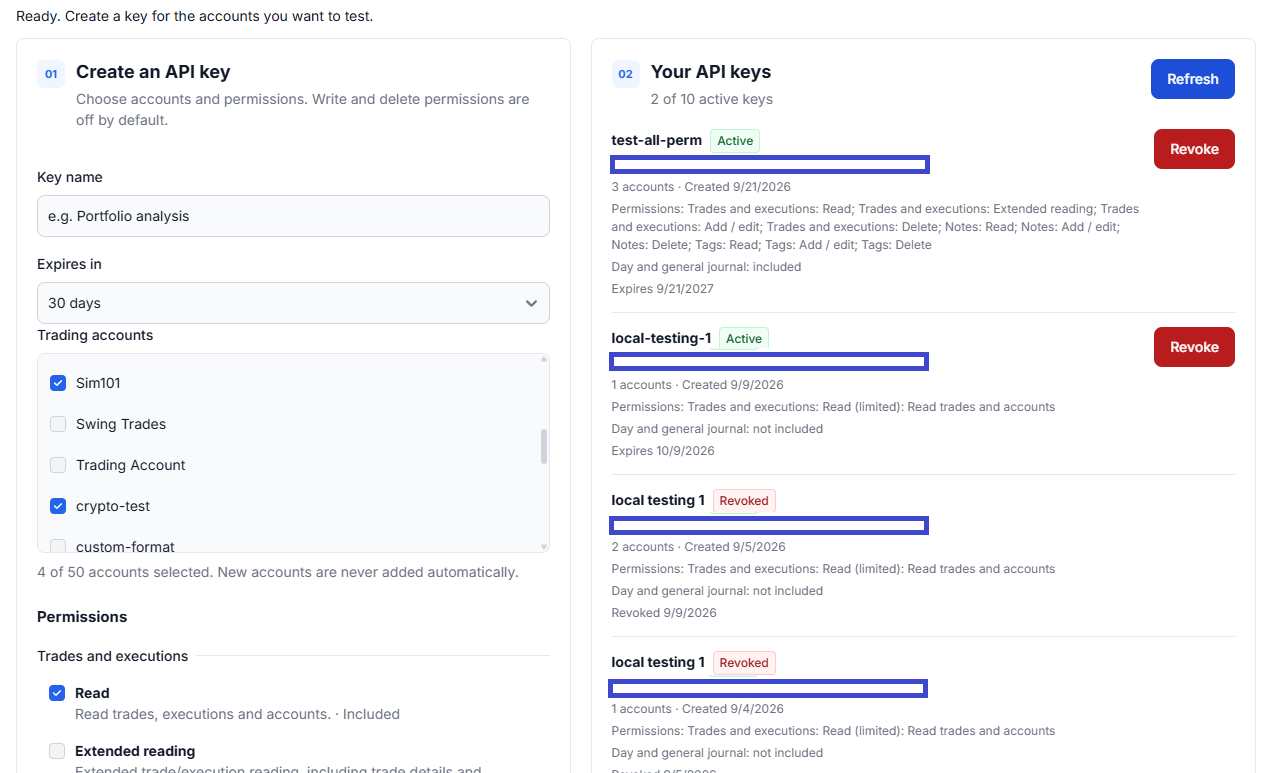
Use a key with only the accounts and permissions your adapter needs. Keep its secret out of chat prompts, screenshots and client-side code.
MCP execution imports follow a prepare, review and explicit confirmation process before commit. For automatic delivery from a custom system, use a properly scoped REST integration and build recovery into it. Read the execution import and reconciliation guide before sending production records.
Two integrations, two responsibilities
Can an AI agent take trades and log them automatically?
An external system can be designed to do this, but TradesViz is the journal side, not the order-execution side. A separately authorized broker integration may place orders where the broker permits it. After the broker confirms eligible fills, your software can log those execution facts through the TradesViz REST API.
Outside TradesViz
Agent + broker integration
Your broker authorization, execution logic, order limits and risk controls.
Broker confirms actual fills
→
TradesViz REST API
Journal adapter
Map supported fills, deliver with retry protection, track application and reconcile.
Review the recorded activity
TradesViz API and MCP cannot place, change or cancel broker orders.
An import retry must never submit another broker order. Record execution and journal delivery as separate outcomes: order requested, fill confirmed, journal import applied.
If you build an execution agent, keep broker credentials separate from journal credentials. Test in the broker's paper environment, use explicit position and order limits, handle partial fills and cancellations, and provide an independent way to stop the execution system. Do not treat a language model's reasoning as a substitute for execution controls.
The useful journaling opportunity comes afterward: record what happened, retain the system's stated rationale as clearly labeled notes, compare intended and actual behavior, and review costs and exceptions. Broker order IDs can be useful in your adapter's audit trail, but the journal must be driven by actual fills, not assumed fills.
We cannot make every broker expose an API. We can provide a documented way to connect supported execution data to your journal. The other side still needs legitimate access, permission and an integration that handles its failures.
Build recurring reviews, coaching tools and company workflows
A weekly workflow can retrieve a defined period, check the data, produce a report and prepare a journal note. Your own application or a compatible agent scheduler supplies the trigger, runtime, notifications and delivery. Connecting MCP does not automatically create a background job.
Personal review assistant
Prepare a Friday review, flag trades missing notes and propose a list to revisit. Store a checkpoint for each run so a retry does not create duplicate notes. Keep automatic retrieval separate from approval of write actions.
Coach or team report
Build a consistent review packet from each trader's authorized records. Keep users and credentials isolated, include the reporting period and filters, and share only the data the trader intends to disclose.
For companies, start with one concrete integration and validate its expected load. Respect request limits, retention requirements and the source provider's terms. Contact TradesViz about higher-volume commercial requirements rather than assuming a personal connection is an unlimited data service.
Know what is available, what you build and what stays separate
Workflow
TradesViz provides
Your client or application provides
Trade review
Authorized records, executions, notes, tags and standard account statistics
The question, complete retrieval, interpretation and verification
Custom analysis or dashboard
Documented data and permissions
Custom calculations, charts, interface, hosting and refresh logic
Notes and trade organization
Permissioned annotations and supported management tools
Chosen targets, reviewed drafts and confirmation of changes
Automatic execution logging
Supported imports and status/reconciliation interfaces
Legitimate fill source, mapping, durable delivery and duplicate prevention
Broker order execution
No broker execution capability
A separate authorized broker integration and its risk controls
Grant access for the task, not for every future possibility
Read, add/edit and delete permissions are separate. Day notes, day tags and general journal notes need their own opt-in because they are not limited to the selected trading accounts. New accounts are not automatically shared. An existing read-only connection does not silently gain write access.
Review the AI provider's handling of data you authorize. Treat note content, imports and retrieved text as data, not instructions to the agent. Never put API keys or broker credentials into prompts. Use the API/MCP dashboard to revoke a key or disconnect an app; that does not undo completed edits or erase a provider's existing copies.
Do not design around an endpoint that does not exist
The website has capabilities beyond the public API. Advanced MFE/MAE, best-exit and multitimeframe-exit analytics, option analytics, chart rendering, market-data tools and tag-group management should not be assumed to have public operations. Extended reading is a defined set of fields, not an export of the entire platform.
Large reports must follow pagination and request limits. Live pagination is not a frozen snapshot, so records can change during retrieval. Returned trade references are not permanent external identifiers. Use bounded batches, honor retry guidance and retain enough context to reproduce a report. See available fields, pagination and errors and limits.
Start with one useful workflow, then expand
Pick one outcome. Review last week's trades, save a session note or build one custom report. A small working loop is more useful than a large unfinished app.
Connect one account with read access. Verify a known trade and its costs before requesting larger analysis.
Make the result inspectable. Keep dates, filters, formulas, record counts and supporting references with the output.
Add the specific write access you need. Review the note, tag targets or management preview before approving it.
Check the result in TradesViz. Confirm the saved record or applied import, then decide whether the workflow deserves automation.
Your journal stays useful. Your workflow becomes yours.
Connect an assistant for a review, or give your next custom tool a journal to build on.
An MCP server exposes defined tools that a compatible AI assistant can call. The hosted TradesViz MCP server lets an authorized assistant retrieve journal records and perform supported journal actions. You select the accounts and permissions. MCP is the connection protocol, not a model, a trading strategy or a broker execution service.
How is MCP different from a trading journal REST API?
Hosted MCP is the conversational route: connect a compatible assistant using browser sign-in and let it call journal tools. The REST API is the software route: use a scoped API key from your own script, dashboard or integration. They access the same journal but use separate credentials. You can use both for different parts of a workflow.
Can I connect ChatGPT, Claude or Grok to TradesViz?
Yes, using a compatible client that supports the hosted MCP connection and its authorization flow. Follow the current TradesViz setup guide, sign in and approve selected accounts and permissions. Client plans, connector support and workspace policies can affect availability. A REST API key is not required for the hosted MCP connection.
Can I query my trades in plain English?
Yes. Ask a connected assistant to retrieve trades for a specified account, symbol, opening-time range, status, side, asset type, P&L range or tag. It can inspect the returned executions and permitted notes and tags. Specify the date basis, timezone and simulated or live status, and require complete pagination and supporting trade references. A fluent answer is not proof that all relevant records were retrieved.
Can an AI agent build custom trading analysis from my journal?
An agent can retrieve documented records and use its coding or analysis tools to calculate your own breakdowns, charts and reports. Examples include setup comparisons, fee impact and performance by holding period. The agent supplies the calculation and visualization; MCP supplies permitted journal access. Check formulas, sample sizes, currencies and source trades before relying on the result.
Can I build a custom dashboard with TradesViz MCP or API?
Yes. An assistant with coding tools can help build a custom interface, and a backend can retrieve supported journal data with the REST API. A dashboard needs its own rendering, hosting, refresh logic and data checks. Keep API keys on the server. This does not mean MCP can create native TradesViz dashboards or expose every chart and advanced metric available on the website.
Can I use my trading journal from an AI assistant on mobile?
Where your mobile AI app supports your authorized MCP connection, you can request a review, find trades or draft a note from your phone. Client, account and workspace support vary, and initial connection setup may require a browser. If the connection is unavailable on mobile, use a supported web or desktop client or open TradesViz directly in a mobile browser. Review proposed changes before approving them.
Can ChatGPT or Claude save notes and add trade tags?
With the matching permissions, an assistant can read, create or explicitly edit trade notes and add tags to trades or days. Day notes, day tags and general journal notes also require the separate day/general journal opt-in. Ask for a draft and a list of affected records before saving. Note deletion, tag removal and global tag deletion require their corresponding deletion permissions.
Can an agent organize or correct trades in my journal?
Supported journal management includes selected execution edits, journal risk settings, splitting or merging trades and explicit deletion. These operations have account and instrument restrictions. Management workflows use a preview and commit process. Confirm affected records and before/after totals before committing. Editing a journal stop-loss does not change an order at your broker.
Can I automatically import trades from my own system using the REST API?
You can build an adapter that maps legitimately obtained execution records into the supported import format and submits them with execution-write permission. The import path currently covers eligible USD US stocks and exact-contract, fixed-multiplier USD futures under supported USD/FIFO profiles. Options, FX, non-USD instruments and continuous futures are not supported by this path. Track import status and reconcile journal records with the source.
Can an AI agent place trades and log them in TradesViz?
TradesViz API and MCP cannot place, change or cancel broker orders. A separate system may use a broker execution API with separate authorization and risk controls, then send confirmed, eligible fills to the TradesViz REST API. Brokerage execution and journal logging are two independent integrations. An order request is not a fill, and an import failure must never trigger another broker order.
Does the API expose every TradesViz chart and advanced statistic?
No. The public interfaces expose documented records, extended fields, standard account statistics and specific journal operations. Do not assume advanced MFE/MAE, best-exit or multitimeframe-exit analytics, options analytics, chart rendering, market data tools or tag-group management have public endpoints. Check the current reference before building around a field or operation.
Can I schedule weekly journal reviews and reports?
Yes, as a workflow you build in a compatible agent scheduler or your own application. The scheduler supplies the trigger, runtime and delivery; TradesViz supplies authorized journal access. Use bounded date ranges, complete pagination, duplicate-run protection and a review step for writes. Connecting MCP alone does not create a background schedule or guarantee that an assistant keeps running.
Why use TradesViz with AI instead of rebuilding a trading journal?
If TradesViz already stores your records and exposes the operations you need, you can build the specialized report or workflow without also rebuilding the underlying journal. Compare validation, imports, security and maintenance as well as initial code generation. A full custom system can still make sense for local-only control or an unavailable capability. An integration is useful when it reduces the total work needed to answer your actual trading question.
How do I control what an AI assistant can access or change?
Choose accounts and explicit read, add/edit and delete permissions for each connection. New accounts are not automatically included. Start with read-only access and grant additional permissions only for a specific task. You can revoke API keys and disconnect MCP apps in the dashboard. Revocation stops new authorized requests but does not undo completed edits or erase data a provider already received.