In our State of Trade Journaling 2026 post, we asked a fairly uncomfortable question: are you trying to understand your trading, or are you just finding more interesting ways to avoid doing it?
Building another dashboard can be one of those ways. So can asking an AI to explain your entire trading career from twelve trades.
This launch is not a reversal of that argument. It is the practical next step.
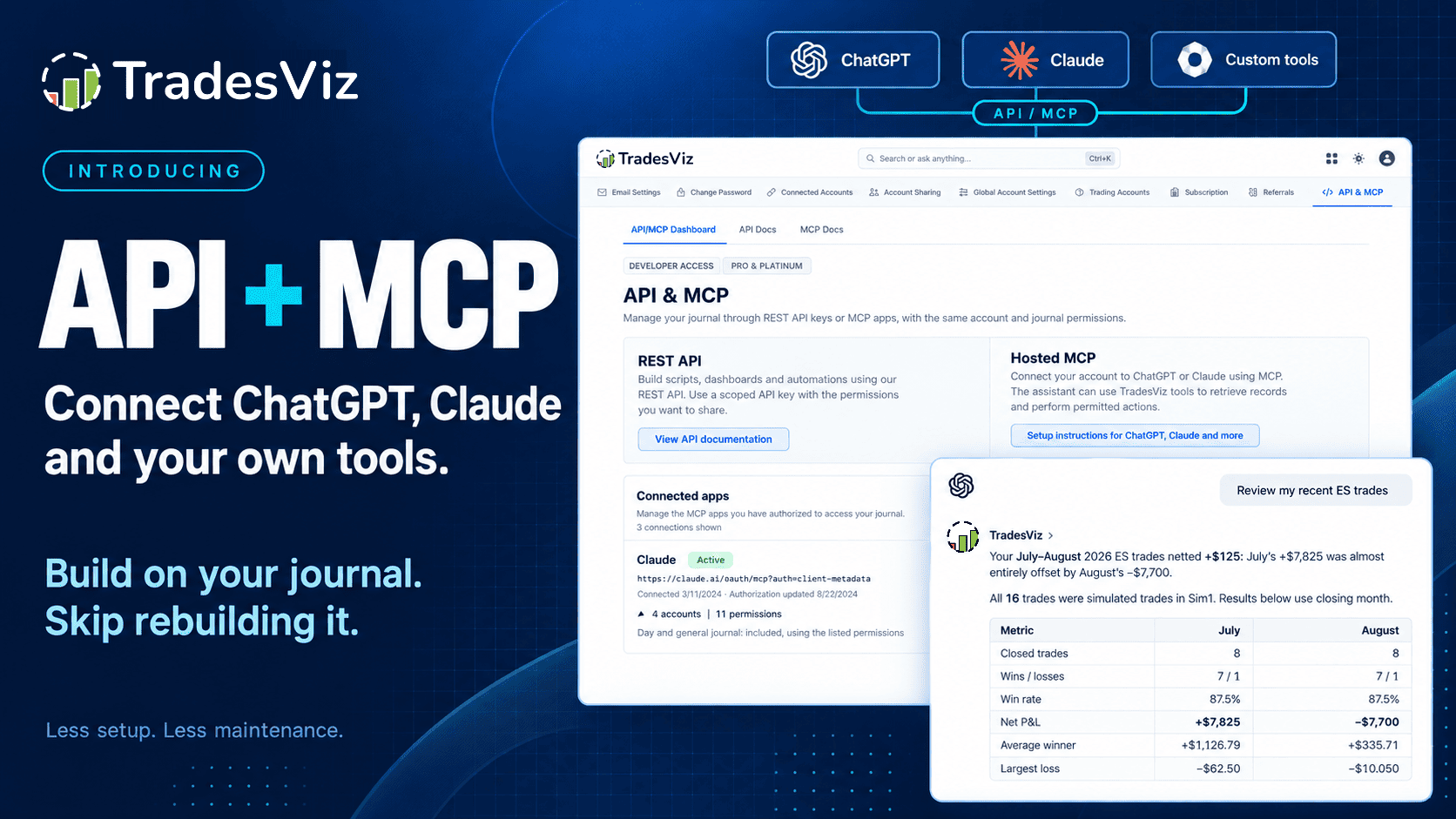
TradesViz now has a REST API and hosted MCP. You can connect ChatGPT, Claude and other compatible assistants to your journal, or build your own tools around it with Python and your own applications. Read your trades. Investigate a question. Prepare a review. Save notes back to the journal. With the permissions you approve, import supported executions and make specific journal changes.
You do not have to choose between using TradesViz and building something of your own anymore.
You can still build your own app. You no longer need to build your own journal underneath it.
That distinction is the whole point. This is not an endpoint reference; we already have API documentation and MCP setup instructions. This post is about what you can actually do with them, where the value comes from, and where you still need to use your head.
First: what are you connecting?
If you want to work conversationally, use hosted MCP. Connect a supported ChatGPT or Claude client, sign in through TradesViz, and choose the accounts and permissions you want to share. The assistant can then use TradesViz tools to retrieve records and perform permitted actions. We host the MCP server. You do not need to run one on your computer or paste a REST API key into a conversation. Availability depends on your AI client's connector support and workspace settings.
If you want a repeatable software workflow, use the REST API. Your script or application talks to TradesViz using a scoped API key. This is the route for a Python report, a custom dashboard, a spreadsheet workflow, an internal tool or an integration another company builds.
These are two ways into the same journal, not two separate copies of your trading history. Each connection has its own authorization. You can use either or both.
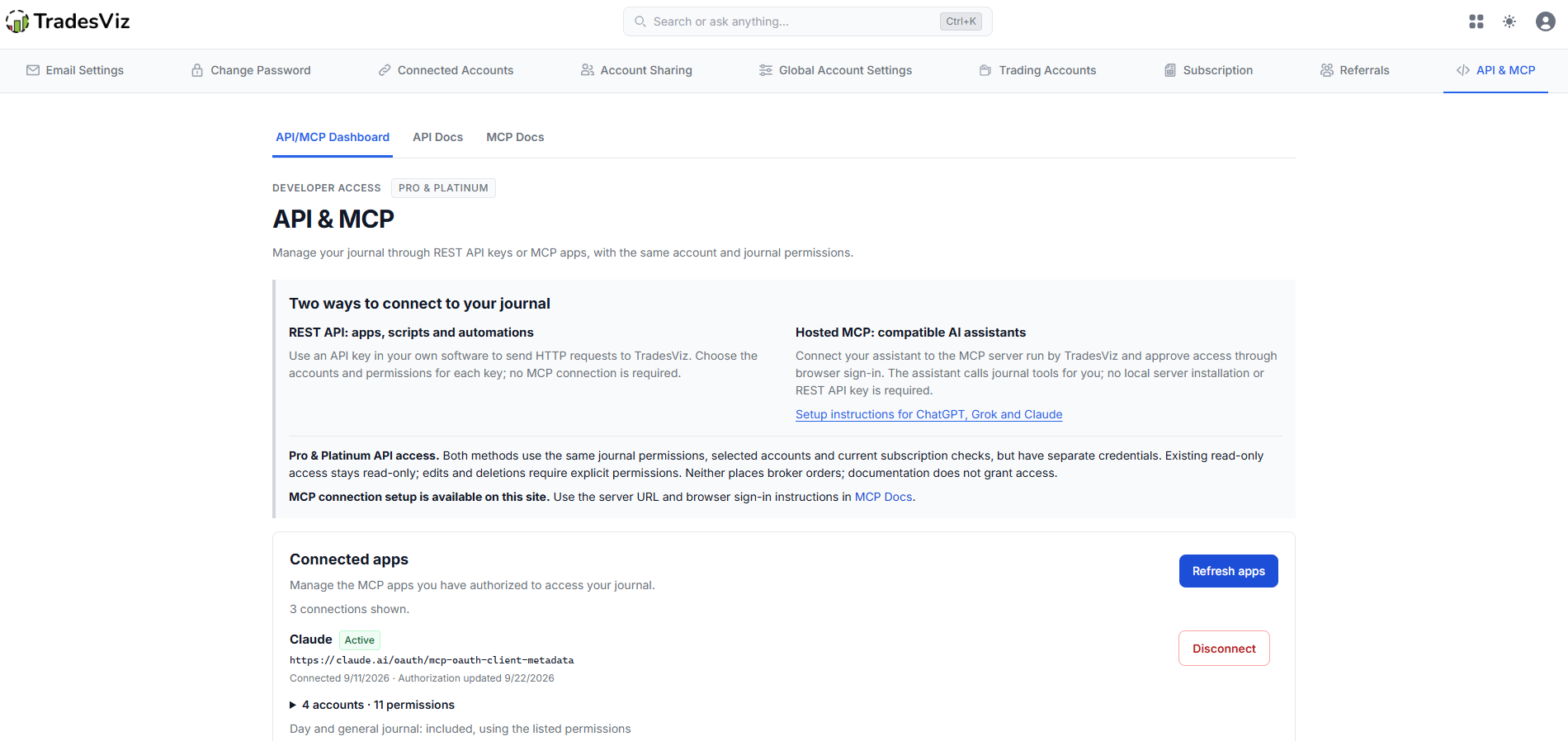
The API/MCP dashboard brings your REST keys, connected assistants and setup documentation together. Click any screenshot to view it at full size.
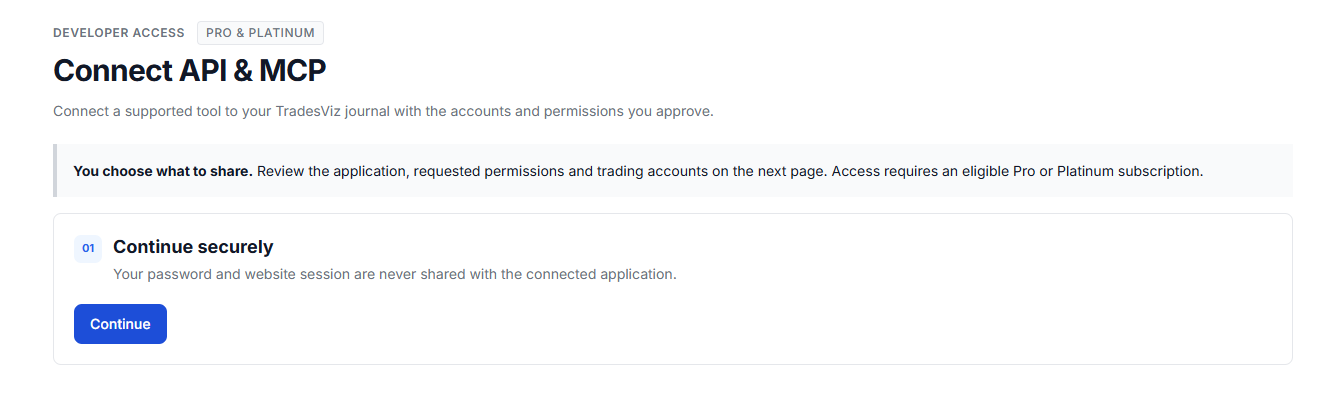
Start the connection through TradesViz, then review the application, accounts and permissions before authorizing it.
What can you do with it today?
1. Finish a weekly review without collecting the same data again
Most traders do not lack questions. They lack a convenient way to get the right records in front of them, with enough context to ask a useful follow-up.
Start with one account and one clearly defined period. Your assistant can retrieve trades, inspect the executions behind a particular trade, and read the notes and tags you have authorized. Instead of uploading another CSV and explaining its columns again, you can start with the question you meant to investigate.
Review my closed trades in [account] for [date range and timezone]. Retrieve all relevant pages, keep simulated trades separate, and show the trade count, net P&L and costs. Identify three trades worth reviewing and show their returned trade references. Separate facts from interpretations. If data is missing, say so. Do not change anything in my journal.
That last part matters. A useful review tells you which records it used. A confident paragraph about your “discipline” with no supporting trades is not a review.
You can then inspect a specific trade's fills, ask what your original note said, and compare the result with your stated plan. The assistant helps you assemble the evidence. You decide what the evidence means.
Here is a real example of asking ChatGPT to summarize ES futures trades across July and August. The response identifies the records as simulated trades and states that it groups them by closing month. This shows the review workflow, not live trading performance or a promise of results.
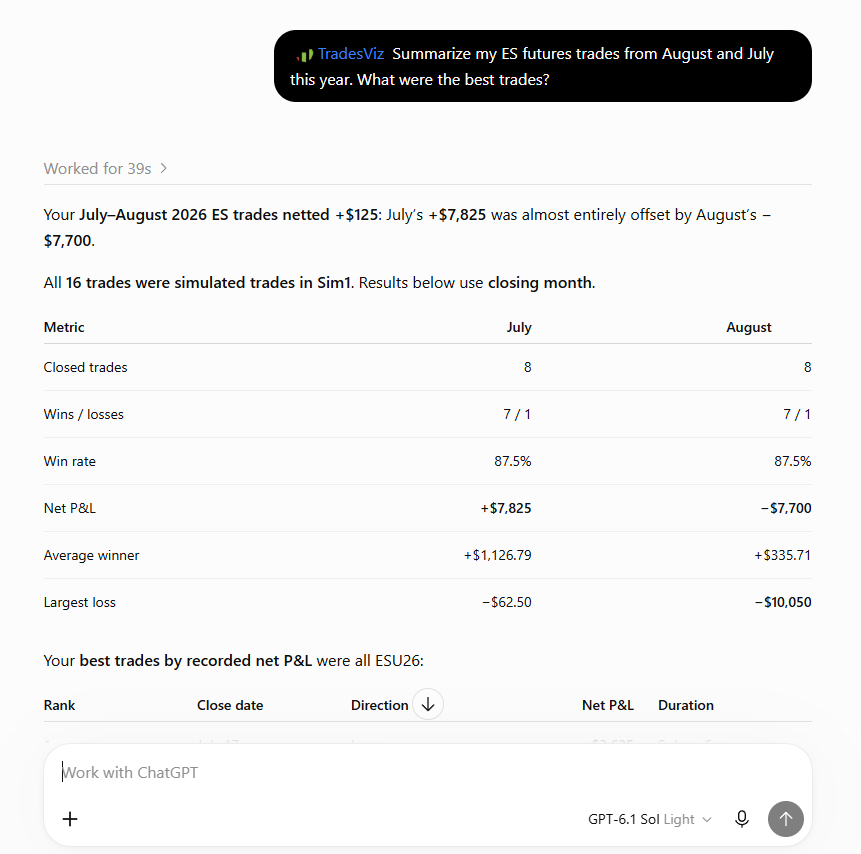
The example response names the simulated account, reports its sample size and explains the closing-month basis of the comparison. Check the underlying records before relying on any assistant's calculations.
2. Investigate an actual question instead of asking “How do I improve?”
That question is too broad. Try: “What happened in the trades I tagged as breakouts this month?” Or: “Show me my losing short trades in this account so I can review the entries.”
You can search by account, exact symbol, opening-time range, open or closed status, long or short side, asset type, P&L range, tag and simulated status. With the matching permissions, you can examine quantities, prices, costs and individual executions. Extended reading adds stored details such as R value, holding duration and execution count.
Standard account analytics include closed-trade counts, win and loss counts, win rate, gross and net P&L, commissions, fees, average win and loss, and profit factor. They give a review a numerical starting point. A custom script can also calculate its own breakdowns from the records it retrieves.
Be precise about the population. “Trades opened this week” and “trades closed this week” are not necessarily the same trades. Neither is the first page of results the same thing as your entire history. If you compare two groups, report the number of trades in each and use consistent currency and cost definitions.
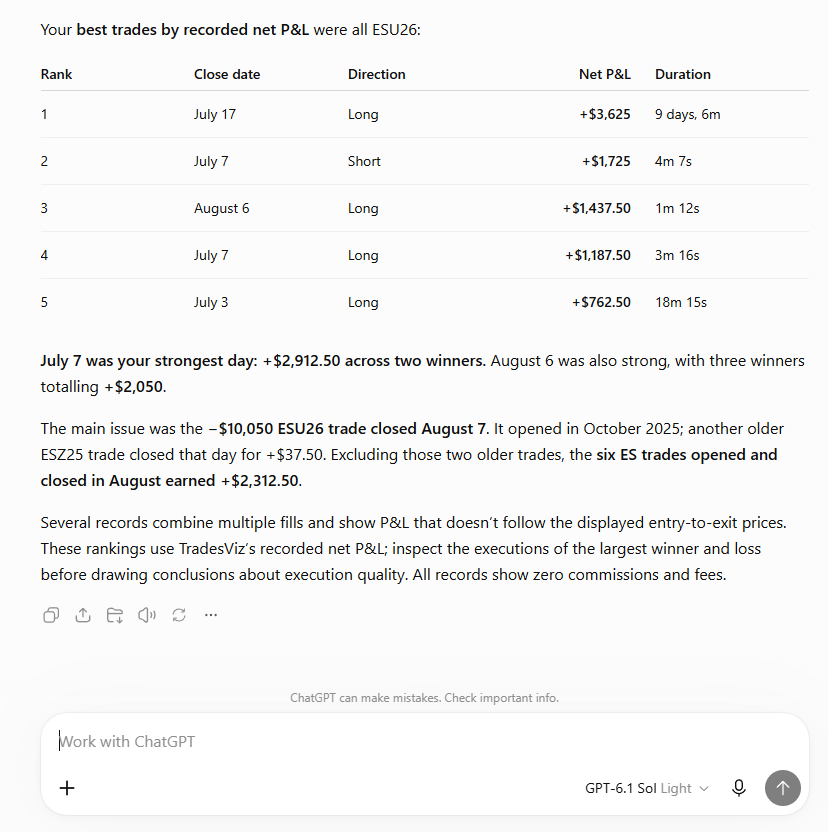
The same response ranks trades and flags older positions, multiple fills and zero recorded commissions and fees. Those details give you specific records and assumptions to inspect next.
More convenient analysis is useful. More convenient overfitting is not. Ten winning trades with a particular tag do not establish an edge. Use the result to decide what to investigate, not to invent a rule that your sample cannot support.
3. Keep the conclusion in your journal, not buried in a chat
This is one of the simplest uses, and probably one of the most useful.
You discuss a trade. You work out what you missed. Then the conversation disappears into a chat history you will never open again. Next month, you make the same observation from scratch.
With note permissions, your assistant or application can read, create and explicitly edit trade notes. With the separate day and general journal opt-in, it can also work with day notes and general journal notes. A weekly review can end where your next review begins: inside TradesViz.
Draft a general journal note from this review. Include the account, period, supporting trades, what I observed, what remains uncertain and one thing I will check next week. Show me the draft first. Save it only after I approve it, and do not replace an existing note.
Notice what we are asking the model to do. Organize a conclusion we have reviewed, not invent one. Your reasoning and uncertainty belong in the note too.
4. Make notes and tags less of a chore
Read existing trade or day tags, propose a consistent label for a reviewed set of trades, and apply the change after checking the list. Add a “Reviewed” tag to the trades you actually reviewed. Bring relevant notes into a setup review. Edit a note without replacing everything else around it.
There are separate permissions for reading, adding or editing, and deleting. Removing a tag from one trade is not the same as deleting that label's attachments throughout your journal. Global tag deletion is an explicit, separately reviewed operation.
This can reduce repetitive housekeeping, but it should not rewrite your history to make a story look cleaner. Preserve what you thought at the time. Add the later review as later context.
5. Build the report you keep wishing someone would build
Perhaps you want a Friday report with exactly six numbers and your own commentary. Perhaps your coach wants a consistent review sheet. Perhaps you want a small dashboard that separates live and simulated trades, or a notebook that computes one unusual metric.
Build that.
Use the REST API to retrieve the documented data, then format, calculate and present it the way you want. Python, a spreadsheet integration, your own web app or a company's internal tool can sit above the same journal. If you want a scheduled email or a recurring report, your application supplies the scheduling and delivery. Those are things you can build with the interface, not a claim that TradesViz now includes every possible connector.
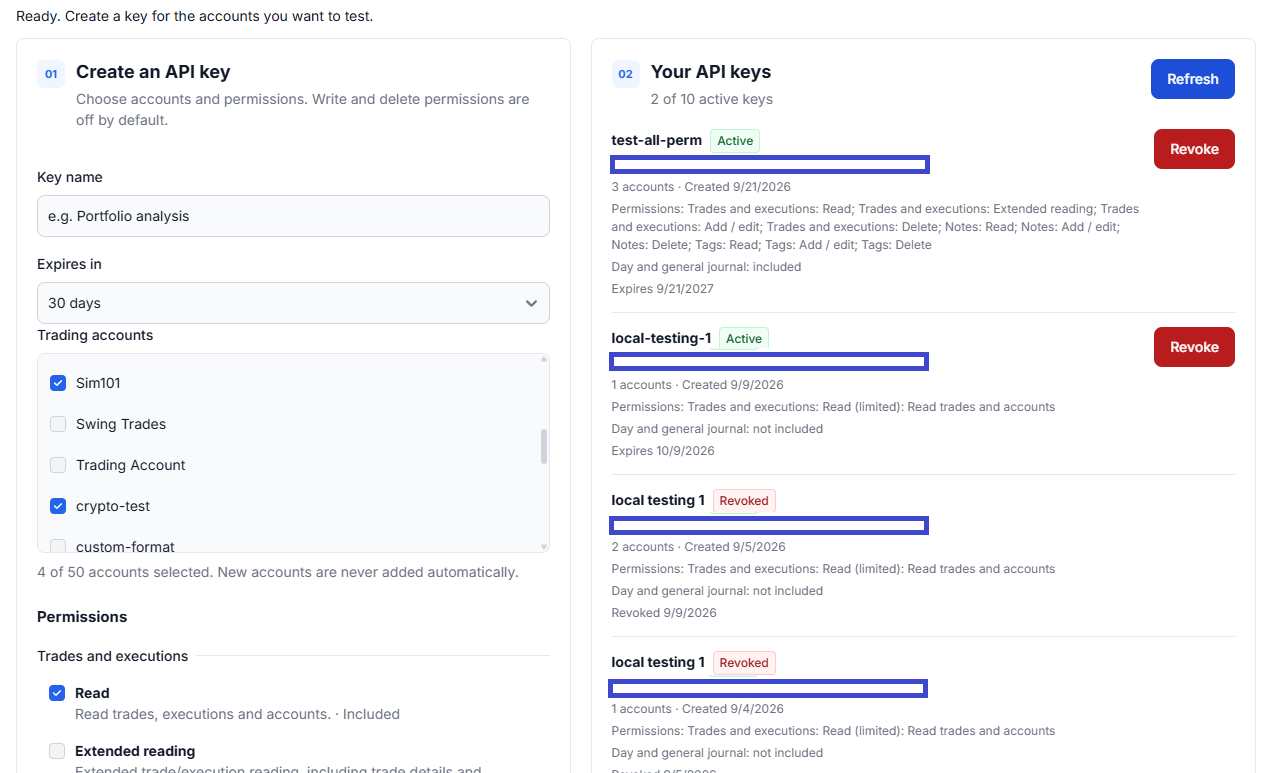
Create a key for your own application, choose its accounts and expiry, and manage it from the same dashboard. Key values are hidden in this screenshot.
For calculations that matter, write down the formula and use code you can test. Let the assistant explain the result. Do not ask it to improvise arithmetic from a wall of trade data and then treat the answer as audited.
The particularly useful part: you can abandon a custom report without abandoning the journal. Your trading records and saved reviews are still usable in TradesViz when that weekend experiment stops being interesting.
6. Connect supported execution data to an existing journal
We have spent years dealing with the gap between what traders need and what their brokers make convenient. Some brokers provide useful APIs. Some provide exports. Some make even basic access more difficult than it should be.
We cannot make every broker open its API. We can make sure your journal has one.
If a trader or company can legitimately obtain the necessary execution records, it can build an adapter to the supported TradesViz import interface. That might connect an existing export process, a permitted broker API, or another tool that already holds the execution facts. You build the missing connection instead of another place to store and analyze the same trades.
There are real boundaries. API/MCP execution imports currently support eligible USD US stocks and exact-contract, fixed-multiplier USD futures under the supported USD/FIFO profiles. This is not the full asset coverage of the website's import system. Options, FX, non-USD instruments and continuous futures are not covered by this import path.
Use the import guide to check eligibility. Avoid sending the same fills through multiple import paths without reconciling them. An API does not create data your broker never supplied, waive a broker's terms, or make a duplicate fill a new trade.
We have opened our side. Now it is up to traders, developers and companies to build useful connections where the other side permits them. Show us what you come up with :)
7. Correct and organize journal records without doing every step by hand
The interface is not just a read-only data export. With the right permissions, supported journal operations include editing trade risk settings, journal stop-loss and profit-target values, and lock status; correcting execution details such as time, side, quantity, price, commission and fees; splitting or merging trades; and deleting explicitly selected records.
These management changes use a prepare-and-commit process. First inspect the proposed change, its affected records and before/after totals. Then commit the confirmed change. Your client should actually show that preview and obtain approval. A preview token does not prove that a human looked at it.
Recalculating edits, including supported TP/SL calculations, have instrument and account-profile restrictions. Do not assume that because a trade can be read, every possible edit can be calculated through the API. The management guide explains the current boundaries.
And please read this distinction carefully: changing a stop-loss value in your journal does not change a stop order at your broker. API and MCP cannot place, change or cancel broker orders.
8. Build something useful for other traders
A coaching workflow could prepare consistent review material from a trader's authorized records. A developer could build a specialized report for a particular trading process. A company could connect supported execution data from a system its customers already use. An educator could help traders compare their written process with the records they choose to share.
These are opportunities, not permission to access everybody's journal. Each user's access must be properly authorized. Keep credentials private, request only the permissions you need, and design around the documented limits. Talk to us before assuming a high-volume commercial workload will fit an ordinary personal integration.
What we want to see is people solving the next useful problem, not ten more versions of the same P&L calendar.
This does not expose every feature on the website
There is a difference between TradesViz having a feature and that feature having a public API operation.
Today's interface provides the documented core records, extended trade fields, standard account statistics and journal operations described above. Do not assume it returns every chart, all advanced MFE/MAE data, best-exit or multitimeframe-exit analytics, option analytics, market-data tools, or tag-group management. “Extended reading” is a specific permission, not an unlimited export of the entire platform.
You can use the broader website tools alongside a connected workflow. If your custom calculation needs data the interface does not expose, check the docs or ask us before designing your application around it. We would rather answer that question now than watch you discover it after a weekend of coding.
Why not just ask an AI to build the whole app?
You can. That was never the difficult part of this argument.
Can an LLM produce a table, a calendar and an equity curve? Of course. Can it make something that looks convincing with the first file you upload? Also yes.
Now import the corrected file. Deal with partial fills. Check that commissions were not counted twice. Compare timestamps across a daylight-saving change. Separate accounts. Explain a mismatch to your broker's report. Recover after a bad edit. Keep notes attached to the correct records. Protect the credentials. Maintain the whole thing when the source format changes.
AI can help with those jobs too. But somebody still has to establish what the correct result is and verify that the generated code produces it. A model generating more code does not remove that responsibility.
The fair comparison gives both approaches the same AI coding help. If an assistant can build your entire journal, it can also build the much smaller report or integration above TradesViz. “AI makes coding cheaper” is not an argument that you should maintain the largest possible codebase.
Supported imports, accounts, trade records, existing notes and a working interface for reviewing them.
Documented data and actions, selected accounts, separate read and change permissions.
The particular question, calculation, review format or integration that matters to you.
A division of responsibility, not a speed benchmark. Source-data checks and validation of your custom work still belong in the process.
| What you need | Rebuild the journal yourself | Build on TradesViz API/MCP |
|---|---|---|
| Usable trading records | Build and maintain import handling, storage and trade representation for your sources. | Start with records in your journal. Maintain an adapter only when your workflow needs one. |
| A custom report | Build the report after the data foundation works. | Build the report from the documented data. This is the work you originally wanted to do. |
| Quality of a review | Validate your import logic, calculations and interpretations. | Check source completeness, use available journal figures, and validate your custom calculations and interpretations. |
| Notes and follow-up | Build storage, editing and links back to the right trades. | Use the existing journal notes and tags through permissioned operations. |
| Access and changes | Design whatever security, authorization and recovery your app requires. | Use selected accounts and scoped access. Your integration still needs secure credential handling and careful approvals. |
| Ongoing maintenance | Own the journal plus every custom feature you add. | Own your integration; TradesViz operates its journal and interfaces. You still depend on the service and its limits. |
| Changing your mind | Keep maintaining the journal even if the custom experiment loses its appeal. | Change or stop the experiment while continuing to use the underlying journal. |
A pretty app is not the unit of value. A completed, checkable review that you actually learn from is much closer.
The time-cost argument, with numbers you can change
Count the hours, not the number of screens your model generated. Getting an app to run and getting a tool you can rely on are different finish lines.
Here is a comparison you can actually inspect. Suppose you want the same recurring report over twelve weeks, and the required data is already available in your TradesViz journal.
| Work over 12 weeks | Own journal + report | TradesViz + report |
|---|---|---|
| Initial build and validation | 24 hours | 3 hours |
| Weekly technical upkeep | 2 hours | 0.5 hours |
| 12 weeks of upkeep | 24 hours | 6 hours |
| Total technical time | 48 hours | 9 hours |
Under those assumptions, the difference is 39 hours. At an assumed value of $25 per hour, that is $975 of time value. At $50, it is $1,950. It is not cash earned, and it is certainly not a forecast of trading profits. It is time you do not spend maintaining the tool.
Count the money fairly too. Add the applicable TradesViz subscription, AI usage and integration hosting to the connected option. Add any hosting, AI usage, data services and other operating expenses to the self-built option. An API workflow is not maintenance-free. If you are starting from an empty journal, include initial setup and data checks. The trading review itself takes time in both cases and is not counted as a saving here.
Change every assumption. If your own journal takes two hours to build and never needs maintenance, its case gets stronger. If the integration you need is complicated, count that work. If you already pay for TradesViz, do not charge the project for a subscription twice. The break-even test is simple: does the connected option's extra cash cost exceed the value of the technical time it saves?
You do not need a made-up multiplier for this to be a very large difference. Even in this deliberately explicit example, you are comparing nine hours of technical work with forty-eight. That is a substantial amount of attention to get back before discussing a single trading insight.
Let's argue against ourselves
“I want complete control.”
Then self-hosting may be the right answer. A hosted journal depends on our availability, documented interfaces and service limits. A connected AI assistant is another provider receiving the data you authorize. If your requirement is that no trading data ever leaves a machine you control, this workflow does not meet it. That is a real constraint, not an objection we can wave away with a marketing paragraph.
“My strategy needs a calculation nobody else has.”
Excellent. Build the calculation. If the required inputs are available through the API, that is an argument for using it. If they are not, you may need another permitted data source or a different architecture. Either way, a unique metric does not automatically require a unique account database, note editor and broker importer.
“I can upload a CSV to Claude and get this for free.”
For a one-off question, that may be enough. The value of a connection grows when the review repeats, the records change, multiple accounts need consistent handling, and the result should go back into your journal. We are not arguing that every spreadsheet needs an API. We are arguing that recurring work deserves a repeatable process.
“My custom app will give me better insights.”
It might, if you design and validate a better method for your question. But that method can often run above TradesViz too. The source of the improvement is your method, not the fact that you also rebuilt a login screen. Keep those claims separate.
“But an AI connected to TradesViz can still be wrong.”
Absolutely. MCP makes records accessible; it does not certify a model's reasoning. Require sources, complete retrieval, clear filters and explicit calculations. Return to the actual trade when something looks odd. Better access to evidence is valuable precisely because it lets you question the answer.
“I enjoy building this stuff.”
Then build it. Learning and enjoyment are legitimate reasons. A small, stable journal for one source can also be a sensible project. Just do not call every hour spent changing its buttons an investment in your trading. Some of it is a software hobby, and there is nothing wrong with admitting that.
The best case for a full rebuild is a requirement the connected approach cannot satisfy, or a project whose small scope makes ownership worthwhile. The weakest case is spending weeks reconstructing features you already have because generating the first screen felt free.
The argument to test: Give both projects the same AI coding help and the same report to produce. If TradesViz already holds the records and exposes the operations you need, what does rebuilding the journal add? Name that benefit. Then compare it with the extra development, checking, security and maintenance you are taking on. “The model can write it” is not the benefit. A capability you genuinely cannot get another way, a necessary control requirement or a measured saving could be.
Paste that into your preferred model and ask it to challenge the assumptions. Give it your actual requirements and time budget. The question is not whether it can write an app. The question is which project leaves you with the most useful working tool for the least total burden.
What this changes about insight quality
We have been quite blunt about AI narratives in the State of Trade Journaling posts. Nothing about MCP changes our position.
The useful improvement is in the review process: records can be retrieved again, costs can be included consistently, notes can explain what you intended, and the supporting trades can be checked. You can ask a narrower follow-up without rebuilding the dataset every time.
That is a better environment for analysis. It is not a guarantee of a better conclusion. A small sample is still a small sample. Missing data is still missing data. A story that fits your losses is not automatically their cause.
Measure the workflow by whether you can reproduce its numbers, inspect the exceptions, preserve what you learned and test a specific change later. Not by how authoritative the assistant sounds.
Start small, and keep the permissions small too
Do not begin by giving an agent permission to edit and delete everything. Start with one account and read access. Check a known trade. Compare a small review with the journal. Only then add the specific write permissions a useful workflow needs.
Trade notes, day notes, tags and general journal access have distinct permission boundaries. Day and general journal access requires its own opt-in because those records are not confined to a selected trading account. New accounts are not automatically shared. Existing read-only access does not quietly turn into write access.
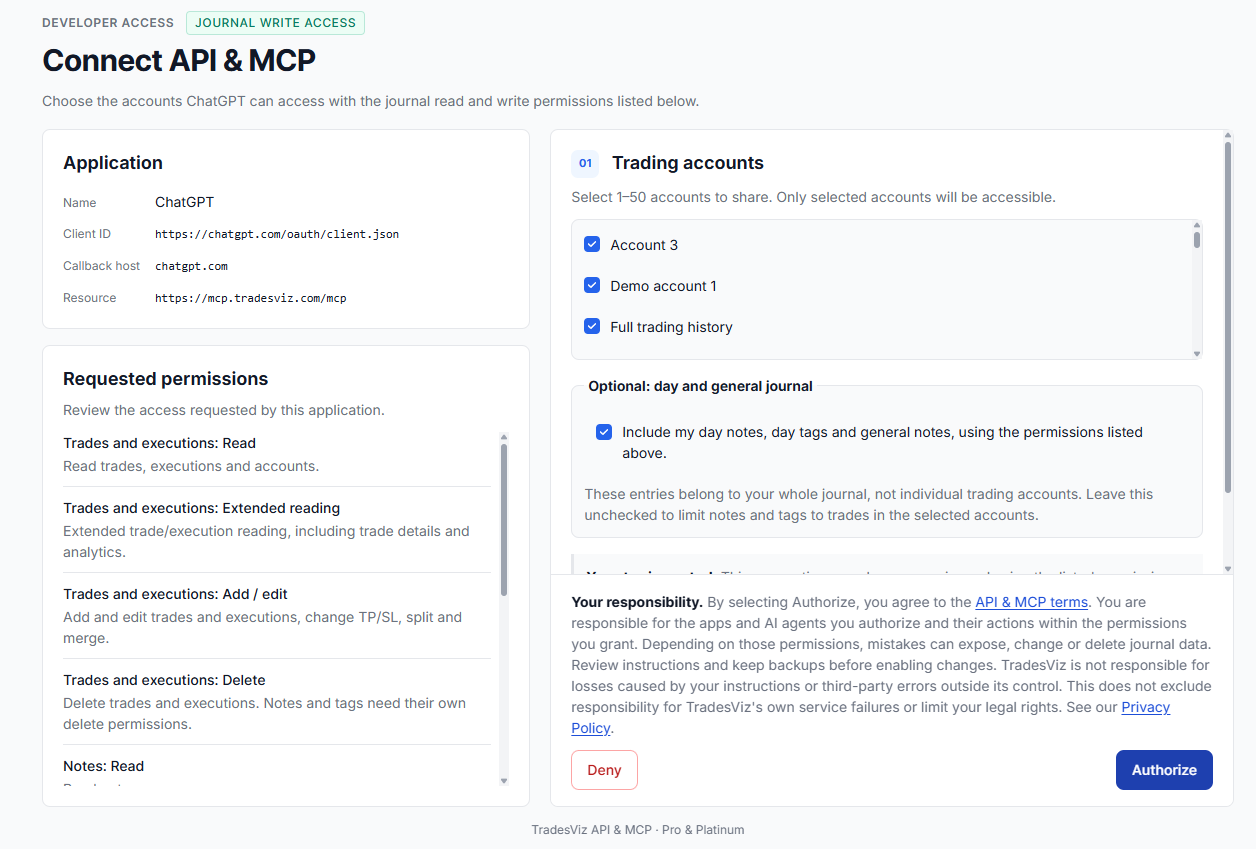
Review the accounts and requested permissions before authorizing an assistant. This example includes write access and day/general journal access; approve only what your workflow needs.
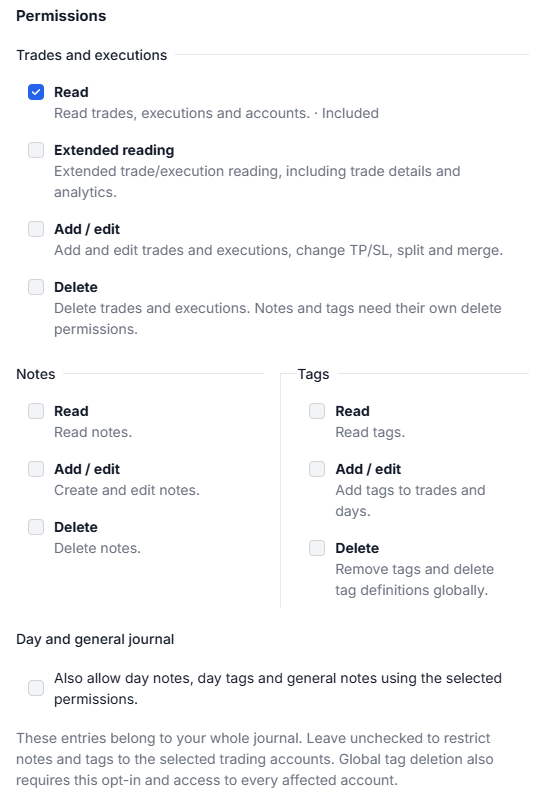
Read, add/edit and delete permissions are separate. Day and general journal access is another explicit choice, not something enabled by selecting a trading account.
Keep API keys out of prompts, source repositories and screenshots. Review which data your assistant provider receives. You can revoke a key or disconnect an app from the API/MCP dashboard, but that does not undo completed edits or retract data already sent elsewhere. Revoke each credential you no longer use.
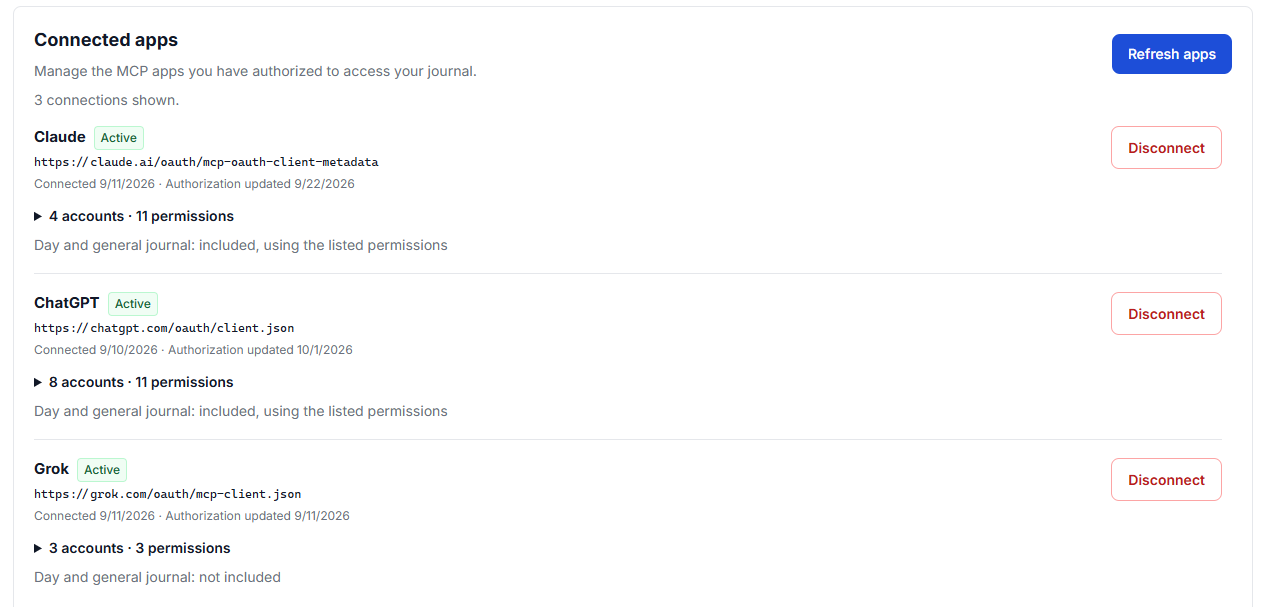
Each connected app has its own account access and permissions. Review or disconnect it independently from other apps and REST API keys.
Developers should follow pagination, respect rate limits, and use the documented retry and idempotency behavior for writes. Retrying an uncertain change is not the same as asking for a second change. Plan around bounded requests and service errors; this is a journal integration, not an unlimited live trading feed. Larger reports also need to account for records changing while data is being retrieved.
Your first useful project
- Choose one outcome. A weekly review saved to the journal. A report for your coach. A specific comparison you repeat. Not “build the ultimate trading app.”
- Choose the interface. Use hosted MCP with ChatGPT or Claude for a conversational workflow, or the REST API for your own software. Check client availability and the documented operations first.
- Verify one small result. Name the account, period and filters. Retrieve complete results. Reconcile a trade and its costs before trusting a larger report.
- Close the loop. After you review the result, save the approved note or perform the specific authorized change. Come back next week and check whether it helped.
For the current feature overview, start here. For access, keys and connected apps, use the API/MCP dashboard. For exact capabilities and setup, use the linked docs. We are deliberately not duplicating them in this post.
We are not against traders building software. We are against traders spending their limited attention rebuilding the same plumbing and calling that progress.
Want your own interface? Build it. Want a particular review process? Build it. Want to connect a legitimate source of execution data to your journal? Check the supported path and build the connection.
Let TradesViz be the journal. Make the part above it yours.
Then spend the time you get back studying your actual trades. That is still the part no API, no journal and no model can do for you.
If you build something useful, show us. If a missing operation blocks a real workflow, tell us what you are trying to do. We would much rather discuss a concrete trader problem than another screenshot of a newly generated calendar.