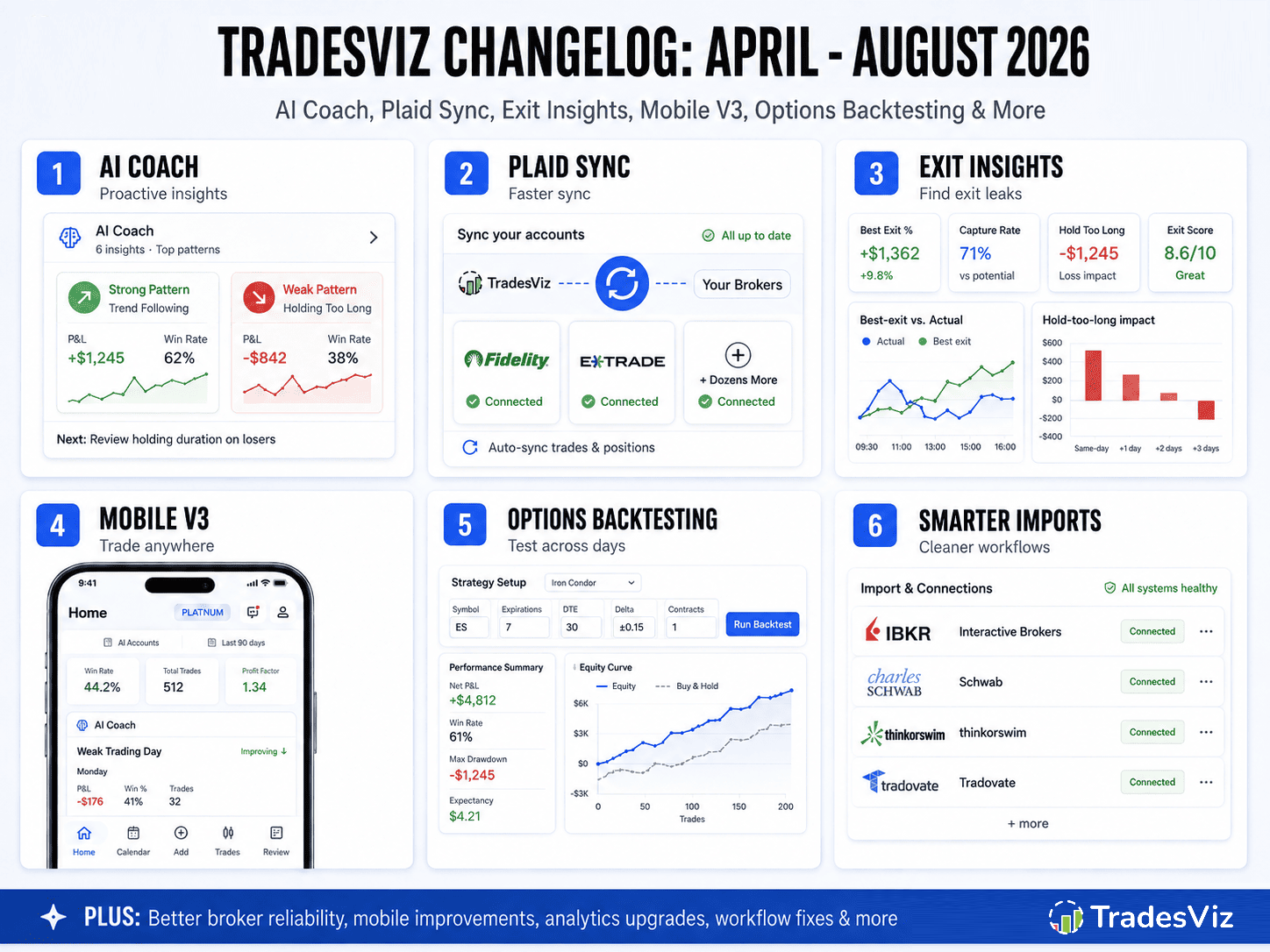
Five calendar months. A better way to import, investigate, practice, and review your trading - on desktop and on your phone.
Our last major changelog covered January through April 2026, including the Real-Time Stock Screener, Prop Firm Compliance Center, DAS Trader Pro auto-sync, Custom TradingView Indicators, and the seasonality revamp. We followed it with a separate April-May quality-of-life changelog for Tags v2, Import Doctor, simpler simulators, templates, navigation, and dozens of smaller fixes.
This post connects the full story from April 1 through August 28, 2026. April and May are recapped for continuity; June, July, and August carry the new work. This is not an exhaustive internal release log. It is the user-facing work that is shipped and useful today.
April 2026 Recap: Prop Firm Compliance, DAS Trader Pro & Seasonality
The Gist: April was about turning specialist workflows into first-class parts of the journal. Prop traders got rule-aware tracking, DAS users got auto-sync, and seasonality moved from a collection of charts into a deeper research workflow.
Key Upgrades:
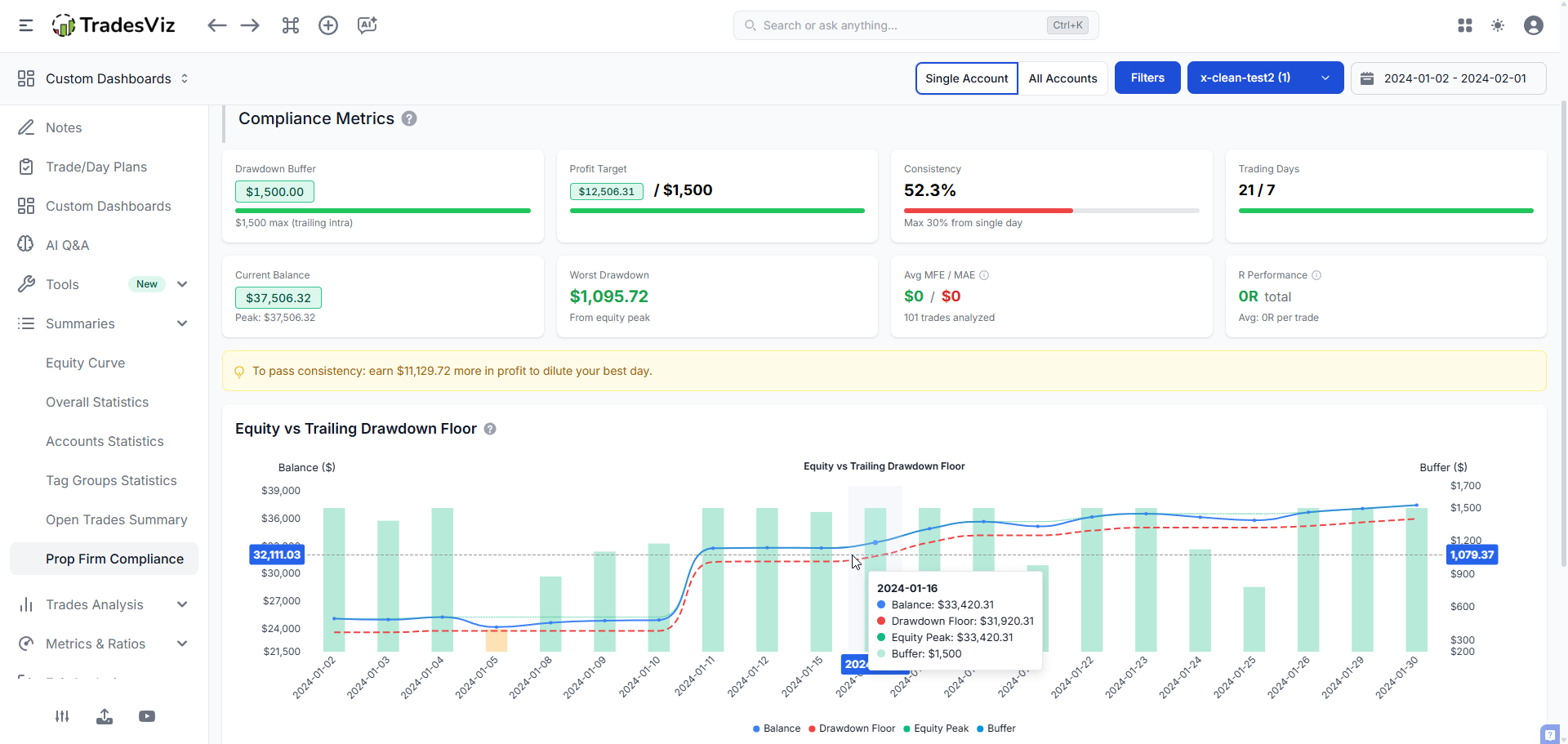
- Prop Firm Compliance Center: Track daily loss limits, maximum drawdown, profit targets, minimum trading days, consistency rules, and other challenge requirements across multiple accounts. Challenge Mode also brings those rules into historical simulator practice. See the full compliance guide.
- DAS Trader Pro auto-sync: DAS executions can flow directly into TradesViz, with an Import From date for controlled historical syncing and clearer guidance for DAS-supported brokers. Read the setup guide.
- Seasonality rebuilt: The updated seasonality workspace added a dedicated screener, improved tables and charts, more useful filters, and better drilldowns for studying recurring market and trading patterns. Explore the seasonality update.
- Options support in TP/SL simulation: The stop-loss/profit-target simulator expanded beyond stocks and futures to support options, with progress feedback for longer calculations.
- AI summaries for Options Flow: The Options Flow workspace gained one-click natural-language summaries as an additional way to read the underlying deterministic charts and tables.
- Smarter import guidance: The import flow gained more inline assistance, faster broker search, and clearer diagnostics instead of leaving users to interpret a generic failure message.
- New and expanded connectivity: April included IG auto-sync and new import work for platforms including Kalshi and TradeSea, alongside the usual broker-format maintenance.
May 2026 Recap: Tags v2, Import Doctor & Faster Daily Workflows
The Gist: May was the month TradesViz became easier to live in every day. Tags v2 became the default, imports started explaining themselves, note and plan templates removed repetitive typing, and simulator controls became less intimidating without losing their advanced depth.
Key Upgrades:
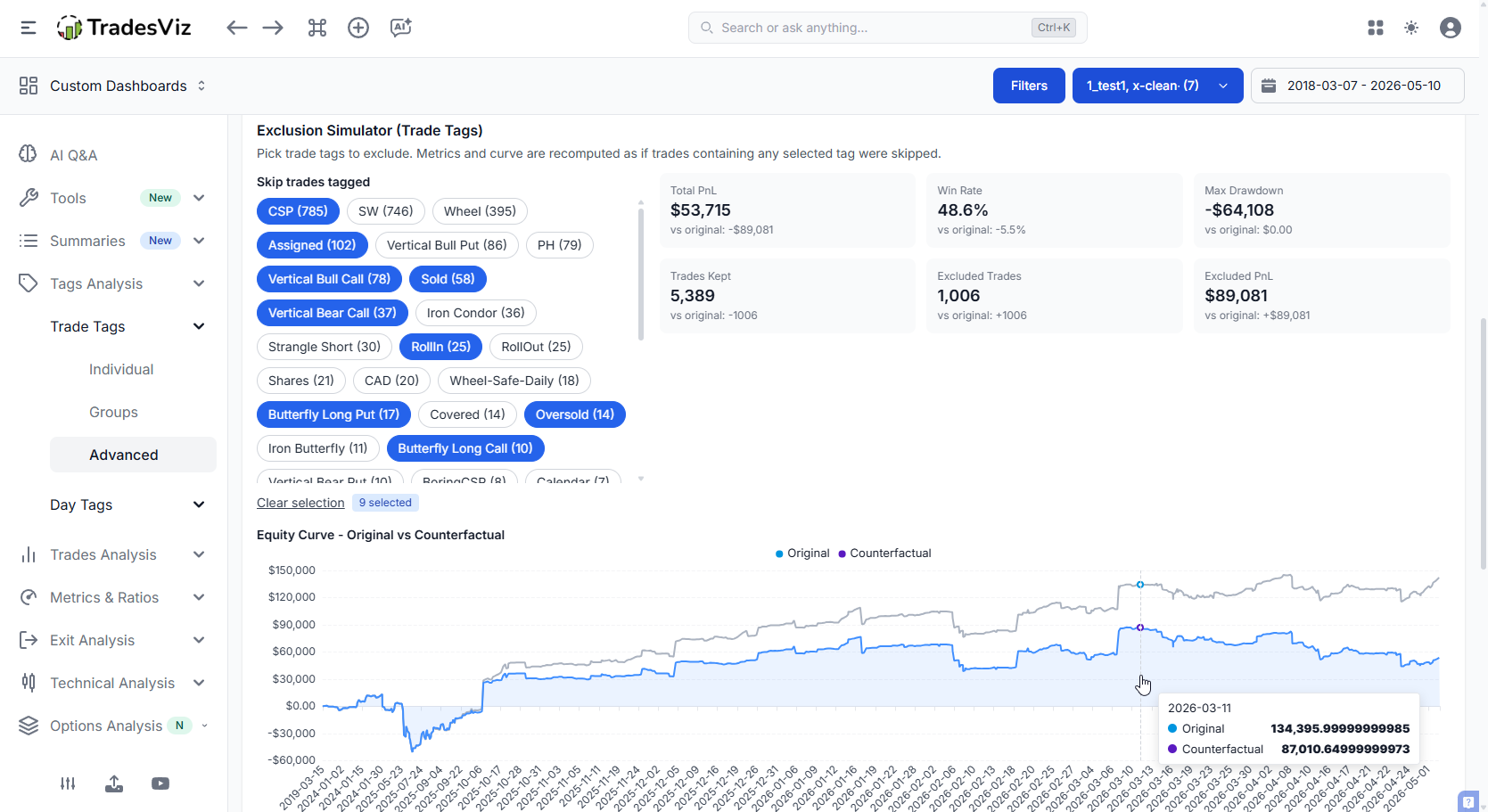
- Tags v2 became the default: Day and trade tags moved to the faster v2 interface with richer metrics, group views, group charts, advanced analysis, automatic tag insights, day-tag support in Pivot Grids, and wildcard cleanup tools. See Tags v2 and the complete Day Tags guide.
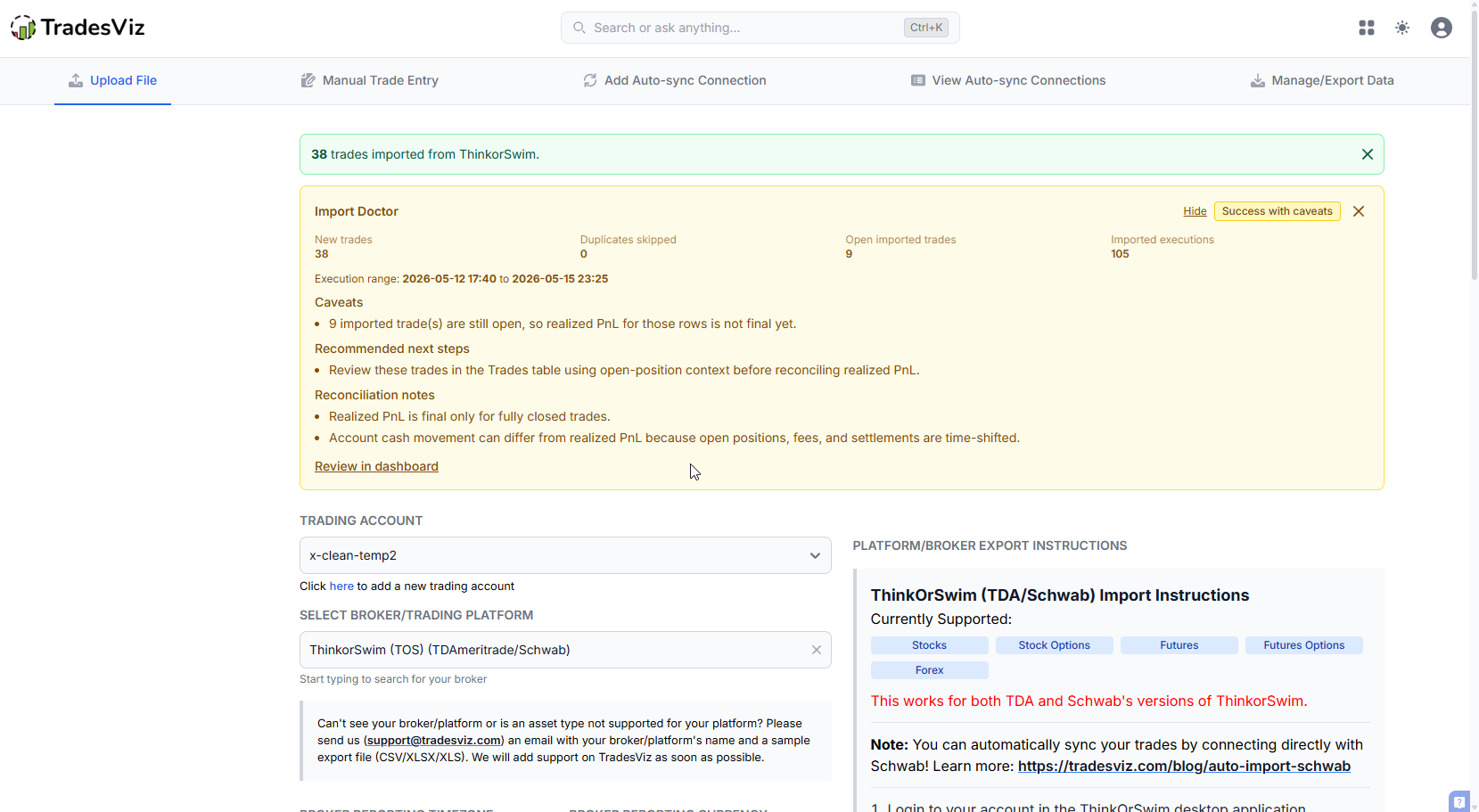
- Import Doctor: Import results now explain duplicates, open positions, caveats, reconciliation details, and recommended next steps in plain language. Frontend validation also catches more malformed custom CSV and cTrader files before upload.
- Note and Trade Plan templates: Save a post-trade review, end-of-day checklist, setup plan, or other reusable structure once and apply it whenever you need it.
- Simulator Simple Mode: New traders can start with the essential chart and execution controls while advanced order, sizing, and configuration tools remain one toggle away. Options Simulator layout and live-PnL handling improved at the same time.
- Trade Explore redesign: The trade-level review workspace received a substantial layout and interaction pass so charts, executions, notes, tags, and edits are easier to reach.
- Options Command Center upgrades: Wheel and premium-selling workflows gained clearer cost-basis context, a premium-collected timeline, improved strategy/symbol switching, and more current Greeks handling. The historical Options Execution Simulator also gained running PnL and stock-leg support for covered and hedged positions.
- AI-generated custom dashboard widgets: Useful AI Q&A results can be turned into persistent widgets on a custom dashboard, then edited and arranged beside the rest of your journal.
- New sync options: Freedom24 and Public.com connectivity shipped, while 60+ existing broker/import modules were touched with fixes or clearer handling across the April-May window.
June 2026: AI Coach, Rebuilt Analytics & Custom Prop Firm Rules
The Gist: June focused on helping traders decide where to look next. AI Coach launched as a ranked, evidence-backed trading review; major analysis pages were rebuilt; and prop-firm rules, screener presets, chart templates, and simulator navigation became more flexible.
Key Upgrades:
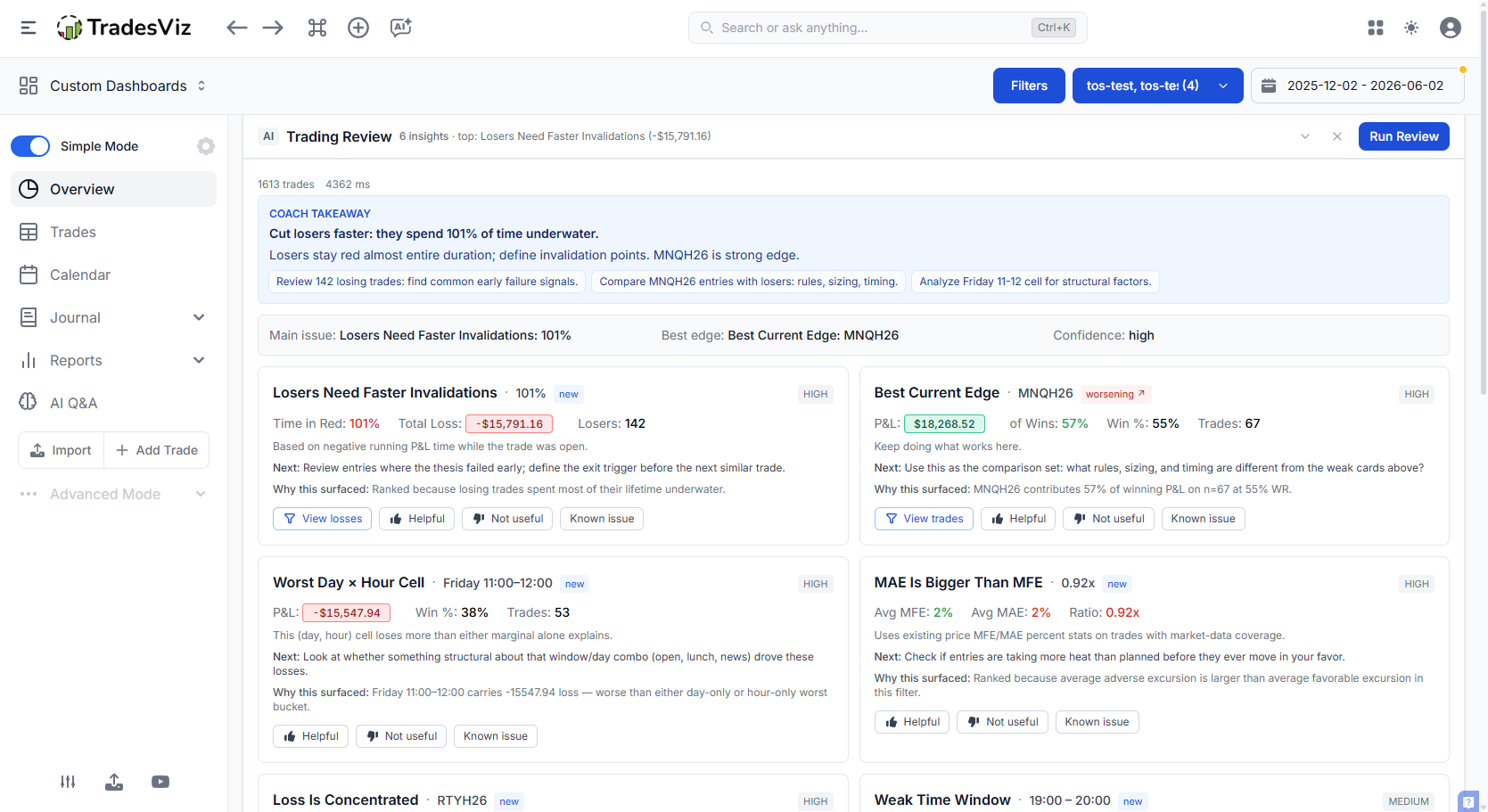
- AI Coach Trading Review launched: Instead of asking a language model to invent a verdict, Trading Review runs deterministic checks against your own trades, ranks the highest-impact leaks and strengths, shows the supporting sample and confidence, and links back to the relevant trades. The current version includes sixteen detectors, trend direction, per-finding feedback, and an optional short AI-written takeaway on top of the verified findings. It is available on Overview for Pro and Platinum accounts. Read how AI Coach works.
- Overall Statistics rebuilt: The Overall Statistics page was reorganized into a clearer, searchable reference with a cleaner interface and better chart/stat navigation.
- Activity analysis unified: The old volume and trade-count surfaces became one Activity workspace with activity-versus-PnL, duration, trend, distribution, intensity, and heatmap views.
- Symbols, Sectors & Industries revamped: Symbol, sector, and industry analysis gained new charts, more consistent drilldowns, and an industry column in trade tables. Browse the charts and statistics reference.
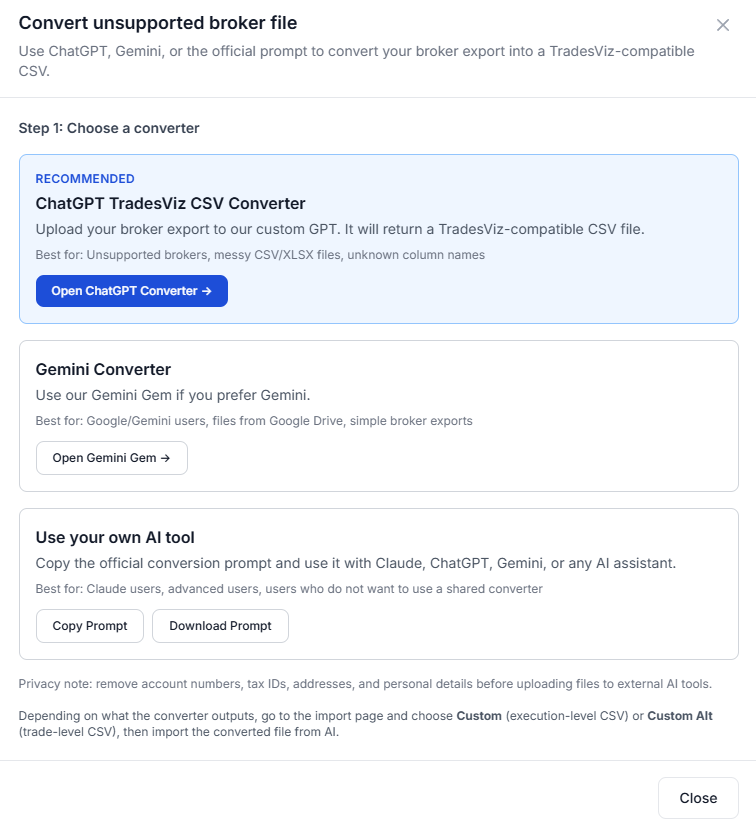
- AI-assisted file conversion: Traders with non-standard exports can launch a guided conversion workflow, use the official prompt with a supported third-party AI tool, review the converted CSV, and then import it through the Custom formats. Conversion happens outside TradesViz, so files should be reviewed and personal information removed first. See the safe workflow.
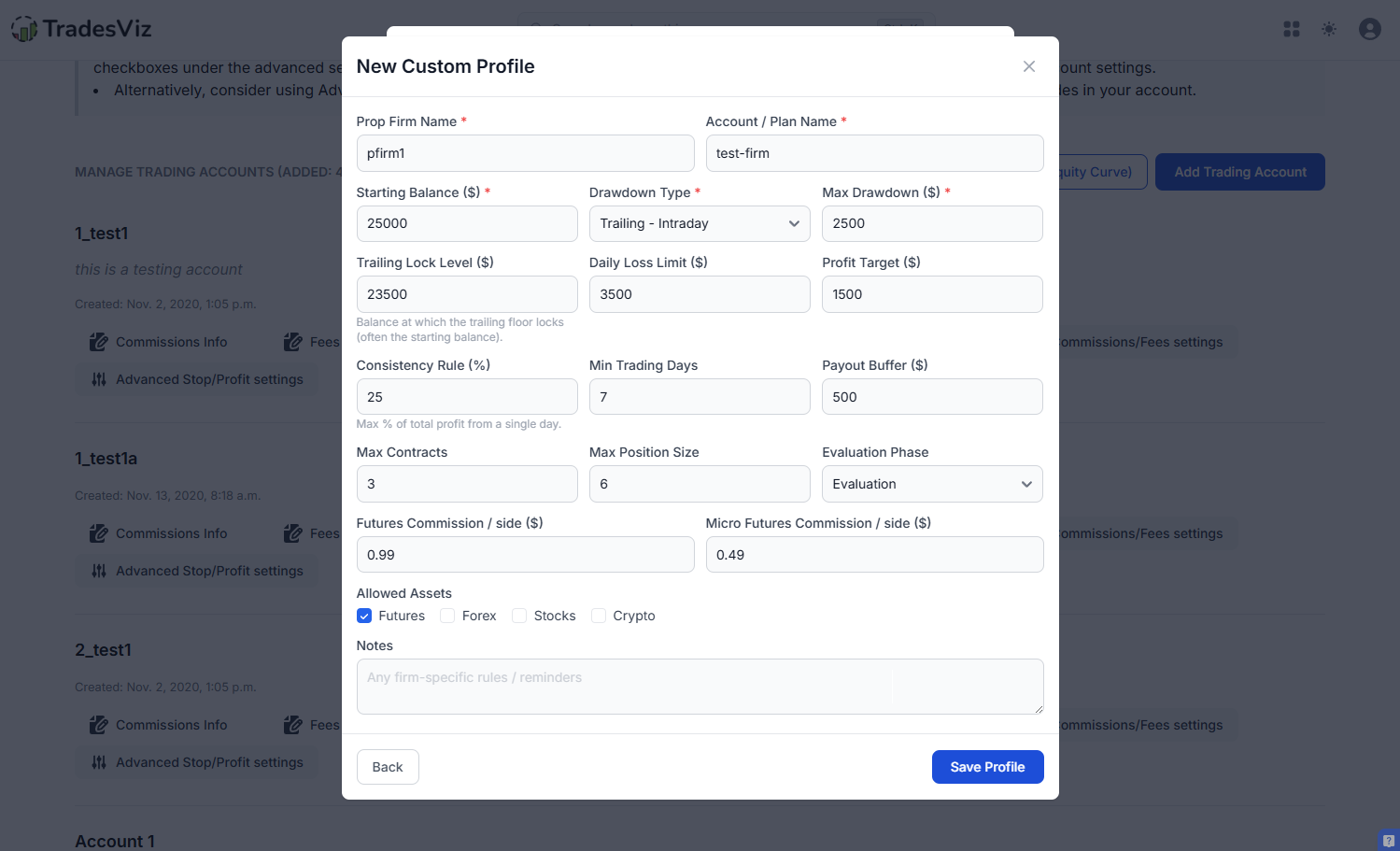
- Custom Prop Firm Profiles: Pro and Platinum traders can define reusable firm rules - starting balance, drawdown type, loss limits, targets, consistency, minimum days, position limits, phase, commissions, allowed assets, and notes - and use them across Compliance, retroactive evaluation, and Challenge Mode.
- Live Screener presets: The real-time screener gained ready-to-use strategy presets, making it easier to start with a coherent scan and then adjust it rather than building every rule from zero.
- TradingView visuals on more charts: Saved visual templates and custom TradingView indicators expanded across more chart surfaces. Simulator navigation also gained seek-to-bar, session shortcuts, and next-day controls.
- New broker and crypto coverage: June added or expanded support for Aster, Lighter, BitMEX, Bitfinex, Pepperstone, Geojit, Jainam, and The Funded Room.
 |
 |
July 2026: Plaid Sync, Exit Insights & Open-Position Risk
The Gist: July strengthened the entire investigation loop: get more data into the journal, understand the positions still open, study the company behind a stock, replay the session that produced a result, and determine whether your exit problem is giving back profit or leaving too early.
Key Upgrades:
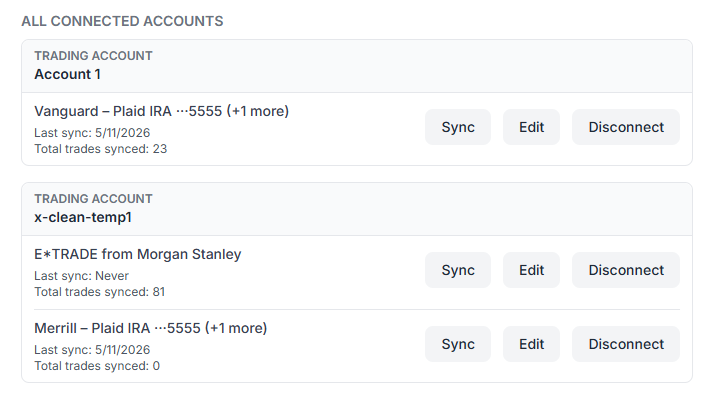
- Plaid investment-account sync launched: Eligible US brokerage and investment accounts can connect through a read-only Plaid flow. TradesViz can import investment buy/sell activity exposed by the institution, optionally recognize supported deposits and withdrawals, start from a selected date, sync incrementally, and use stable transaction IDs to prevent duplicates. TradesViz cannot place trades or move money. Institution coverage, history depth, and update timing vary, so this is periodic journal syncing - not real-time execution streaming. Plaid sync is available on Pro and Platinum. Read the Plaid guide.
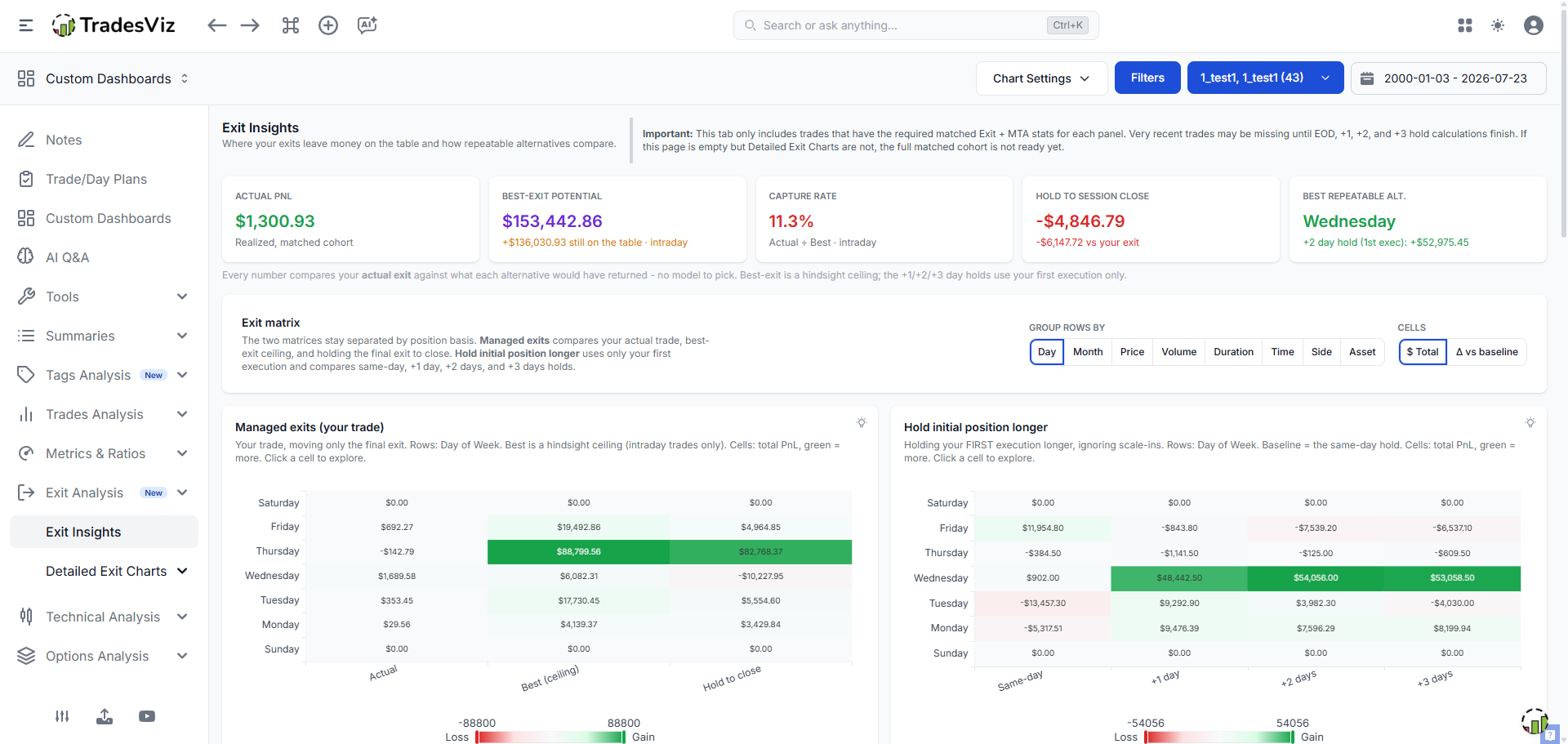
- Exit Insights launched: A five-number scorecard, two exit matrices, ranked leak analysis, reliability charts, and best-exit timing help separate two very different problems: open profit that was given back and positions that were cut before they had room to work. Click any matrix cell or ranked leak to inspect the exact trades behind it. Exit Insights is a Platinum feature. Explore Exit Insights.
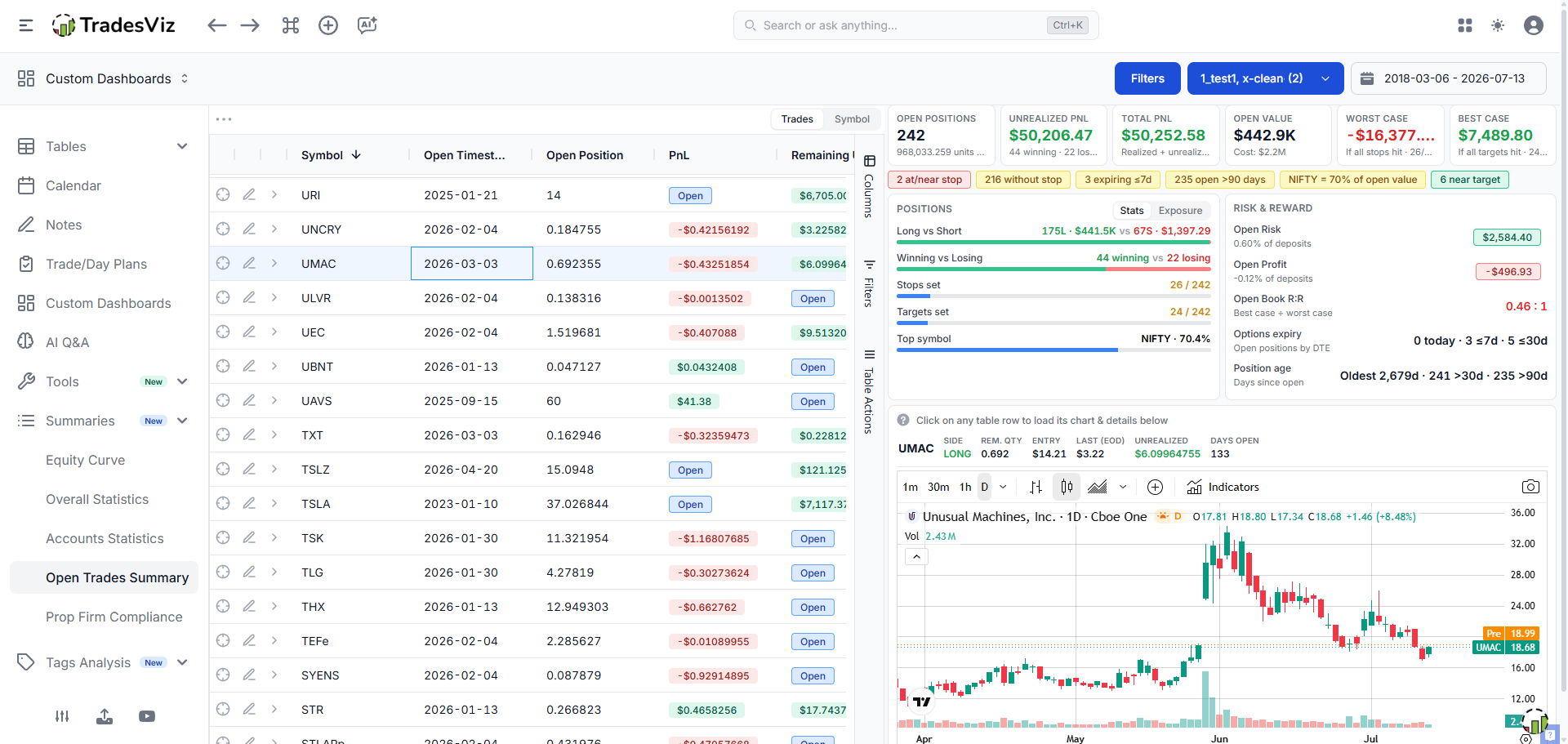
- Open Trades Summary rebuilt: Six KPI cards summarize open positions, unrealized PnL, total PnL, open value, worst case, and best case. Conditional alerts flag positions near a stop, missing a stop, approaching options expiry, open unusually long, or concentrated in one symbol. Exposure, risk/reward, stop/target coverage, allocation, row details, and a live chart now live in the same workspace. It is available on every plan. See the open-position workspace.
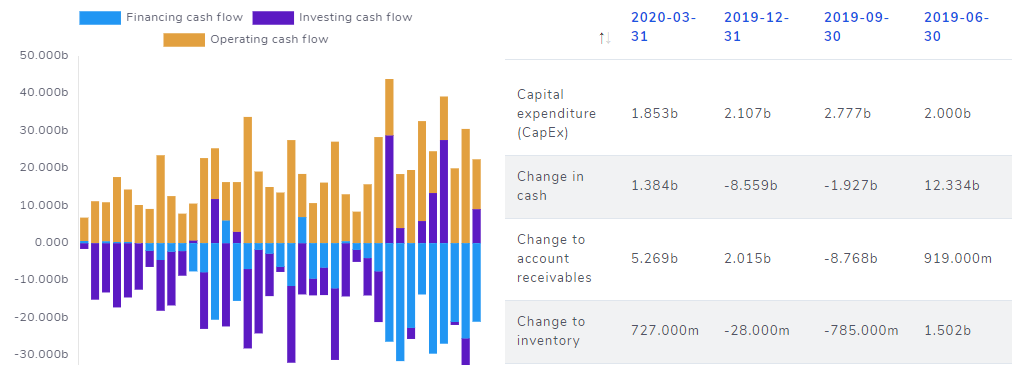
- Fundamentals rebuilt for every plan: Research earnings, estimates, financial trends, valuation, financial health, statements, ownership, insider activity, dividends, splits, price targets, and company details without leaving the journal workflow. Supported coverage includes US, Canadian, Indian, and Australian symbols. See the new Fundamentals page.
- Whole-day symbol replay: Day Explore can replay a symbol's complete chronological execution stream for the selected day - separate trades, scale-ins, and scale-outs together - instead of replaying only one selected trade. See session-level replay.
- New symbol allocation charts: Analyze traded volume, trade count, realized PnL, unrealized PnL, and open position value by symbol, with clearer allocation views across symbols, sectors, and industries.
- More resilient auto-sync: Retry/backoff, connection-state tracking, expanded logging, and a retry queue made transient broker/API problems less likely to require manual intervention.
- Faster editing and more connectivity: In-place trade editing reduced unnecessary page refreshes, mobile responsiveness improved, and support expanded for eToro and Colmex, while Plaid compatibility and institution handling continued to improve.
August 2026: Mobile V3, Options Backtesting & A New Options Flow Workflow
The Gist: August brought a major Mobile V3 release, rebuilt the options-practice stack, launched a cross-session Options Strategy Backtest, and transformed Options Flow from a query-first page into a guided discovery workflow that surfaces what deserves investigation.
Key Upgrades:
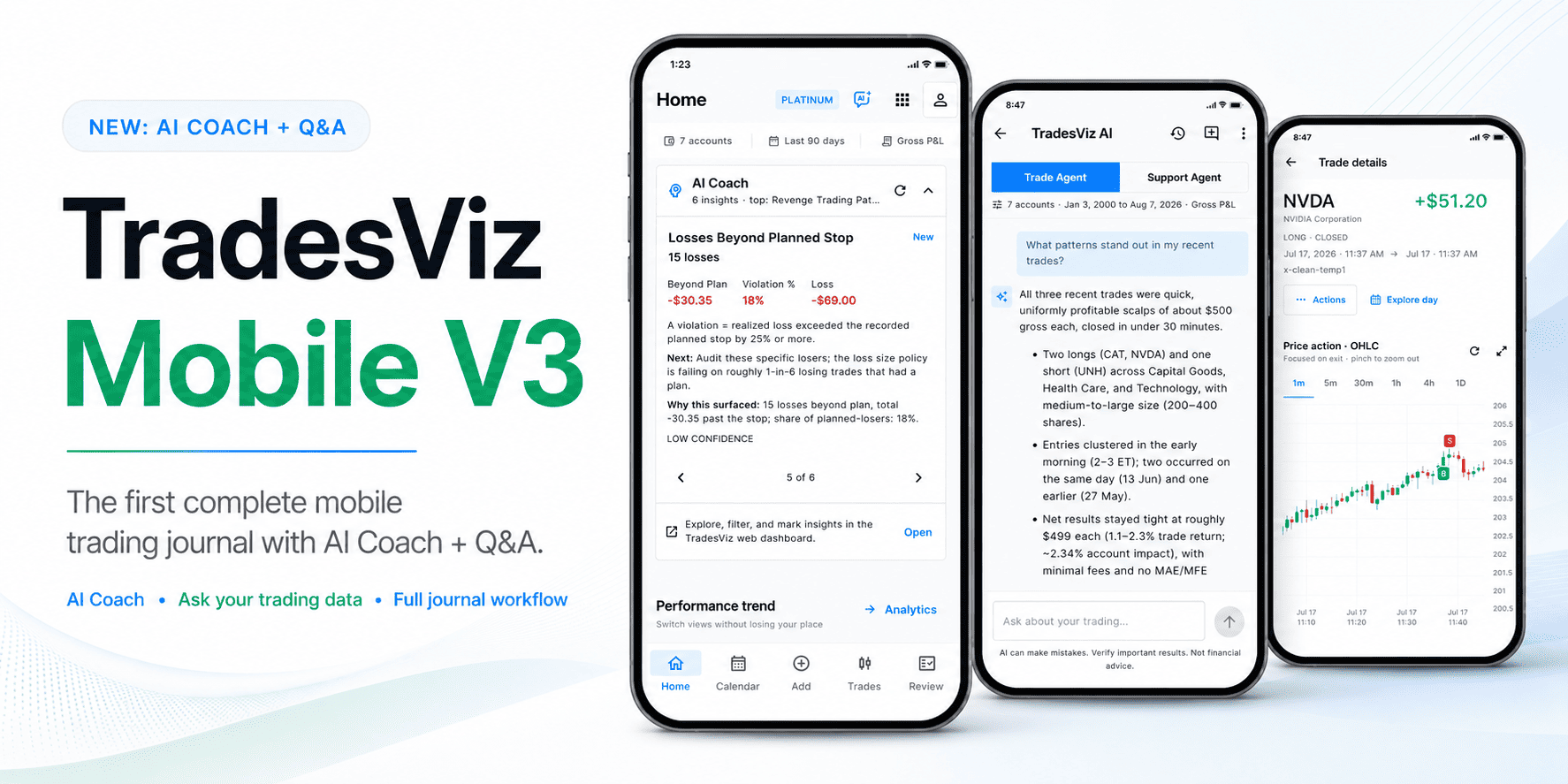
- TradesViz Mobile V3 launched on Android and iOS: Home analytics, global filters, a real monthly calendar, Day Review, searchable trades, native OHLC charts, execution editing, split/merge tools, notes, plans, screenshots, manual entry, broker-file import, connection management, chart-to-trade drilldowns, AI Coach, and scoped Trade/Support agents now form one connected mobile workflow. The app uses your existing account and subscription; there is no separate mobile plan. See everything in Mobile V3.
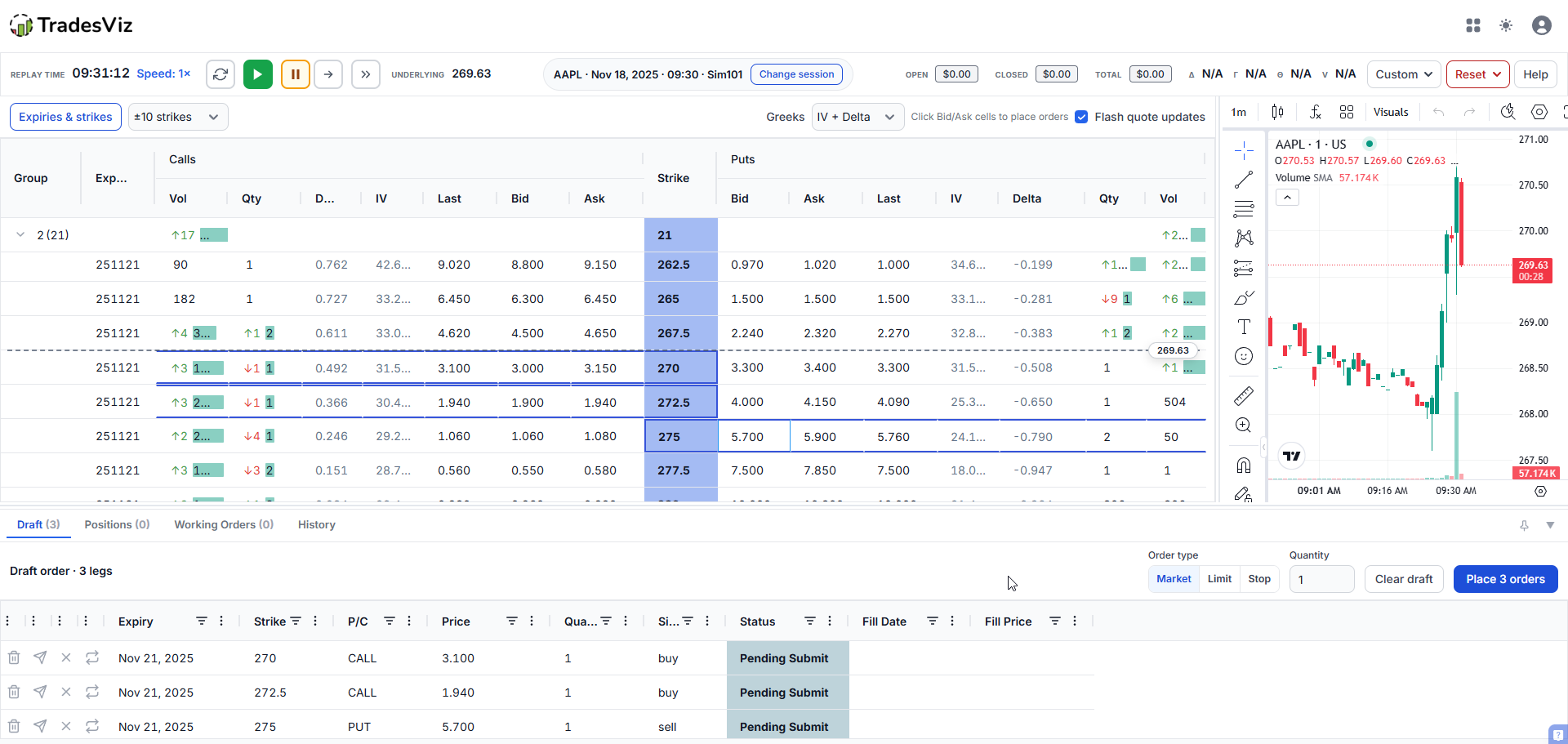
- Options Chain Simulator V2: Sessions load with one click and open ready but paused. The options chain and underlying chart remain side by side, while a persistent dock separates Drafts, Working Orders, Positions, and History. Orders can be edited, positions closed or flattened, and Balanced, Chain Focus, or Chart Focus layouts resized and saved. The Options Chain Simulator is a Platinum feature. Explore the redesigned Options Simulator.
- Live IV and Greeks during replay: The Options Simulator now recalculates implied volatility, delta, gamma, theta, and vega as historical replay advances. Choose IV + Delta, all Greeks, or a clean view; see net position Greeks in the header and optional per-position Greeks in the dock.
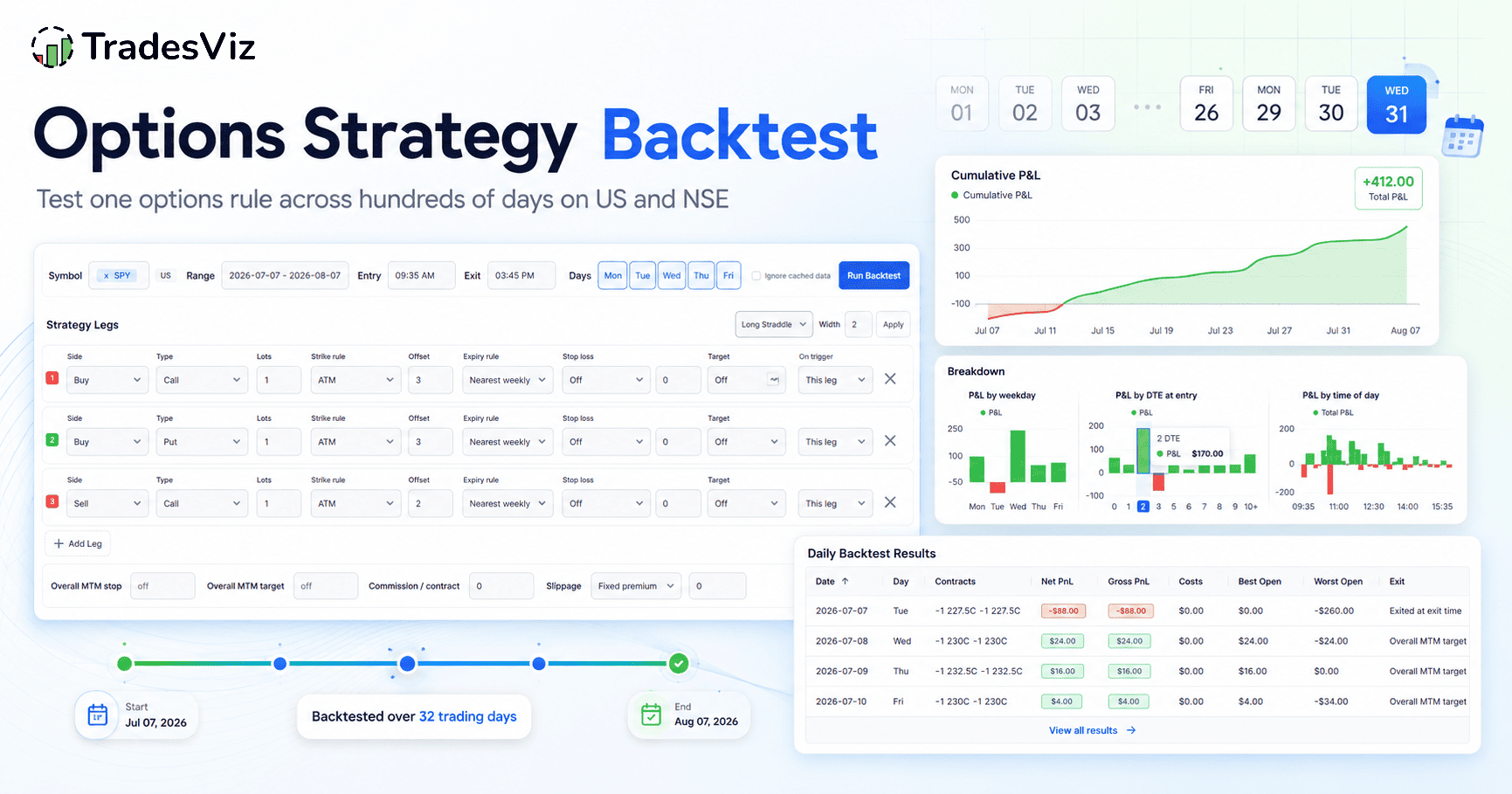
- Options Strategy Backtest launched: Run a multi-leg options rule across a historical date range for US or NSE options. Define entry/exit times, weekdays, relative strike and expiry rules, per-leg and whole-position stops/targets, commissions, and slippage; then review the equity curve, drawdown, expectancy, streaks, payoff, running PnL, breakdown charts, and every simulated day. Selected result days can also be added to a journal account for deeper review. This is a Platinum feature. Read the Options Strategy Backtest guide.
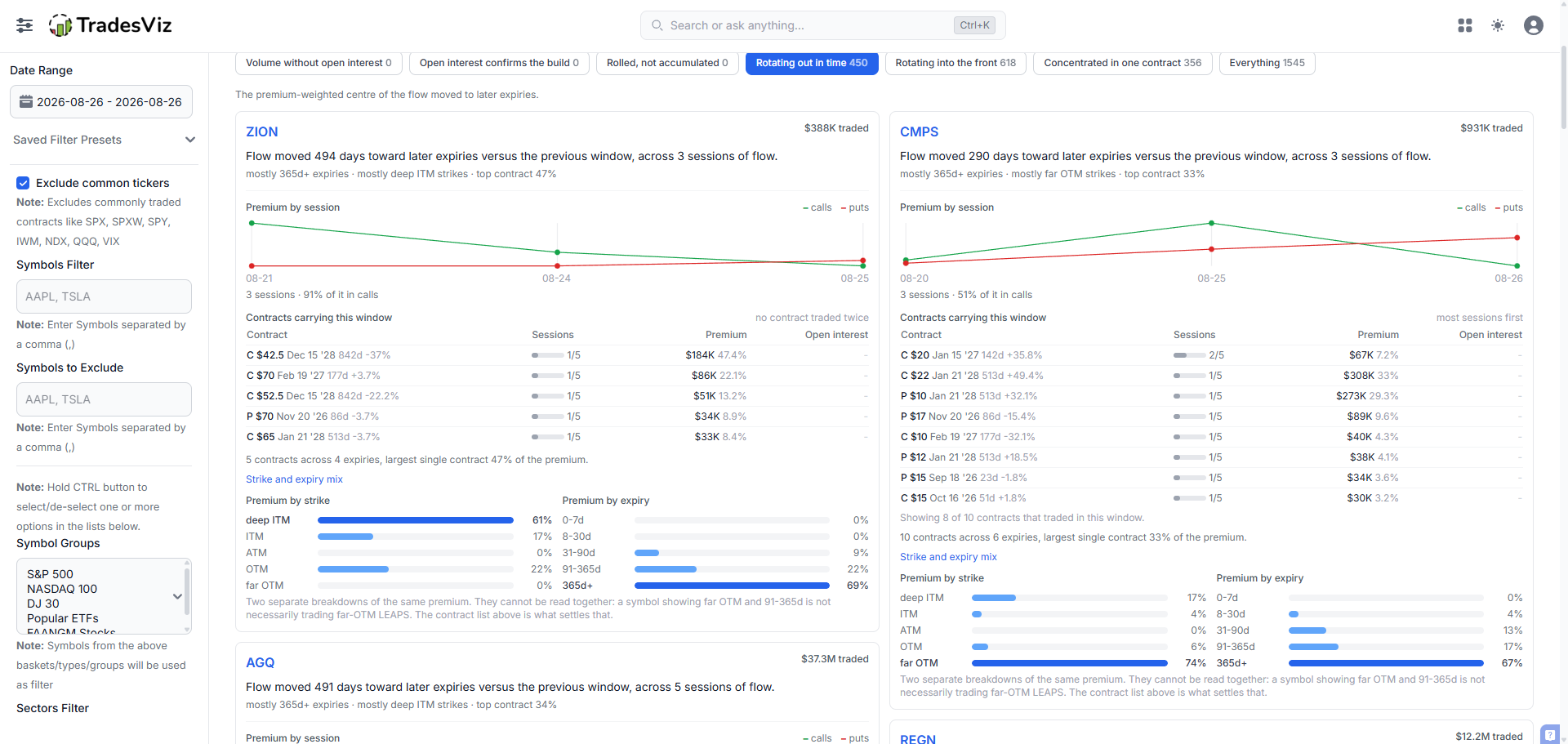
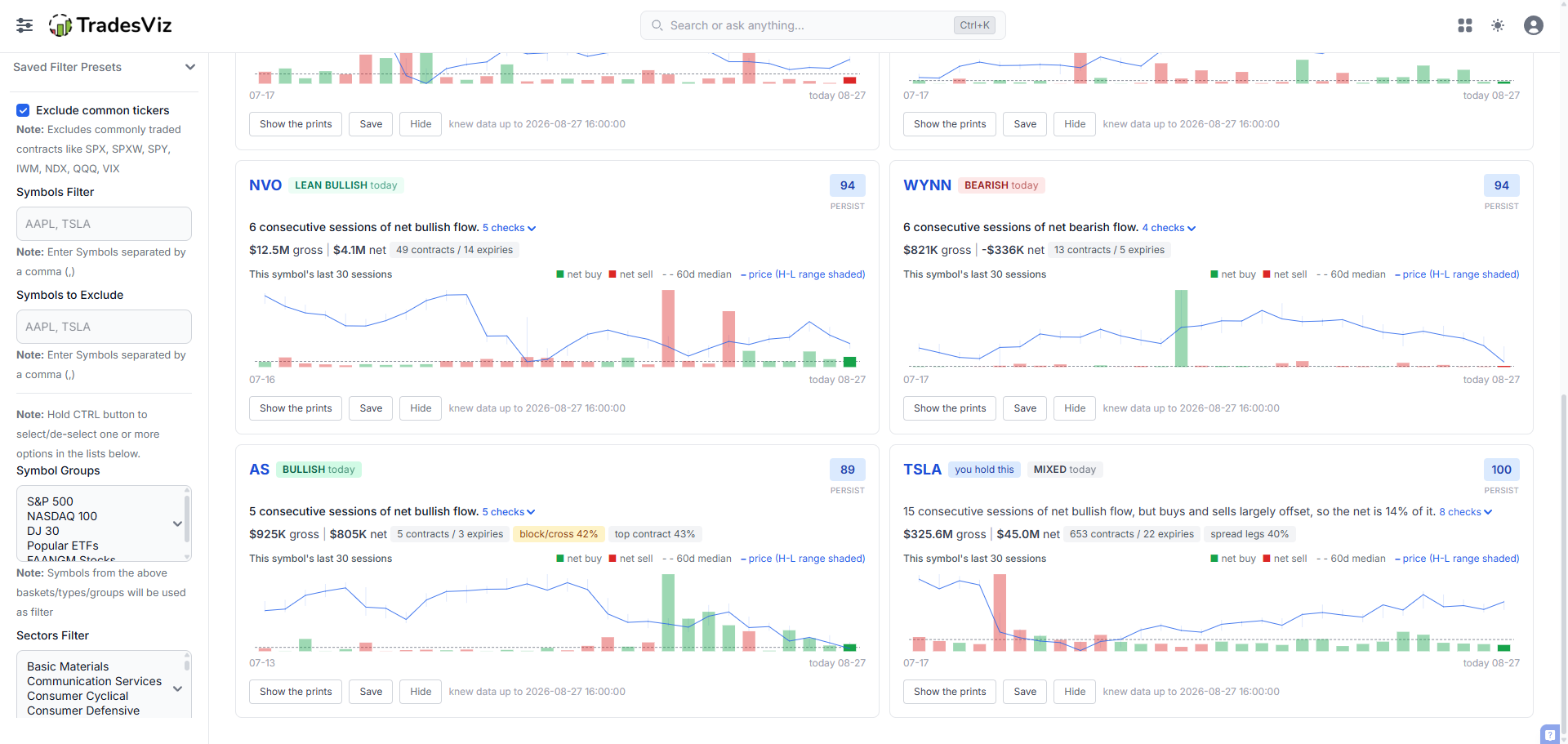
- Options Flow: Today, Footprint & Symbol Lab: The new Today view ranks unusual candidates against each symbol's own recent history instead of simply listing the day's biggest premium. It keeps unusualness, direction, persistence, and price/flow divergence separate, shows counterevidence beside the reason a candidate surfaced, and prioritizes symbols that overlap your own journal. Footprint puts multi-session flow, turnover, open-interest context, and detected rolls side by side, with coverage labels that make clear what the data can and cannot establish. Symbol Lab pulls the current signal, multi-session history, journal relevance, and underlying prints into one place. Candidates can be saved or copied into journal notes. Options Flow is a Platinum feature.
- Replay became a journaling workspace: Add notes and tags while replay is running, then keep refining the review without leaving the session. New Next Bar controls make step-by-step playback faster.
- Calendar display modes: The calendar can now display PnL, R-value, points, or ticks, with clearer behavior when global filters are active.
- Faster table work: New Last N Trades and PnL-per-quantity controls, split/merge actions in Day Explore, Expected R-value sorting/filtering, inline trade and execution editing, selection-aware summary totals, and clearer backend-delay messaging reduce the number of detours needed for routine cleanup.
- Options reliability work: Assignment/expiry handling, options cost-basis calculations, weekly contracts, and related reconciliation paths received a concentrated round of fixes.
- Broker and market coverage: August added or expanded work for Profit Mart, Westpac, Kraken Futures, and Thai stock charts, while IBKR, Schwab, cTrader, Trading 212, MT4/MT5, Gate.io, Robinhood, Bybit, and other connections received ongoing reliability fixes.
Broker Import Reliability: Schwab, thinkorswim, IBKR & More
The Gist: Broker exports and APIs change constantly. From April through August, we shipped targeted parser, grouping, validation, and sync improvements for Schwab, thinkorswim (ToS), Interactive Brokers (IBKR), Tradier, TradeStation, Questrade, cTrader, Tastytrade/Tastyworks, Tradovate, MT4/MT5, TradingView, and many other platforms.
What improved:
- Schwab: More reliable multi-account linking, multi-leg and partial-fill price handling, futures contract mapping, pagination, and assignment/expiry edge cases.
- thinkorswim: Better detection and warnings for empty or filtered exports, broader format handling, and continued assignment/expiry reconciliation work.
- IBKR: Stronger Flex Query validation, localized date parsing, retry/backoff for temporary errors, clearer Web Service guidance, duplicate-query protection, and better handling of timeouts and futures-options edge cases. Flex Query remains the preferred route for reliable historical automation.
- Across the importer: Import Doctor, earlier file/header validation, clearer date and open-position warnings, improved duplicate/grouping logic, better multiplier and commission handling, and more resilient auto-sync state and retry behavior.
If older imported data still looks wrong: Importer fixes are applied while data is being parsed; they do not always rewrite trades already in the account. Simply uploading the same file over the existing data usually will not refresh those rows because de-duplication intentionally skips matching executions.
- Test first: Import the original, untouched broker file into a new empty trading account with the same account and import settings. Compare the affected symbols, dates, quantities, prices, grouping, and PnL.
- Remove only the affected import when possible: Go to Import/Export > Manage/Export Data, select the trading account, delete that import, and then re-import complete history oldest-to-newest. If an opening execution was missing, re-export from before that position was opened.
- Use Clear trades only for an intentional full rebuild: Download or export anything you need first, review or pause auto-sync, confirm its Sync From date, clear the trading account, and then re-import the complete source history.
Important: Deleting an import removes the executions and trades created from that file. If a trade becomes empty, its trade-level notes, tags, images, targets, charts, plan links, and manual edits can also be lost. Clear trades is broader: it permanently removes all imports, trades, executions, and trade-level work from that trading account. Any issue already covered by the current parser should be resolved by a clean import with complete source history and the correct settings; incomplete exports or new broker-format changes still need investigation.
Still not right? Use live chat or email [email protected] with:
- Your TradesViz trading-account name, broker/platform, and exact importer or connection used.
- The original untouched export or downloaded raw auto-sync file, plus the import file ID or connection ID if available.
- The import/sync timestamp, timezone, date range, and one to three exact affected symbols or contracts.
- What you expected versus what TradesViz shows for price, quantity, time, grouping, positions, or PnL, with screenshots where possible.
- Relevant settings such as FIFO/LIFO, spread grouping, expiry handling, commissions, and Sync From date.
Please never send passwords, OAuth codes, API secrets, or IBKR tokens. A complete report gives us what we need to reproduce the issue and usually turn around a broker-format fix within a few days instead of guessing through multiple support messages.
For the complete workflows, see the Import Complete Guide and Import Troubleshooting Guide.
What Should You Try First?
- If an existing import looks wrong: Follow the clean re-import checklist above. For a new connection or unsupported file, start with Plaid or AI-assisted file conversion.
- If you do not know what to fix: Run AI Coach Trading Review.
- If current risk is the problem: Open Open Trades Summary.
- If exits are the problem: Compare your behavior in Exit Insights.
- If you need deliberate practice: Load the Options Simulator, Options Strategy Backtest, or whole-day replay.
- If you are away from the desk: Update to Mobile V3 and complete the same daily review loop from your phone.
Thank you to everyone who sent a broker file, reported an edge case, explained a confusing workflow, or told us exactly where an analysis stopped being useful. A large share of the work above started with that kind of specific feedback.
We will keep shipping - and keep showing the work. You can browse every previous update in the TradesViz changelog archive.
Questions, feedback, or feature requests? Use live chat or email [email protected]. We read everything.