The features get the headlines. The small stuff is what you actually use every day.
Our last changelog covered the big launches of the year so far - the Real-Time Stock Screener, Custom TradingView Indicators, Prop Firm Compliance Center, DAS Trader Pro auto-sync, Seasonality revamp, and more. But while we were shipping those, we were also quietly fixing a hundred smaller frustrations - the kind of paper cuts that wear you down even when the headline features work fine.
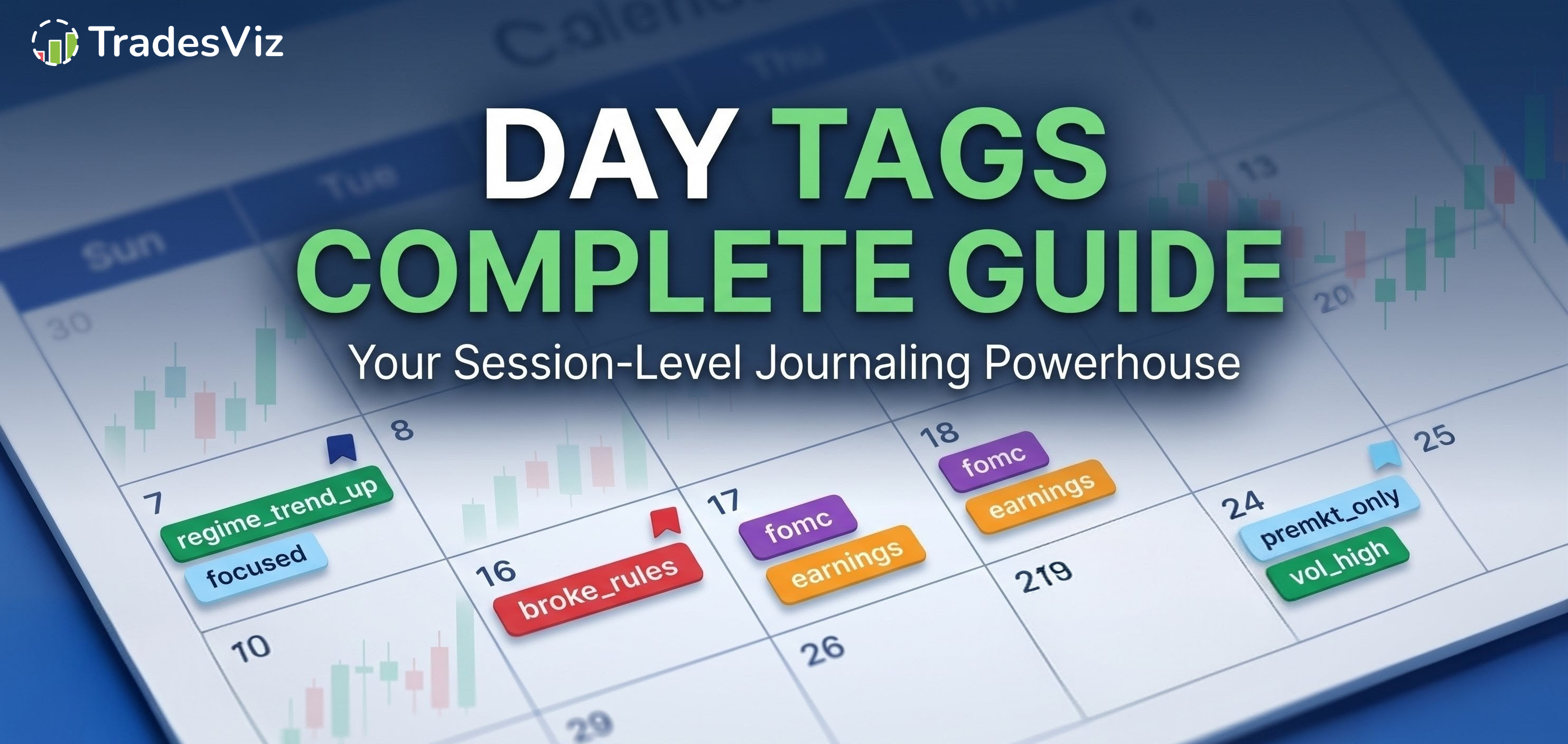
This is the "quality of life" changelog for April and May 2026. No big launch announcements. No feature campaigns. Just the dozens of small improvements, smarter defaults, cleaner UI choices, better error messages, and undocumented upgrades that make TradesViz easier to live in - especially if you log in every single day.
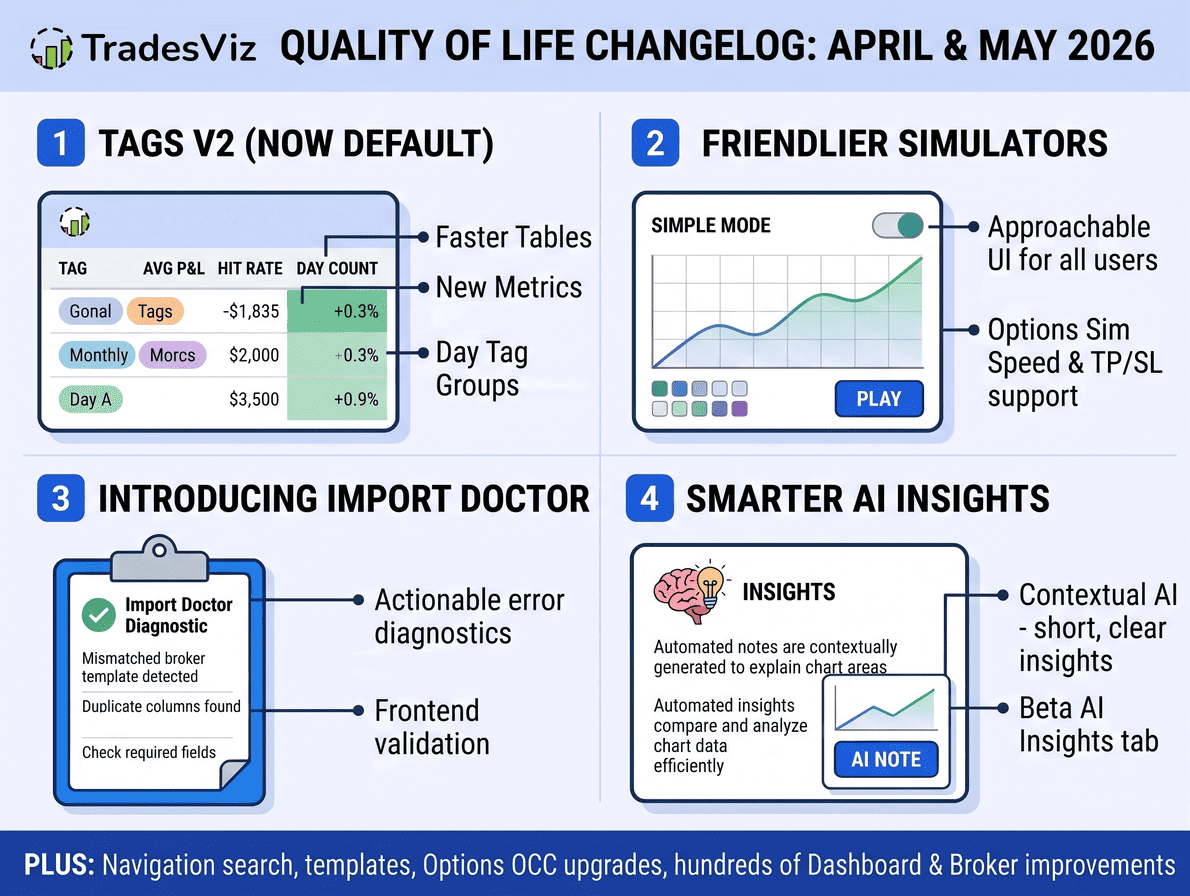
Tags v2 Is Now The Default
The big shift this quarter that didn't get its own marketing post: we finished migrating everyone off the old v1 tag interface and launched Tags v2 as the default across all tag tabs - day tags and trade tags alike.
What this means in practice:
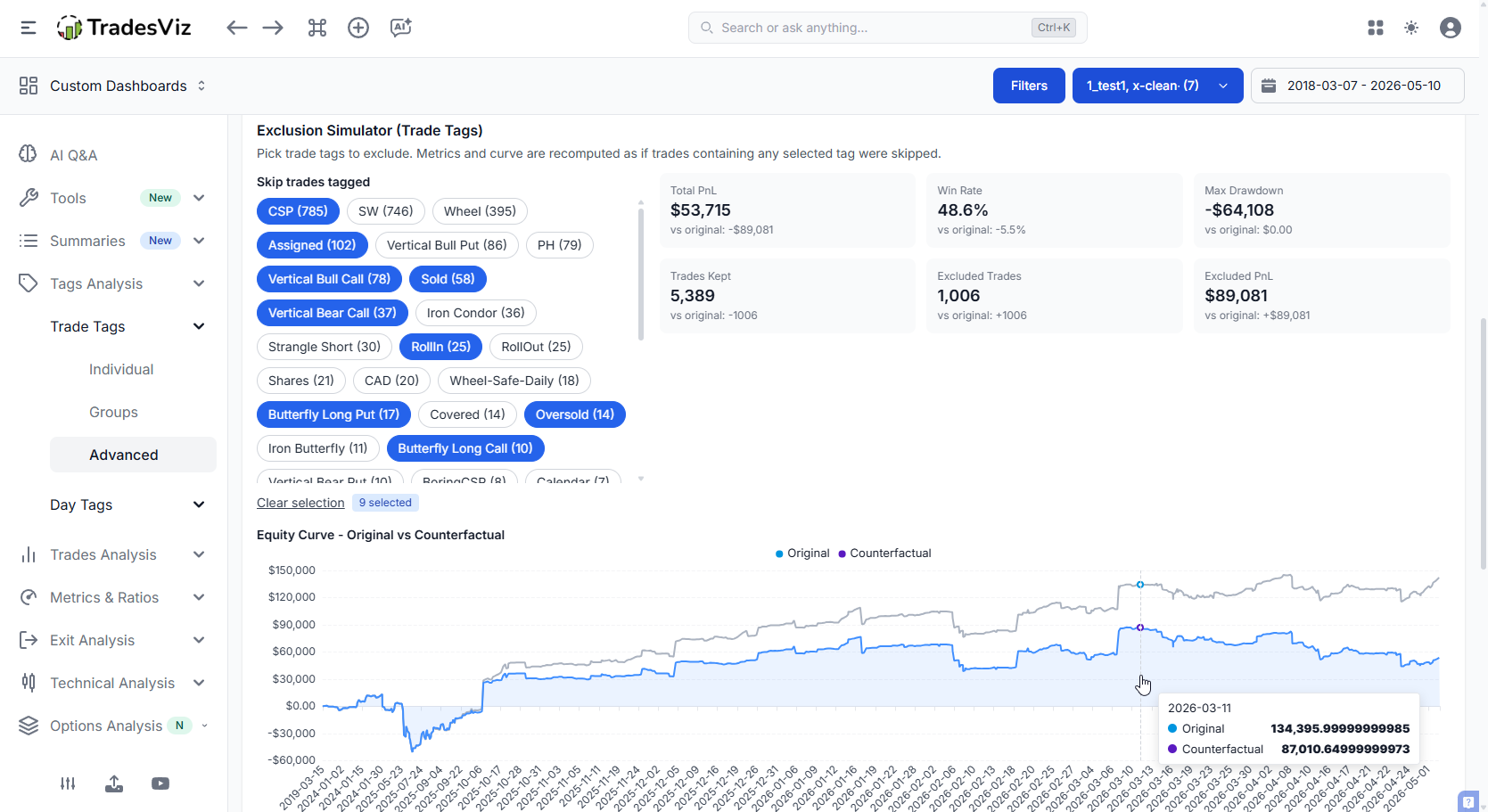
- Faster, more useful tag tables - the v2 tables surface more metrics per tag (avg PnL, hit rate, expectancy, day count, trade count) and load noticeably faster than the legacy v1 grids.
- Tag Groups for day tags - you can now build day tag groups (e.g., "High-Volatility Days", "FOMC Days", "Pre-Market Gappers") and analyze them as one cohort. New summary cards and group-level charts are built right in.
- Day tags inside Pivot Grids - day tags are now first-class columns in pivot grids. Slice your PnL by "Days I journaled vs. days I didn't" or any day-level label in two clicks.
- Group charts inside Day and Trade Groups tabs - the tag group view now includes the same chart set as your trade tabs, so you can compare group performance visually rather than scrolling tables.
- Tag insights - automatically surfaced observations about how each tag performs against your baseline - profitable tags, low-frequency edges, draggers on your win rate.
- Wildcard removal - when you delete or rename a tag from account settings, you can now wildcard-match similar tag names (e.g., delete every tag starting with
old_) instead of cleaning them up one by one. - Cleaner remove/rename UX on selection - we clarified the behavior when you remove or rename tags while a selection is active so you don't accidentally nuke a global tag when you only meant to untag a few trades.
- Tag support for MT4 imports - MT4 trades can now carry tags through import the same way MT5 trades have for months.
If you were on the fence about tags, this is the version that's designed for daily use. Most of the small-team beta feedback we got was rolled directly into this release.
The Trading Simulator Is Now Friendlier
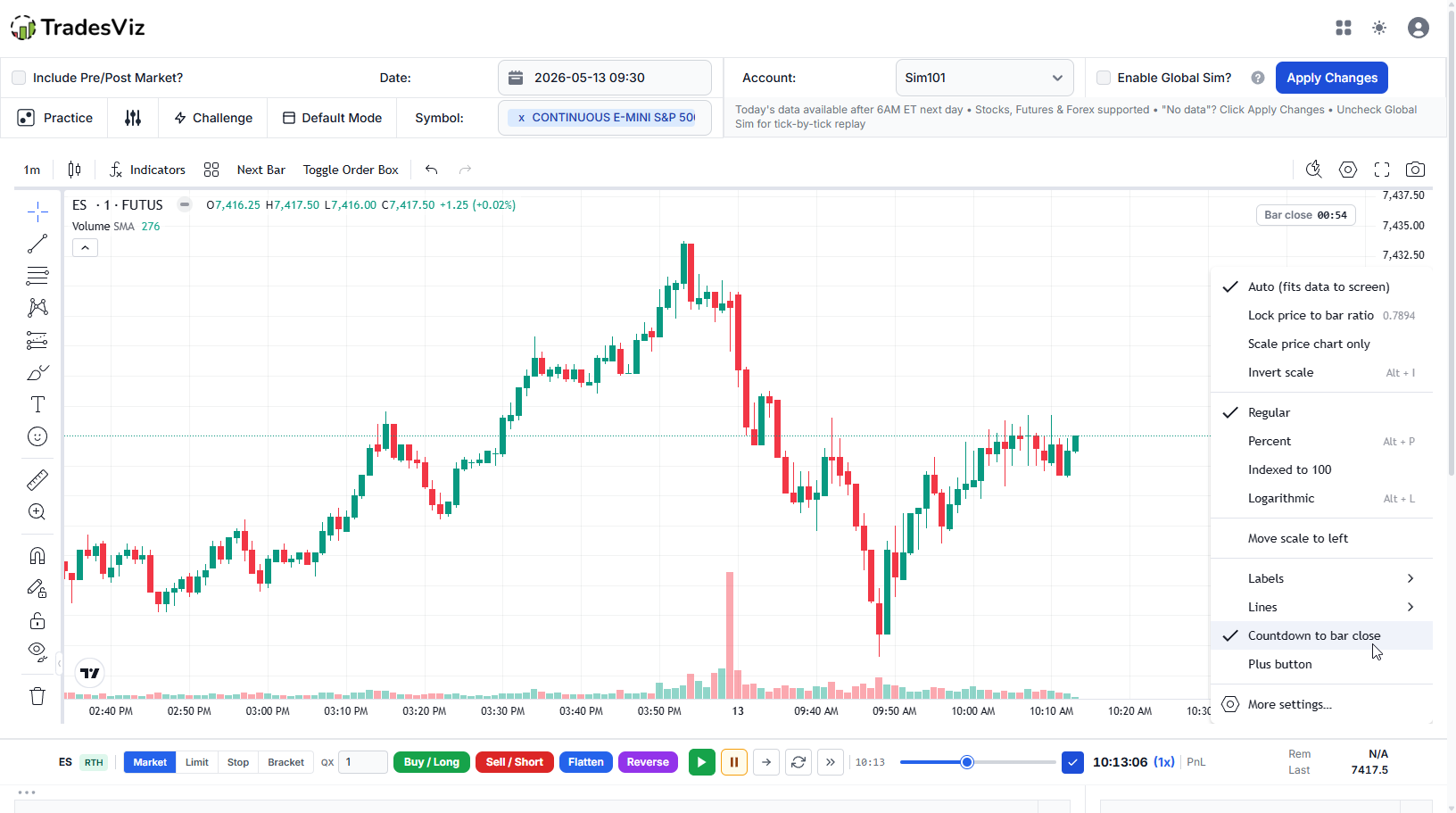
The full-power simulator isn't going anywhere - but a lot of users were getting overwhelmed by every control being visible at once. So we built a Simple Mode that hides advanced controls behind a toggle and pre-fills the most common settings.
- Simulator Simple Mode - one toggle hides advanced order types, position sizing tools, and configuration panels. New users see a chart, a buy/sell button, and a P&L readout. The advanced view is one click away.
- Cleaner Simple Mode for Options Sim - same treatment applied to the options simulator. CSS, layout, and copy were all tightened so first-time options sim users aren't staring at a wall of Greeks.
- Faster Options Simulator - rendering and calculation pipeline optimizations across the board. Loading large multi-leg strategies is noticeably snappier.
- Replay mode no longer records trades (optional) - if you just want to scroll through history without polluting your journal, replay mode now has an explicit "don't save" toggle.
- TP/SL Simulator: now with options support - the TP/SL backtest sim now supports options strategies in addition to stocks/futures, with progress updates as it runs. The maximum trade count was bumped from the old cap to 100 trades.
- Target Simulator - also bumped to 100 trades max so you can run more substantial what-if exercises.
- Better seek/scrub controls - jumping around in time-based simulators is smoother and more responsive.
- Challenge Mode bug fixes - the prop firm challenge simulator had a few edge cases (timezones, rounding, day boundaries) that we cleaned up.
- New keyboard shortcuts - more hotkeys added to the main trading simulator for faster manual replay.
- Options sim rounding fix - small but annoying precision bug in the options sim P&L calc - resolved.
Imports: Less Guessing, Better Errors, Less Friction
Import is the most-used surface on TradesViz, and almost every other QoL ticket touches it. Here's what changed in April and May:
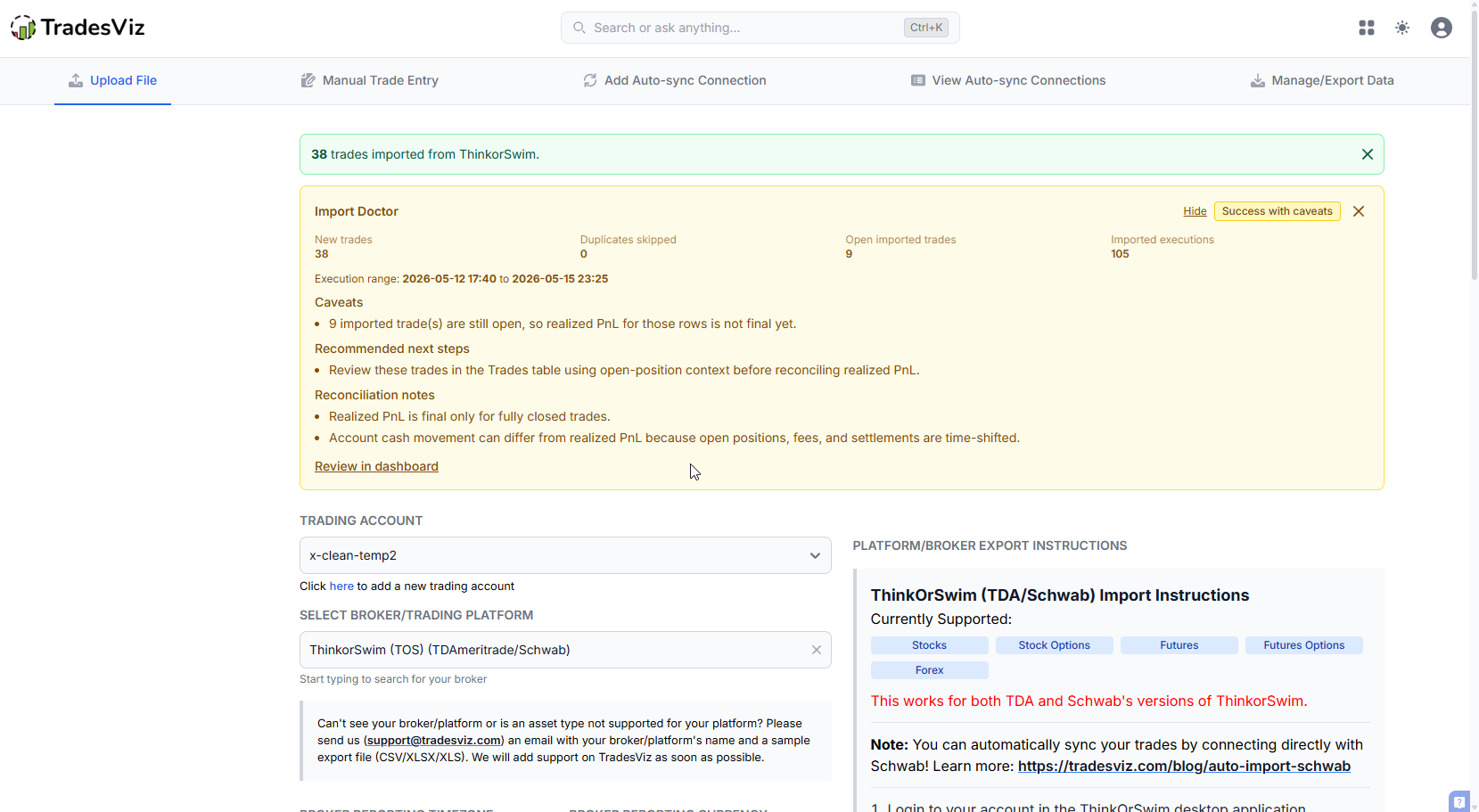
- Import Doctor - a new tool that runs diagnostics on a failed or partial import and tells you why it didn't work in plain English (duplicate columns, missing required fields, mismatched broker template, etc.) instead of just saying "import failed".
- Import Assistance / Walkthrough - more inline guidance on the import page itself, including a clearer dropdown, smarter ordering, and improved search so traders find their broker faster.
- Better import error detection (frontend) - lots of error cases that used to require the import to run end-to-end before failing now get caught immediately in the browser, with actionable error messages.
- Custom TradesViz CSV - frontend validator - if you use our generic / custom CSV template, the frontend now validates the headers and data shape before upload. Same for cTrader CSVs.
- Strict header validation - several brokers had loose header matching that occasionally let bad files through. We tightened the validation across the board.
- Empty files no longer count as "failed" for auto-sync - quiet trading days no longer trigger false failure notifications. An empty pull is now logged as a successful no-op.
- Auto-sync error handling - redirect to support - persistent auto-sync errors now route the user to a dedicated support flow with the diagnostic info pre-filled, instead of dumping a cryptic stack trace.
- Auto-sync warning UI - clearer warnings when a connection is partially broken or rate-limited, including in the cancel flow if a user tries to cancel due to a sync issue.
- Sync from date for DAS Trader Pro - you can now pull historical data starting from a specific date.
- Sample trades - delete button on the same page - the "add sample trades" flow now has a matching "delete sample trades" button right next to it.
- Edit Connection: account ID now editable - if you mistyped or need to repoint a connection to a different sub-account, you no longer have to delete and recreate it.
- Date format guard - alt date-format detection during import is more robust; fewer manual date-format selections needed.
- Onboarding guide on the import page - first-time importers get a structured walkthrough explaining the import flow before they upload anything.
- Import error modal cleanup - more readable, less wall-of-text.
- Auto-sync cooldown for free users - free-tier accounts are now limited to one auto-sync per 30 minutes (with a cooldown-reset path), which actually improves reliability since runaway sync loops no longer hammer broker APIs and get connections temporarily blocked.
Navigation: Search Everywhere, Faster
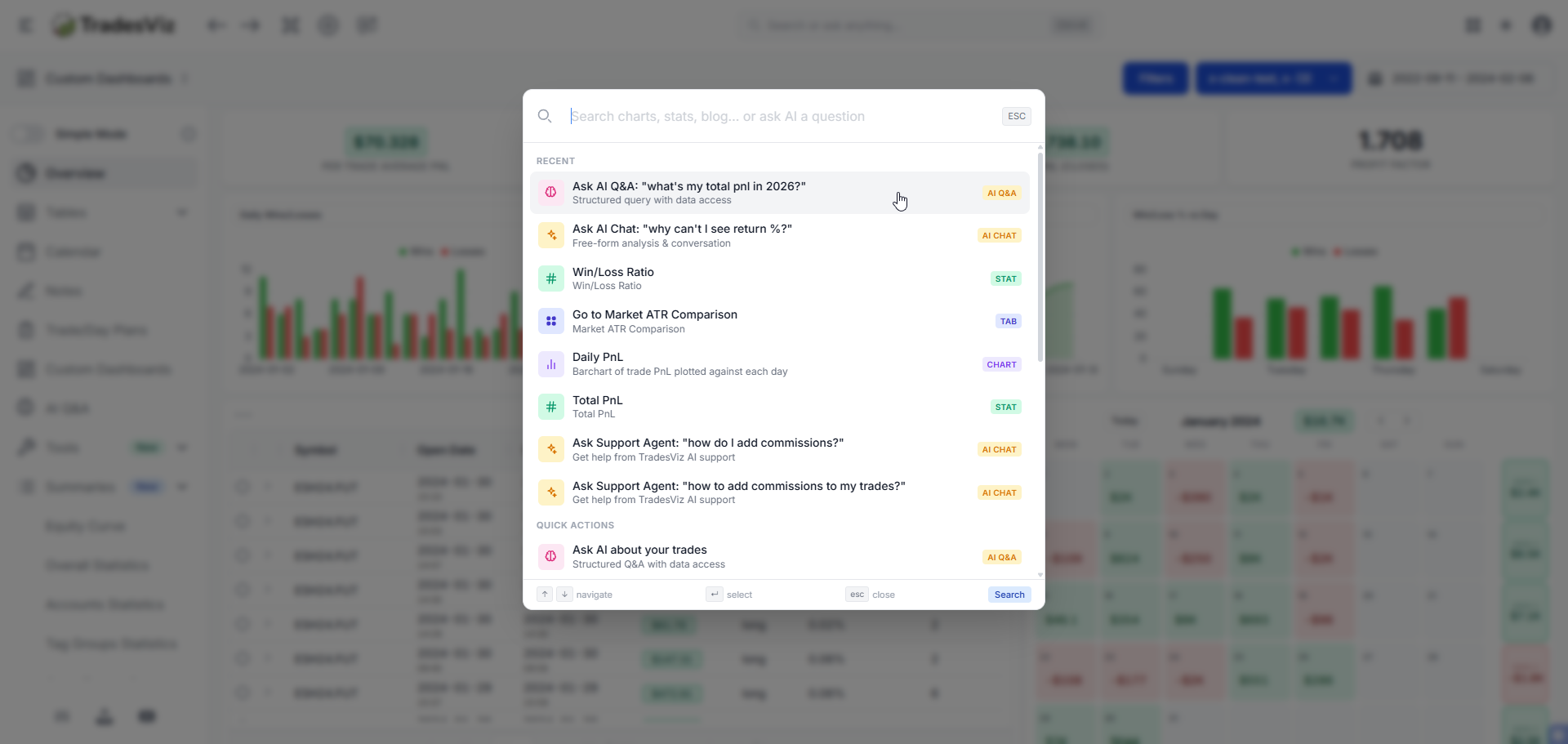
We've been steadily turning TradesViz into a keyboard-first product. April and May added more search surfaces.
- Sidebar Search - the left sidebar now has a search bar of its own. Type a few characters and jump straight to any tab, tool, or settings page without scrolling the nav.
- Search in Prop Firm Selectors - the prop firm picker (used in the compliance center, profiles, retention flows) now has type-ahead search. With 50+ prop firm profiles in the system, this matters.
- Strategy / Symbol Switcher in Open Trades Summary - flip between strategy-grouped and symbol-grouped views of your open positions with one toggle. Same switcher now exists in the Options Command Center.
- Sidebar UI cleanup - we re-tuned the sidebar typography, spacing, and contrast to be easier on the eyes during long sessions. Subtle but you'll notice it within a day.
- Command Search Center additions - the Ctrl+K palette continues to gain entries; everything new this quarter is wired into it.
Notes & Plan Templates
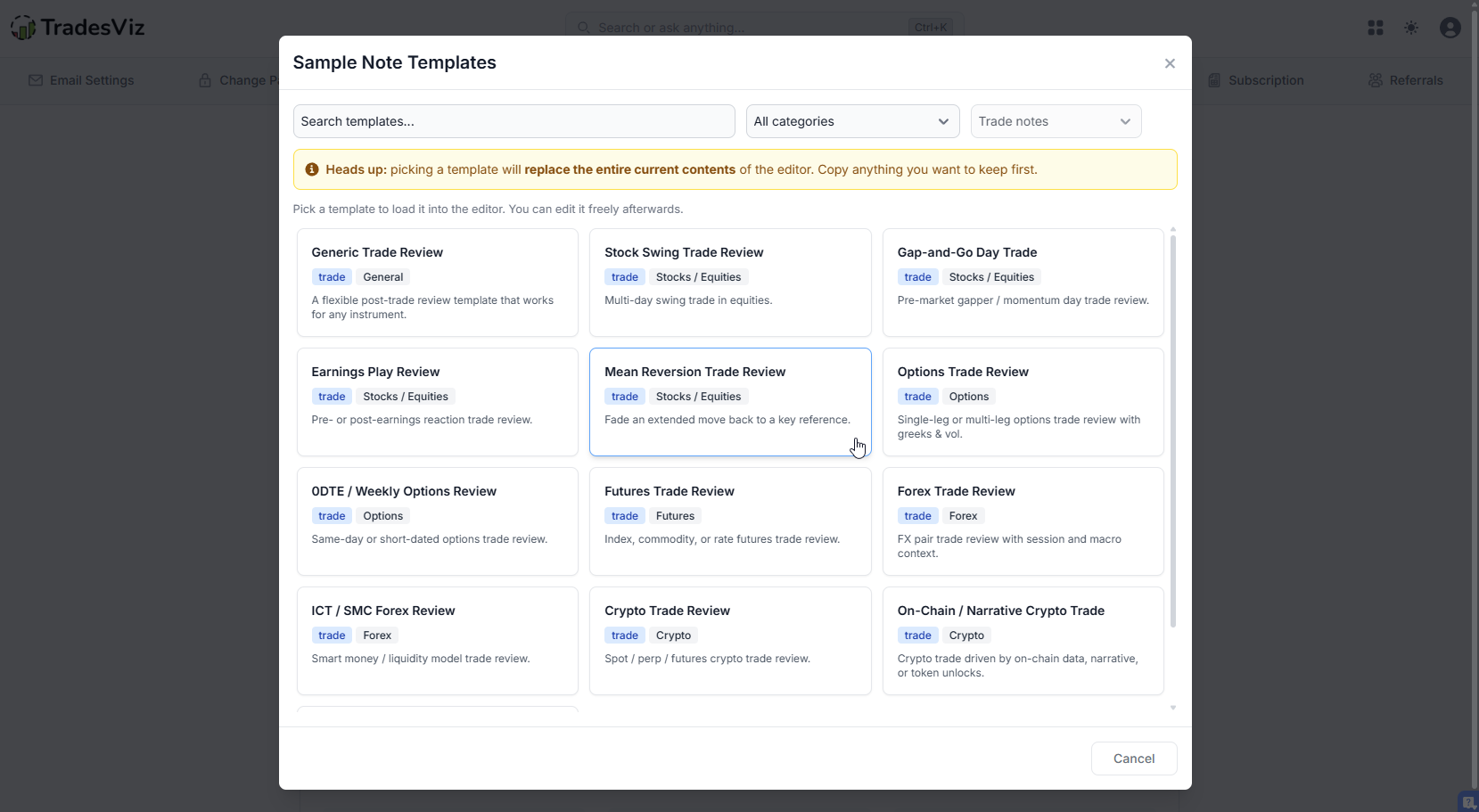
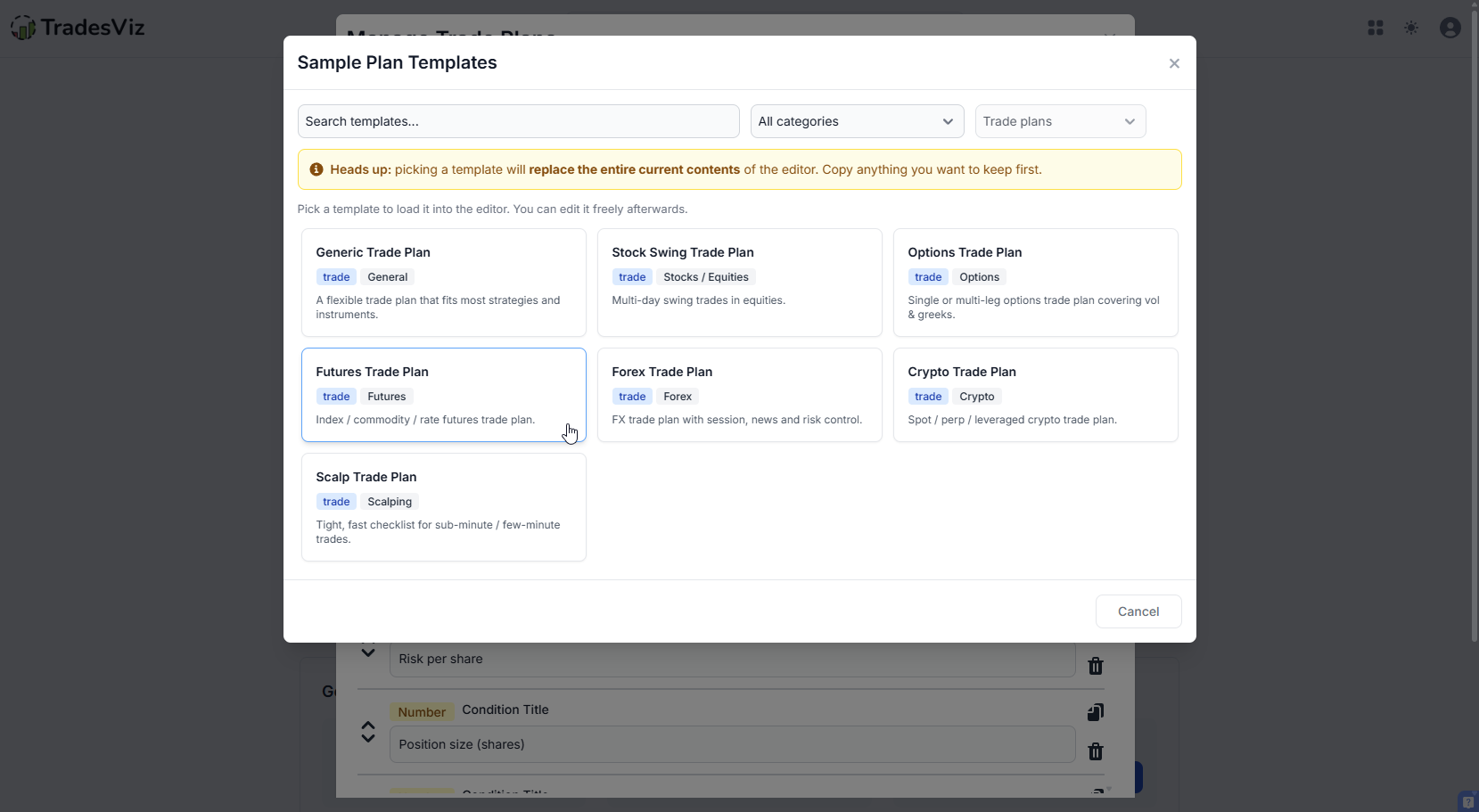
If you journal in any kind of structured way, you've probably copy-pasted the same template into your notes a hundred times. Not anymore.
- Note Templates Popup - save reusable note templates (post-trade review, end-of-day journal, mistake checklist, setup recap) and apply them with one click when adding a note.
- Trade Plan Templates - same idea for trade plans. Build a starter plan once - entry conditions, exit logic, risk parameters - and reuse it across setups.
- Summernote bullet fix - the bullet list behavior in the rich text editor was misbehaving for a small set of users. Fixed.
 |
 |
Options Command Center Keeps Getting Better
The most-used options feature of 2026 got another round of upgrades:
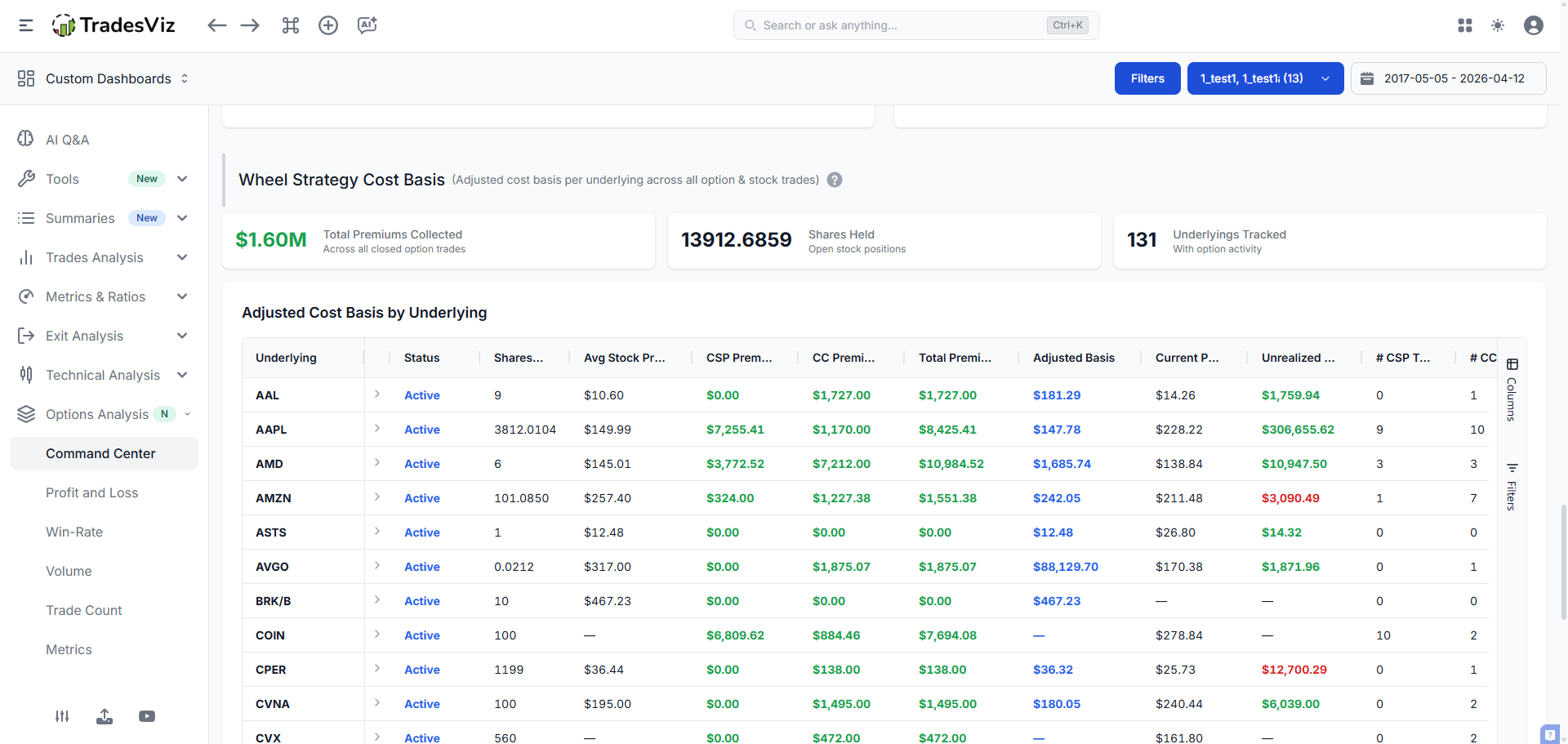
- CSP Cost Basis visibility - cash-secured put and wheel-strategy users can now see the cost basis of all positions directly in the command center. No mental math, no spreadsheet.
- Premium Collected chart - a new chart visualizing total premium collected over time. Wheel and credit-spread sellers, this one is for you.
- Strategy / Symbol switcher (same as Open Trades Summary - see above).
- Greeks update logic (uses latest) - the Greeks shown in the command center now use the most recently available data point rather than a stale snapshot, giving you more accurate current-state assessments.
- Options Side-based switch - flip between call-side and put-side aggregated views.
- Weekly options Athena ID fix - weekly options were occasionally being grouped wrong in historical pulls. Fixed.
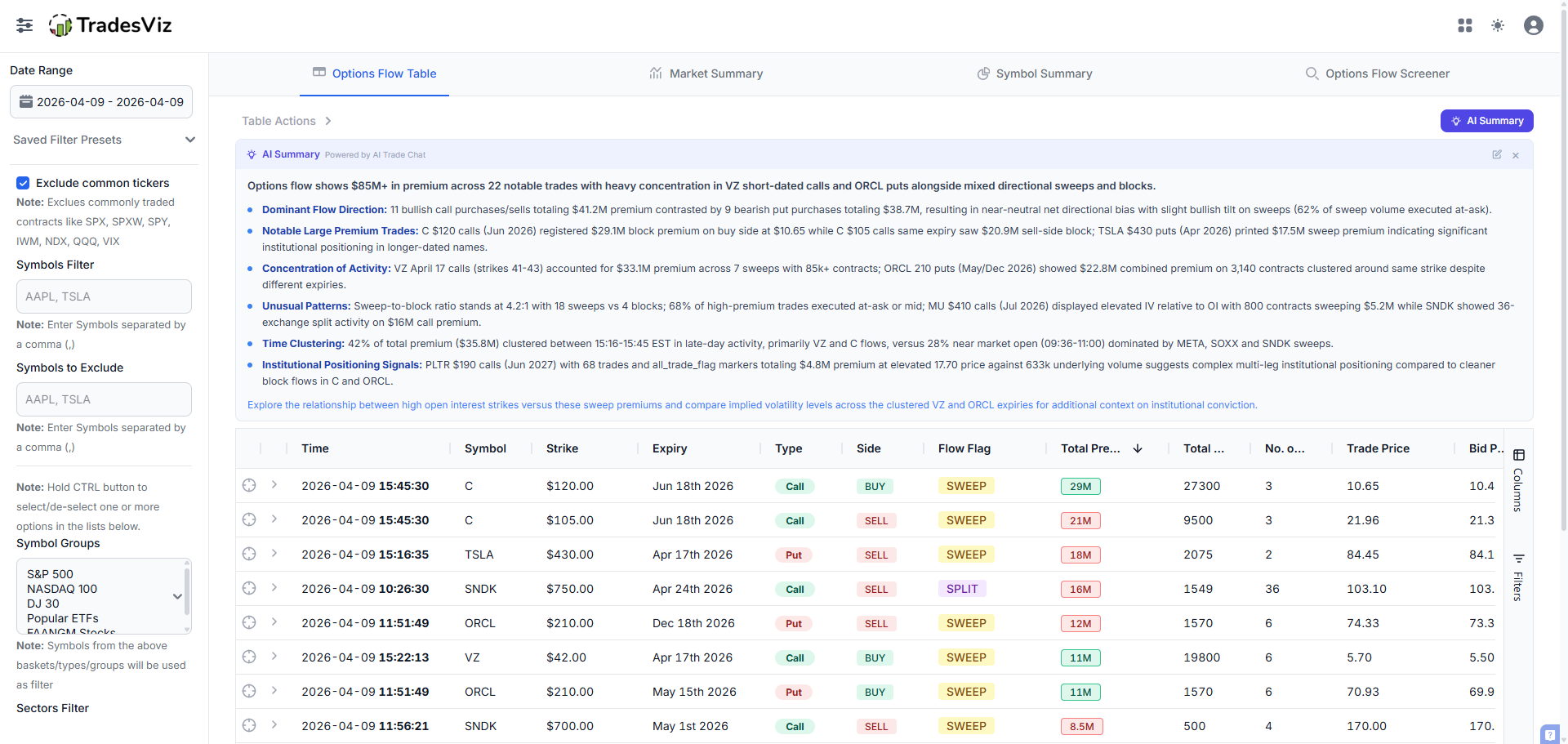
- Options Flow optimization - faster loaders, paginated rendering, optimized data fetches.
- AI Summary for Options Flow - one-click natural-language summary of unusual options activity, directly on the flow page.
- Options Backtester upgrade - now includes a running PnL chart and proper stock leg support (so covered calls / collars / synthetic positions backtest correctly).
- ITM Expiry addition page polish - cleaner UI for adding ITM expiry executions.
- Mid price for options in trade tables (continued from earlier in the year).
- Options chart - show non-RTH data - extended-hours options ticks are now plotted properly.
- Options payoff chart fix - rendering bug for multi-leg payoffs squashed.
AI: Everywhere, But Smarter
We didn't launch a new AI product this quarter, but the existing AI surfaces got materially better:
- AI Note buttons on all charts - every chart in TradesViz now has an "AI Note" button that generates a contextual, natural-language explanation of what you're looking at. Useful when you want a quick sanity check or a starting point for a journal entry.
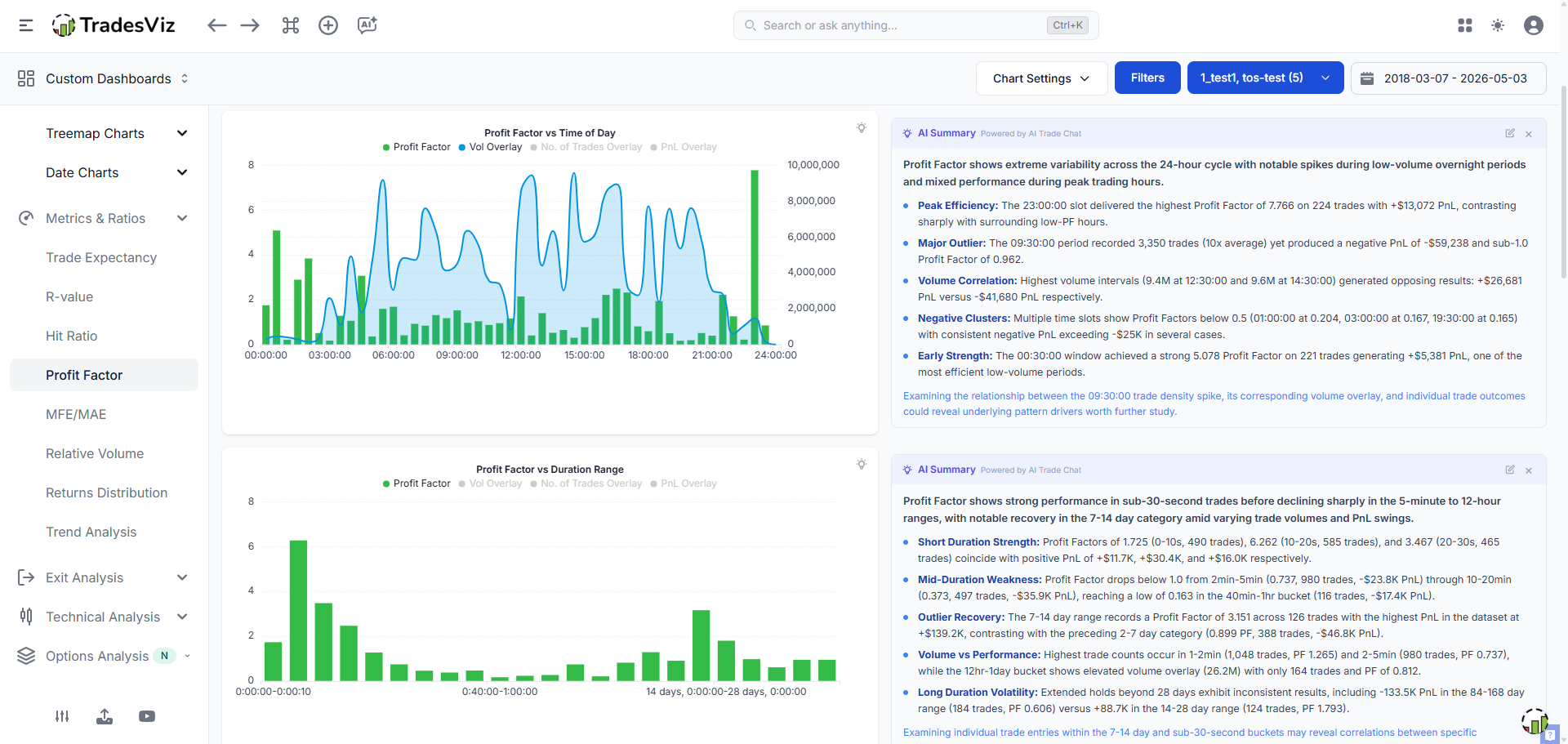
- AI Insights tab (beta) - a dedicated tab surfacing AI-generated insights about your recent trading. We turned thinking mode on for this so the reasoning is more substantive.
- AI Chat - longer history, more tokens - the chat now handles much longer back-and-forth before truncating context, and the per-message token cap was raised.
- AI Trade Chat model upgrade - moved to a stronger reasoning model. Optional "deepseek" model added to the model picker.
- AI Trade Chat UI - chat widget is sized correctly for unauthenticated visitors (no more giant floating widget on landing pages).
- AI Disclaimers - terms of service updated to include clearer AI disclaimers for transparency.
- Symbol-search bug for crypto in AI notes - fixed an edge case where crypto symbols weren't resolving in AI note context.
- AI Query top-bar revamp (continued from earlier this year).
Trading Account & Dashboard Polish
- Add Deposit button - a quick-add deposit shortcut directly from the trading account list, with a notification flow confirming the deposit was recorded.
- Deposit value calc fix - resolved an edge case where deposits with certain currencies were rounding incorrectly.
- Trading account text overflow - long account names no longer break the layout.
- Trade Locked flag - new Locked flag on trades. Once locked, a trade can't be accidentally modified or auto-synced over - useful for finalized journal entries you want to preserve as-is. You can access this by editing any trade.
- Custom Dashboard - AI widget improvements - new chart types, better styling, AI-generated widgets editable in place.
- Custom Dashboard - calendar widget - cleaner CSS for the embedded calendar, especially in compact layouts.
- Custom Dashboard - stat widget UI - improved readability and design consistency.
- Overview 5 polish - small bug fixes, chart fixes, calendar refresh handling, calendar week column.
- Modal close behavior fix - a recurring bug where some modals would unexpectedly dismiss on background interactions has been fixed.
- Modal scroll CSS - long forms in modals now scroll cleanly on more screen sizes.
- % formatting in charts - consistent percentage formatting across all chart types.
- Calendar earnings in Day Explore - earnings indicators now show correctly in the day explore drill-down.
- Calendar refresh bug - fixed an edge case where the calendar would not refresh after certain account-level changes.
- Calendar / custom dashboard CSS updates - many small visual fixes.
- Day Explore country filter for market events - filter macro events by country, useful for non-US-only traders.
-
Sentiment position - new sentiment data point at the position level (frontend + backend), feeding new metrics in tag and pivot views. This is important to options traders. Historically, we have had only side of a trade labeled based on the first execution's side (buy = long, sell = short) but the new account setting changes this. Check "Label trade side based on options sentiment (bullish/bearish)" option in your account settings (advanced settings) to make TradesViz label the side of the trade based on the sentiment of the trade. Your risk calculations are unaffected -- use this if you need stats and charts based on sentiment instead of entry position side.
- Unrealized PnL stats for extended hours - your unrealized PnL now reflects extended-hours moves.
- Group charts in Day & Trade Groups tabs - already mentioned above under tags, but worth re-flagging for chart users.
- Day tag grouping colors in auto-suggest - the auto-suggest dropdown for day tags now respects the assigned group color so you can spot the right tag faster.
- Run PnL calc improvement - more accurate run-PnL on multi-execution trades.
Performance & Stability
-
Password-scanner browser extension lag fix - some browser extensions (password managers, security scanners) were causing TradesViz pages to become laggy. We added a defensive code path so these extensions no longer slow the app down.
If you notice any slowness or lag when using TradesViz, PLEASE check your extensions! TradesViz's front and backends are HIGHLY optimized at this point, yet we've seen so many password managers and screen scraping extensions kill TradesViz performance because they keep scanning for input fields! So if you have issues, try TradesViz in incognito mode without extensions -- if you still have issues, reach out to us at [email protected] - Options flow efficiency improvement - large options flow datasets now paginate much faster.
- Tag group summary speed - tag group aggregations are noticeably faster on accounts with many groups.
- Multichart resilience - several layout and refresh bugs squashed; multichart now stores layouts more reliably.
- Live Screener stability - a new "stable" feed model that handles transient feed glitches gracefully, plus several refresh and auth/signing bug fixes.
- Image upload via Celery - image uploads occasionally failed on the worker side. Resolved.
- Export with images - exporting a trade file with attached images now works correctly.
- Export base currency fix - exports now consistently respect your base-currency setting.
- Greeks update accuracy - explicit prefer-latest logic for Greeks across the command center.
Brokers: Auto-Sync, New Additions, Fixes
New auto-sync integrations / brokers:
- IG auto-sync (frontend + backend complete, with multi-platform identifier format detection and forex-mini support)
- Public.com auto-sync
- Freedom Finance / Freedom24 auto-sync (with rename support)
- BYDFi auto-sync
- Webull OAuth path added (alongside the existing flow)
- Bybit testnet + demo support
- Binance testnet
- 4ProTrader prop firm platform added
- Tradeify, MyFundedFutures, 5ers, Lucid - new prop firm profiles
- Tradesea, Kalshi (prediction markets), Odindiet - new broker integrations
- TopStepX auto-sync hardening (host fallback, clarifications)
- Tradovate - first sync now does a full historical sync, extended sync available, sync expiration messaging clearer
- DAS Trader Pro - sync-from-date, list of supported brokers added to the platform page, blog post live
- MT4 - tag input support, alt format fixes, multiplier corrections, MT4 added to spread_id processing
- MT5 / MT5FA - magic-number support, language detection (non-English files rejected for cleaner imports), better FTP error reporting, pre-sync checks, overlapping positions fix, custom tag inputs on FTP/FA sync, server list updates
Broker fixes (non-exhaustive):
IBKR (multiple flex parser fixes, proxy support, sync messaging, websocket error), Schwab (sync, raw file, expiry handling, MCO→MCL), Tradier (sync suffix, full revamp), TradeStation (revamp, format), Robinhood (auth, API), Webull (alt format, auto, errors), Questrade (auto, full revamp), Alpaca (revamp), cTrader (frontend validation, OAuth, URL), Tastytrade / Tastyworks (revamp), Tradovate (sync, history, expiration), TradingView extension (de-dup, time-till-next-bar, dedicated tab guidance, timezone/date selectors), DAS Trader Pro (sync-from-date, supported brokers list), Plus500, Tradenation, Deribit, Clearstreet, ProRealtime, Trendspider, Fyers, Dhan (v2 API migration, session handling), Capital.com, XTB, Trading212, Binance (de-dup, testnet), MEXC, Bybit, Gate.io, Bitunix, Phemex, OKX, Coinbase, Kalshi, Forexcom, MatchTrader, TradingTech, ScotiaBank, Firsttrade, JPM, BlackArrow, ATAS (alt format), DXTrade (instructions + fixes), iress, CMEG (mixed sections fallback, instructions), Freedom Finance, Flatex (header alias, thousand separators, ToHSi orders), Trade Nation, Webull, Zerodha, Tigerbrokers (xlsx fallback), CQG, Exness, FXCM, VolFix, Finvasia, IronBeam, dYdX, Fineco, Moomoo, Saxo, Fidelity, IRESS Viewpoint, NinjaTrader (TP/SL manual support, resilience, symbol parsing), Sierra Chart, Edgewonk (new format alias), Trading Tech, Kiwoom, Xerodha, Plus500, Ninja import detect, Hammerpro, freestoxx, TopstepX, TDCanada... and many more.
By the Numbers: April + May 2026
| Category | Count / Notes |
|---|---|
| QoL / UX Improvements | 80+ shipped across UI, navigation, charts, modals, dashboards |
| Tag System (Tags v2 launch + day tag groups + pivot grid integration) | Fully replaces v1 as default; multiple new analytics surfaces |
| Simulator Improvements | Simple Mode + faster options sim + TP/SL options support + 100-trade caps |
| Import / Auto-Sync Improvements | 15+ direct improvements (Import Doctor, frontend validators, empty-file logic, cooldowns, walkthroughs, sample-trades flow) |
| New Auto-Sync / Broker Integrations | IG, Public.com, Freedom24, BYDFi, Webull OAuth, plus prop firm platforms |
| Broker Fixes | 60+ broker modules touched in two months |
| AI Surface Improvements | AI note buttons on all charts, AI Insights tab, longer chat history, model upgrades |
| Options Command Center | CSP cost basis, premium-collected chart, side/strategy switch, Greeks accuracy, options backtester upgrade |
| Performance Wins | Options flow pagination, multichart, tag group summary, screener stability, password-scanner extension fix |
Why a QoL Changelog At All?
Big feature posts get attention. They're also the easiest changes to ship visibly. But what actually keeps people on a product for years isn't the launch announcement - it's the fact that the modal closes the right way, that the import error tells you what's wrong, that the sidebar finds the tab you typed, that the deposit button is finally where you'd expect it.
Most of the items in this post were not assigned tickets. They came from user feedback. We logged them. We fixed them. We moved on.
If you've emailed us, hit us up on live chat, or filled out a cancel-flow survey in the last two months - there's a good chance one of the items above is directly because of you. Thank you.
We don't just ship features. We sand the edges. Both matter.
One More Thing…
Do you really think your AI-stitched, “I built a trading journal in a weekend” make-shift solution can do all of the above?
Or that vibe-coded, pay-once, lifetime-subscription ad you saw on Twitter / X / TikTok last week will do any of the above? In two months? Across 300+ brokers? With real-time market data? With AI that actually understands options strategies? With prop firm compliance, custom dashboards, screener infrastructure, and a support team that responds?
Think again.
This changelog - just the boring quality-of-life half of two months - is what professional platform development actually looks like. It’s not a one-time job. It’s not something an AI can take care of for you. It’s sustained engineering work, real user research, support volume, infrastructure cost, and the kind of attention to detail that only comes from six years of doing this for tens of thousands of real traders.
Our subscription charges cover all of this - the features, the QoL fixes, the infrastructure, the broker integrations, the AI compute, and the human support - and the cost is exponentially smaller than the time, money, and frustration you would spend building one yourself or fighting with a poor-quality solution that ships once and then quietly dies.
We’re just leaving these comparison links here… you know… in case you needed any more convincing 😉
Have a small annoyance that's been bugging you for a while? Tell us. Live chat or [email protected]. The next QoL changelog probably has your fix in it.