
Use the seasonality screeners when you want to find symbols, and Returns when you already know which stock you want to examine. This walkthrough covers the current controls, updated October 2, 2026, with links to the exact-window charts and portfolio guide.
The seasonality page now has six tabs: Returns, Screener, Upcoming Windows, Heatmap, vs. My Trades, and Sector Rotation. Use them to find seasonal candidates, examine the history behind a pattern, and compare it with your own trading.
Seasonality analysis helps you study how prices have behaved at similar times of year. Upcoming Windows adds a practical question: which symbols have historically moved in my chosen direction over the dates I plan to hold?
Choose the view for your question
| Question | Where to start |
|---|---|
| How did CBOE perform between October 2 and December 2 over 15 years? | Returns: select CBOE.US, then set Seasonal window to 10-02, 12-02 and 15 history years. |
| Which stocks had positive October returns? | Screener: select a monthly period and your filters. |
| Which stocks moved in my direction over a planned entry and holding period? | Upcoming Windows: Fixed window. |
| Which tested entry date and holding period had the strongest qualifying history? | Upcoming Windows: Find historical windows. |
A stock can appear in Returns without appearing in a screener. Scans apply their own dates, usable-year thresholds, liquidity and options filters, ranking and result limit. For a known stock, use the direct analysis first instead of repeatedly widening a scan.
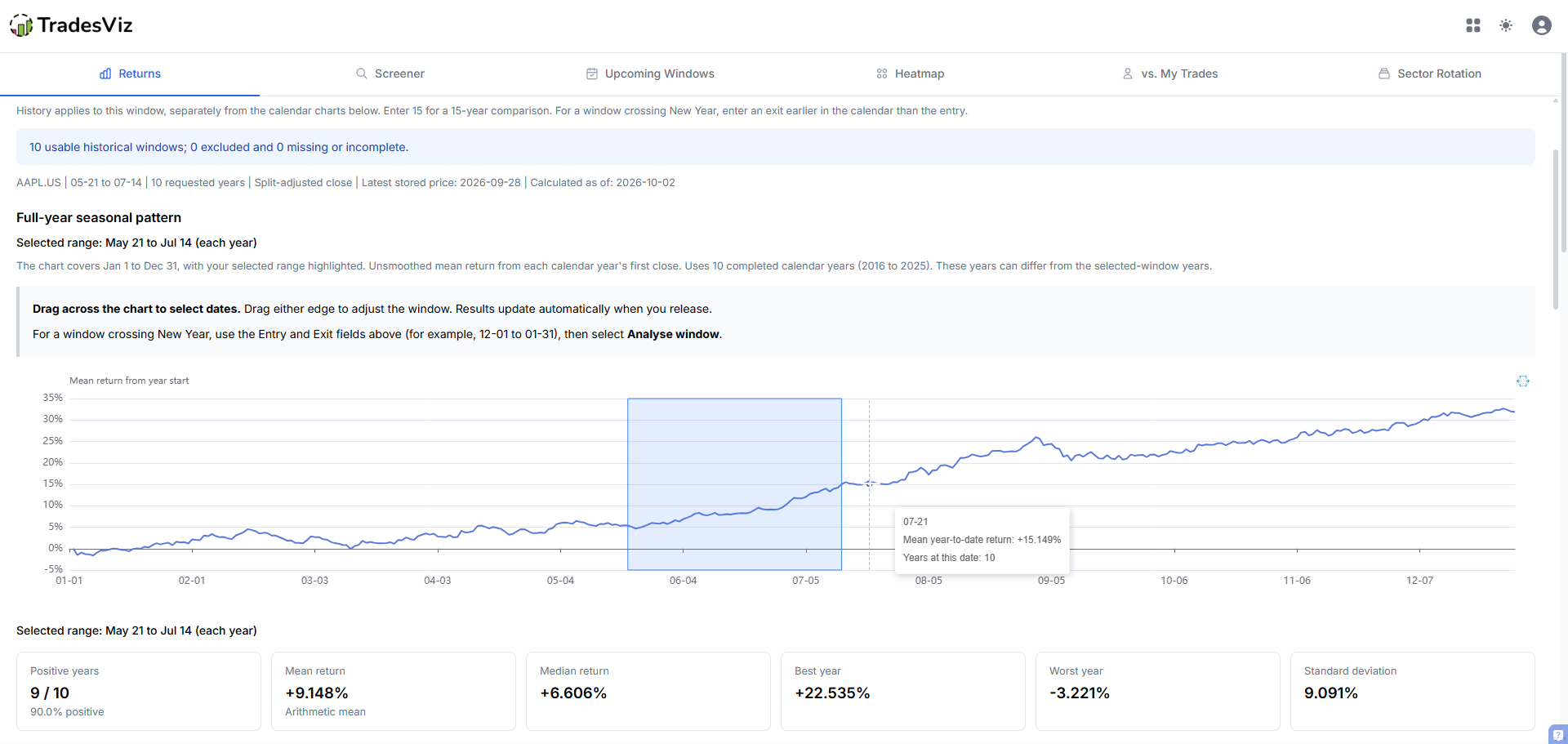
For a known symbol, start in Returns. This October 2, 2026 example selects May 21 to July 14 for AAPL.US. Dragging changes the window; the Selected range labels confirm the dates behind the summary and yearly results.
Calendar Seasonality Screener
Instead of checking symbols one at a time, the Screener tab lets you scan thousands of symbols at once for historical tendencies during a selected month, quarter, or week of the year.
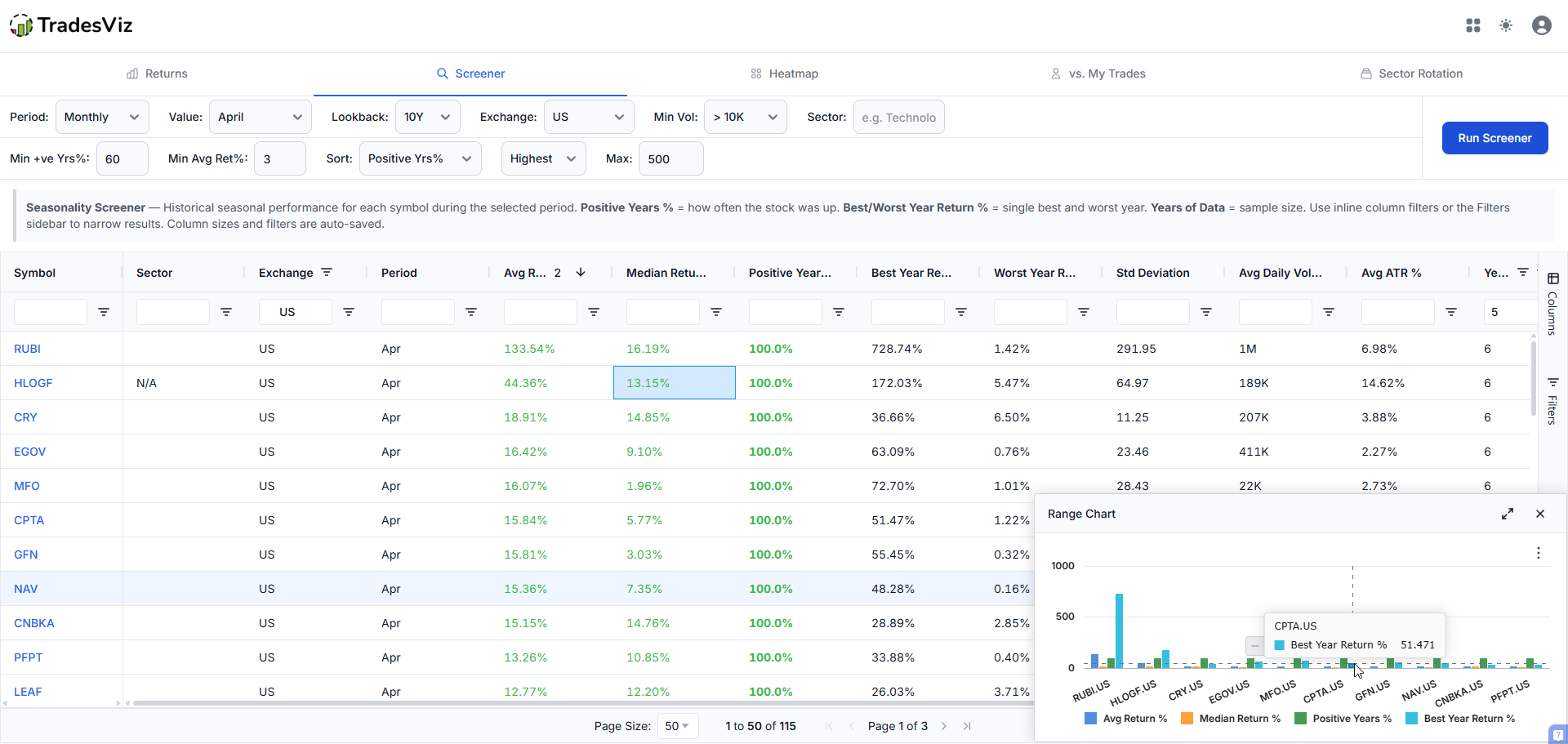
You can filter by:
- Period type: monthly, quarterly, or weekly
- Lookback window: 5, 10, or 20 years of historical data
- Exchange: US, India, or Canada
- Minimum average volume: volume averaged across the historical seasonal periods being compared; use Upcoming Windows for recent liquidity filters
- Sector: focus on a specific sector
- Minimum positive years %: how consistently a stock goes up during that period
- Minimum average return %: set a return threshold
Results load in a fast, sortable grid with inline column filters. You can sort by positive years %, average return, median return, volume, or standard deviation. The grid also shows you the best year return, worst year return, and years of data (sample size) for every result, so you can immediately gauge how reliable a seasonal pattern is.
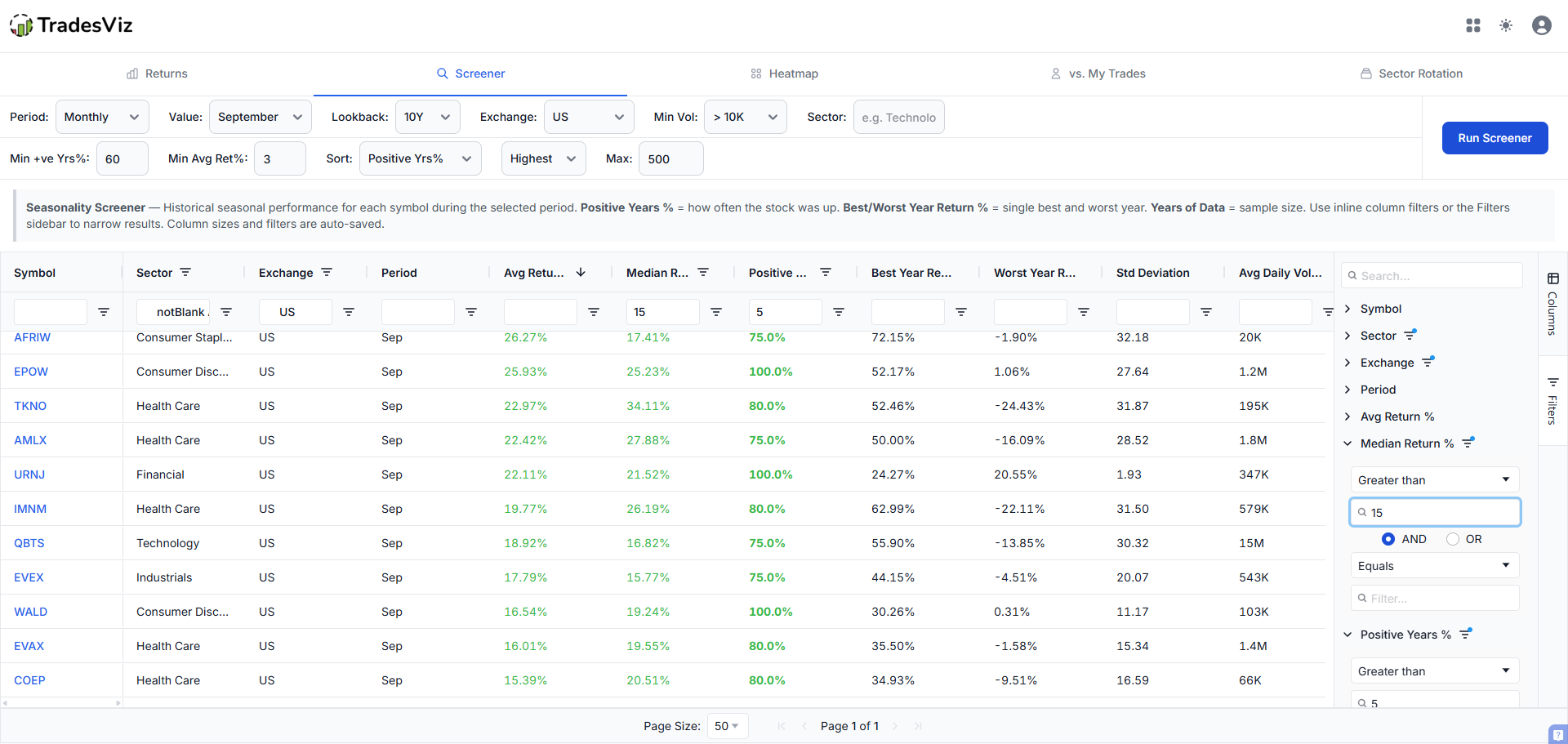
Click a symbol in the screener to open its seasonality charts in the Returns tab.
In Returns, the selected symbol loads automatically. Set the exact entry and exit month/day and 1 to 20 history years, or drag the selection on the full-year chart. While an update loads, the previous results stay in place with a loading indicator. The annual bar chart sits beside its grid and follows grid filtering and sorting; the summary and yearly paths still describe the full analysed sample. See how to read each chart and exclude a year from the calculation.
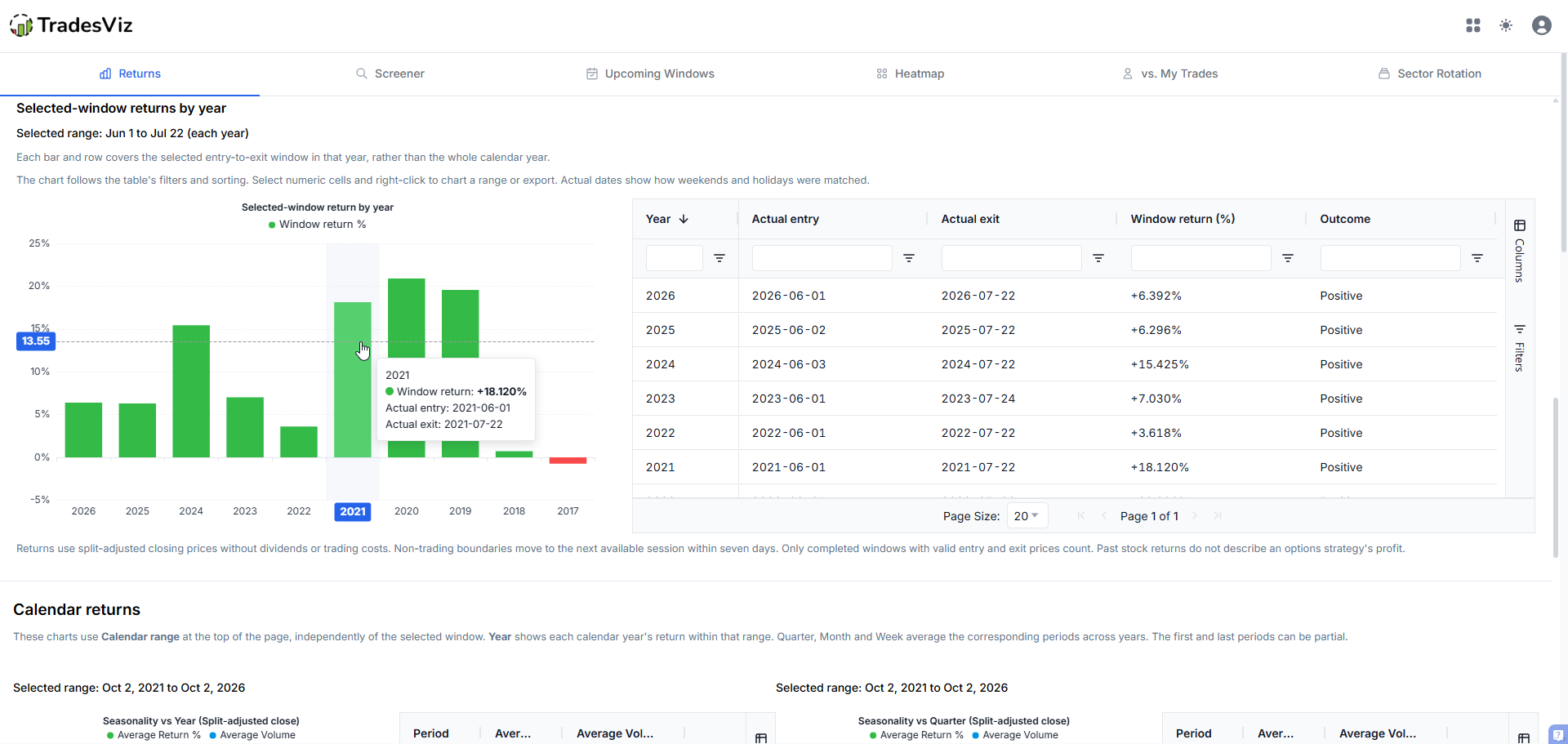
Here the selection has changed to June 1 to July 22. Each bar matches a row in the grid. Actual entry and exit dates show how weekends and holidays were handled; these are window returns, not whole-year returns.
Upcoming Windows: Screen the Dates You Plan to Hold
A calendar month may not match your trading plan. If you want to enter next week and hold for 30 or 45 days, open the Seasonality page and select Upcoming Windows. Choose Fixed window to compare dates you already have in mind, or Find historical windows to search entry dates and holding periods. Both modes use split-adjusted closing prices and your chosen filters. Cash dividends are not included in returns.
1. Choose your planned entry date and holding period
Select Fixed window to compare the same entry date and holding period across symbols.
Start with the controls across the top of the tab:
- Planned entry date: choose today or a date within the next 365 days. Past dates are disabled because this is the entry you are planning; History sets the past years used for comparison.
- Holding period: choose 15, 30, 45, 60, or 90 calendar days, or select Custom for a period from 7 to 180 days. Check the Target window beneath the controls to confirm the start and end dates.
- Direction: choose Bullish to find windows with historically rising prices, or Bearish for historically falling prices.
- History and Market: select a 5-, 10-, or 20-year lookback and a market: United States, India, or Canada. Available history varies by symbol.
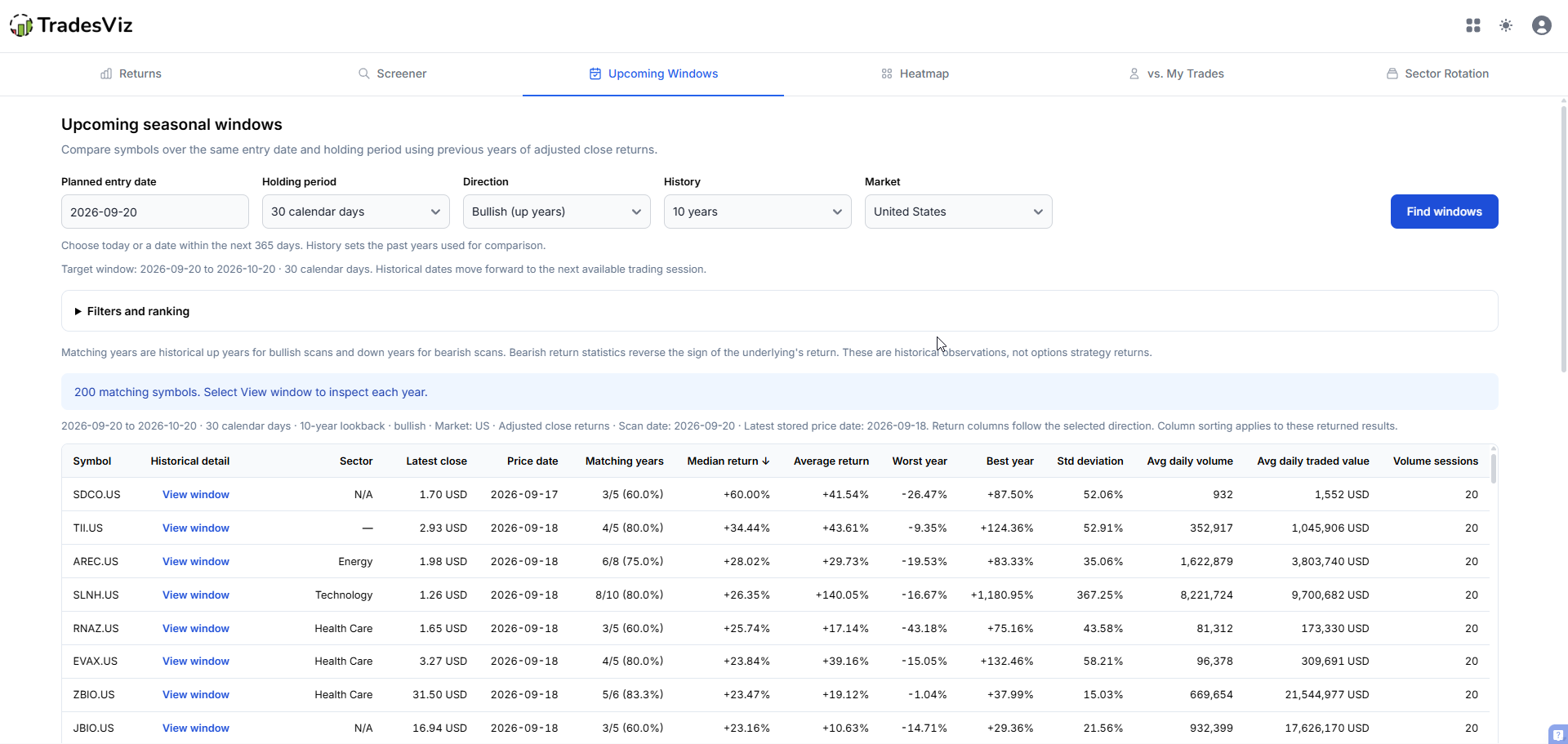
The example below compares a September 20 entry and a 30-day hold ending October 20, using a bullish direction and a 10-year lookback. Select any of the screenshots in this walkthrough to open it at full size.
2. Open Filters and ranking to narrow the scan
Expand Filters and ranking to define the symbols and historical evidence you want to see.
- Sectors: open the dropdown, type in the search box, and check one or more sectors. Leave the selection empty to include all sectors.
- Minimum and maximum latest price: limit the list by the symbol's latest closing price, in its quote currency.
- Min avg daily volume and traded value: filter by recent stock activity. Volume measures shares; traded value measures price multiplied by volume in the symbol's quote currency, without conversion to US dollars. These use up to 20 valid recent trading sessions within the last 60 calendar days.
- Min matching years (%): set how often the historical window must have moved in your chosen direction. The initial setting is 60%.
- Minimum years of data: require a minimum number of usable historical windows. The initial setting is 5; a 10-year lookback does not guarantee 10 usable years for every symbol.
- Min directional median (%): set a minimum median return in your chosen direction. The initial setting is 0%.
- Rank highest first and Maximum results: choose the ranking used to select the returned list and how many results to show. The initial settings rank by median directional return and return up to 200 symbols.
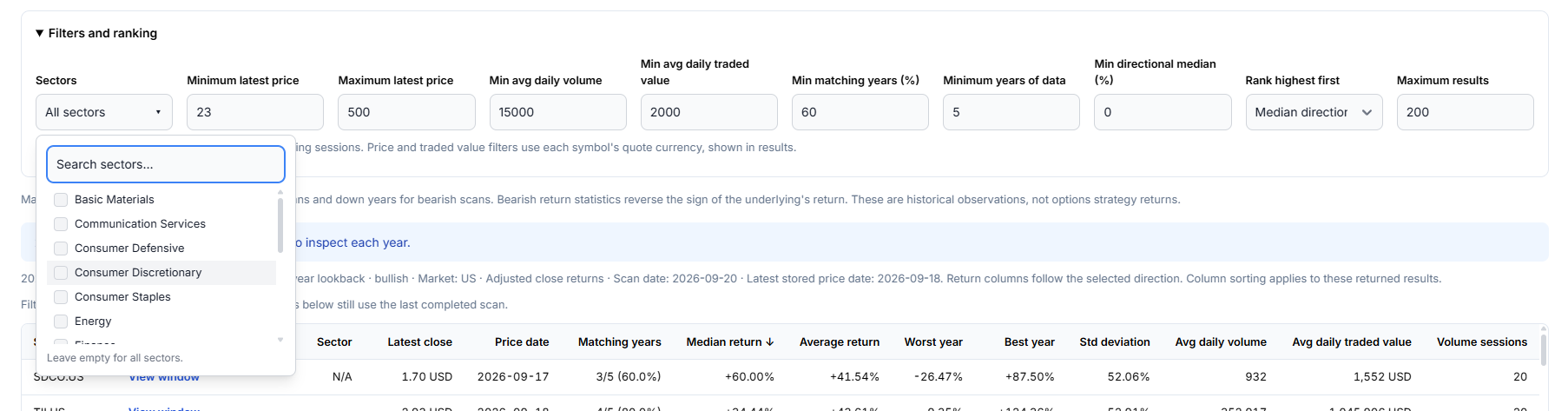
The screenshot shows the sector search open while filters are being edited. After changing a filter, click Find windows to apply it. Until then, the visible results and their details still belong to the last completed scan.
3. Run the scan and read the results
Click Find windows on the right. Your scan filters are saved automatically on this device and restored when you return. A saved future entry date is preserved; if it has passed, the entry date moves to today.
Start with Matching years: a value such as 4/5 (80%) means four of the five usable historical windows moved in the selected direction. The denominator is the available sample, not necessarily the full lookback you requested. A flat year does not count as a match.
Compare Median return, Average return, Worst year, Best year, and Std deviation to understand the spread of outcomes. Check Latest close, Price date, and the recent volume columns alongside those returns. The Scan date tells you when the scan ran; it is separate from the dates of the stored prices.
Upcoming Windows uses the same interactive grid as the Screener. Click column headings to sort, use the inline column filters or Filters sidebar to narrow the returned list, and open Columns to show, hide, or rearrange metrics. Column filters remain applied when you run another scan; the grid footer shows how many rows are visible after filtering. To change which symbols qualify for the returned list, change the scan filters or Rank highest first setting and run the scan again.
Select a range of cells and right-click to choose Chart Range. For example, compare symbols by median return or average options volume. Use Export in the same menu to download CSV or Excel data. Exports follow the grid's column filters and sorting; numeric metrics stay numeric, with returns expressed in percentage points (3.4 means 3.4%). The Currency column identifies the units for prices and traded value. Missing numeric values export as blank cells. View window appears before each symbol and opens its annual results below.
The Annual results table also supports sorting, column filters, range charts, and CSV or Excel export. Compare individual years or chart the annual returns directly from the table.
Return columns follow the chosen direction: a 4% rise is +4% in a bullish scan, while a 4% fall is +4% in a bearish scan. These are historical underlying price returns, not the profit from an options spread.
4. Select View window to inspect each historical year
Click View window beside a symbol to open its historical detail below the results. Each line in the chart represents one year, beginning at 0% on that year's actual entry date. Hover over the chart to compare returns at the same number of calendar days after entry.
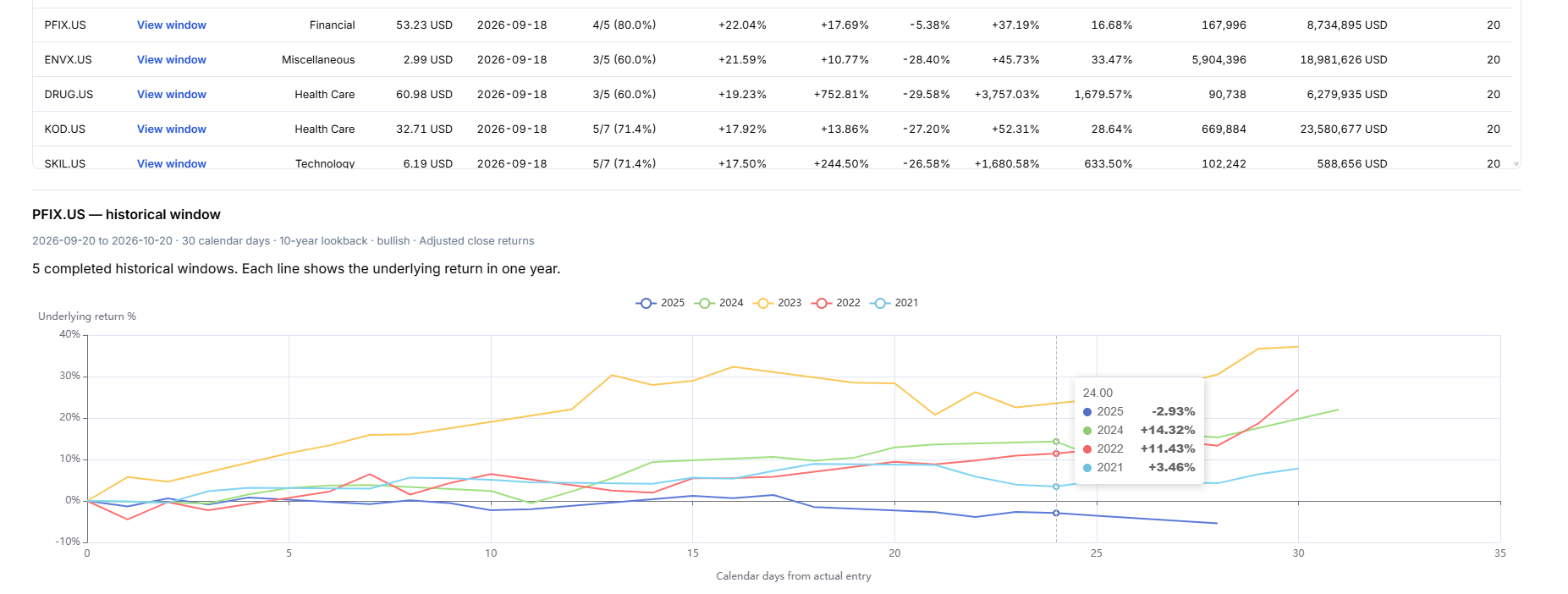
In this PFIX example, the 10-year lookback contains five usable windows. Four finished higher, while the 2025 line finished lower. The individual paths show information that a single average cannot: when each move happened and how the years differed during the holding period.
Scroll below the chart for Annual results. The grid shows each year's actual entry and exit dates, underlying return, directional return, whether it matched your direction, and its year group. The chart always shows the underlying's price movement; in a bearish scan, falling chart lines can correspond to positive directional returns in the grid.
5. Compare another window
Change the planned entry date, holding period, direction, or filters, then click Find windows again. Fixed window compares one chosen window across symbols. To compare multiple entry dates and holding periods in one scan, switch to Find historical windows.
How historical dates are matched: each year uses the selected month and day, with February 29 mapped to February 28 in non-leap years. The end is that historical start plus your chosen number of calendar days. If a boundary is not a trading day, the first available session on or after it is used, within seven days. Only completed windows with valid split-adjusted closing prices at both boundaries are included.
If the scan returns no results: read the status message first. A scan requires a latest stock price from the past seven calendar days and usable historical split-adjusted closing prices. Missing or outdated data is reported separately from a scan where no symbols meet your filters. For a genuine filter miss, widen the relevant filters and run again; lowering thresholds cannot replace missing price data.
Find Historical Entry and Exit Windows
Inside Upcoming Windows, change Mode to Find historical windows. This answers a different question: within the ranges you choose, which tested entry date and holding period had the strongest qualifying historical outcome for each symbol?
- Set Planned entry date and Last possible entry. Use the same date for both to compare holding periods alone. The last entry can be up to 60 calendar days after the first; both dates must fall between today and the next 365 days.
- Set the minimum and maximum holding periods, such as 15–90 calendar days. Entry step and Holding step set the spacing between tested candidates. Range endpoints are included. The search supports up to 240 combinations; it does not claim to test every date unless you choose daily steps.
- Choose history and Recent validation years. For example, 10 years with 2 reserved uses up to 8 years for selection and 2 recent years for validation. Minimum selection years, matching years, and return thresholds apply only to selection years.
- Set price, sector, stock-liquidity, and options filters, then click Find windows. Settings are saved automatically on this device. Broad searches may require narrower filters; the search supports up to 1,500 qualifying symbols at a time.
- Read the returned Entry date, Exit date, and Holding days. The return and matching-year columns describe the selection years. Validation median shows the reserved years separately, including their usable sample size.
How the winner is chosen: the selected ranking metric chooses among qualifying windows. With a liquidity ranking, median directional return chooses each symbol’s window and liquidity ranks the symbols. Ties use median return, sample size, shorter holding duration, and earlier entry. Validation returns never choose the winner or qualify it for the list.
Open View window to inspect the selected dates, annual paths, separate validation outcomes, and up to two distinct alternatives. The entry-date/holding-period heatmap shows selection-year median returns for the tested grid, including candidates that did not pass your thresholds. The neighboring-window percentage reports how many nearby tested windows also had a positive selection median; it is not a forecast probability.
Every candidate uses the same nominal historical season cohort. Missing years reduce the usable sample; they are not replaced by older years. For a search spanning December and January, the season year can precede an actual January entry. Searching many date combinations can fit historical noise, so review nearby dates, losing years, and the untouched validation results. The result is the best historical window within your tested range, not a prediction of how long a future move will last.
Filter Seasonal Candidates by Options Activity
Both Screener and Upcoming Windows include Optionable, Min avg options volume, and an Avg options volume (20 sessions) result column. Start with Optionable = Yes and a minimum appropriate to your research, then review the candidates and their volume dates.
Options volume means contracts per day across all calls, puts, strikes, and expiries over the latest 20 completed market sessions. It uses complete daily equity-options volume from OCC. The large-trade-only Options Flow feed is not used for this average. A verified zero-volume session contributes zero; missing, incomplete, or stale coverage produces N/A. Optionable comes from a dated contract reference: absence of recorded flow does not mean a stock has no options. Unknown reference coverage is shown as Unknown.
The initial options-volume adapter covers US-listed underlyings where complete data has been loaded. Unsupported listings or insufficient history retain N/A; a positive volume minimum excludes them. Aggregate activity does not guarantee liquidity in your intended contract. Check its expiry, strike, bid/ask spread, and quoted size separately.
US optionability and volume are refreshed daily from OCC's dated reports and stored locally. Daily equity-options volume is checked against OCC's published market total before it enters the average. The screener uses completed sessions, so these figures describe recent activity rather than live intraday volume. A missing report stays N/A until it can be verified.
For US symbols, the detail view's View options flow link opens the Options Flow symbol view and carries the proposed seasonal dates as research context. Options Flow retains its own displayed data dates; future seasonal dates do not become historical flow filters.
Month x Year Heatmap
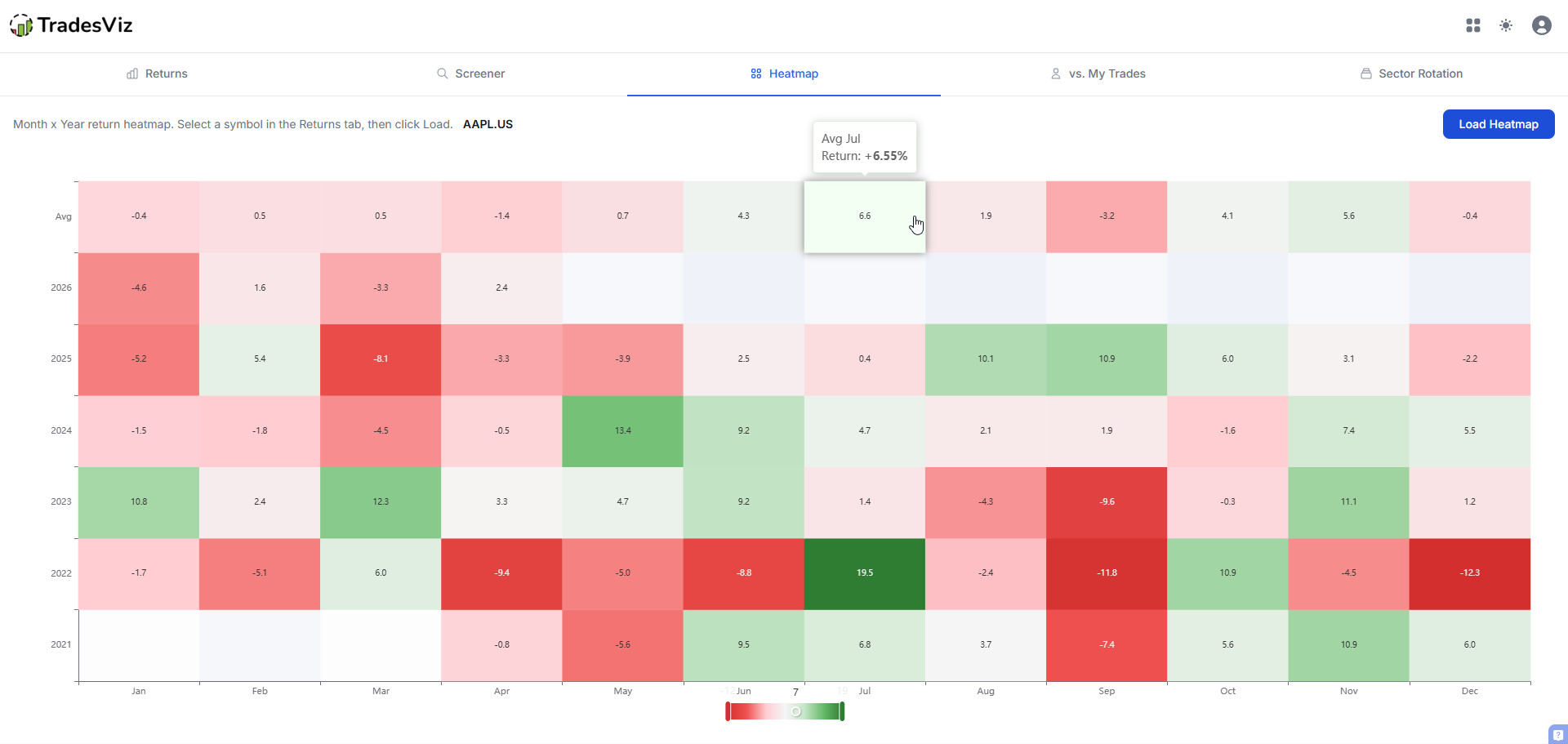
The heatmap tab shows every year's return for a symbol in a color-coded grid. Instantly spot which months are consistently green, which are red, and whether the pattern is strengthening or fading over time.
Use it to explore how a symbol's monthly behavior changes across years. A pattern driven by one or two outlier years looks very different from a consistent trend across a decade. For an Upcoming Windows result, use View window to validate the exact dates and calculation behind that result; a monthly heatmap is broader context.
vs. My Trades (Performance Mirror)
The "vs. My Trades" tab compares your actual trading performance by month with a symbol's historical seasonality.
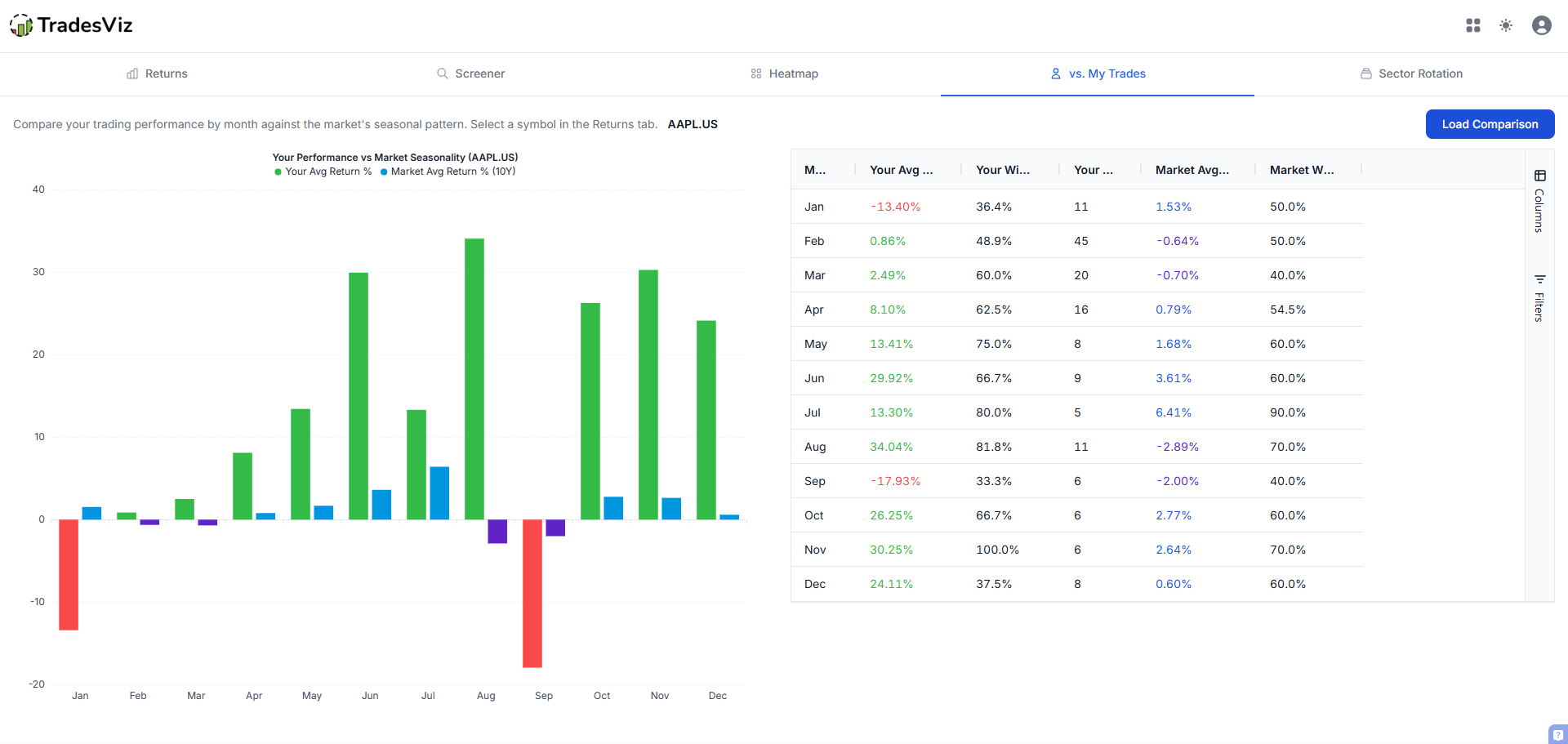
Are you trading with the seasonal trend or against it? Are there months where you consistently underperform the seasonal average? This kind of comparison can reveal timing issues or opportunities you might be missing. Select any symbol you've traded in the Returns tab, then check this tab to see the overlay.
Sector Rotation
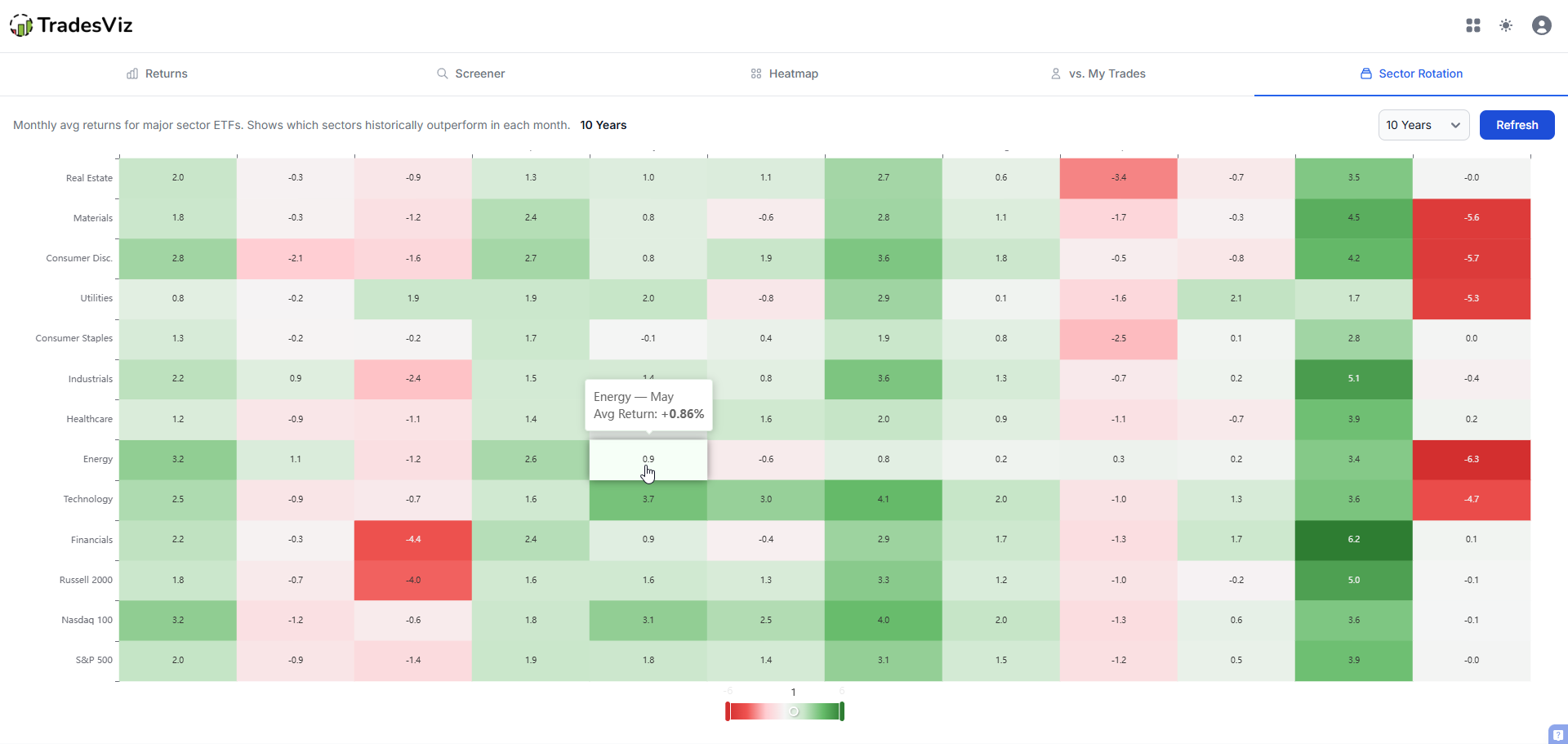
The sector rotation tab shows a heatmap of monthly average returns across major sector ETFs. Compare the sectors' historical returns for each month and see how the pattern changes with the lookback. These are price returns; the chart does not identify institutional trades or cash flows.
You can configure the lookback period (5, 10, or 20 years) to see how these rotations look over different time horizons.
Which Historical Prices Are Used?
Seasonality uses split-adjusted end-of-day closing prices, without dividend adjustments. The same approach applies across Returns, the Screener, Upcoming Windows, the Heatmap, vs. My Trades, and Sector Rotation. There is no price-setting choice to configure.
Why adjust for splits? If a stock closes at $100 before a 2-for-1 split and $50 afterward, unadjusted prices look like a 50% loss. Split adjustment makes those prices comparable, so the split itself does not create a seasonal gain or loss.
Cash dividends are not added to returns, and ex-dividend price drops remain in the price history. These are underlying price returns, not total investment returns or options-strategy returns. Calendar charts measure first-to-last closing prices within each period, so their boundaries can differ from a custom holding window. Missing adjusted closes are excluded rather than replaced with an unadjusted price.
The screenshots in this article include earlier interfaces. Labels such as "adjusted close," older market choices, and the earlier annual table do not describe the current price policy, coverage or grid. The current calculation uses the single split-adjusted series described above. Current market coverage is the US, India and Canada; available dates vary by symbol.
Keep a record of the research
Save the scan date, selected window, history, filters and the reason a candidate passed or failed your review. Use notes and a seasonality tag to compare the idea with your actual trades later. The vs. My Trades tab provides monthly context; it does not attribute your trading result to one exact seasonal window.
For a worked example with real September 30, 2026 scans and losing years, read the seasonal trading ideas guide. For a stock already on your watchlist, start with the Returns walkthrough. To compare a group of long and short ideas, use Portfolio Seasonality.
Options volume narrows the research universe; it does not tell you whether a particular spread will trade well. Use the selected contract's quotes and a separate payoff analysis to evaluate that strategy.