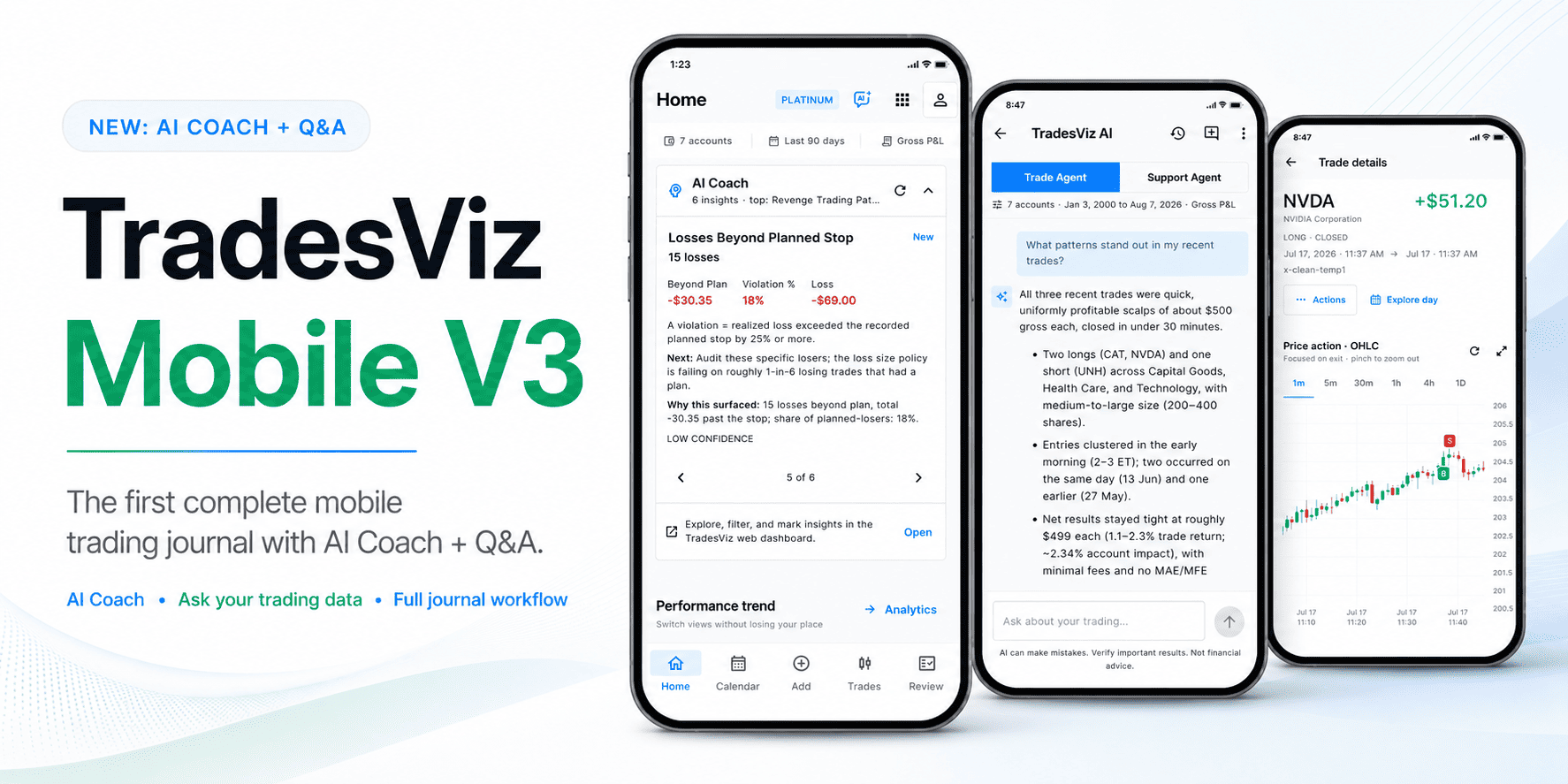
TradesViz Mobile V3 is now available for Android and iOS.
This is our biggest mobile app update so far. We rebuilt the main workflows, cleaned up the navigation, fixed the connection and login problems that made the older app frustrating, and brought much more of the actual TradesViz journaling experience to your phone. AI Coach and TradesViz AI are now part of that mobile workflow too.
The goal is simple: if you are away from your desk, you should still be able to check your performance, review a trading day, inspect a trade, add context, fix data, import trades, sync a broker, and follow a chart result back to the trades behind it.
After this update, we believe TradesViz is the most complete mobile trading journal available. There are still desktop-only research tools, but the full daily journaling and review loop now fits in the app.

What can you do in the new TradesViz app?
Here is the short version. You can now:
- Home dashboard: View total and unrealized P&L, win rate, trade count, direction mix, cumulative P&L, daily P&L, and volume.
- Global filters: Keep the selected trading accounts, date range, and Gross or Net P&L scope consistent while moving through the app.
- AI Coach: See ranked, data-backed strengths and leaks on Home, including the supporting metrics, confidence, direction, and a practical next step.
- TradesViz AI: Ask Trade Agent questions about the accounts, dates, and P&L scope you selected, or switch to Support Agent for help with TradesViz.
- Trading calendar: Review a proper month grid and tap any date, including an empty date, to open Day Review.
- Day Review: See P&L, wins and losses, executions, quantity, session duration, fees, symbols, returns, notes, tags, and every trade from the session.
- Running daily P&L: Follow how realized P&L changed through the day and open the trades behind the result.
- Trade plans: Apply your existing TradesViz day-plan templates without returning to the website.
- Trades table: Search by symbol, sort and filter the list, switch between open and closed trades, and select multiple trades.
- Bulk trade tools: Apply notes or tags to several trades and use supported split and merge workflows.
- Trade Detail: Review the complete trade, jump to its trading day, and manage its review data from one page.
- Native OHLC charts: Inspect entry and exit markers across multiple intervals with pinch zoom and fullscreen mode.
- Trade editing: Edit trades and executions, split executions, add executions, attach screenshots, and update notes, tags, stop-loss, and profit-target context.
- Trade Explore: Tap a chart bar or line value and see only the trades that produced that result. You can also combine multiple chart values.
- Review and analytics: Browse daily review, notes, performance charts, best-exit analysis, risk metrics, and other mobile-optimized statistics.
- Broker file import: Search 200+ supported brokers, view export instructions, choose a file, and review the import settings.
- Broker connections: Check connection health, see the latest sync result, and trigger eligible broker syncs.
- Trading account management: View account information and create, rename, export, clear, or delete accounts where your plan allows it.
- Manual entry: Add a new trade or execution and choose the account, symbol, side, time, currency, price, and quantity.
- Notes and screenshots: Add journal context from a trade or day and search your notes from Review.
This is the difference between V3 and the older app. V3 is not just a place to glance at a few statistics. You can actually complete useful journal work from start to finish.
How far the mobile app has come
The first TradesViz mobile app gave users a quick way to view statistics and make basic trade updates. It did the job, but uploads, broker sync, plans, deeper analytics, and several review workflows still required the website.
Mobile V2 added many more charts and statistics, notes, broker connection sync, file import, caching improvements, and light and dark themes. That was a major update, but the app still felt like a collection of individual pages rather than one connected workflow.
V3 fixes that. Home, Calendar, Add, Trades, and Review are now the five main destinations. Filters behave consistently. A chart can open the exact matching trades. A trade can open its day. A day can open its trades. Import and broker connections live together. Temporary server or network problems no longer automatically mean that your login is invalid.
TradesViz Mobile V1 vs V2 vs V3
The mobile app has changed from a quick statistics viewer into a complete daily trading journal. Here is the clearest comparison:
| Area | Mobile V1 | Mobile V2 | Mobile V3 |
|---|---|---|---|
| Main purpose | Quick mobile statistics | Metrics, notes, import, and sync | Complete daily journal and review workflow |
| Navigation | Swipe between screens | Expanded tab set | Home, Calendar, Add, Trades, and Review |
| Home and charts | Core statistics | More charts, R-value, best exit, MFE, and MAE | Redesigned overview with AI Coach and chart-to-trade drilldowns |
| AI review | Not available | Not available | AI Coach insights plus Trade Agent and Support Agent chat |
| Calendar and day review | Basic date and calendar views | Expanded daily statistics | Full month grid, complete Day Review, running P&L, notes, tags, and plans |
| Trade Detail | Add and edit basic trade data | Trade data with more statistics | Review workspace with native OHLC, executions, screenshots, and Explore Day |
| Trade Explore | Not available | Not available | Tap chart values to open the exact matching trades |
| Trade plans | Website only | Website only | Apply existing day-plan templates from Day Review |
| File import | Not available | Import from 200+ brokers | Searchable, guided broker import with settings review |
| Broker sync | Not available | Sync existing connections | Connection status, last result, recovery guidance, and eligible sync actions |
| Bulk trade tools | Not available | Not available | Multi-select notes, tags, review cleanup, split, and merge tools |
| Account management | Basic account selection | Account scope and filters | Create, rename, export, clear, delete, and inspect account details |
| Reliability | Manual reset or login retry when data became stuck | Better cache handling and refresh on restart | Session-safe reconnect, lifecycle recovery, and clearer loading and offline states |
| Appearance | Original mobile UI | Revamped UI with light and dark modes | One consistent design across light, dark, and colorblind modes |
V1 helped you check the journal. V2 made it easier to keep data and notes up to date. V3 lets you complete the full review loop from the phone.
How does Mobile V3 compare with other trading journal apps?
We reviewed current public product pages and mobile-store descriptions for several popular types of trading journals. We have not used product names below because the useful question is not which logo is on the screen. It is what you can actually finish from the phone.
| Publicly described app type | What it emphasizes | Documented mobile scope | AI and analysis | Where TradesViz Mobile V3 goes further |
|---|---|---|---|---|
| Standalone mobile trade tracker | Manual multi-asset trade entry, tags, notes, attachments, calendar, goals, and core P&L analytics | A focused native tracker and habit journal | Clear filtered analytics; AI is not part of the public mobile description | Broker files and connections, execution management, OHLC review, chart drilldowns, bulk tools, account maintenance, AI Coach, and scoped AI chat in one app |
| Native companion to a web-first journal | Performance reports, trade details, executions, price action, notes, and screenshots | The public app listing recommends the website for new executions and says non-stock trade entry uses the web interface | The broader platform advertises AI feedback and detailed reports | V3 is designed to finish the daily journal loop natively, including multi-step edits, imports, sync, Day Review, plans, account tools, and AI |
| Psychology-first cloud journal | Automated imports, psychology and diary tools, mistake tracking, analytics, and AI-driven analysis | Cloud access on phone, tablet, and computer is emphasized | Strong focus on behavior, discipline, and automated edge finding | TradesViz combines behavior and review with a documented native Android and iOS workflow, deep trade editing, chart-to-trade exploration, and broad account operations |
| Mobile-first MT4/MT5 specialist | Automatic MetaTrader sync, pre-trade plans, goals, CSV import, and mobile logging | Native Android and iOS experience centered on MT4 and MT5 traders | Performance analytics, planning, and goal tracking | TradesViz supports a much broader journal workflow across 200+ broker and platform file formats, multiple connection types, advanced analytics, account management, and two complementary AI experiences |
| TradesViz Mobile V3 | Complete daily journal, review, data maintenance, analytics, and AI workflow | Native Android and iOS app with Home, Calendar, Add, Trades, Review, Day Review, Trade Detail, imports, connections, and account tools | AI Coach ranks evidence-backed patterns. Trade Agent answers scoped questions. Support Agent helps with the product. | One connected path from raw executions to a day, a chart, the matching trades, a review note, and the next question |
Comparison based on public product pages and app-store descriptions reviewed in August 2026. Features and plan limits can change. This compares documented mobile workflows, not every feature that may exist in a desktop product.
We could not find another publicly documented mobile trading journal that combines this full set in one connected app: broad import and sync, a real trading calendar and Day Review, running P&L, native OHLC with markers, execution editing, split and merge tools, chart-to-trade drilldowns, trade plans, account maintenance, AI Coach, and an AI assistant that follows the active journal scope.
Home, Calendar, and Trades
These are the three screens most traders will use every day. Home gives you the quick answer. Calendar gives you the day-by-day view. Trades gives you the actual records behind the numbers.
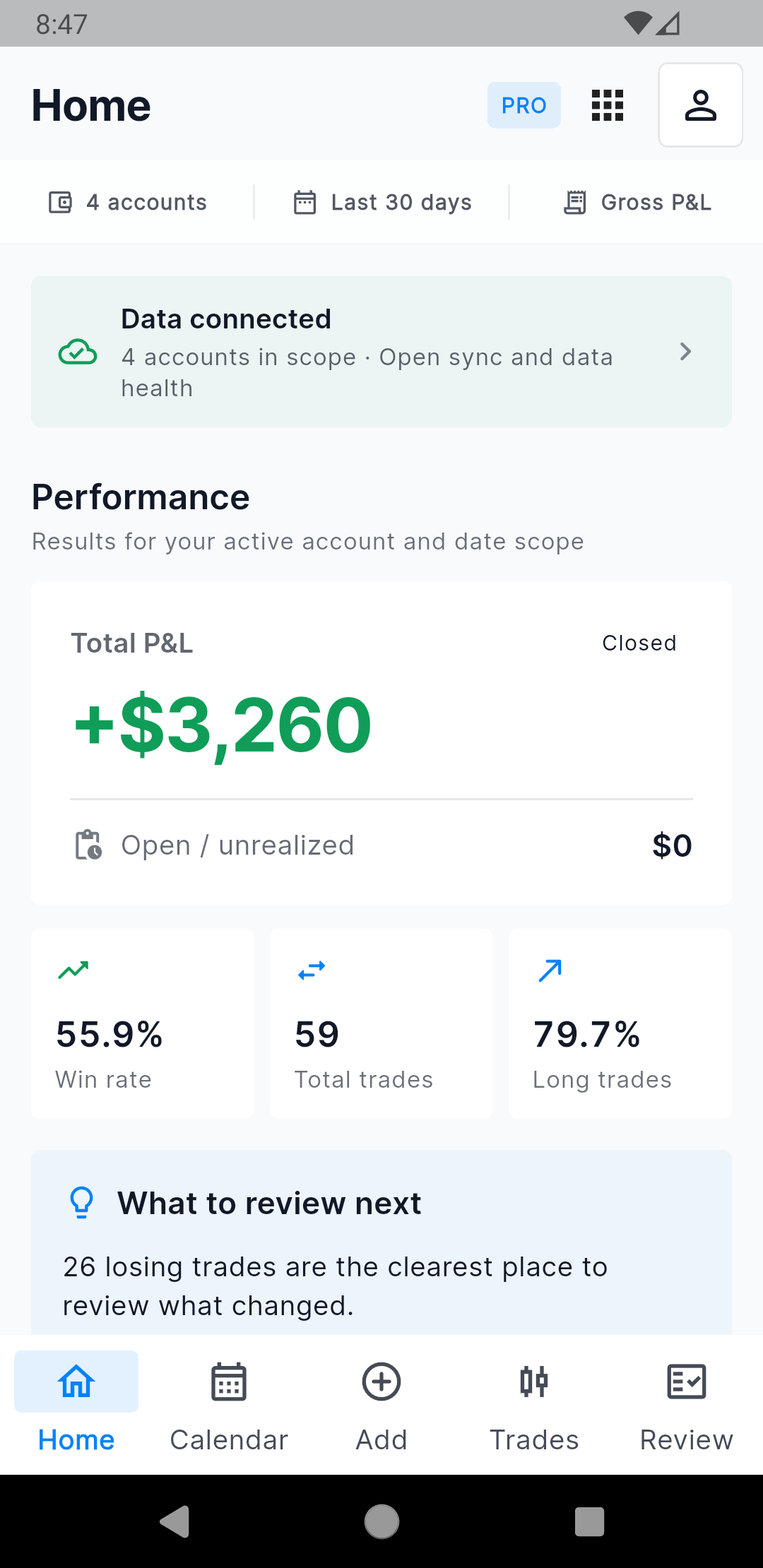
Home keeps the active scope and main results together. |
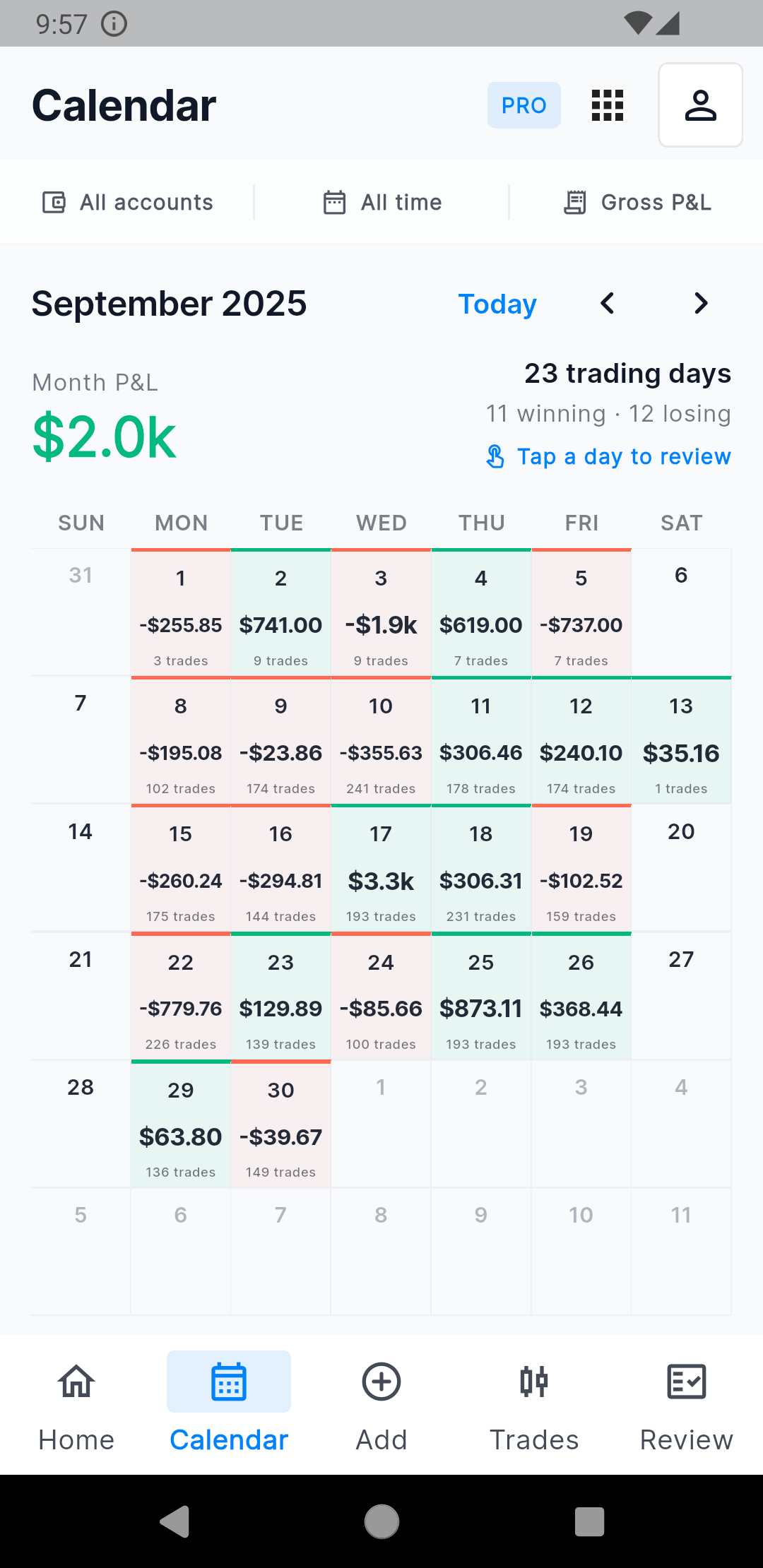
Tap any day to open the complete session. |
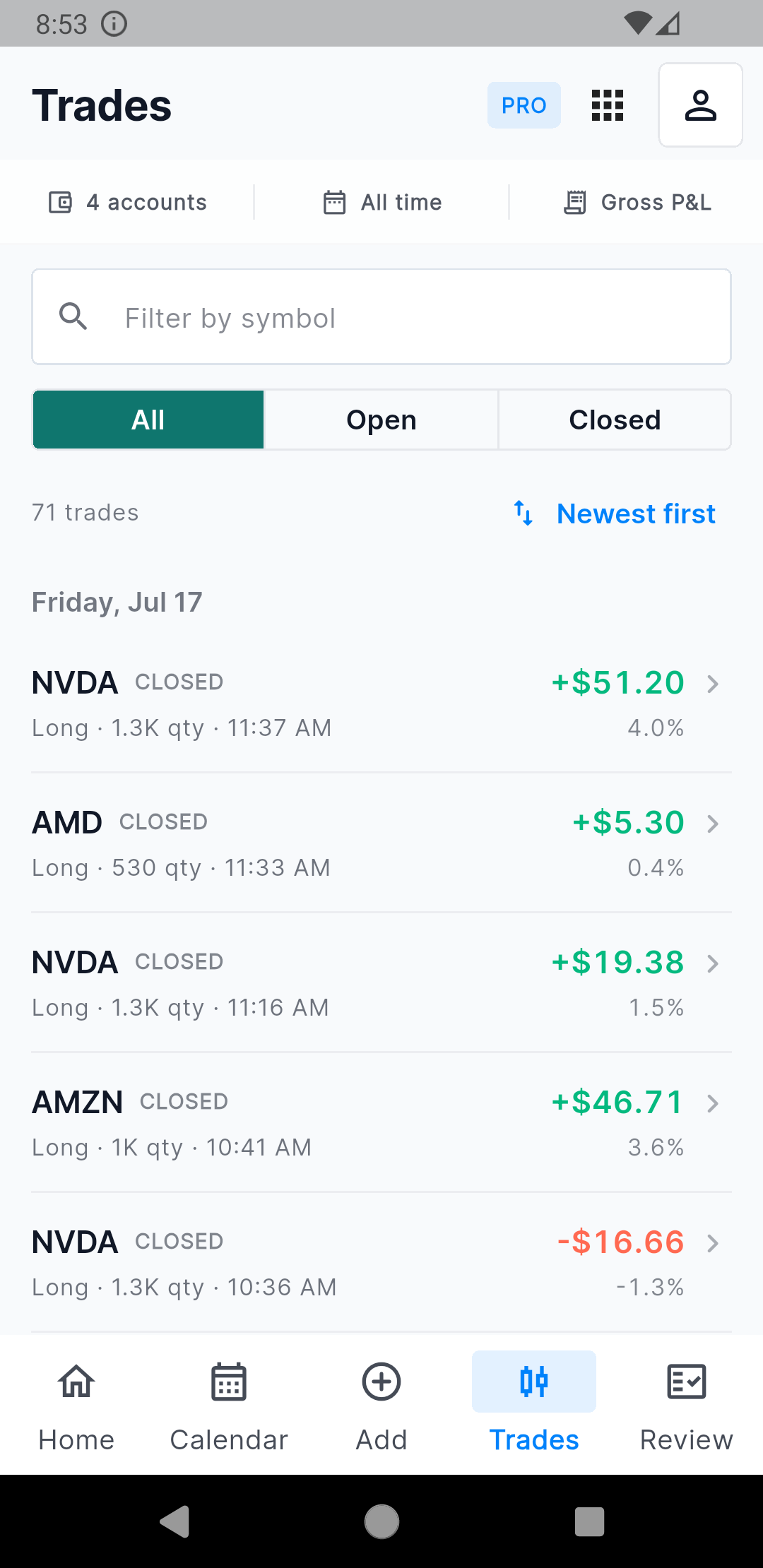
Search, filter, sort, select, and open trades. |
The Calendar is now a proper month grid. Winning and losing days are easy to spot, each trading day shows its P&L and trade count, and the month summary stays above the grid. We also added a clear hint that each day is tappable because a calendar is only useful when users know where it leads.
The Trades screen is designed for speed. Search by symbol, switch between All, Open, and Closed, and sort or filter by symbol, quantity, open date, close date, and P&L. Selection uses visible checkboxes instead of a hidden long press.
Review the whole day, then inspect the exact trade
Day Review is one of the biggest additions in V3. It brings the most useful session details into one page, including the running P&L path. You can move between trading days, open individual trades, write a note, add tags, or apply one of your existing website day-plan templates.
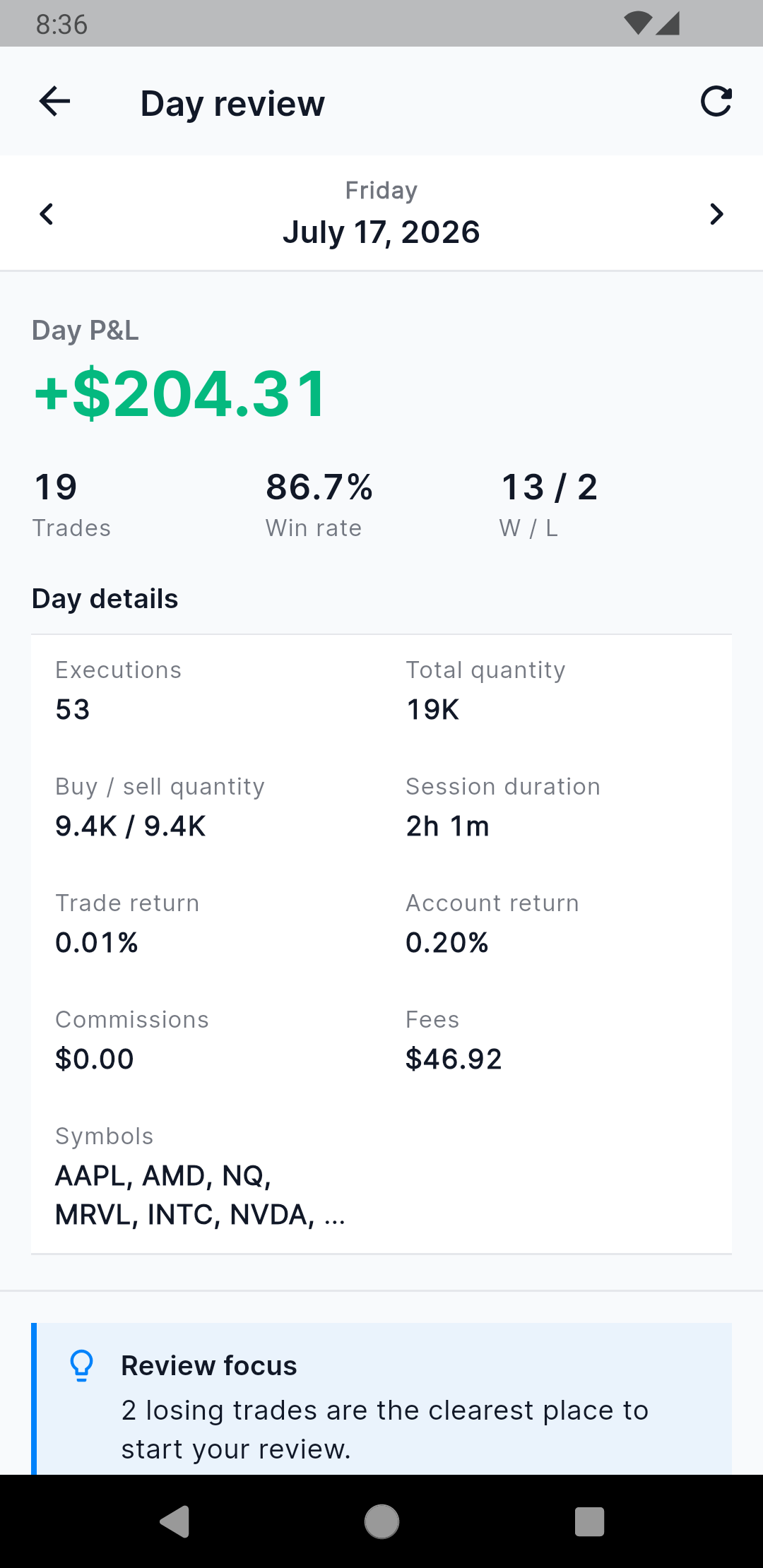
See the full result and session statistics. |
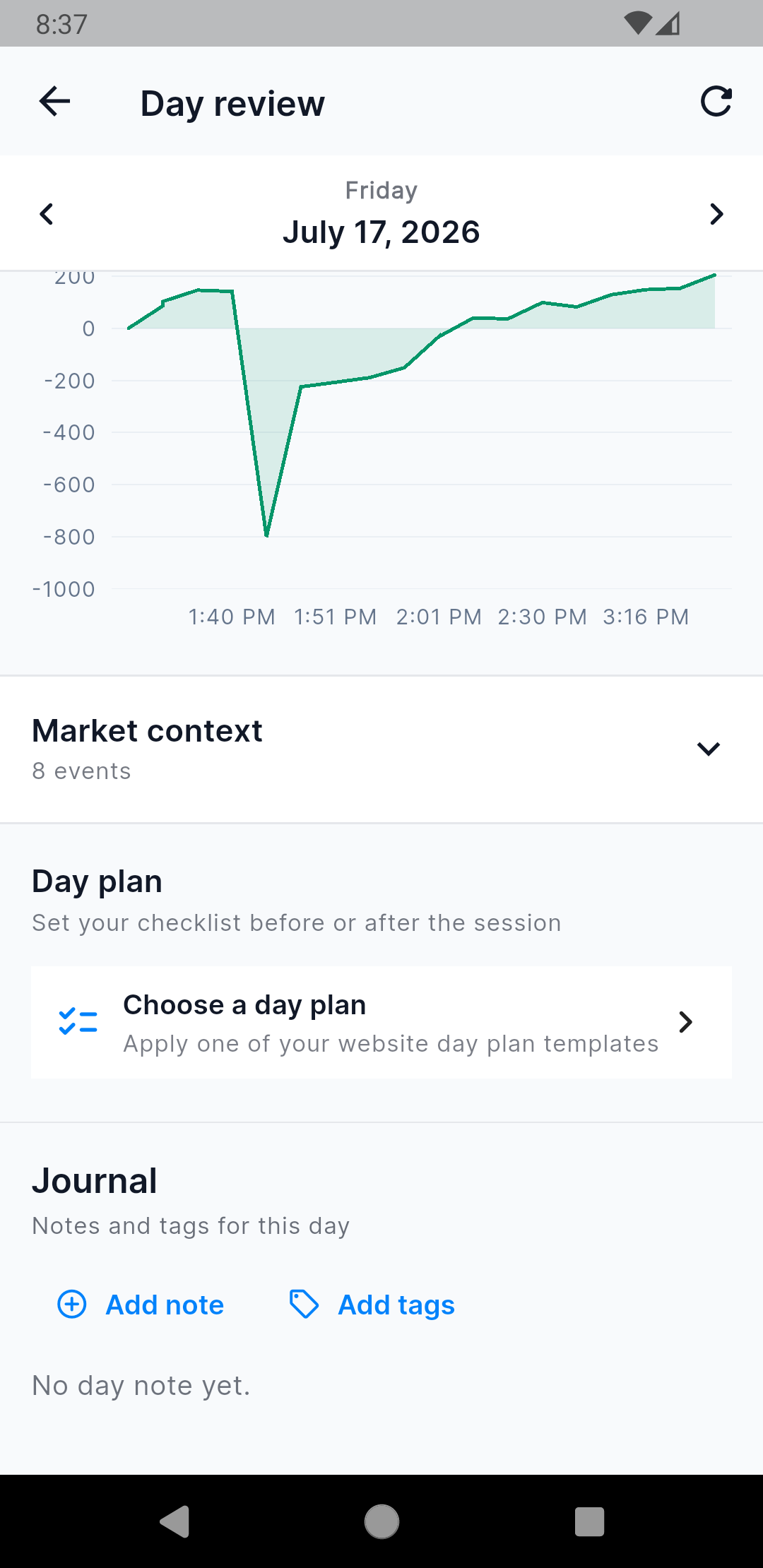
Review the P&L path and apply a day plan. |
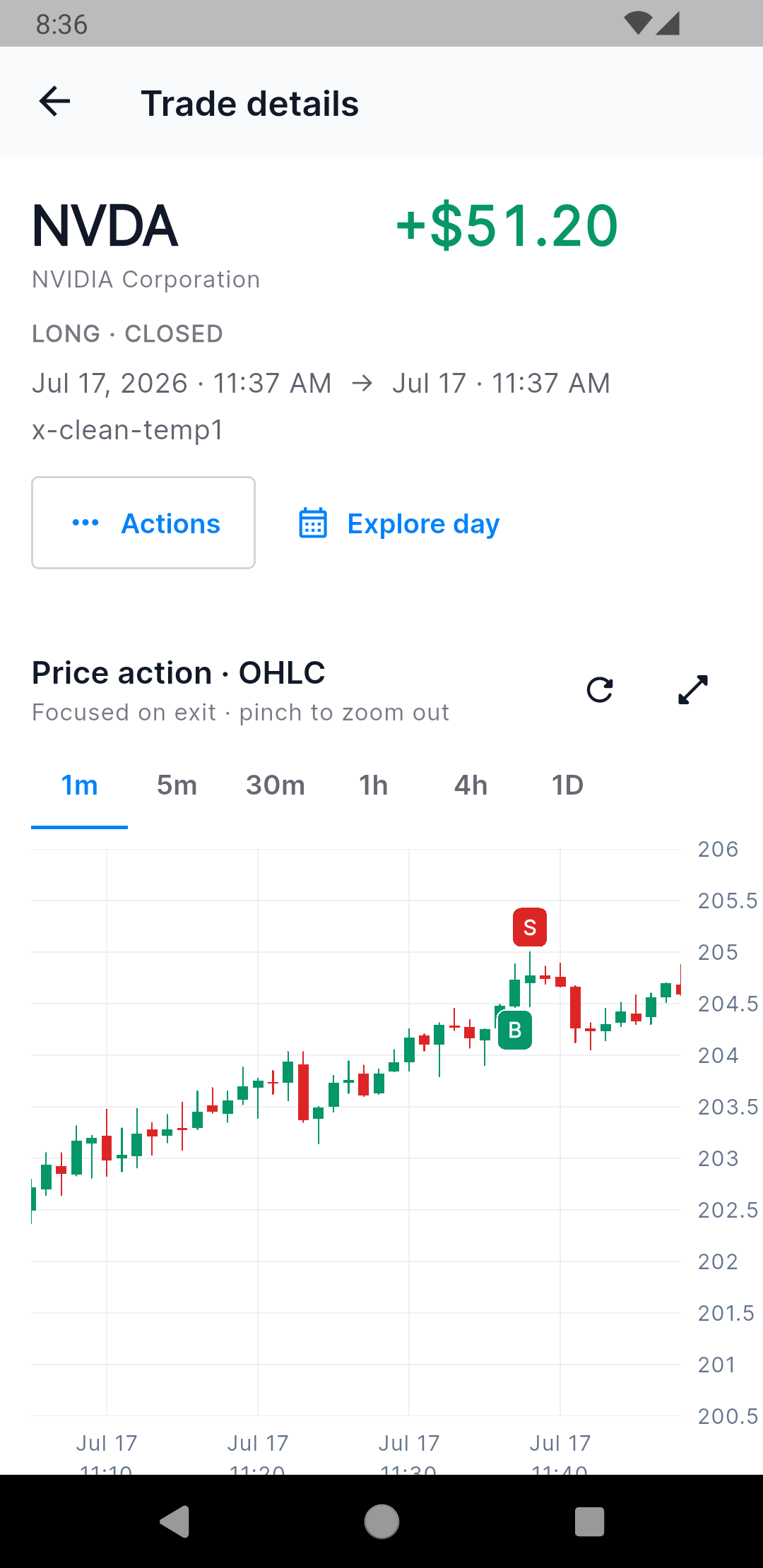
Inspect NVDA price action with clear buy and sell markers. |
Trade Detail now feels like a review workspace instead of a read-only summary. The native OHLC chart supports 1-minute through daily intervals, fullscreen inspection, and pinch zoom. The first view focuses around the trade exit so entry and exit markers remain readable on a phone.
From the same page you can open Trade Actions, explore the trading day, edit review fields, manage executions, attach screenshots, regenerate the chart, or delete the trade after confirmation.
Charts now lead to the trades behind them
A chart should help you find something worth reviewing. It should not be a dead end.
Review is split into Daily, Insights, and Notes. Insights gives you direct paths into the analytics catalogue, review queue, metrics, performance charts, and risk and exit analysis. Performance charts cover P&L, win rate, symbols, tags, sectors, price, time, weekday, month, duration, and more.
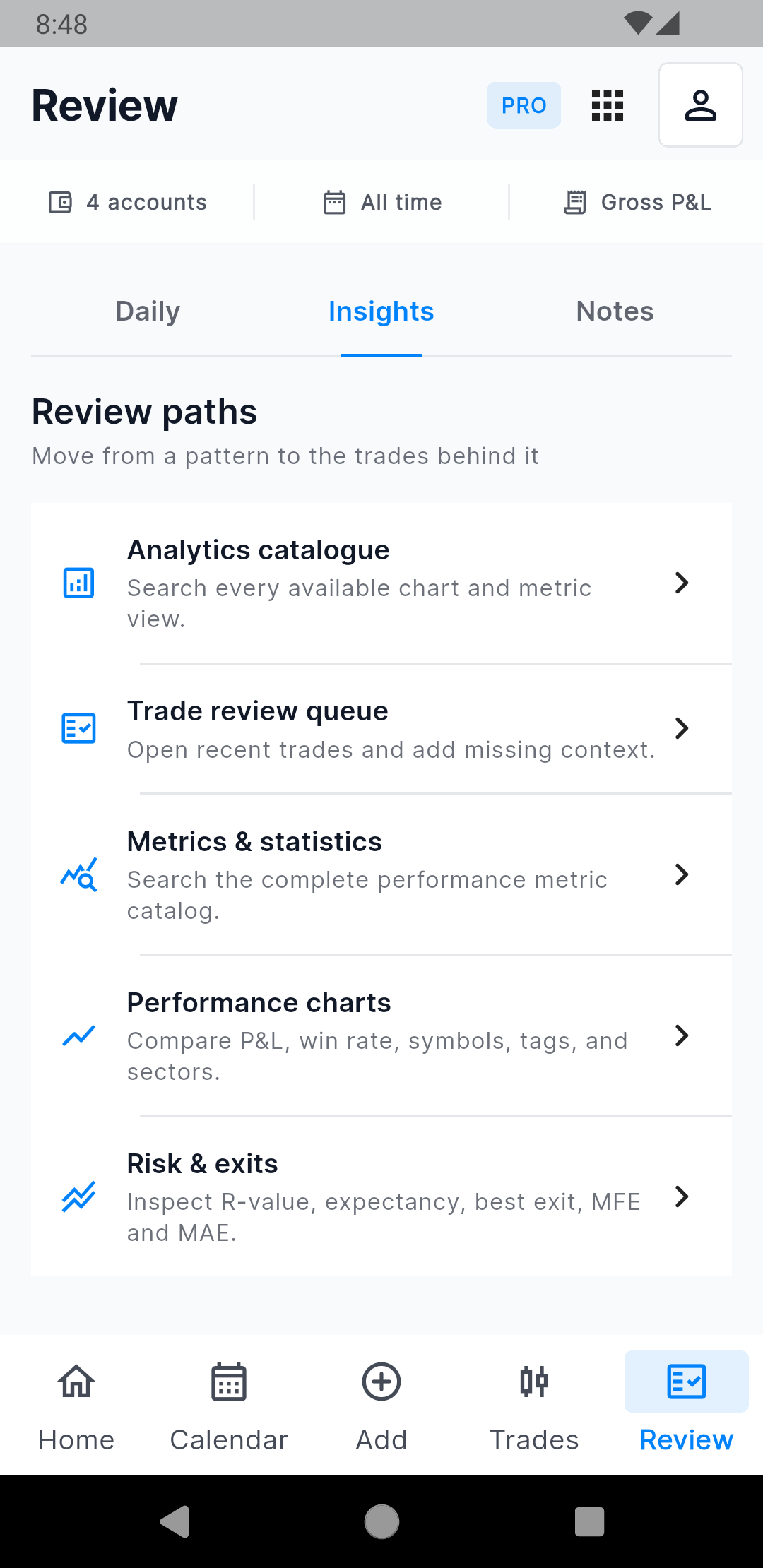
Start with the question you want to answer. |
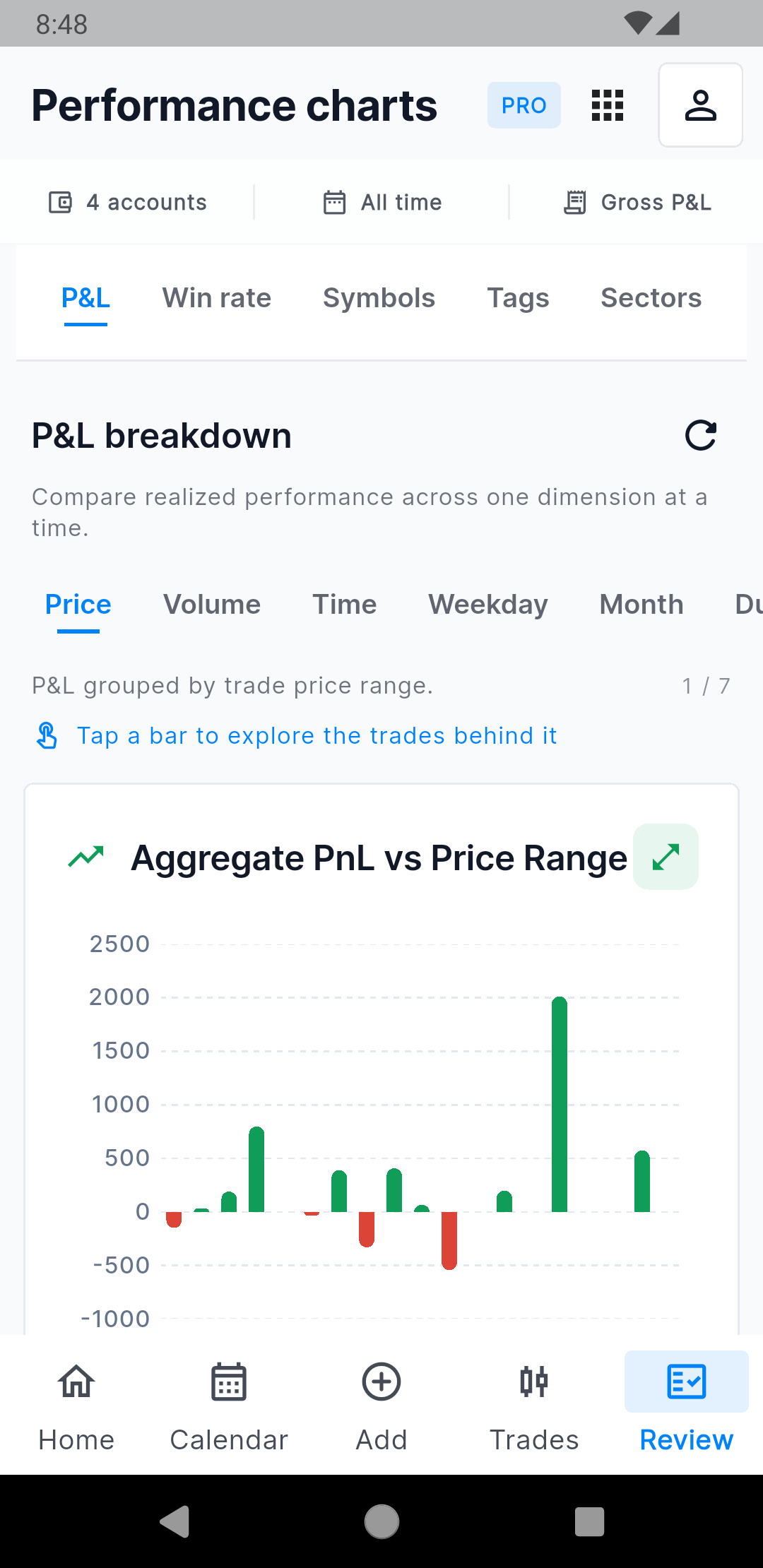
Tap a chart value instead of guessing from the graph. |
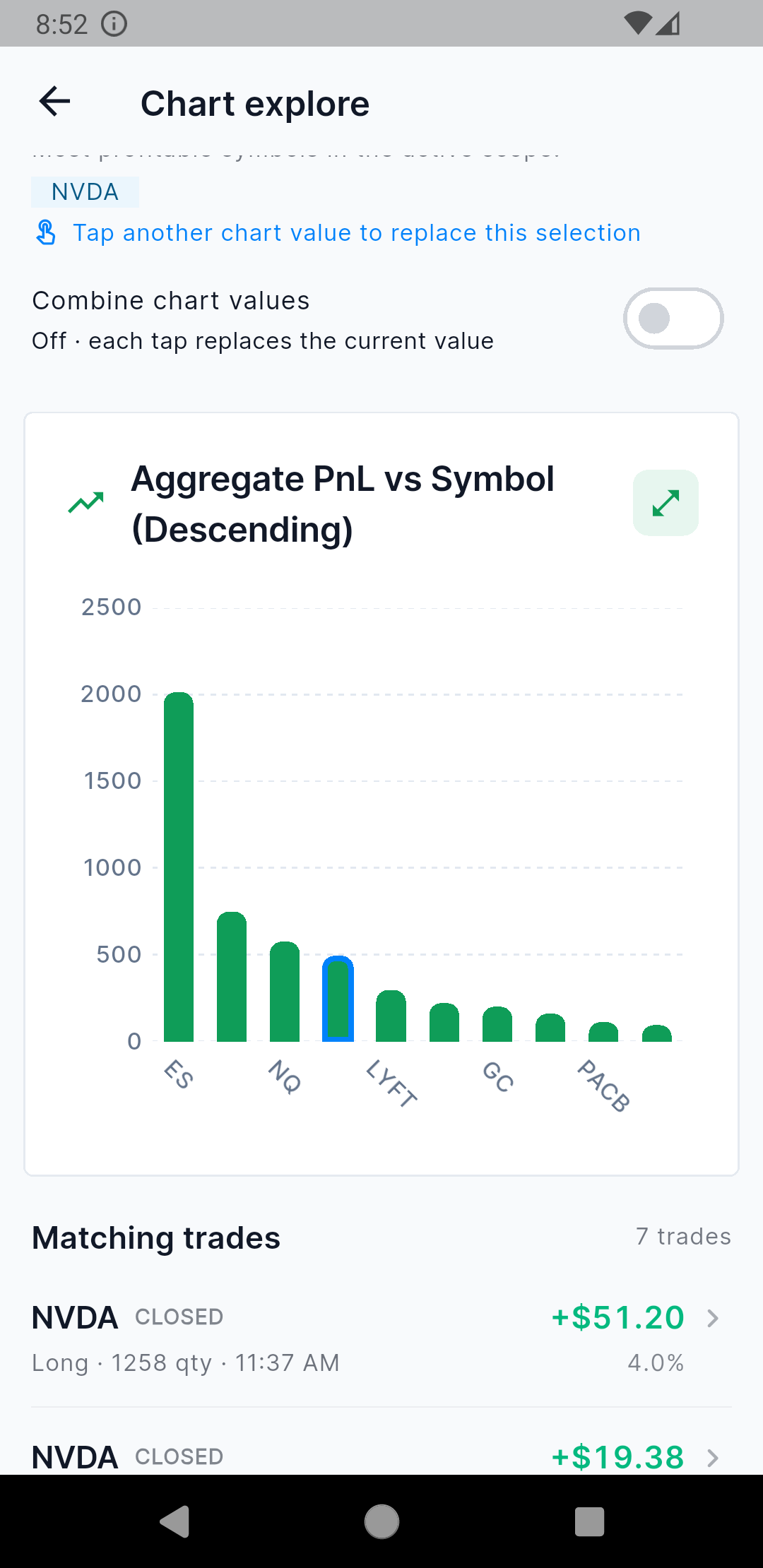
NVDA is selected and only its seven matching trades are listed. |
Tap a bar or line value and Chart Explore opens with that value selected. Tap another value to replace it, or turn on Combine chart values to build a wider selection. The trade list below the chart follows the selection. In the example above, selecting NVDA shows only the seven NVDA trades behind that result.
The same drilldown works from the overview charts on Home. This makes it much faster to move from a result that looks unusual to the exact trades that created it.
AI Coach and TradesViz AI are now on mobile
Charts tell you what happened. AI should help you decide what deserves attention next. V3 adds two different tools for that job instead of putting one generic chat box everywhere.
AI Coach brings ranked insights to Home
AI Coach scans the current account, date, and P&L scope for repeatable strengths, leaks, and changes. Each insight shows the result behind the pattern, the sample size, whether it is improving or worsening, why it surfaced, the confidence level, and a practical next step. You can move through the insight carousel without leaving Home.
For example, the Losses Beyond Planned Stop insight identifies trades where the realized loss exceeded the recorded stop by 25% or more. It shows how many violations occurred, the share of planned losers affected, the loss beyond plan, and the specific review action to take next.
The mobile carousel is intentionally focused on reading and acting. The full web dashboard remains the place to explore, filter, and mark insights for later.
TradesViz AI lets you question the journal directly
The blue AI icon in the app header opens TradesViz AI. Trade Agent uses the account, date, and Gross or Net P&L scope shown at the top of the chat. Ask which symbols are hurting performance, compare winners with losers, look for patterns in recent trades, or continue with your own follow-up question.
Support Agent is separate, so product questions do not get mixed into trading analysis. Chats include history and new-chat controls, and useful Trade Agent responses can be copied or saved into Notes. AI can make mistakes, so important results should still be verified against the journal.
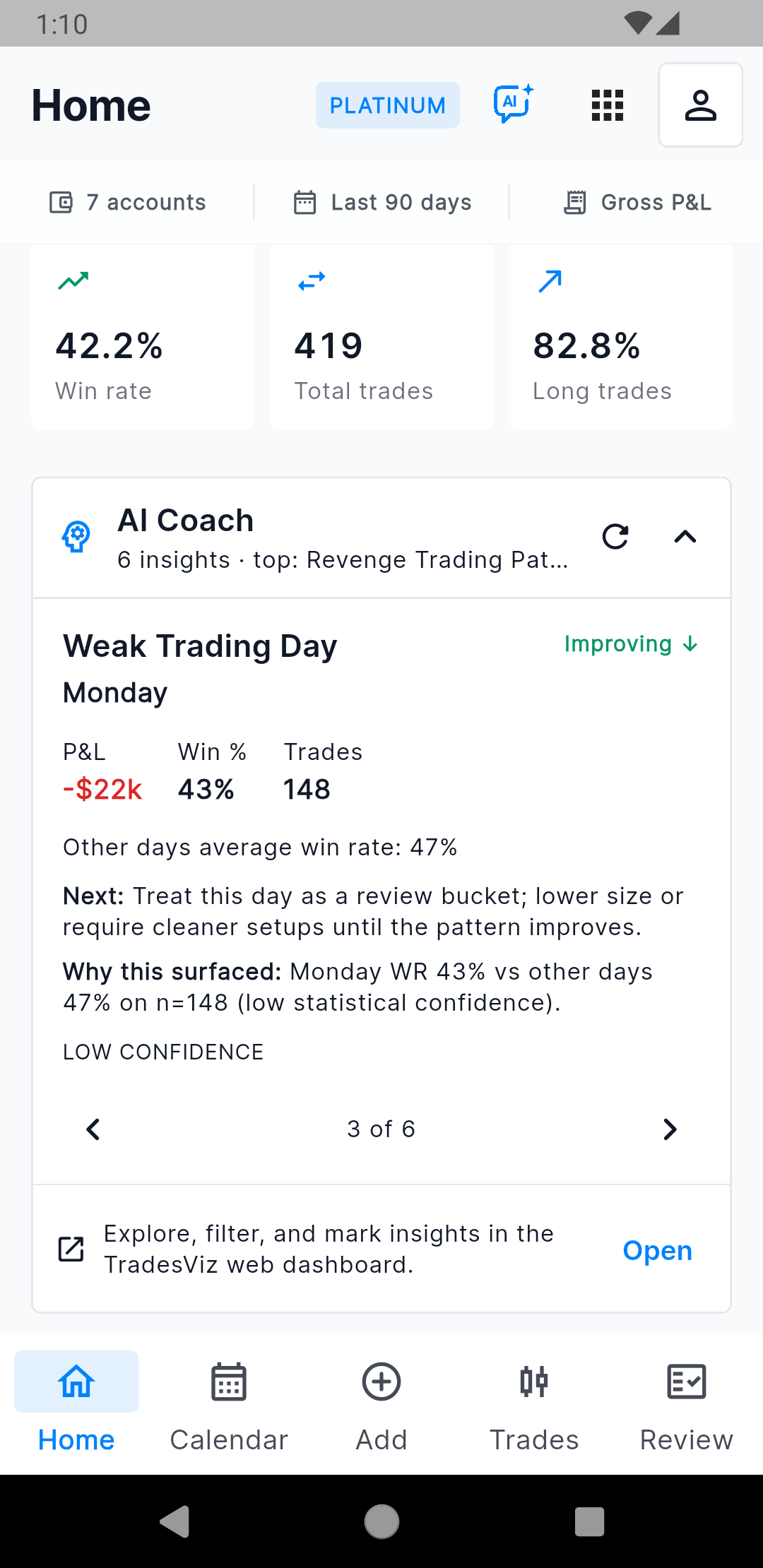
AI Coach ranks strengths, leaks, and changes. |
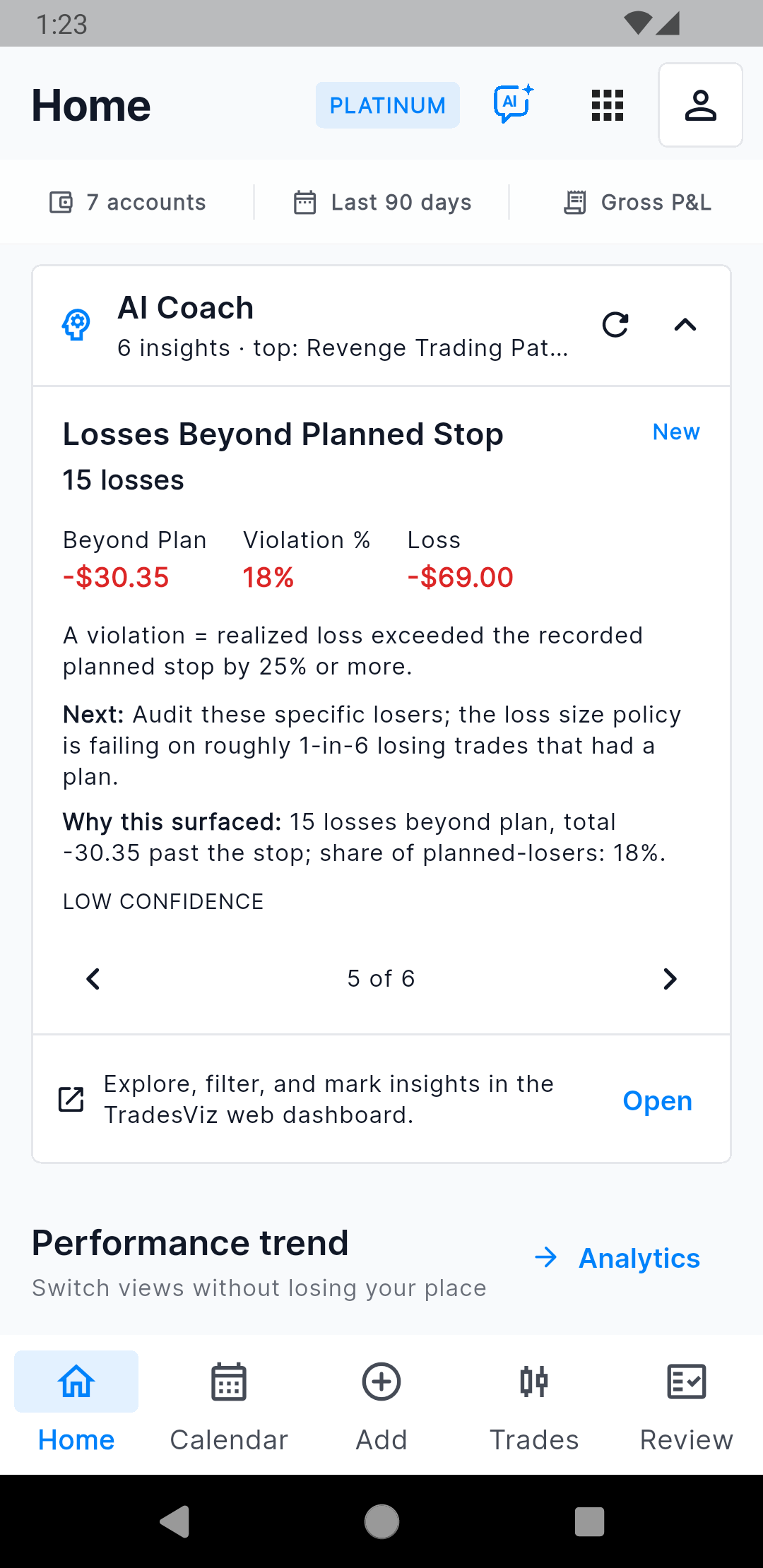
Audit the exact losses that exceeded the recorded plan. |
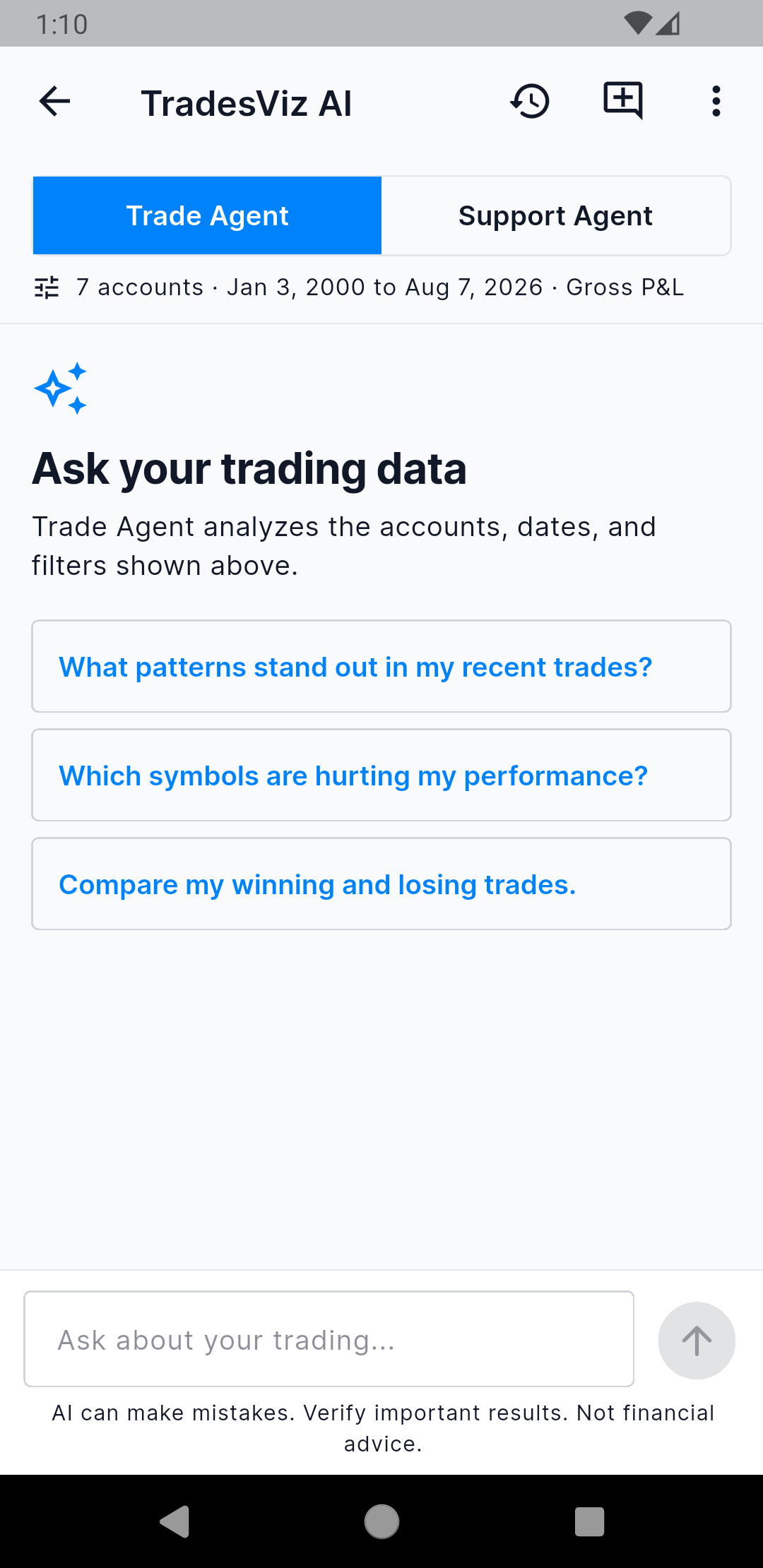
Start with a suggested question or ask your own. |
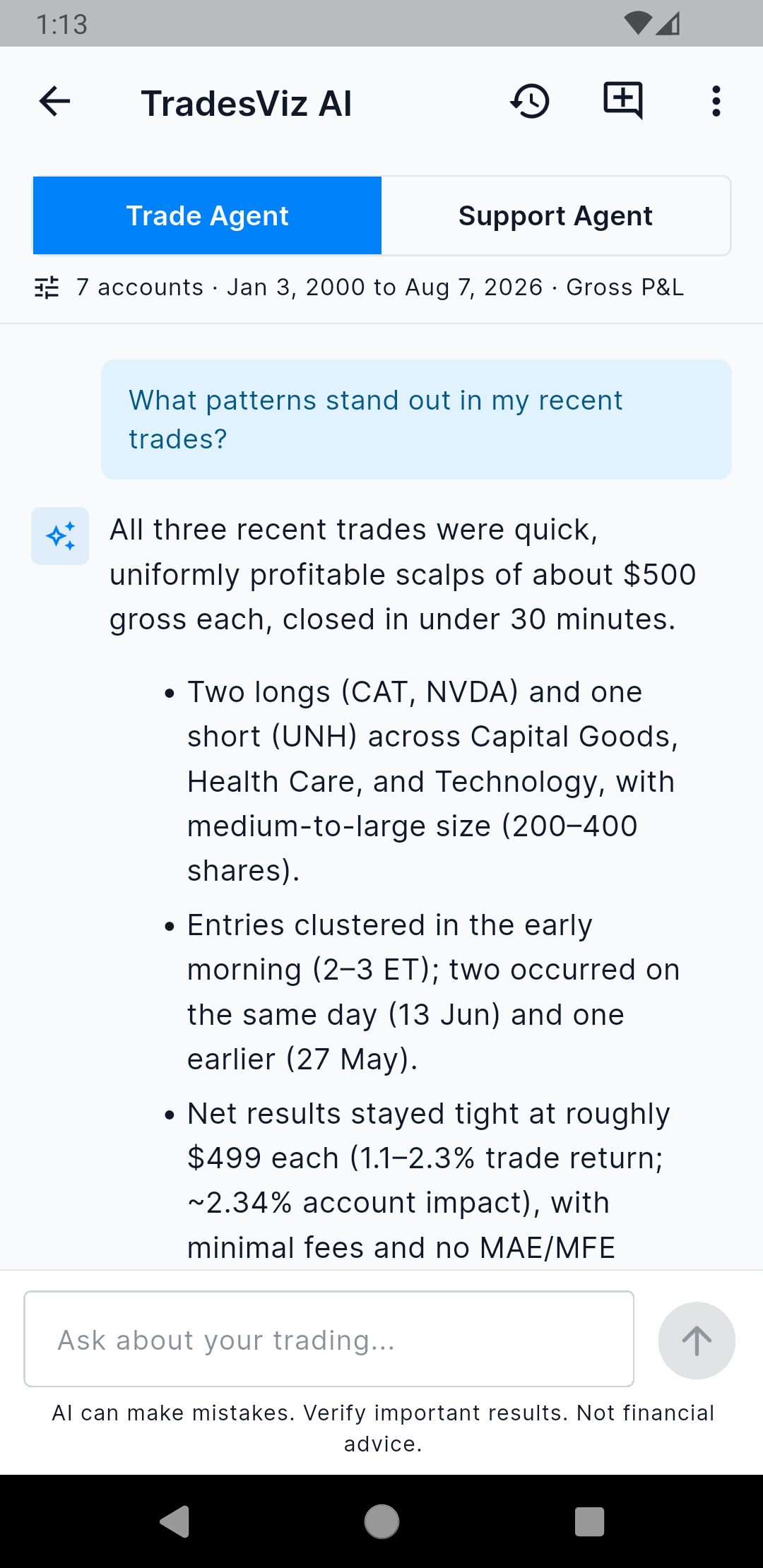
Review a scoped answer, then copy it or save it to Notes. |
Import, sync, or add data from your phone
V2 introduced mobile import and sync. V3 makes both much easier to use.
The Add button now gives you four clear choices: add a trade, import a broker file, sync broker connections, or add a note. The import flow has a searchable broker selector, broker-specific export instructions, file selection, and a final settings review before upload.
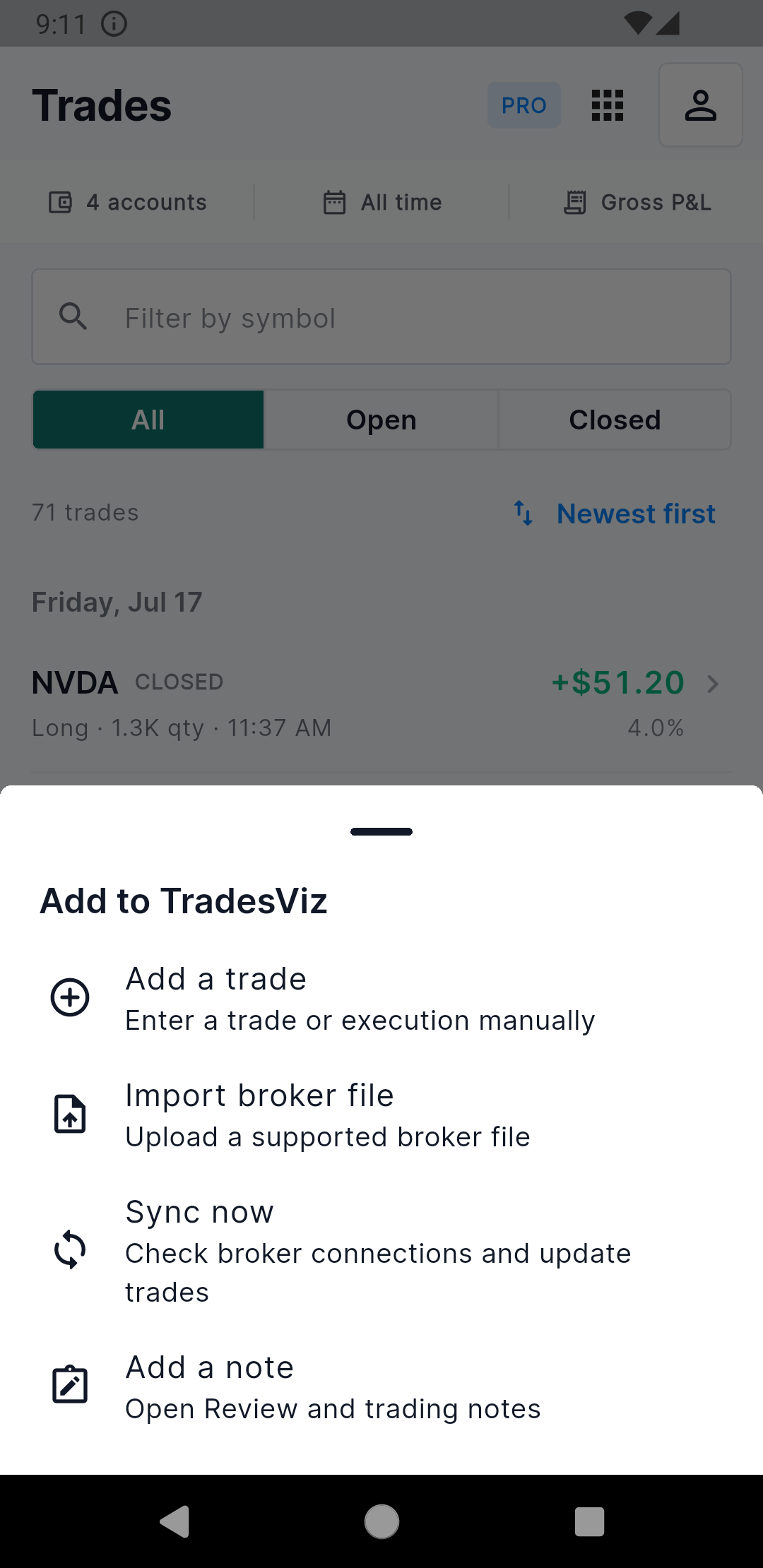
Add a trade, import, sync, or write a note. |
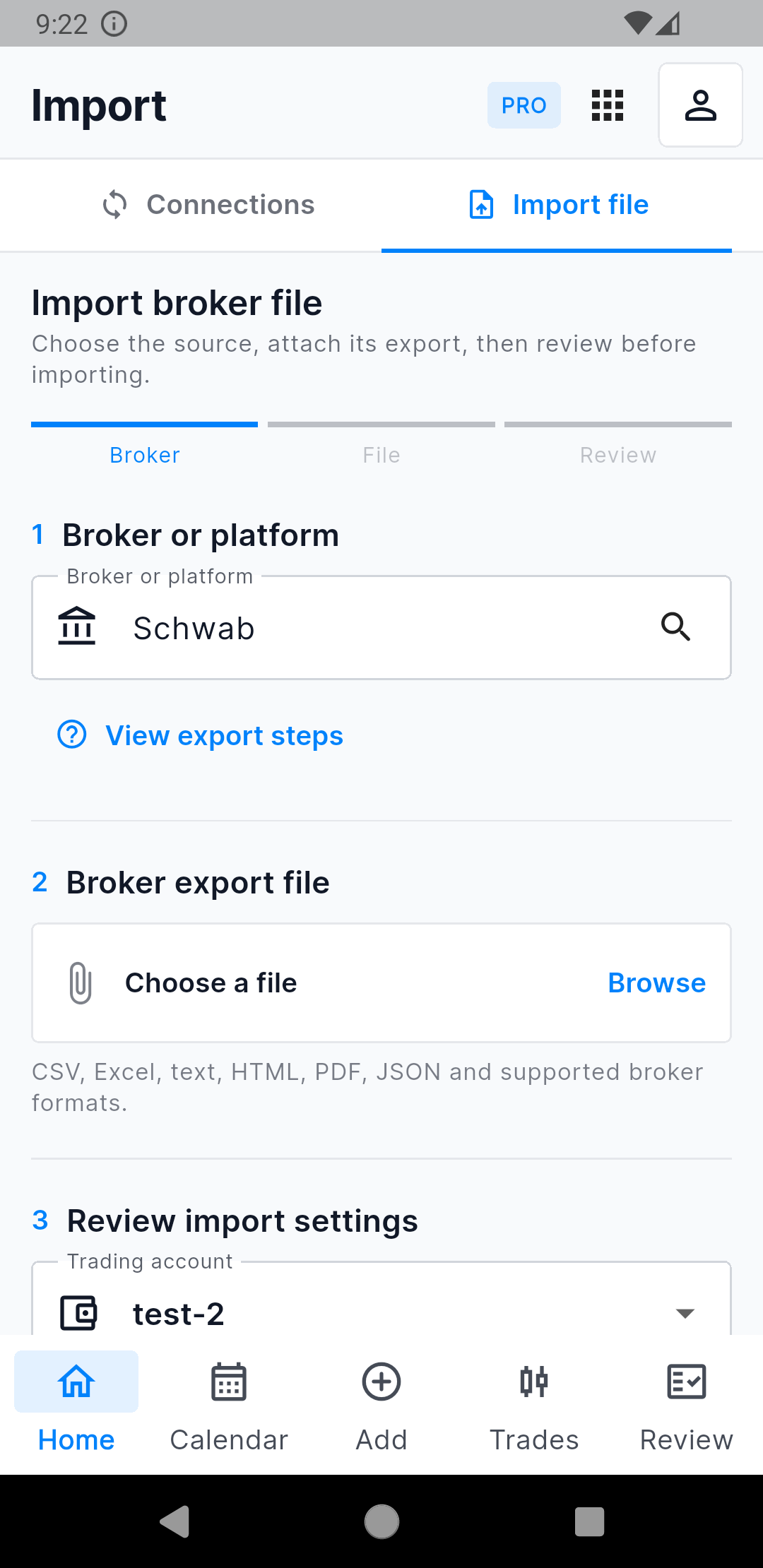
Schwab selected in the guided file-import flow. |
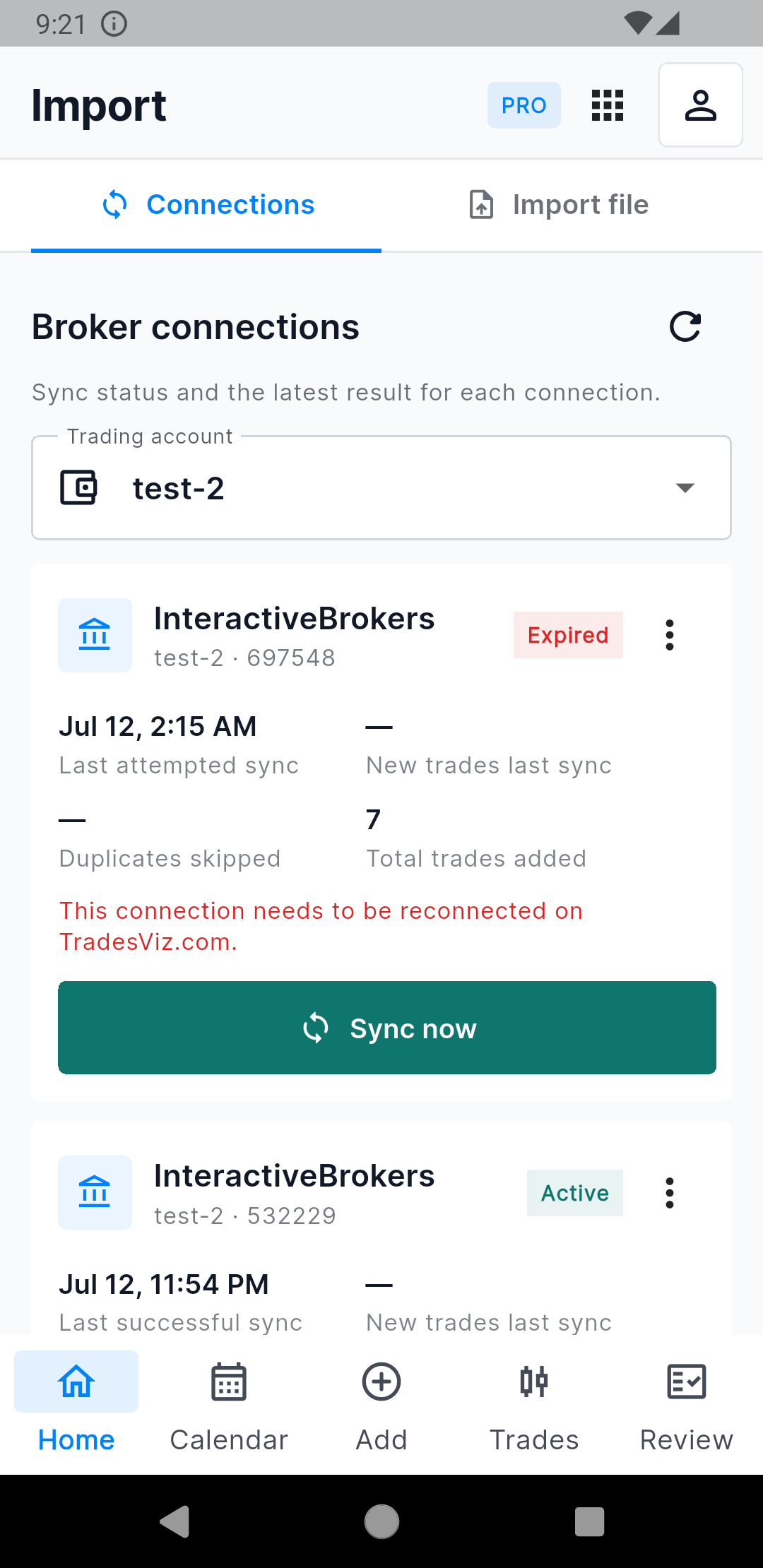
See active and expired IBKR connections and sync status. |
TradesViz supports manual files from 200+ brokers and platforms. Supported broker connections can also be checked and synced from the Connections tab. Robinhood, Charles Schwab, Interactive Brokers, Tradovate, Tastytrade, TradeStation, Webull, and many other integrations continue to use the same backend and plan rules as the website.
Some brokers have connection or authentication limits set by the broker. For example, Robinhood does not provide the same long-lived public API flow as many other brokers. V3 shows the connection status and gives you the right next action instead of hiding the problem.
Manual entry and notes are no longer afterthoughts
You can manually add a trade or execution with the correct account, symbol, side, date, timezone, currency, price, and quantity. Trade review fields cover stop loss, profit target, notes, tags, and screenshots. Notes can be searched and opened back into the related trade or day.
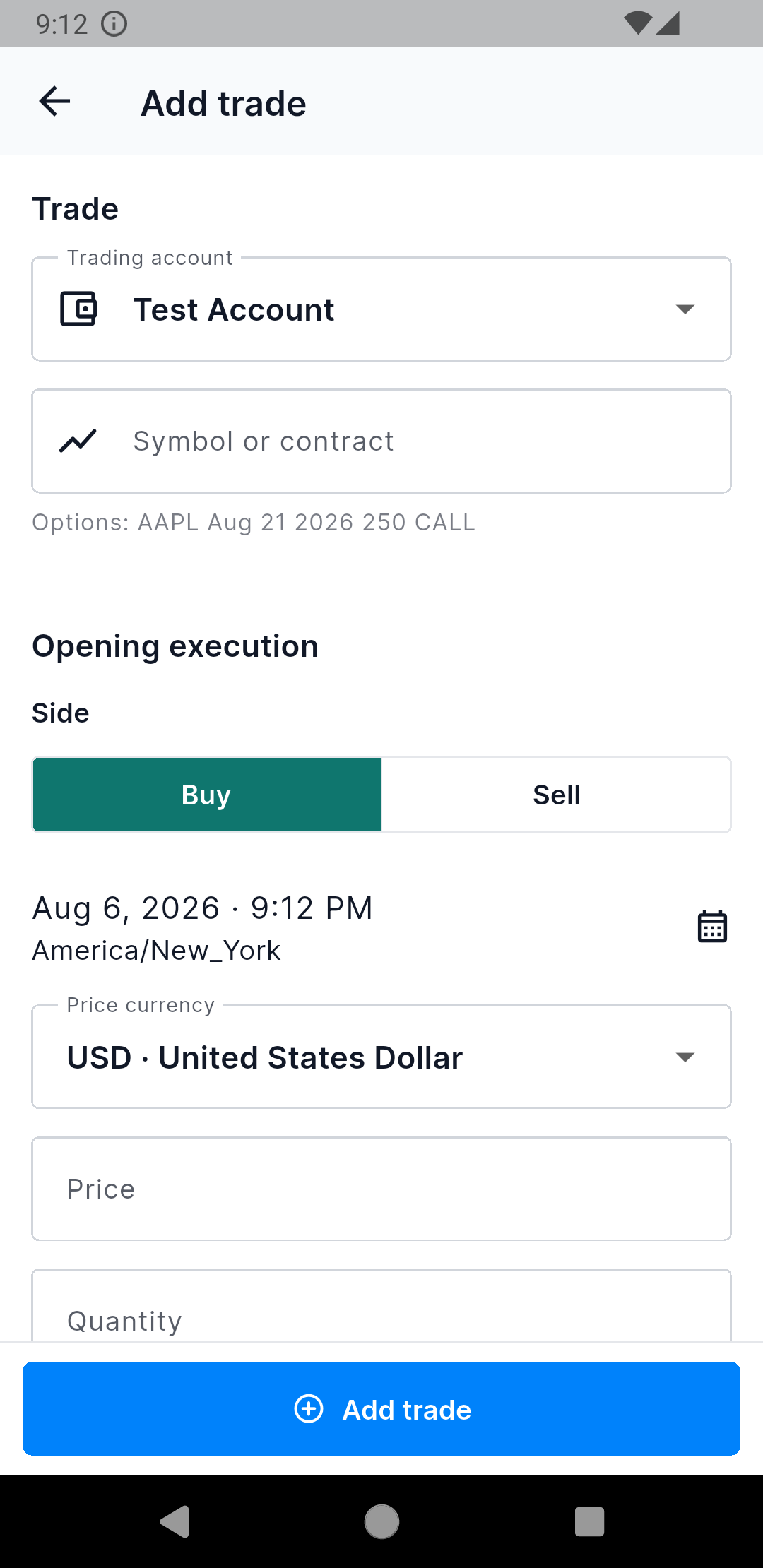
Add a trade or execution without returning to the desktop. |
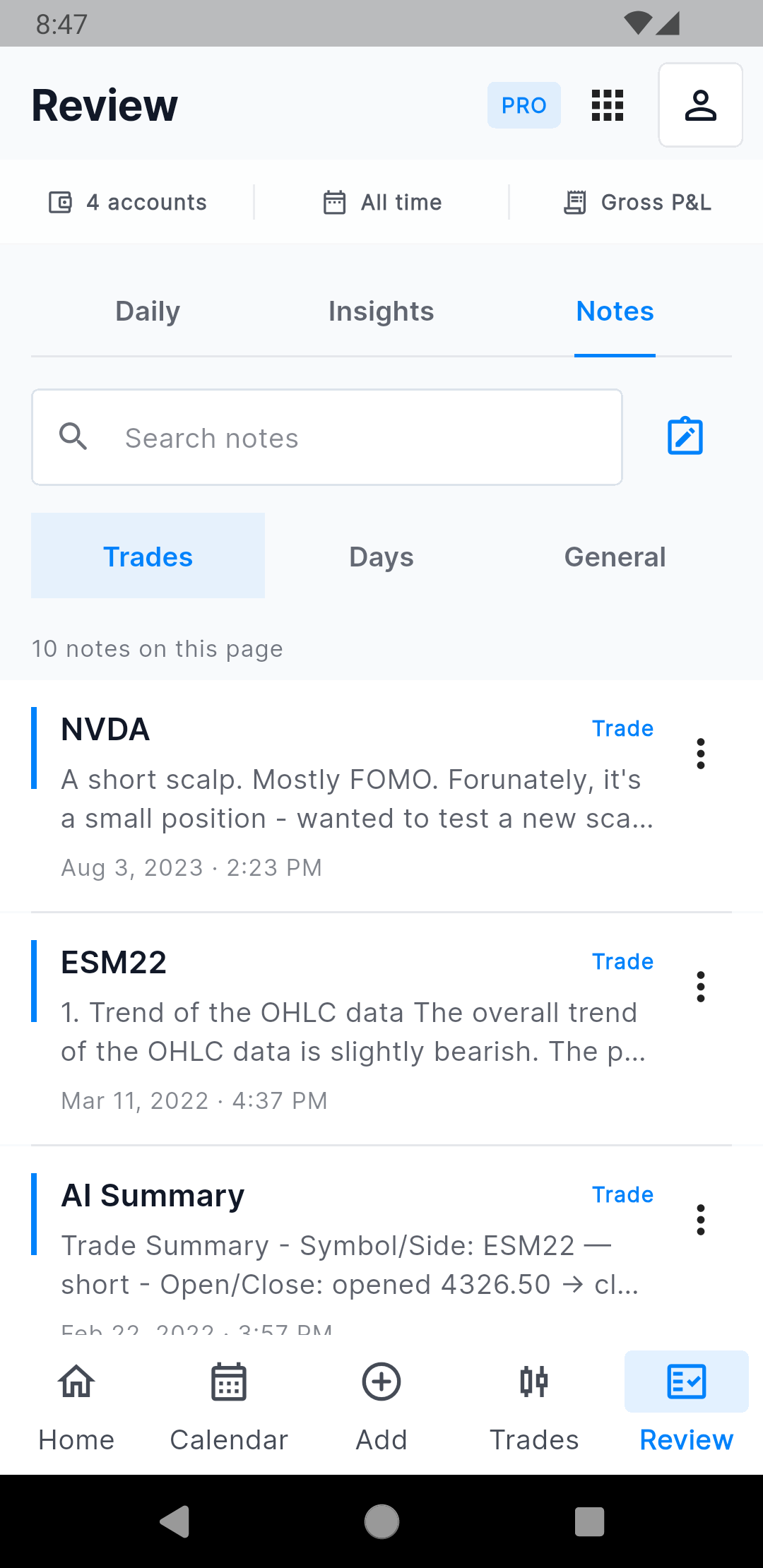
Search trade, day, and general notes from Review. |
Built for daily use
A lot of the work in V3 is not visible in a feature list. We spent time on the things that made the old app unreliable or slow:
- A normal network or server failure does not automatically clear a valid login.
- Reconnect attempts are coordinated so an older socket callback cannot overwrite a newer connection.
- The app handles foreground, background, sleep, inactive, and resume states without launching duplicate refreshes.
- Valid account and filter data stay visible while a refresh is running.
- Loading, empty, offline, and error screens explain what happened and what to do next.
- Search fields, tabs, icons, cards, charts, and bottom navigation now use one consistent visual system.
- Light, dark, and colorblind modes are supported across the redesigned pages.
- Android and iOS keep their platform-specific navigation and control behavior where it matters.
We also reduced unnecessary borders, oversized cards, rounded containers, and repeated filter panels. The app should feel faster because there is less UI in the way.
Does the mobile app now have every website feature?
No, and that is still not the goal.
The website remains the best place for the full 600+ analytics library, custom dashboards, simulators and replay, advanced screeners, options-flow tools, and research-heavy workflows.
What V3 now covers is the complete daily journal loop: get data in, check performance, open a day, review its trades, inspect price action, fix or annotate data, use plans and notes, analyze patterns, review AI Coach insights, ask Trade Agent a scoped question, and drill back to the exact evidence. That is the feature parity that matters when you are using a phone.
Available on Android and iOS
V3 uses your existing TradesViz account, trading accounts, data, filters, and subscription. There is no separate mobile subscription. Download or update the app and sign in using the same method you use on the website.
Please send feedback, bugs, and feature requests to [email protected]. A large part of this update came directly from users telling us what slowed them down in the older app.
We hope V3 makes it much easier to keep your journal up to date, regardless of where you are or which device you are using.
Frequently asked questions
Is TradesViz Mobile V3 available on both Android and iOS?
Yes. TradesViz is available on Google Play for Android and the App Store for iPhone and iPad.
Do I need a separate subscription for the app?
No. The app uses your existing TradesViz account and subscription. Pro and Platinum features follow the same entitlements as the website.
Can I import and sync trades from the mobile app?
Yes. You can import supported broker files, review import settings, check supported broker connections, and trigger eligible syncs. Broker availability and subscription requirements are the same as the website.
Can I use trade plans on mobile?
You can apply your existing website day-plan templates from Day Review. You can also add notes, tags, screenshots, stop-loss context, and profit-target context.
What can AI Coach and TradesViz AI do on mobile?
AI Coach surfaces ranked patterns from the active journal scope on Home. Trade Agent answers questions about the selected accounts, dates, filters, and Gross or Net P&L scope. Support Agent answers TradesViz product questions. AI features follow the same subscription entitlements as the website.
What happens if the app loses its connection?
V3 keeps a valid stored session during normal network or server failures. It shows a reconnect or retry state and coordinates the recovery when the app returns to the foreground. The session is cleared only after an explicit authentication rejection or logout.