In this post, we will explore how to pair your TradesViz account with Public.com for seamless auto-sync of your trades and activities.
Once you select your trading account and broker as Public.com in the trade auto-import page, a popup box will appear when you click on the "Connect account" button.
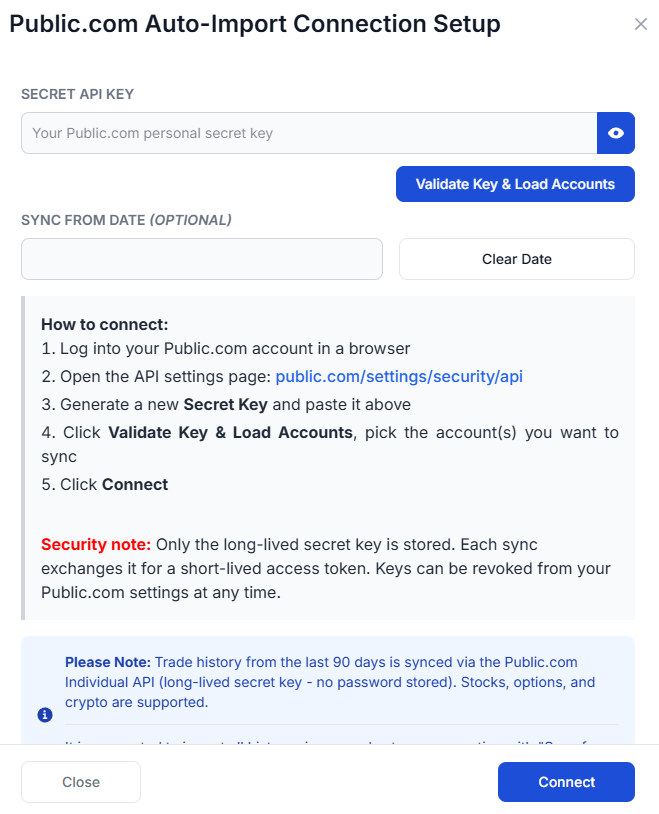
The purpose of this blog post is to guide you in establishing a Public.com connection on TradesViz. Here are the steps you need to follow:
- Log into your Public.com account in a browser.
- Open the API settings page: https://public.com/settings/security/api.
- Generate a new Secret Key — this is a long-lived key that is shown only once, so copy it immediately.
- Paste the Secret Key into the TradesViz connection popup and click Validate Key & Load Accounts. We will fetch the list of accounts available under that key.
- Tick the account(s) you want to sync (you can sync one or more accounts through a single connection), optionally set a Sync from date, then click Connect.
For full details on the Public.com Personal API, please refer to Public.com's official documentation: https://public.com/api/docs.
- Your password is NEVER stored on our servers. Public.com auto-sync uses the official Personal API with a long-lived Secret Key only — no password is ever exchanged.
- We are not responsible for ANY actions taken in your account.
- Please use the account connect and sync feature ONLY if you agree to the above terms.
Once connected, you can click on sync in the connections list to get your trades synced into TradesViz. All our syncs run once per day automatically and you are also able to manually trigger the sync at any time.
Note: Public.com auto-sync brings in up to 90 days of historical data from the date of connection (subject to the Public.com Personal API limits). For older trades, we recommend importing your historical CSV first and then setting the "Sync from date" to the day after your last imported execution.
Note: About API key security — Only the long-lived Secret Key is stored on our server. Each sync exchanges that key for a short-lived access token (valid up to 24 hours, regenerated on every sync) before calling the Public.com history API. You can revoke the key at any time from your Public.com API settings page, which will immediately disable the auto-sync. Public.com allows up to 5 active keys per account.
Supported instruments: Stocks, ETFs, options (single-leg and multi-leg via individual executions), and crypto assets available on the Public.com platform are supported. Option symbols are parsed automatically from Public.com's OCC-style identifiers into the underlying, expiry, strike, and call/put fields used by TradesViz.
That's it! Please let us know if you have any questions or concerns about the Public.com auto-sync integration by sending us an email at [email protected].