In this post, we will explore how to pair your TradesViz account with Polymarket for automatic sync of your event contract trades.
Plan requirement: Event contracts are a Pro and Platinum asset type, the same as crypto. Free accounts import stock trades only, so you need a Pro or Platinum plan or the free 7 day trial to connect Polymarket.
Once you select your trading account and broker as Polymarket in the trade auto-import page, a popup box will appear when you click on the "Connect account" button.
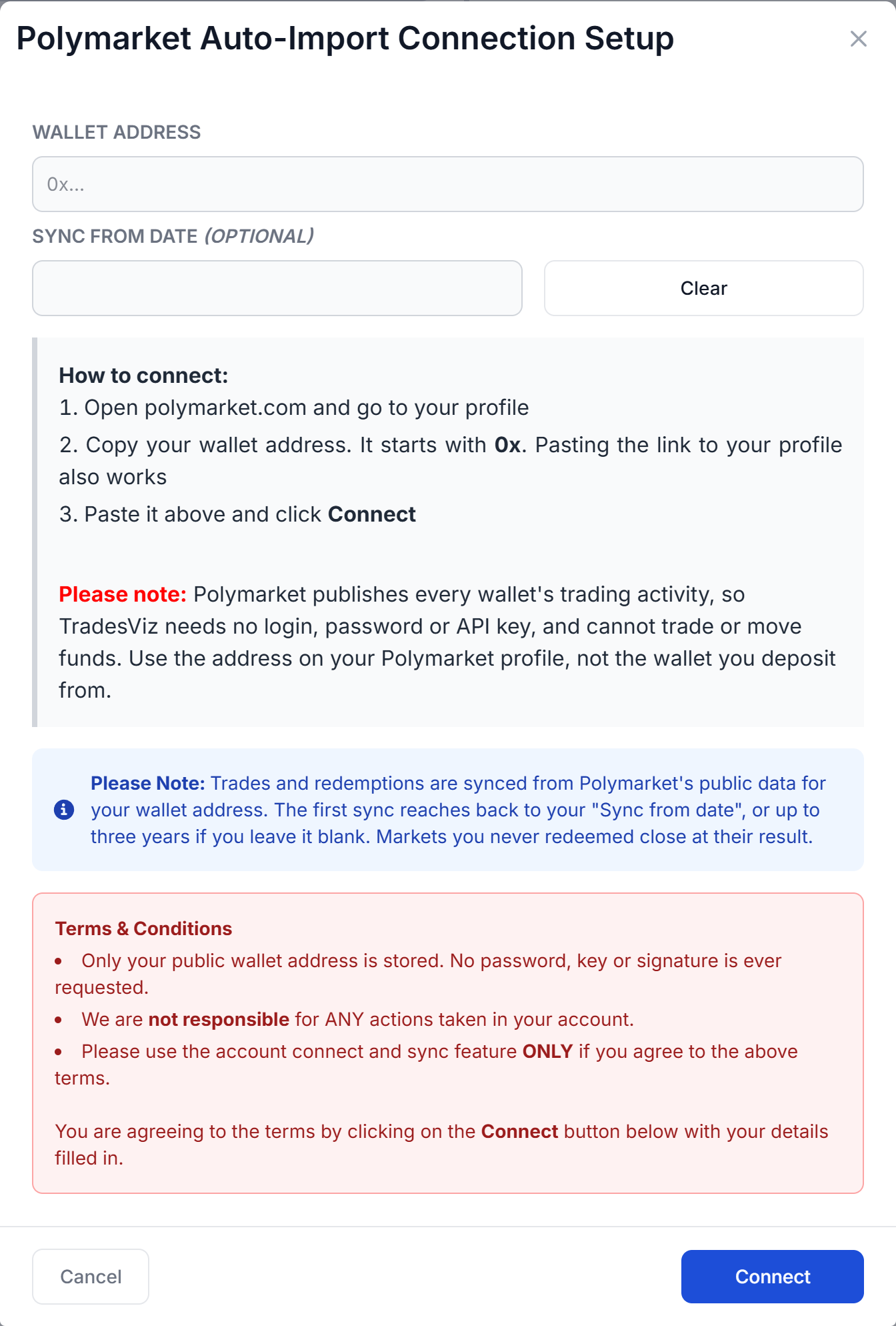
The connection only needs your Polymarket wallet address. Polymarket publishes every wallet's trading activity, so there is no login, password or API key involved. Here are the steps you need to follow:
- Log into polymarket.com and open your profile.
- Copy your wallet address. It starts with
0x. You can also copy the link to your profile page, and TradesViz picks the address out of it. - Paste it into Wallet address in the TradesViz popup.
- Optionally set a Sync from date. Leave it blank to import up to three years of history.
- Click Connect.
Use the address shown on your Polymarket profile. Polymarket keeps your positions at that profile address, which is different from the wallet you sign in or deposit with. If you paste an address with no Polymarket activity, TradesViz tells you so when you click Connect.
- Only your public wallet address is stored. Your password, private key or seed phrase is NEVER requested.
- We are not responsible for ANY actions taken in your account.
- Please use the account connect and sync feature ONLY if you agree to the above terms.
Once connected, TradesViz starts your first sync from the connections list, and you can click on sync there at any time. All our syncs run once per day automatically.
Note: How much history is imported - The first sync reaches back to your "Sync from date", or up to three years of Polymarket history if you left it blank. Every sync after that rechecks the last 14 days and skips anything already imported.
Note: Positions you never redeemed - Polymarket only records a redemption when you claim a payout, so a losing position usually has no closing record at all. When a market you still hold resolves, TradesViz closes it at the result Polymarket publishes, so old positions do not stay open.
Note: About wallet security - TradesViz only reads the public activity of your wallet address. It has no access to your wallet, so it cannot place orders, move funds or sign anything. Deleting the connection stops the sync immediately.
Note: Importing a file instead - Polymarket has no export button. If you prefer to upload a file, choose Polymarket on the import page and upload an activity export in Polymarket's data API format, as CSV, JSON or XLSX. The import page lists the columns it needs. A file and the sync read the same activity, so overlapping dates are skipped as duplicates.
Supported instruments: Polymarket event contracts are supported, including Yes/No markets, Up/Down markets and markets between two teams or candidates. Each market is one trade. The first outcome Polymarket lists shows as YES and the other as NO, and the trade closes at the payout or at the price you exited. Polymarket's trading fees are imported with each trade. Splits and merges do not change a position, and rewards and rebates are account income, so none of these are imported as trades. Polymarket US, the separate US app, does not use a wallet address and cannot connect this way.
Reviewing your Polymarket trades
Returns on event contracts are measured on the amount you staked, so a total loss is -100% before fees. Once your trades are in, a Prediction Markets tab appears in your dashboard menu with:
- Calibration and Brier score: how often the prices you paid matched what actually happened.
- Return by entry price and by market: the price ranges and market series where you make or lose money, such as all of your 15 minute Bitcoin markets together.
- Breakdowns: category, Yes vs No, and positions you held to the result vs exited early.
- Open positions: your live markets with entry, last price and unrealized P&L.
In Trade Explore, each trade shows the Polymarket price chart with your fills marked, your entry as American and decimal odds, and the closing price for events with a scheduled start.
That's it! Please let us know if you have any questions or concerns about the Polymarket auto-sync integration by sending us an email at [email protected].