In this post, we will explore how to pair your TradesViz account with BYDFi.
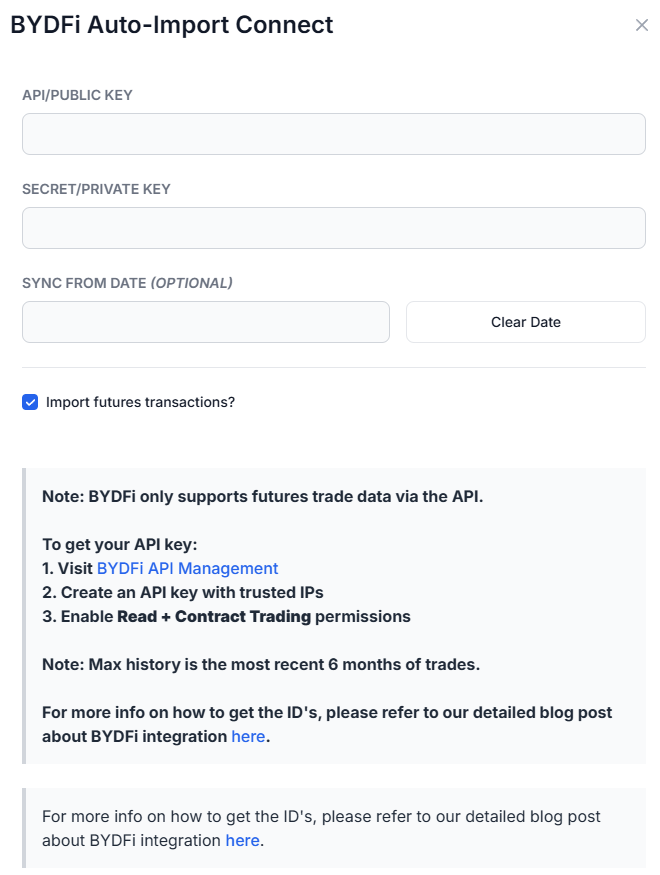
Once you select your trading account and broker as "BYDFi" in the trade auto-import page, a popup box will appear when you click on the "Connect account" button.
The purpose of this blog post is to guide you to get API credentials from the BYDFi website. Here are the steps you need to follow:
Step 1: Create an API Key on BYDFi
- Apply for API permissions by filling out BYDFi’s official API access form: https://docs.google.com/forms/d/e/1FAIpQLSelUn74MsydrcNBpryW50XZKdx0M5ZwCx51Hh8lQLXjpjoH2g/viewform. Wait for BYDFi to approve your request before proceeding.
- Once approved, log into your BYDFi account and create a read-only API key from the API management section.
- After creating the key, you will see your API Key and Secret Key. Make sure to copy and save them as the Secret Key will only be shown once.
- Do NOT enable "Transfer" or "Withdrawal" permissions – TradesViz only needs read access to your orders/trades.
Step 2: Connect on TradesViz
- Go to the Import/Export page on TradesViz
- Switch to the "Auto-sync" tab
- Select "BYDFi" from the broker dropdown
- Enter your API Key and Secret Key from the previous step
- The "Import futures transactions" checkbox will be checked by default – BYDFi only supports futures trade data via the API
- Optionally set a "Sync from date" to control how far back to fetch history (up to 6 months)
- Click "Connect"
Once connected, TradesViz will automatically sync your BYDFi futures trades once per day. You can also manually trigger a sync at any time from your connections list. All your cryptocurrency trades will appear with full analytics, charts, and journaling features.
That's it! Please let us know if you have any questions or concerns about the BYDFi auto-sync integration by sending us an email at [email protected].