In this post, we will explore how to pair your TradesViz account with Capital.com to automatically import your trades. Both Live and Demo accounts are supported.
On the trade auto-import page, select your TradesViz trading account and choose Capital.com as the broker. Click Connect account to open the connection setup.
Create your Capital.com API key
- Log into the Capital.com web platform at www.capital.com.
- Enable two-factor authentication (2FA) if it is not already enabled.
- Open Settings > API integrations and click Generate API key.
- Name the key TradesViz, create a custom API password and choose an expiration date if needed.
- Confirm with your 2FA code. Save the generated API key securely: Capital.com displays it only once. Keep the custom API password you created with it.
Capital.com's API setup reference is available at www.capital.com/en-int/trading-platforms/api-development-guide.
Connect your account in TradesViz
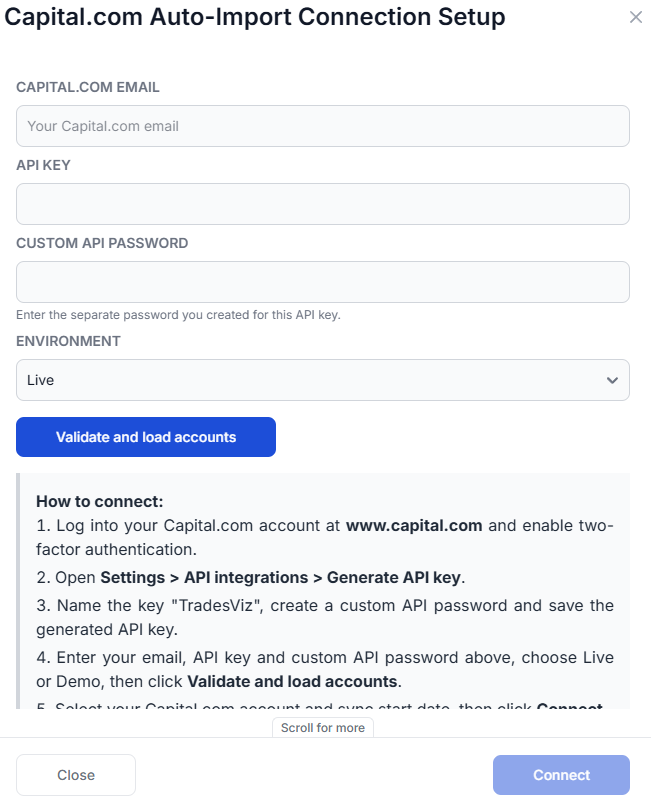
- Enter your Capital.com email, API key and custom API password in the connection popup. Use the separate password created for the API key, not your website login password.
- Choose Live or Demo to match the account you want to sync.
- Click Validate and load accounts. TradesViz checks the credentials and displays the available Capital.com accounts.
- Select the Capital.com account to connect to your chosen TradesViz trading account.
- Choose a Sync from date (UTC), or leave it blank to start 30 days ago. Choose a date before the opening executions you want to import. If you already imported Capital.com statements, avoid overlapping those dates to prevent duplicates between statement imports and API sync.
- Read the terms below, then click Connect.
- Your email, API key and custom API password are sent securely via HTTPS and stored encrypted so that TradesViz can sync automatically.
- Capital.com API keys allow trading and cannot be restricted to read-only access. TradesViz uses this connection to read your history and does not place, change or close orders.
- You can revoke the API key in Capital.com at any time to stop access.
- We are not responsible for ANY actions taken in your account.
- Please use the account connect and sync feature ONLY if you agree to the above terms. You agree to these terms by clicking Connect with your details filled in.
Syncing your trades
Once connected, use the sync button in your connections list to import your trades. With automatic sync enabled, older history imports in batches and continues until caught up. Your account then syncs daily. The starting date controls what TradesViz requests; the history available depends on Capital.com.
Each connection syncs one Capital.com account. Add separate connections for additional accounts or for Live and Demo environments. Repeated API syncs recognize previously imported executions.
Capital.com commissions and overnight charges are applied when they can be matched to the imported trades. If the connection shows unmatched charges, some costs may be missing from your net P&L. Check these against your Capital.com statement and contact support if the warning remains.
Updating your API credentials
If your key expires, is disabled or has been replaced, click Reconnect Capital.com in the connections list. Enter the replacement credentials for the same account and Live/Demo environment. Reconnecting preserves your imported history and sync start date.
If validation fails, check your email, selected environment, API key and custom API password. Make sure the API key is enabled and has not expired. To stop access, revoke the key in Capital.com and remove the connection from TradesViz.
Please let us know if you have any questions about Capital.com auto-sync by emailing [email protected].