In this post, we will explore how to pair your TradesViz account with TradeZero for seamless auto-sync of your trades and activities.
Once you select your trading account and broker as TradeZero in the trade auto-import page, a popup box will appear when you click on the "Connect account" button.
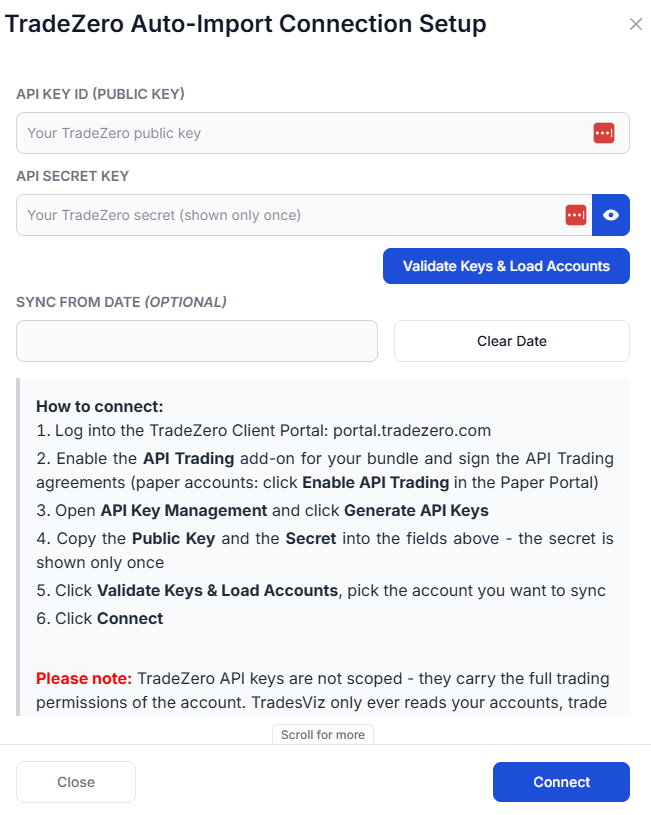
The purpose of this blog post is to guide you in establishing a TradeZero connection on TradesViz. Here are the steps you need to follow:
- Log into the TradeZero Client Portal at portal.tradezero.com (paper trading accounts use the same login).
- Enable the API Trading add-on for your bundle and sign the API Trading agreements. Paper accounts just need to click Enable API Trading once inside the portal.
- Open API Key Management and click Generate API Keys.
- Copy the Public Key (API Key ID) and the Secret — the secret is shown only once, so copy it immediately.
- Paste both into the TradesViz connection popup and click Validate Keys & Load Accounts. We will fetch every account visible to that key pair.
- Pick the TradeZero account you want to sync, optionally set a Sync from date, then click Connect.
For full details on generating keys and the TradeZero Trading API itself, please refer to TradeZero's official developer documentation: https://developer.tradezero.com/docs/documentation.
- Your password is NEVER stored on our servers. TradeZero auto-sync uses the official Trading API key pair only — no password is ever exchanged.
- We are not responsible for ANY actions taken in your account.
- Please use the account connect and sync feature ONLY if you agree to the above terms.
Once connected, you can click on sync in the connections list to get your trades synced into TradesViz. All our syncs run once per day automatically and you are also able to manually trigger the sync at any time.
Note: TradeZero auto-sync brings in your live trade history on every sync, reaching back to your chosen "Sync from date" on the first sync (up to 1 year, the maximum TradeZero's API allows), then rolling a 30-day window on every sync after that. For older trades, we recommend importing your historical CSV first and then setting the "Sync from date" to the day after your last imported execution.
Note: Paper trading accounts work a little differently. TradeZero's trade-history endpoints only return data for live accounts, so for paper accounts TradesViz instead pulls the current trading day's completed orders on every sync. If you want a full paper trading history in TradesViz, import it via CSV first.
Note: About API key security - TradeZero API keys are not scoped to read-only - they carry the same trading permissions as your account. TradesViz only ever calls TradeZero's account, position, and order-history endpoints; we never place orders or move funds. You can revoke or regenerate your keys at any time from API Key Management in the TradeZero portal - just remember that regenerating invalidates the old secret immediately, so you'll need to update your TradesViz connection with the new one.
Supported instruments: Stocks and options traded on TradeZero are supported. Option symbols are parsed automatically from TradeZero's OCC-style identifiers into the underlying, expiry, strike, and call/put fields used by TradesViz.
That's it! Please let us know if you have any questions or concerns about the TradeZero auto-sync integration by sending us an email at [email protected].