In this post, we will explore how to pair your TradesViz account with Match-Trader for automatic sync of your closed positions.
Plan requirement: Forex, metals and crypto are Pro and Platinum asset types. Free accounts import stock-type trades only, so on a free plan only index, commodity and stock CFDs are imported. You need a Pro or Platinum plan or the free 7 day trial to bring in your forex, gold, silver and crypto trades.
Once you select your trading account and broker as Match-Trader in the trade auto-import page, a popup box will appear when you click on the "Connect account" button.
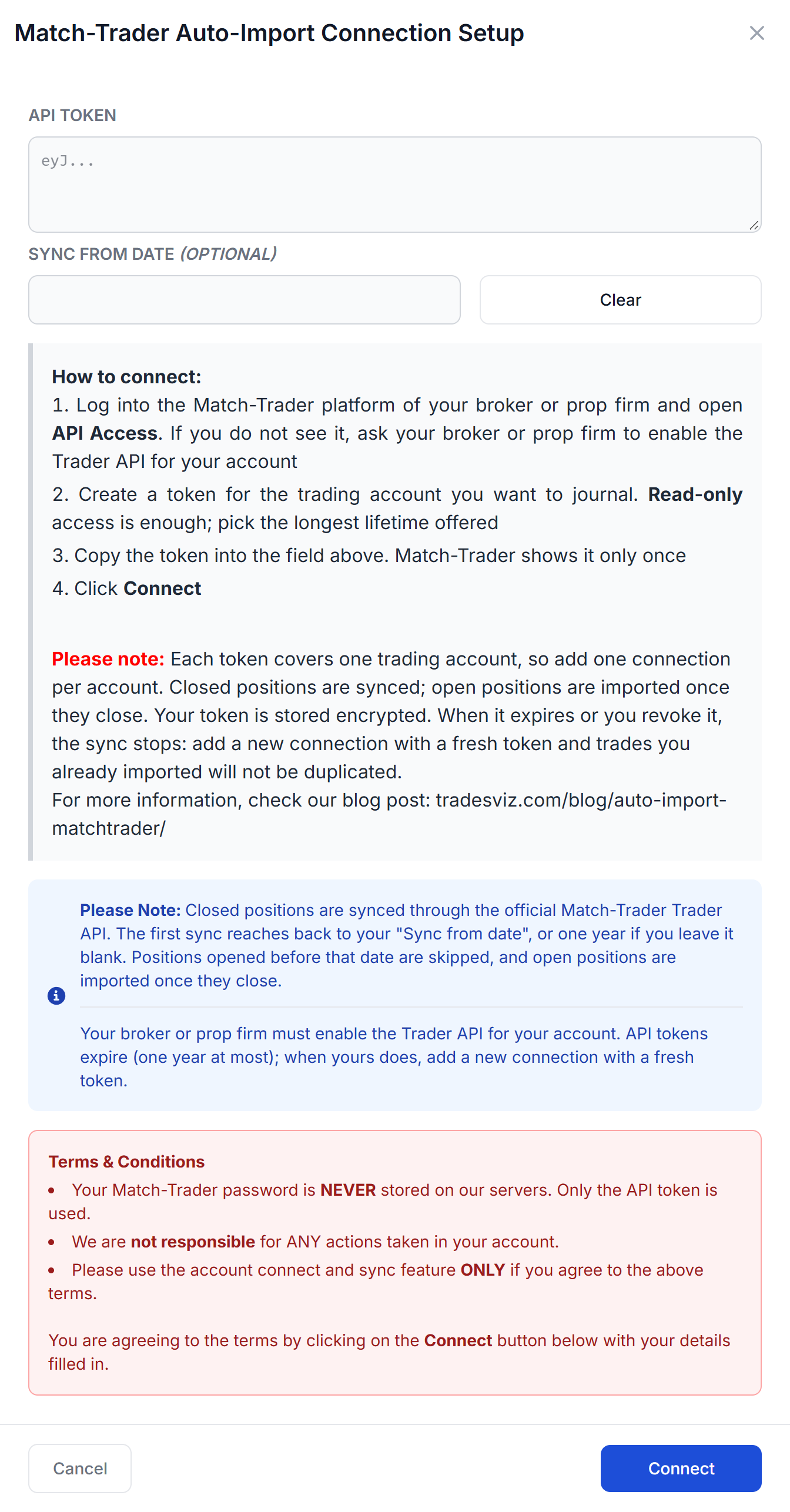
The connection uses a Match-Trader API token, which you create inside the Match-Trader platform of your broker or prop firm. Here are the steps you need to follow:
- Log into the Match-Trader platform of your broker or prop firm.
- Open API Access. If it is not there, the Trader API is not enabled for your account yet, so contact your broker or prop firm.
- Create a token for the trading account you want to journal. Read-only access is enough for TradesViz. Pick the longest lifetime offered so you do not have to reconnect often.
- Copy the token. Match-Trader shows it only once, so copy it before you close that window.
- Paste the token into API Token in the TradesViz popup.
- Optionally set a Sync from date. Leave it blank to import the last year of trades.
- Click Connect. TradesViz checks the token with Match-Trader and confirms the broker and account number it belongs to.
For full details on the API itself, please refer to Match-Trade's official Trader API documentation: app.theneo.io/match-trade/trader-api.
- Your Match-Trader password is NEVER stored on our servers. Only the API token is used.
- We are not responsible for ANY actions taken in your account.
- Please use the account connect and sync feature ONLY if you agree to the above terms.
Once connected, TradesViz starts your first sync from the connections list, and you can click on sync there at any time. All our syncs run once per day automatically.
Notes:
- Each token belongs to one trading account. For several accounts, such as a few prop firm challenges, create a token for each and add one connection per account.
- The first sync reaches back to your "Sync from date", or one year if you left it blank. Positions opened before that date are skipped. Later syncs recheck the last 7 days and skip anything already imported.
- Only closed positions are synced. Open positions appear after they close.
- If you already imported Match-Trader files, pick a "Sync from date" after your last imported trade, or use a separate trading account, so the two do not overlap.
- Tokens last up to one year. When yours expires or is revoked, the connection asks to be reconnected: add a new connection with a fresh token and remove the old one. Imported trades are not duplicated.
- Create the token with read-only access if you can. TradesViz only reads your account, closed positions and symbol details, never places orders, and stores the token encrypted. Revoking it in API Access stops the sync immediately.
Supported instruments: Forex, metals, crypto, and index, commodity and stock CFDs traded on Match-Trader are supported. Lot sizes are converted to units using each symbol's contract size from Match-Trader. Positions you closed in parts are kept together as one trade with each partial close as its own exit. Commissions and swaps are imported with each trade, and your stop loss and take profit are saved as the trade's targets. Deposits and withdrawals are not imported.
That's it! Please let us know if you have any questions or concerns about the Match-Trader auto-sync integration by sending us an email at [email protected].