In this post, we will explore how to pair your TradesViz account with TopStepX platform.
Once you select your trading account and broker as "TopStepX" in the trade auto-import page, a popup box will appear when you click on the "Connect account" button.
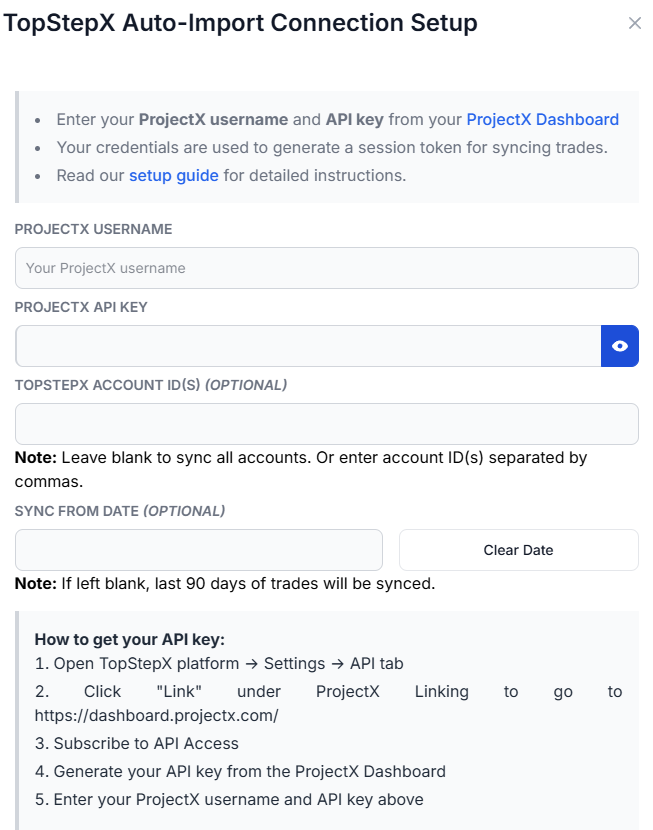
The purpose of this blog post is to guide you in establishing a TopStepX connection on TradesViz. Here are the steps you need to follow:
- Go to https://dashboard.projectx.com and subscribe to the API Access plan.
- In TopStepX, open Settings > API (https://topstepx.com/settings?tab=api). Click "Add Link" to link your ProjectX profile, then "Add API Key" to generate your key.
- Enter your TopStepX trading-platform username and API key in TradesViz. Email can be used as a fallback. Leave account selection blank to sync all active accounts, or enter exact account names or numeric IDs, separated by commas, to select specific active or inactive accounts.
- Click Connect and the connection will be established
Once connected, click on Sync in Broker connections to get your trades synced into TradesViz. Automatic sync runs once per day when enabled, and you can also trigger a manual sync. By default, the first sync requests the last 90 days of trades available from TopStepX. You can choose another start date; CSV import is optional for additional history.
Note: TradesViz uses the API only to read your trades and does not place orders. The API key itself can grant trading access; keep it private.
That's it! Please let us know if you have any questions or concerns about the TopStepX auto-sync integration by sending us an email at [email protected].