In this post, we will explore how to pair your TradesViz account with the IG platform for seamless auto-sync of your trades and activities.
Once you select your trading account and broker as IG (both demo and live accounts are supported) in the trade auto-import page, a popup box will appear when you click on the "Connect account" button.
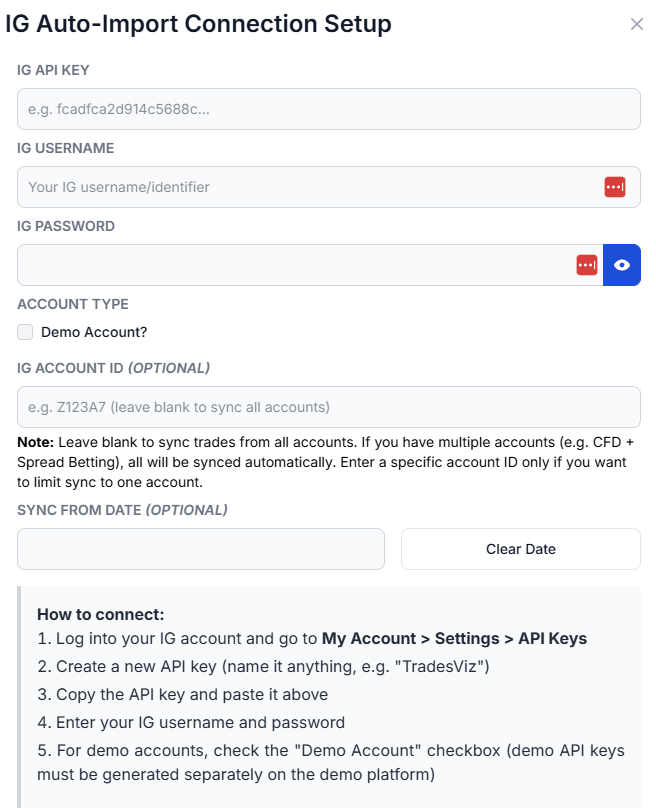
The purpose of this blog post is to guide you in establishing an IG connection on TradesViz. Here are the steps you need to follow:
- Fill in your IG API Key, Username, Password, and (optionally) Account ID and Sync From Date.
- Click Connect and the connection will be established.
- Your password is NEVER stored on our servers. Once we obtain the secure access token, your password is immediately discarded.
- We are not responsible for ANY actions taken in your account.
- Please use the account connect and sync feature ONLY if you agree to the above terms.
Once connected, you can click on sync in the connections list to get your trades synced into TradesViz. All our syncs run once per day automatically and you are also able to manually trigger the sync at any time.
Note: IG auto-sync brings in up to 90 days of historical data from the date of connection.
That's it! Please let us know if you have any questions or concerns about the IG auto-sync integration by sending us an email at [email protected].