In this post, we will explore how to pair your TradesViz account with Lighter.
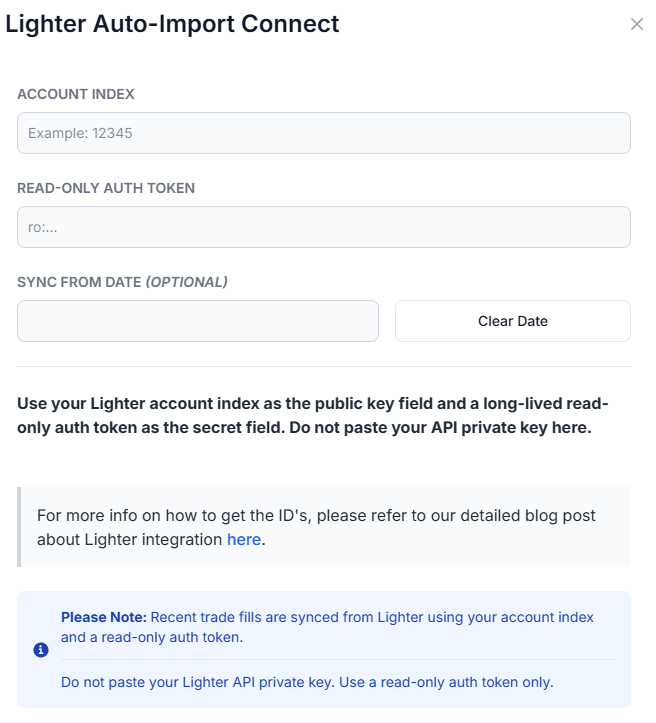
Once you select your trading account and broker as "Lighter" in the trade auto-import page, a popup box will appear when you click on the "Connect account" button.
The purpose of this blog post is to guide you in establishing a Lighter connection on TradesViz.
Here are the steps you need to follow:
- Log into Lighter and review the official documentation (docs.lighter.xyz/trading/api#api-keys).
- Find the Lighter account index for the account or sub-account that you trade from.
- Create or obtain a long-lived read-only auth token for trade history access. Read-only tokens are intended for data access and should not be able to place orders.
- In TradesViz, go to the Import page, open the Add auto-sync connection tab, select your trading account, and choose Lighter as the broker.
- Enter your Account Index in the API/Public Key field.
- Enter your read-only auth token in the Secret/Private Key field. Do not enter your Lighter API private key.
- Select the sync-from date if you want TradesViz to start from a specific date, then click Connect.
Once connected, you can click on sync in the connections list to fetch available Lighter trades. All our syncs run automatically, and you are also able to manually trigger the sync at any time.
Note: This connection only uses read-only access for your Lighter trade history. We do not request trading or transfer permissions.
That's it! Please let us know if you have any questions or concerns about the Lighter auto-sync integration by sending us an email at [email protected].