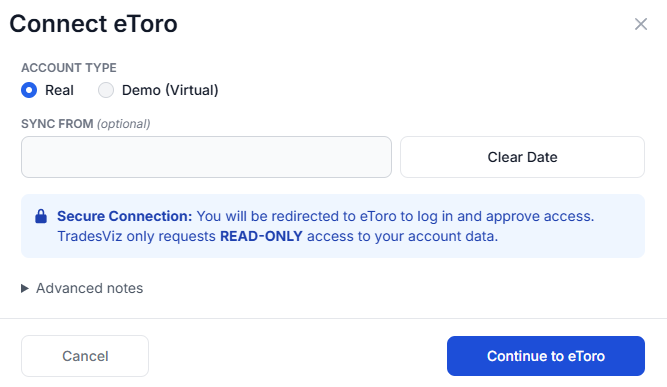
To connect eToro to your TradesViz trading journal, select eToro as your broker in the trade auto-import page and click Create Connection. Choose Real or Demo (Virtual) account type, then click Continue to eToro. You will be redirected to eToro's own login page to approve read-only access - no API keys to copy and no password is ever entered into TradesViz.
Yes, the TradesViz eToro integration is built on the official eToro Public API using OAuth authorization - the same secure 'Log in with...' flow used by major platforms. Access tokens are refreshed automatically and can be revoked by you at any time from your eToro account settings.
TradesViz supports both eToro real accounts and demo (virtual) practice portfolios. Connect each as a separate connection - ideally on separate TradesViz trading accounts - to track and compare real and virtual performance side by side.
The TradesViz trading journal imports all eToro asset types: stocks, cryptocurrencies, forex pairs, commodities, indices, and ETFs, including leveraged CFD positions with direction, size, open/close rates, and fees for accurate P&L tracking.
The eToro auto-sync imports closed positions. A position appears in your TradesViz journal automatically on the next sync after you close it on eToro. Up to one year of closed-position history is imported on the first sync, or from your chosen Sync From date.
The TradesViz trading log automatically syncs with eToro once per day to import your closed positions. Additionally, you can manually trigger a sync at any time through the connections list to immediately update your journal.
Yes, the TradesViz connection to eToro is completely secure. TradesViz only requests read-only OAuth permissions and never sees your eToro password. TradesViz cannot place trades, close positions, copy traders, or move funds in your eToro account.
eToro requires your account to be verified (KYC complete) before API access is enabled. If the connection fails right after you approve access, complete the verification process in your eToro account settings and then reconnect from the TradesViz auto-import page.
If eToro ends the authorization session (for example after a password change or long inactivity), the connection shows a sync error asking you to reconnect. Simply select eToro in the auto-import page and go through the login again - your existing trades and journal data are not affected.
Use Python, scripts or your own applications to read and search your TradesViz accounts, trades and executions, build custom reports, and manage notes and tags. With the required permissions, you can import supported executions, edit journal entries, update trade risk settings, split or merge trades, and delete selected journal data. Execution imports currently support eligible USD US stocks and fixed-multiplier USD futures, not every asset supported by the website.
Yes. Connect a compatible ChatGPT, Claude or other MCP client to the hosted TradesViz MCP server using browser sign-in; no local MCP server or REST API key is needed. Ask your assistant to summarize recent trades, compare results from retrieved trades, find trades by symbol or tag, or save a review note. Editing and other journal changes require the matching permissions. Connector availability depends on your AI client and workspace settings.
You select the trading accounts and permissions each API key or MCP connection can use. Start with read access and grant editing or deletion separately when needed. Day notes, day tags and general journal notes require a separate opt-in. You can revoke access from the API/MCP dashboard. These tools manage your journal; they cannot place, change or cancel broker orders. AI responses can contain mistakes, so review proposed changes before approving them.