In this post, we will explore how to pair your TradesViz account with Aster.
Once you select your trading account and broker as "Aster" in the trade auto-import page, a popup box will appear when you click on the "Connect account" button.
The purpose of this blog post is to guide you in establishing an Aster connection on TradesViz.
Here are the steps you need to follow:
- Log into Aster and open the API management (www.asterdex.com/en/api-management) page.
- If you already have an existing legacy API key, copy the API key and API secret. If you do not have a legacy key, Aster currently directs new API users toward Aster Pro API wallet-based access, which is not supported by this TradesViz auto-sync connector yet.
- In TradesViz, go to the Import page, open the Add auto-sync connection tab, select your trading account, and choose Aster as the broker.
- Enter your Aster API key and secret key in the connection popup.
- Enter the Aster symbols you trade, separated by commas. Use the base symbols, for example: BTC, ETH, SOL. Symbols are required because Aster trade history is queried per market.
- Select the sync-from date if you want TradesViz to start from a specific date, then click Connect.
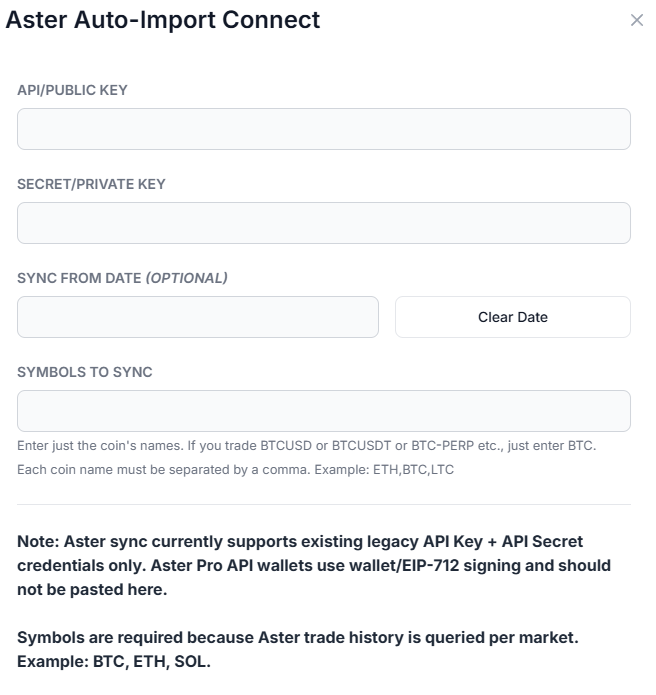
Once connected, you can click on sync in the connections list to fetch available Aster trade history. All our syncs run automatically, and you are also able to manually trigger the sync at any time.
Note: This connection only gives us read access to your Aster trade history through the API credentials you provide. We do not request trading or transfer permissions.
That's it! Please let us know if you have any questions or concerns about the Aster auto-sync integration by sending us an email at [email protected].