Built for the complete trading workflow

TradesViz turns every trade into a system you can study, test, and improve.

TradesViz started as a trading journal and has grown into a full performance platform for traders. Import your executions, organize context, analyze behavior, find ideas, ask AI questions, practice with replay and simulation, then review the exact habits that are helping or hurting your edge.

600+
stats and analytics
250+
supported brokers
70+
auto-sync connections
30k+
sim symbols

One connected flow from import to improvement

Most trading tools handle one slice of the process. TradesViz connects the entire loop so your data, ideas, practice, and review all build on each other.

01

Import and normalize

Bring in fills from broker sync, CSV, supported platforms, TradingView workflows, Google Drive, and manual logs. TradesViz organizes trades, fees, executions, symbols, accounts, tags, plans, notes, and time zones into one clean journal.

02

Analyze what happened

Use 600+ charts, statistics, pivots, dashboards, calendar views, MFE/MAE, running PnL, risk, drawdown, exit quality, multi-timeframe analysis, options greeks, and symbol-level analytics to see the real shape of your trading.

03

Find and test ideas

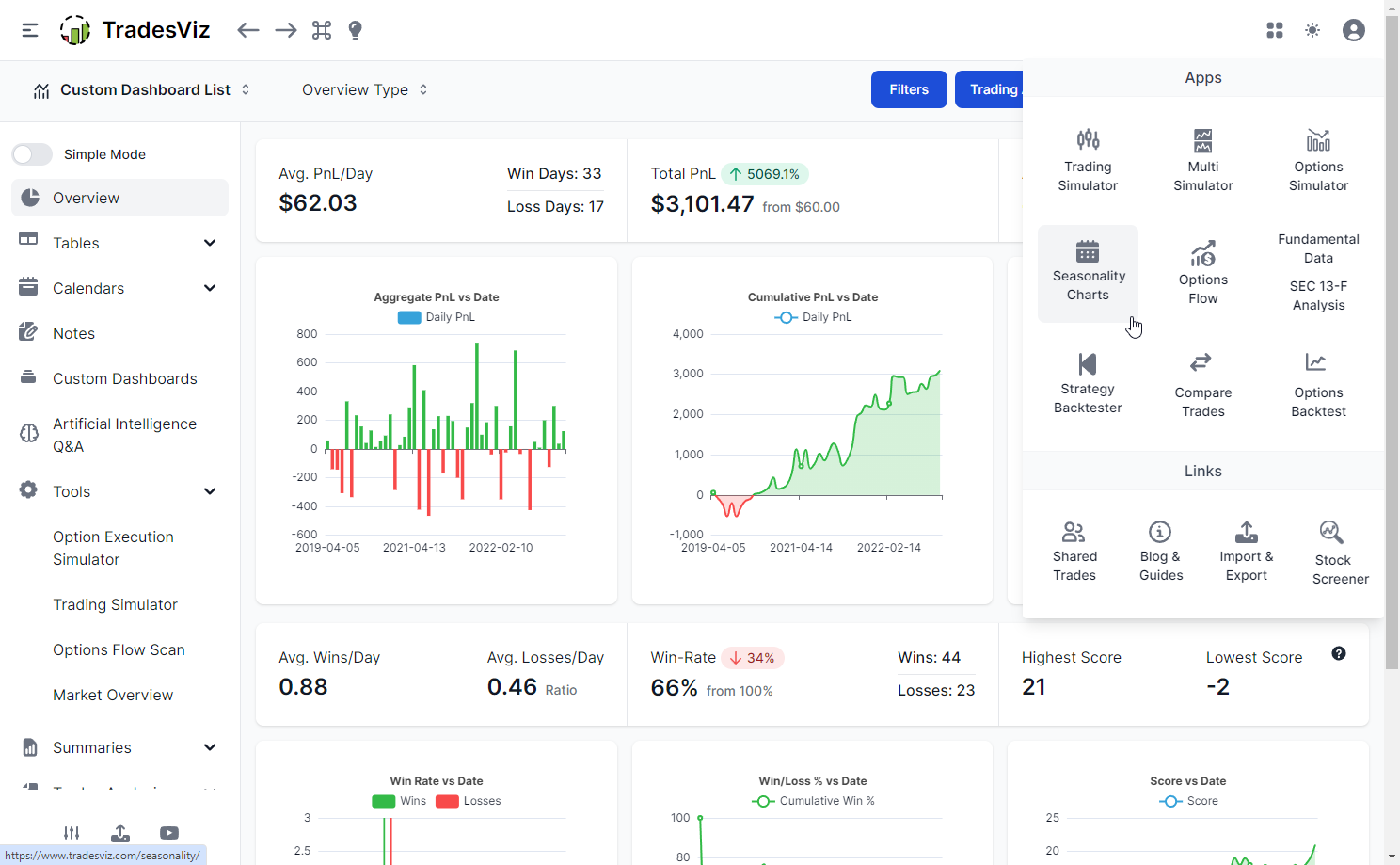
Move from review into ideation with real-time screeners, daily screeners, options flow, seasonality, fundamentals, watchlists, trade plans, strategy research, and backtesting tools that tie back into the journal.

04

Practice and review

Replay real trades second by second, simulate historical sessions, practice options and multi-asset setups, run prop-firm style challenges, and journal simulated trades with the same analytics used for live performance.

Main TradesViz features at a glance

The platform is broad, but the feature set maps cleanly to the way traders work: collect data, understand it, find opportunities, practice, and review.

Import and sync

  • 250+ supported brokers and platforms
  • 70+ auto-sync connections
  • CSV, manual, Google Drive, FTP, and platform workflows
  • Multi-account, multi-currency, and timezone support

Journal and organize

  • Trade, day, month, and account review views
  • Tags, tag groups, mistakes, notes, and attachments
  • Trade plans for setups, rules, and day-level review
  • Custom filters for strategies, symbols, dates, and accounts

Analytics and charts

  • 600+ charts, tables, stats, and widgets
  • PnL, drawdown, win rate, risk, and expectancy reports
  • MFE/MAE, running PnL, best-exit, and exit-quality analysis
  • Calendar, pivot grid, symbol, time, and behavior breakdowns

AI analytics

  • AI Coach: 21 deterministic checks ranked by dollar impact, covering costly leaks and proven edges
  • AI Q&A for plain-English trade analysis
  • AI dashboard widgets from saved questions
  • AI Notes, AI Summary, and AI Daily Insights
  • AI Chat, fundamentals Q&A, and support agents

Screening and research

  • Real-time stock screener and daily scan workflows
  • Watchlists, notes, and idea capture from screens
  • Seasonality, fundamentals, and SEC 13F visualization
  • Options flow, flow screeners, and symbol research

Practice and testing

  • Trading simulator for stocks, futures, forex, and options
  • Global simulation with 30,000+ supported symbols
  • Trade replay with second-by-second historical review
  • Strategy backtesting and what-if execution analysis

Options and advanced markets

  • Options strategy detection and multi-leg tracking
  • Greeks, payoff, expirations, and spread analytics
  • Futures tick-value, forex, crypto, CFD, and index support
  • US, India, Canada, Australia, and global-market workflows

Dashboards and reports

  • Custom dashboards with drag-and-drop widgets
  • Saved views, cloned dashboards, and homepage layouts
  • Shared trade, day, chart, and report views
  • Exportable reports and repeatable review routines

Built around the questions traders actually ask

TradesViz is not just storage for trades. It is designed to answer the operating questions a trader asks every week: what is working, what is breaking, what should I avoid, what should I practice, and what evidence supports the next change.

  • Which setups deserve more size? Filter by tags, symbols, time, strategy, direction, risk, account, expiry, market condition, and custom groups.
  • Where am I leaking money? Study missed exits, poor holds, overtrading, bad time windows, mistake tags, drawdown behavior, slippage, commissions, and avoidable losses.
  • What should I do next? Turn review into watchlists, plans, notes, simulator sessions, replay work, dashboard widgets, and repeatable improvement routines.
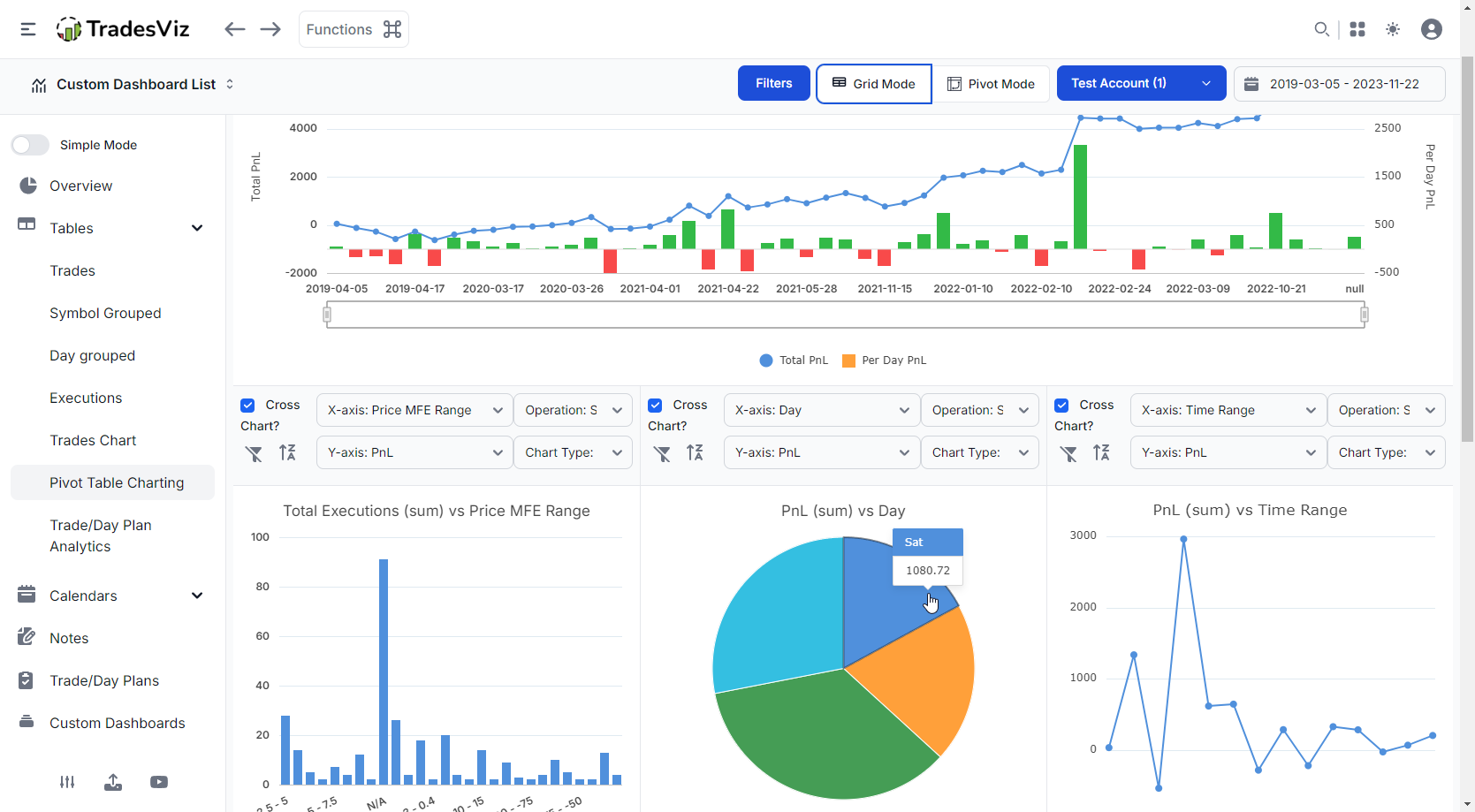
TradesViz pivot grid analytics

A platform for the whole trading desk

Whether you trade one market or five, TradesViz keeps the workflow consistent while giving each asset class the detail it needs.

Stocks and ETFs

Journal executions, review chart context, study stock-specific performance, scan real-time and daily opportunities, use fundamentals and seasonality, and build dashboards around the stats that matter to your strategy.

Stock journaling

Options

Track multi-leg strategies, spreads, greeks, expirations, payoff, option charts, options flow, chain simulation, and options-specific analytics without reducing every trade to a simple ticker row.

Options analytics

Futures and prop traders

Analyze tick-value products, intraday execution, rule adherence, drawdown, account-level targets, and prop-firm style challenges with journal, simulator, and replay workflows built for active traders.

Futures workflow

Forex and CFDs

Review pairs, sessions, lots, currencies, leverage, intraday timing, multi-account activity, and replay or simulate historical forex conditions with the same review loop as other markets.

Forex journaling

Crypto and global markets

Keep multi-exchange, multi-currency, and global-market records together with flexible reporting, tags, notes, dashboards, and symbol-level review.

Crypto journaling

Multi-asset portfolios

Combine accounts, currencies, asset classes, and strategies into one performance view while still drilling down into the exact trade, day, symbol, or behavior that explains the result.

Explore features
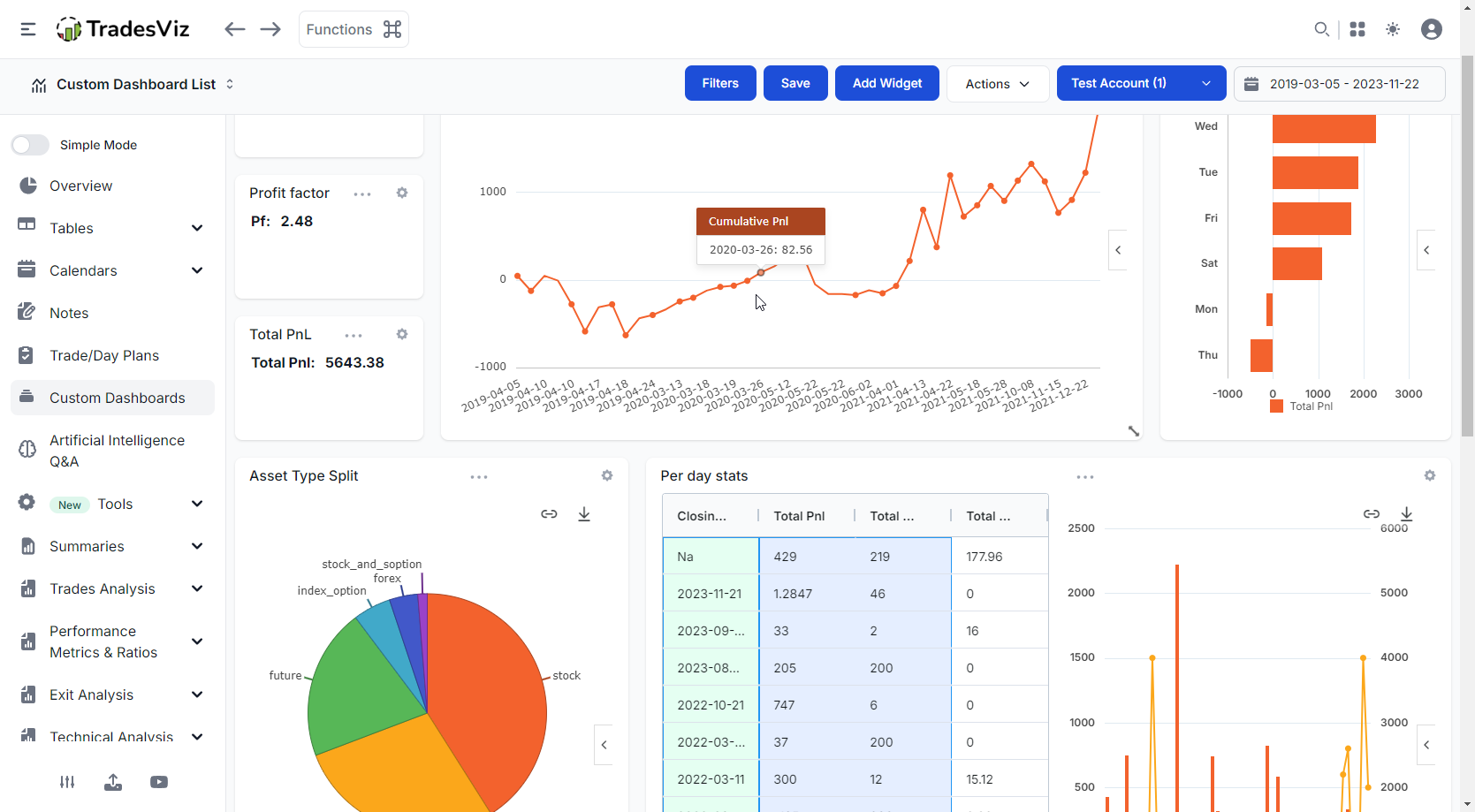
TradesViz AI dashboard analytics
AI that works on your trading data

Ask better questions without building every report by hand

TradesViz combines deterministic trading statistics with AI tools built for analysis, not generic chat. You can ask plain-English questions, create dashboard widgets, generate notes, summarize charts, review fundamentals, and use AI to speed up the work that usually gets skipped.

AI Q&A

Turn natural language into charts, tables, and filtered analysis across your imported trades.

AI Widgets

Pin AI-generated analytics to custom dashboards and keep your key questions visible.

AI Notes

Generate trade summaries, context, and review notes when you do not want blank note fields.

AI Coach

Run 21 deterministic checks and review the 8 findings with the greatest dollar impact.

Screen, plan, and practice before money is at risk

TradesViz does not stop after you import trades

A review process is useful only when it changes the next session. TradesViz links analysis to idea generation and deliberate practice, so the lessons from your journal can become watchlists, trade plans, simulator work, and replay sessions.

Screeners and research

Real-time screens, daily scans, options flow, seasonality, fundamentals, SEC 13F visualization, watchlists, and idea capture.

Trade plans

Attach rules, expectations, mistakes, tags, screenshots, notes, and planned behavior to trades and trading days.

Simulation

Practice stocks, futures, forex, options, and global symbols with second-by-second control, 70+ indicators, order handling, and auto-journaling.

Replay and backtest

Replay your own trades on historical tape, test exits and rules, and study how a strategy behaves before making the next adjustment.

TradesViz trading simulator

The review loop that keeps traders honest

A journal works when it changes behavior. TradesViz gives traders multiple ways to review the same problem until the pattern is clear enough to act on.

Daily review

Use calendar views, day explore, trade plans, mistakes, notes, screenshots, and session stats to review the trading day while the context is still fresh.

Trade review

Open any trade and inspect executions, charts, targets, MFE/MAE, best-exit scenarios, tags, plan adherence, notes, option legs, and attached files.

Strategy review

Filter by setup, symbol, hour, market, tag group, account, expiry, direction, or custom condition to understand which slices of your process deserve attention.

Dashboard review

Build custom dashboards with charts, tables, widgets, AI analytics, and the exact performance questions you want to revisit every week.

Practice review

Treat simulator, replay, and backtest results like real performance data, then review them alongside live execution to see whether practice is transferring.

Account review

Separate accounts, combine portfolios, track goals, review risk, understand drawdown, and keep multiple strategies organized without losing the details.

About TradesViz FAQ

What is TradesViz?

TradesViz is a trading journal and performance platform that covers the full trader workflow: import trades, organize them, analyze performance, screen for ideas, use AI analytics, practice with simulation and replay, backtest, write notes and trade plans, and review what is improving or hurting results.

Which markets does TradesViz support?

TradesViz supports workflows for stocks, options, futures, forex, crypto, CFDs, indices, and multi-asset traders, with features that adapt to the asset type such as options strategies, greeks, futures and forex analytics, simulators, and multi-currency reporting.

Can TradesViz import trades automatically?

Yes. TradesViz supports 250+ brokers and platforms, including 70+ auto-sync connections. Traders can also use manual CSV import, Google Drive, broker connections, FTP-style sync, and platform-specific workflows where available.

What AI features are available in TradesViz?

AI Coach runs 21 deterministic checks and ranks findings by dollar impact, covering both costly leaks and the edges worth protecting. AI Query turns plain-English questions into charts and tables. AI Chat supports open-ended conversations with your trades. AI Summary explains charts and filtered tables. AI Notes reviews individual trades. AI Daily Insights helps prepare each session. AI Widgets save custom query results to your dashboards. Additional AI tools assist with fundamentals and product support.

Does TradesViz include simulation and replay?

Yes. TradesViz includes trading simulators, options simulation, global symbol simulation, trade replay, second-by-second review, strategy backtesting, and automatic journaling of simulated trades so practice can be measured with the same analytics as live trading.

What can I do with the TradesViz REST API?

Use Python, scripts or your own applications to read and search your TradesViz accounts, trades and executions, build custom reports, and manage notes and tags. With the required permissions, you can import supported executions, edit journal entries, update trade risk settings, split or merge trades, and delete selected journal data. Execution imports currently support eligible USD US stocks and fixed-multiplier USD futures, not every asset supported by the website.

REST API documentation and examples

Can I connect ChatGPT or Claude to my TradesViz journal using MCP?

Yes. Connect a compatible ChatGPT, Claude or other MCP client to the hosted TradesViz MCP server using browser sign-in; no local MCP server or REST API key is needed. Ask your assistant to summarize recent trades, compare results from retrieved trades, find trades by symbol or tag, or save a review note. Editing and other journal changes require the matching permissions. Connector availability depends on your AI client and workspace settings.

Connect ChatGPT, Claude or another MCP client

How do API and MCP permissions protect my trading journal?

You select the trading accounts and permissions each API key or MCP connection can use. Start with read access and grant editing or deletion separately when needed. Day notes, day tags and general journal notes require a separate opt-in. You can revoke access from the API/MCP dashboard. These tools manage your journal; they cannot place, change or cancel broker orders. AI responses can contain mistakes, so review proposed changes before approving them.

API & MCP overview · API/MCP dashboard
If you trade actively, TradesViz is the place where the whole process comes together.

It is for traders who want far more than a spreadsheet: automated import, serious analytics, AI-powered review, idea generation, simulation, replay, backtesting, notes, plans, and a repeatable process for getting better.