The Options Command Center: Your Complete Guide to the Options Portfolio Dashboard
Options traders, this one's for you. Whether you're running the wheel strategy, selling covered calls, managing iron condors, or trading complex multi-leg spreads - tracking your options portfolio has always been a nightmare. You're juggling Greeks across positions, monitoring multiple expirations, and trying to understand your true risk exposure... usually across multiple spreadsheets that break the moment you add a new position.
Not anymore.
Today, we're introducing the Options Command Center. The most comprehensive options portfolio dashboard available in any online trading journal. This isn't a basic P&L tracker with a few stats bolted on. This pulls in data from various parts of your account and from our data sources to provide you with a centralized view of your open options positions, and it's just the beginning.
We've built this from the ground up based on feedback from thousands of options traders on TradesViz. Every feature you're about to see exists because traders asked for it. Let's dive in.
What's in the Options Command Center?
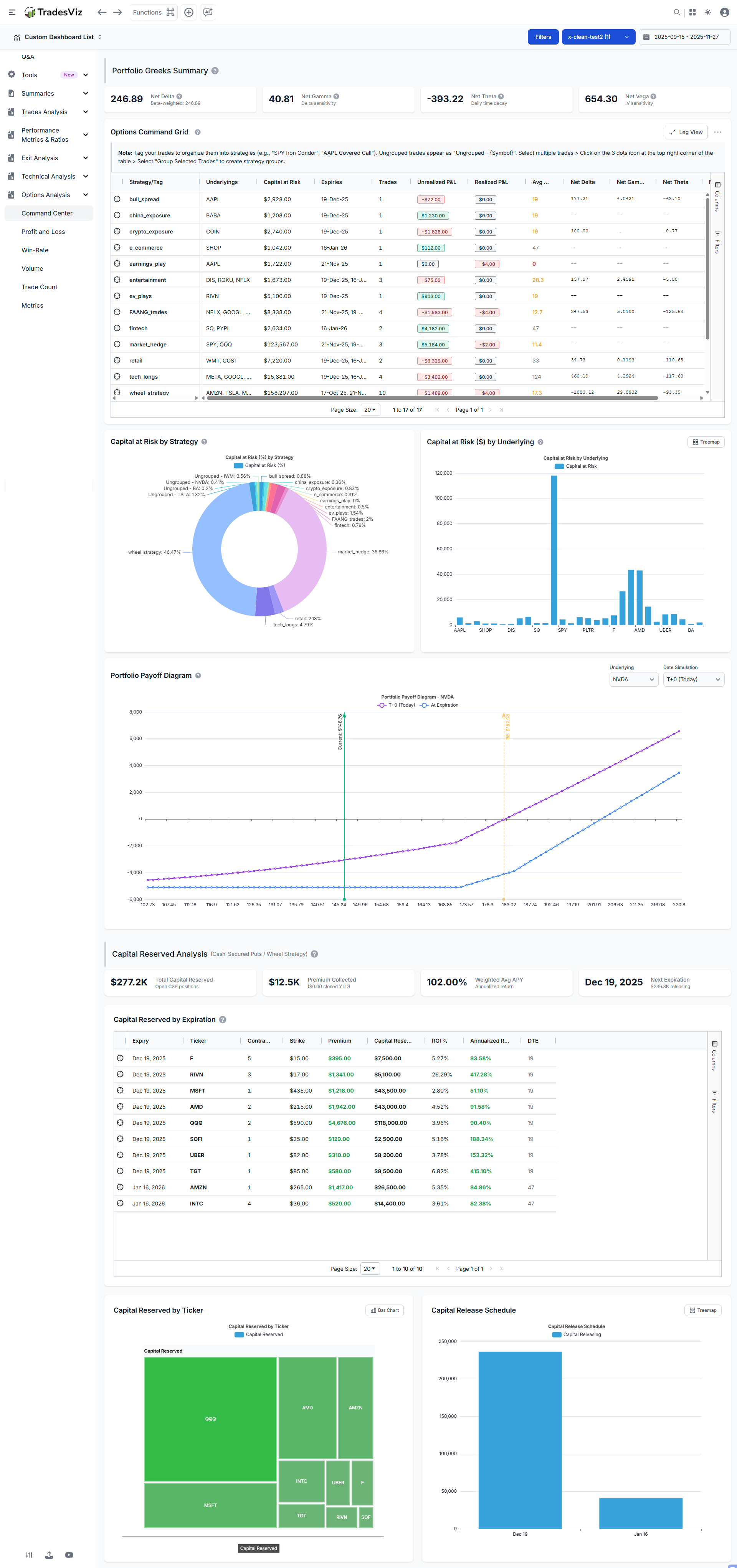
Before we go deep into each feature, here's what you're getting:
- Net Greeks Summary Cards: Delta, Gamma, Theta, and Vega aggregated across your entire portfolio
- Options Command Grid: Strategy-level view with grouping, drill-down to individual legs, P&L color coding, and DTE warnings
- Capital at Risk Charts: Visual breakdown of your capital allocation by strategy and underlying
- Portfolio Payoff Diagram: Interactive T+0 and expiration payoff curves for any underlying
- Cash-Secured Put Analytics: Dedicated CSP analysis with ROI, APY calculations, and capital release scheduling
- Strategy Grouping: Seamless integration with TradesViz's existing tagging system
You can find the options dashboard under the Options analysis tab in your TradesViz dashboard.
Net Greeks Summary Cards: Know Your Portfolio-Level Risk Instantly
At the top of the dashboard, you'll find four cards showing your aggregate Greek exposure across all open options positions. This is portfolio-level risk management that most retail traders never get to see... or bother looking at... but it's essential to understand this. Read on.

Understanding the Greeks (Quick Refresher)
If you're already familiar with options Greeks, skip ahead. If not, here's what each one tells you:
Delta (Δ) measures directional exposure. A portfolio delta of +250 means your positions behave like owning 250 shares of the underlying. If the overall market rises $1, you gain approximately $250.
[Jan 2026 Update]
Beta-Weighted Delta takes this a step further. Raw delta is misleading when you have positions across different underlyings - a delta of +100 in AAPL is very different from +100 in TSLA because they move differently relative to the market. Beta-weighted delta normalizes all your positions to SPY-equivalent shares using the formula:
β-weighted Δ = Σ (Position Delta × Beta × Underlying Price / SPY Price)
This converts your entire portfolio into "how many shares of SPY is my portfolio equivalent to?" A beta-weighted delta of +200 means your portfolio behaves like owning 200 shares of SPY. This is the standard way institutional traders measure directional risk across diverse portfolios. Hover over the Net Delta card to see a breakdown by underlying showing each position's contribution.
Gamma (Γ) measures how fast your delta changes. High gamma means your directional exposure can shift rapidly as prices move. This is highest for at-the-money options near expiration.
Theta (Θ) is your daily time decay. Positive theta means you're collecting decay (you're net short options). Negative theta means you're paying it (you're net long options). A theta of -$400 means your portfolio loses roughly $400 per day just from the passage of time, all else equal.
Vega (ν) measures sensitivity to implied volatility. A vega of +650 means a 1% increase in IV across your positions adds ~$650 to your portfolio value.
Why Portfolio-Level Greeks Matter
Individual position Greeks tell you about one trade. Portfolio Greeks tell you about your actual risk. You might think you're "hedged" because you have some long calls and some short puts, but without aggregating the Greeks, you have no idea if those positions actually offset each other.
The Options Command Center does this automatically. Because all of what you see here is built on years of feature requests. TradesViz is still the only trading journal that has and generates Greeks for your executions. This was introduced in 2020 - back when showing pnl in a calendar was considered a "big deal" (at least for other journals.. and hey, it still is... ;)).
For example, if your Net Delta shows +500 and your Net Theta shows -$200, you know immediately:
- You have significant bullish exposure (equivalent to 500 shares)
- Time decay is working against you ($200/day erosion)
- You need the underlying to rise to offset theta losses
This is the kind of visibility that transforms how you manage an options portfolio. Now, what journal(s) show you this? TradesViz and... wait.. that's it.
The Options Command Grid: Your Strategy-Level Control Panel
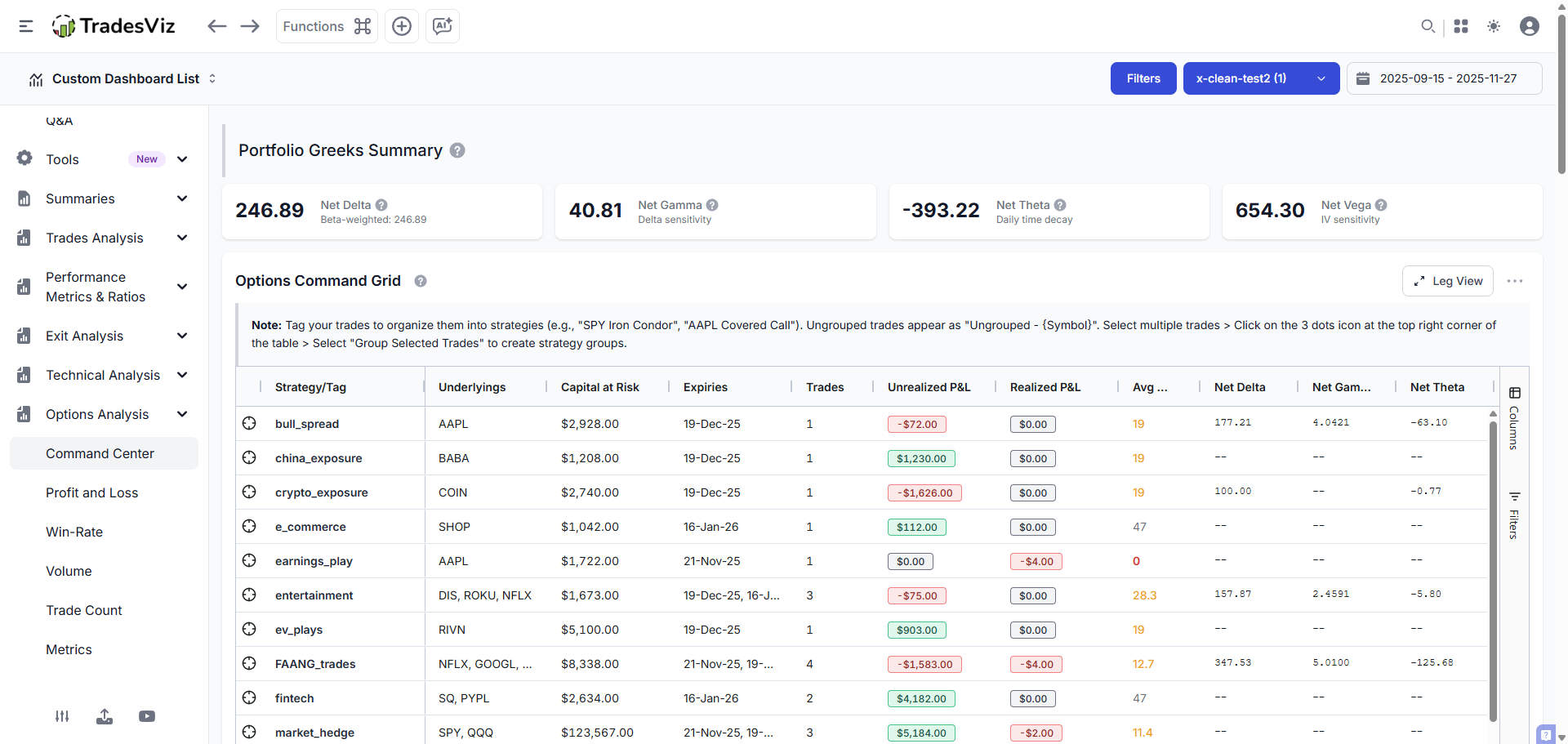
This is where things get powerful. The Command Grid displays all your options positions grouped by strategy, with full aggregation of Greeks, P&L, capital, and DTE at the strategy level.
Strategy View vs. Leg View
The grid operates in two modes:
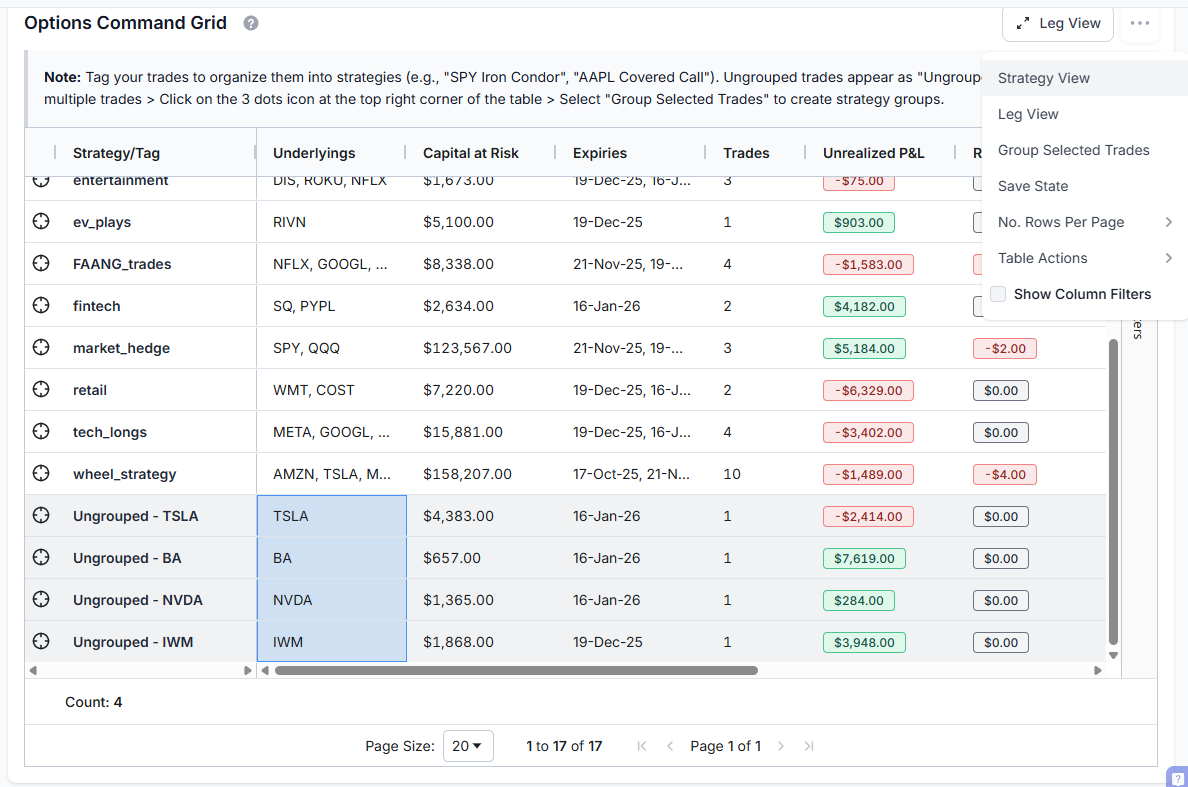
Strategy View shows your positions grouped by their assigned tag (strategy name). Double-click on any row to expand and see the individual trades within that strategy. This is your high-level view. Haven't been using tags? Now is a good time.
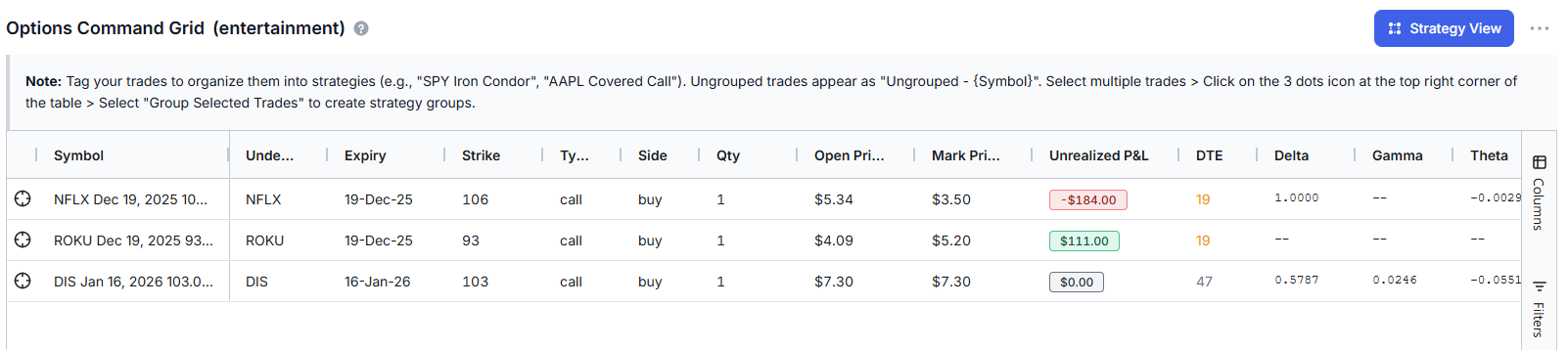
Leg View drills down to show individual option legs with full execution details, strike, expiry, side, quantity, entry price, current price, P&L, and leg-level Greeks. Double-click any strategy row to jump directly to its legs, and click on the "Strategy view" button when in leg view to switch back to Strategy view.
Grid Columns Explained
| Column | What It Shows | Why It Matters |
|---|---|---|
| Strategy/Tag | The tag name grouping these trades | Organize by strategy type (wheel, spreads, hedges, etc.) |
| Underlyings | Stock/ETF symbols in this strategy | See concentration risk at a glance |
| Capital at Risk | Total capital deployed or reserved | Know your actual dollar exposure |
| Expiries | Expiration dates for positions | Manage upcoming expirations |
| Trades | Number of individual positions | Strategy complexity indicator |
| Unrealized P&L | Current profit/loss on open positions | What you'd gain/lose if closed now |
| Realized P&L | Profit/loss from closed positions | Locked-in gains/losses for the strategy |
| Avg DTE | Average days to expiration | Time remaining across positions |
| Net Greeks | Aggregated Delta, Gamma, Theta, Vega | Strategy-level risk assessment |
DTE Color Coding
The Avg DTE column uses smart color coding to highlight expiration urgency:
- 🔴 Red (≤7 days): Critical! Position expires this week. Gamma risk is elevated.
- 🟡 Yellow (≤30 days): Warning. Theta decay is accelerating. Time to decide: roll, close, or hold.
- 🟢 Green (>30 days): Comfortable time buffer. Standard management applies.
This visual system means you'll never be caught off-guard by an expiring position. The grid literally tells you which strategies need attention right now.
P&L Color Coding
Unrealized and Realized P&L columns are color-coded too:
- Green = Profitable
- Red = Losing
Simple. Effective. You can scan 20 strategies in 5 seconds and know exactly where your winners and losers are.
Capital at Risk Analysis: Where Is Your Money Actually Deployed?
"Capital at Risk" answers the question every options trader should be asking: How much of my account is tied up in options positions right now?
This calculation differs based on position type:
For Long Options (Bought Calls/Puts)
Capital at Risk = Premium Paid × Contracts × 100
Example: You bought 2 AAPL Jan 2026 $200 Calls at $15.50.
Capital at Risk = $15.50 × 2 × 100 = $3,100
This is your maximum possible loss. If the options expire worthless, you lose $3,100.
For Short Options (Sold Calls/Puts)
Capital Reserved = Strike Price × Contracts × 100
Example: You sold 1 TSLA Dec 2025 $250 Put.
Capital Reserved = $250 × 1 × 100 = $25,000
This is how much cash you must have available if assigned (to buy 100 shares at $250).
Why Short Options Show Larger Capital Numbers
A $3 premium on a $200 put might seem like a small position. But if assigned, you're obligated to buy $20,000 worth of stock! This is why the dashboard shows Capital Reserved (strike-based) for short puts rather than just the premium received. This is your true capital commitment.
Capital at Risk Charts
Two charts visualize your capital distribution:
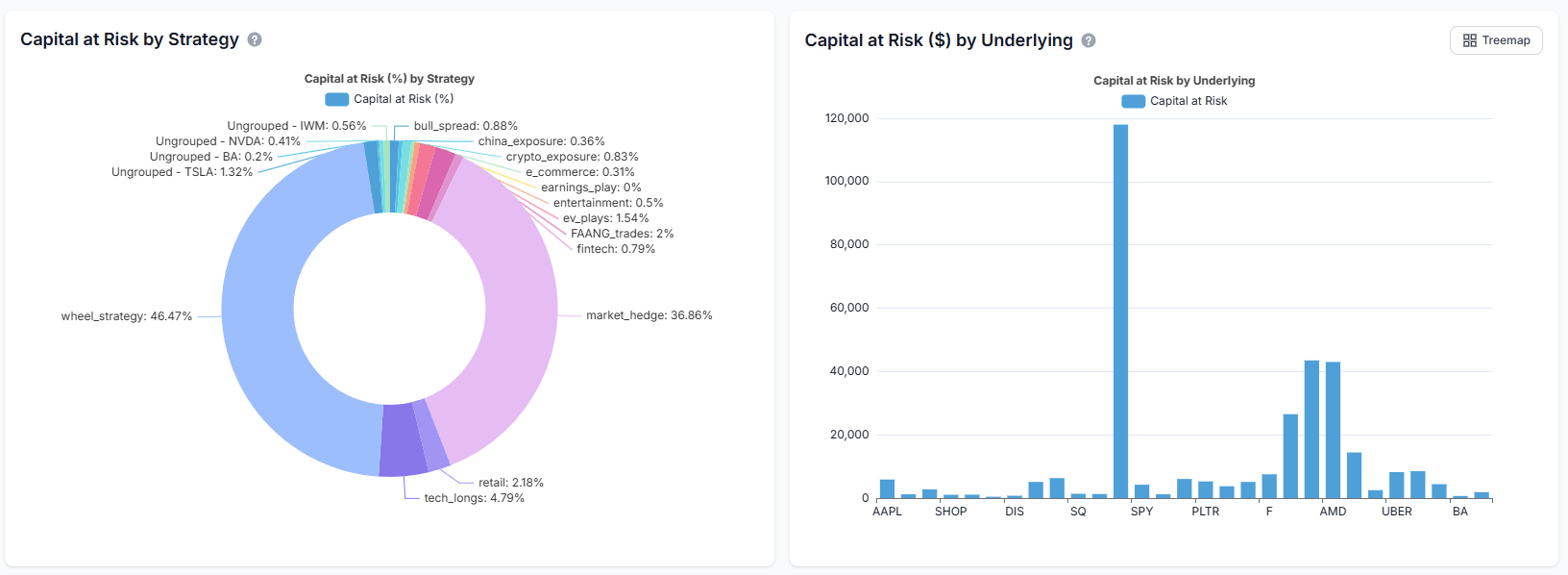
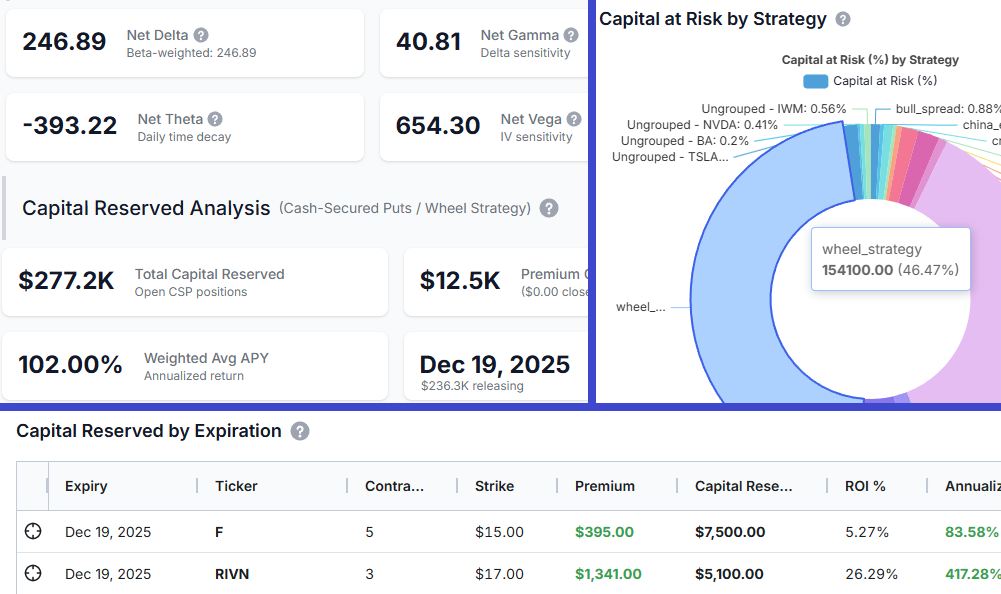
Capital by Strategy (Pie Chart) shows what percentage of your capital is allocated to each strategy type. If your wheel strategy is consuming 60% of your capital, you'll see it immediately.
Capital by Underlying (Treemap/Bar Chart) shows concentration risk by individual stock. Use the toggle button to switch between treemap (better for seeing relative sizes) and bar chart (better for precise comparisons).
The treemap view is particularly useful for identifying overconcentration. If TSLA is taking up half your visual space, you have half your capital at risk on one underlying. That might be intentional, or it might be a risk you didn't realize you were taking.
Portfolio Payoff Diagram: Visualize Your Risk/Reward Profile
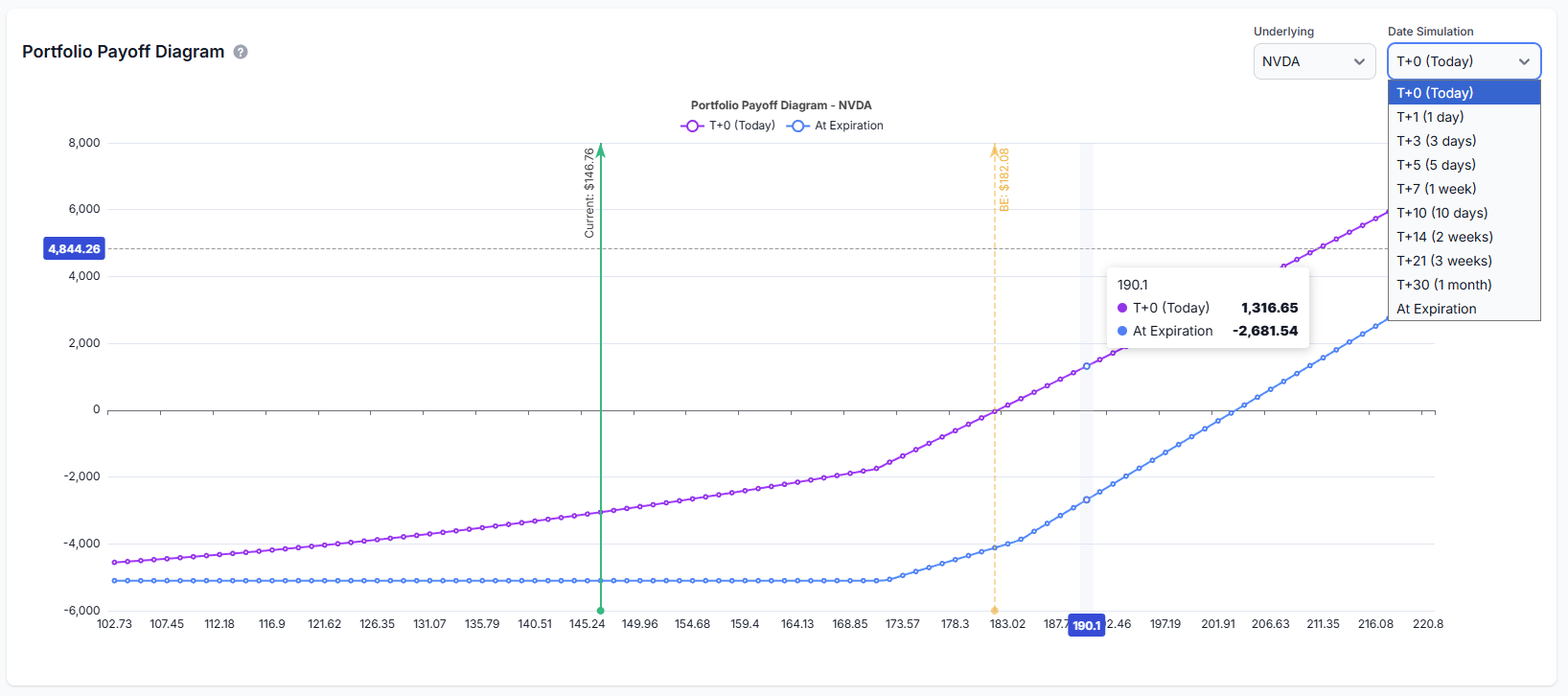
This is the feature experienced options traders have been asking for. The payoff diagram visualizes your portfolio's profit and loss across a range of underlying prices.
Reading the Payoff Diagram
The diagram displays two key lines for multiple date ranges - like T+3, T+17, T+15, etc.:
| Line | What It Shows |
|---|---|
| T+0 (Today) | Your theoretical P&L if you closed the position at various prices right now. Includes time value. |
| At Expiration | Your P&L at expiration when options have no time value left. The classic "kinked" payoff profile. |
The gap between the two lines represents time value (extrinsic value). Before expiration, options have extra value from potential future movement. At expiration, only intrinsic value remains. The lines converge as expiration approaches. This lets you see exactly how theta decay will reshape your risk profile as time passes.
Key Annotations
- Current Price Marker: Vertical line showing where the underlying is trading now
- Breakeven Points: Where your P&L crosses zero at expiration
- Max Profit/Loss Zones: Visual indication of your best and worst-case scenarios
Underlying Selector
If you hold options on multiple underlyings, use the dropdown to switch between payoff views. The diagram recalculates for the selected underlying, showing only positions in that stock.
Cash-Secured Put (CSP) Analytics
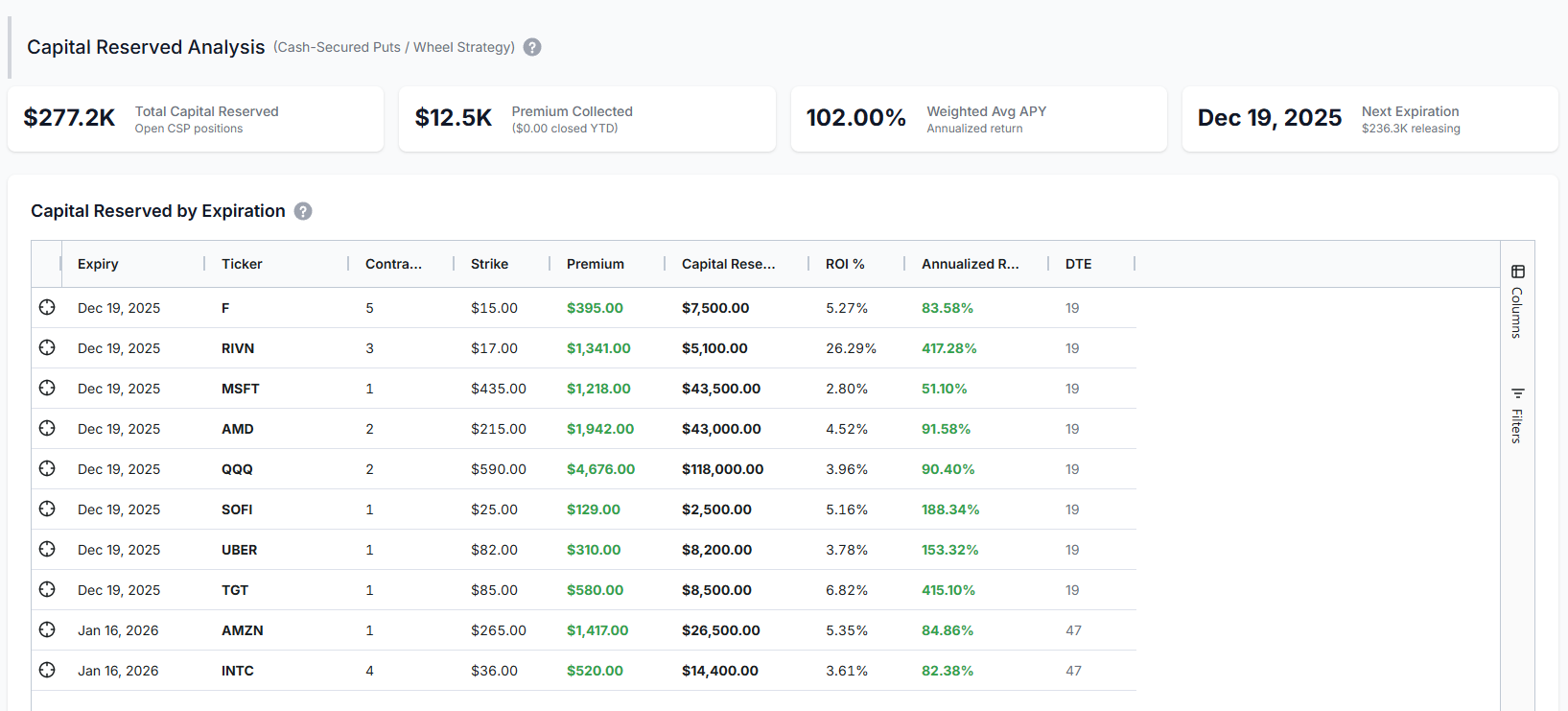
If you're running the Wheel Strategy (historically tracked by most traders on TradesViz using tags or notes) or selling cash-secured puts for income, this section is built specifically for you.
CSP Summary Metrics
| Metric | What It Shows |
|---|---|
| Total Capital Reserved | Sum of (Strike × 100 × Contracts) for all your short puts. This is your total assignment liability. |
| Premium Collected | Total premium received from selling puts. |
| Weighted Avg APY | Annualized return on reserved capital, weighted by position size. Higher = better return per dollar committed. |
| Next Expiration | When your nearest CSP expires. Shows how much capital is about to be released (or assigned). |
CSP Return Calculations
For each CSP position, we calculate:
ROI % = (Premium Collected ÷ Capital Reserved) × 100
Annualized ROI = (ROI % ÷ Days to Expiration) × 365
Example: You sold a SOFI $15 Put for $0.85 with 30 DTE.
- Premium Collected: $0.85 × 100 = $85
- Capital Reserved: $15 × 100 = $1,500
- ROI %: $85 ÷ $1,500 = 5.67%
- Annualized ROI: (5.67% ÷ 30) × 365 = 68.9%
If the put expires worthless, you earned 5.67% in 30 days - equivalent to 68.9% annualized. The dashboard calculates this automatically for every CSP position.
Remember: Premium is NOT realized PnL! Nothing is realized unless 2 executions of opposite sides are matched.
Capital Release Schedule
The bar chart shows when your capital will be "released" (assuming no assignments):
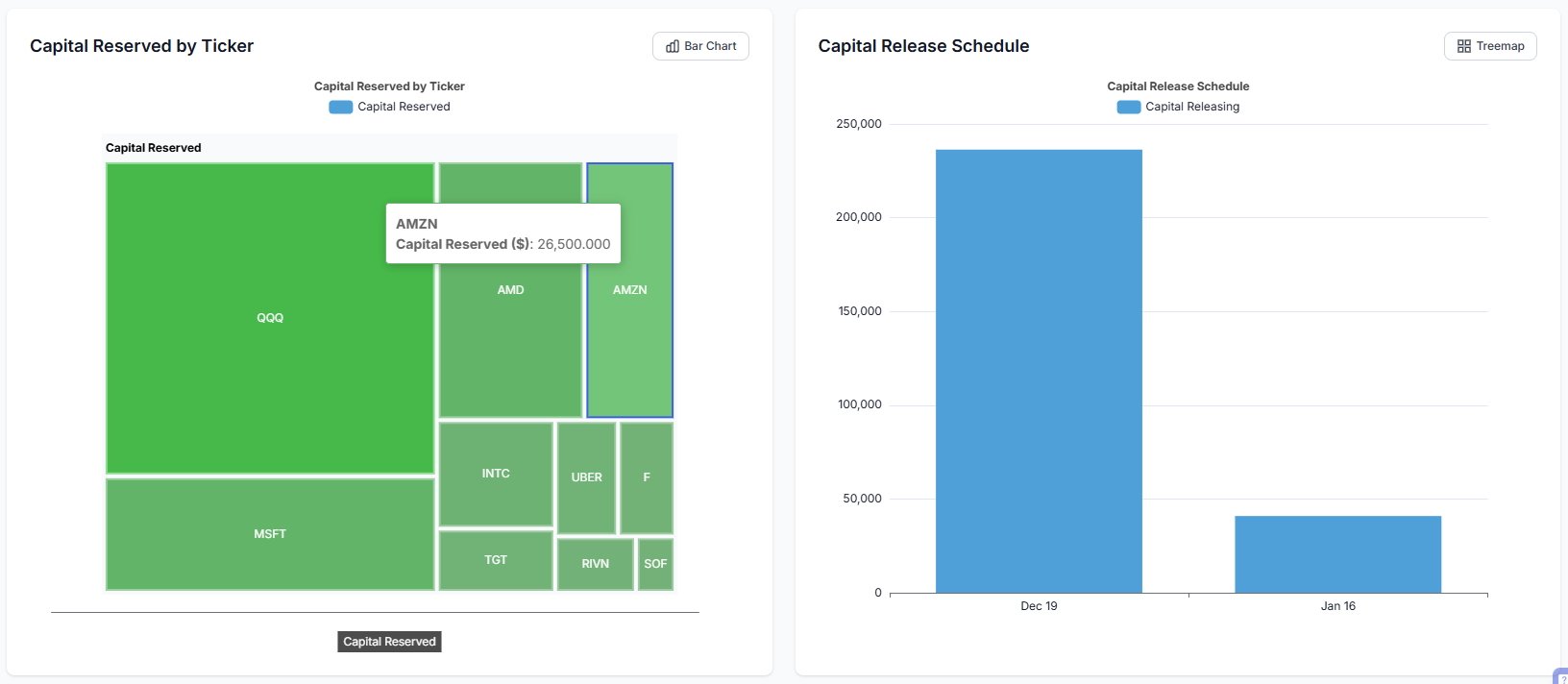
This helps you plan future capital deployment. After Dec 19 expiration, you might have $150K freed up for new trades or tied up in assignments if stocks dropped. Either way, you know exactly when decisions are coming.
Strategy Grouping: Powered by TradesViz Tags
The Options Command Center integrates seamlessly with TradesViz's existing tagging system. No new learning curve. No separate grouping mechanism. Just use the tags you're already using.
How It Works
- Assign tags to your options trades (e.g.,
iron_condor_spx,wheel_tsla,earnings_play) - The Command Grid automatically groups all trades with the same tag into one strategy row
- Greeks, P&L, capital, and DTE aggregate across the tagged group
If you're already using tags in TradesViz (and you should be (again!), see our complete guide to tags), your strategies will appear automatically in the Command Center.
Creating Strategy Groups
Two ways to group trades:
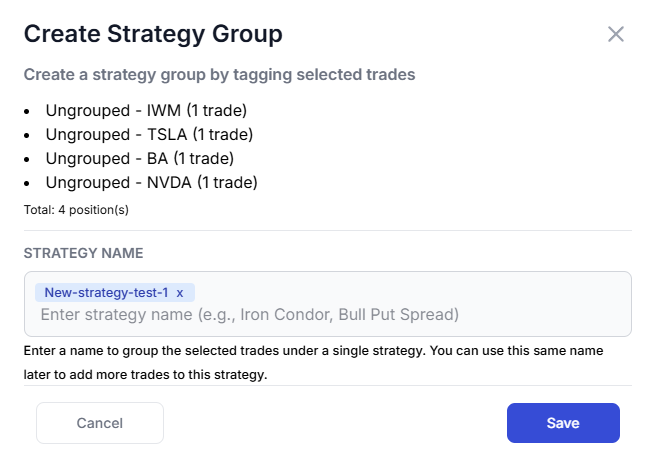
- Tag directly: Click the pencil icon on any trade in the trades table and add a tag (remember to add a comma after each tag)
- Bulk tag: Select multiple trades in the grid, click "Create Strategy Group," and assign a common tag name
 |
 |
Trades with Multiple Tags: "First Tag Wins"
What happens when a trade has multiple tags? For example, you might tag a position as both tech_longs and trend_days. In the Options Command Center, each trade appears under only its first (oldest) tag to prevent double-counting.
Here's why this matters:
- Accurate Greeks aggregation: Without this rule, a trade with 3 tags would contribute 3x to your Net Delta, Theta, etc. - completely misrepresenting your actual exposure.
- Correct Capital at Risk: The same trade's capital would appear in multiple strategy rows, making your total capital look 2-3x larger than reality.
- Grid totals match summary cards: The sum of Greeks in the Command Grid now equals the portfolio-level Greeks Summary Cards at the top.
How to identify trades with multiple tags: In the Strategy/Tag column, you'll see a badge like +1 or +2 next to the strategy name. This indicates the trades in that group have additional tags. Hover over the badge to see which other tags apply.
Best practice: Use your primary strategy classification as the first tag. Add secondary descriptors (like market conditions, timeframe, etc.) as additional tags. The first tag you add becomes the "owning" strategy in the Options Command Center.
Ungrouped Trades
Trades without tags appear as "Ungrouped - [SYMBOL]" in the grid. These are individual positions that haven't been assigned to a strategy. Best practice: always tag your trades. Even simple tags like speculative or income help organize your thinking.
Best Practices for Using the Options Command Center
Daily Monitoring Checklist (Turn this into a trade plan!)
- Check Net Delta: Is your directional bias where you want it?
- Review Net Theta: How much are you earning/losing daily to time decay?
- Scan for Red DTE: Any positions expiring within 7 days?
- Check P&L colors: Any strategies significantly underperforming?
Weekly Review Tasks
- Review payoff diagrams for positions with high unrealized P&L
- Check capital concentration by underlying (rebalance if needed)
- Evaluate CSP annualized returns – are you being compensated for the risk?
- Plan for upcoming expirations (roll, close, or let expire)
Risk Management Guidelines
| Rule | Guideline | Why |
|---|---|---|
| Single Position Size | No single position > 10% of capital | Limits damage from any one bad trade |
| Single Underlying | No underlying > 20-25% of capital | Prevents concentration disasters |
| Strategy Allocation | No strategy type > 50% of capital | Maintains diversification |
| Delta Range | Keep portfolio delta within ±500 | Reduces directional blowup risk |
Too many things to keep track of? We already have trading goals to simplify certain goal tracking for you. Maybe we'll add some options, specific metrics to those?... let us know!
Common Mistakes to Avoid
Ignoring Theta When Net Long
If your Net Theta is -$300, you're losing roughly $300 per day just from time passing. Don't hold long options indefinitely, hoping for a move - time is literally money draining from your account.
Overleveraging CSPs
Selling $500K worth of puts when you have $100K in your account is a recipe for margin calls. The Capital at Risk section exists precisely to prevent this. Only sell puts you can actually afford to be assigned on.
Ignoring Expiration Clusters
If all your positions expire the same week, you face "expiration risk" - too many decisions at once, gamma risk spikes, and potential for cascading losses. Use the DTE color coding to identify and spread out your expirations.
Chasing High APY
A 500% APY on a CSP usually means extreme risk. The stock could easily drop through your strike. The dashboard shows you APY, but it also shows you the capital reserved. Balance yield with probability of success.
If you don't see your positions, make sure you have:
- Options trades imported (check our import guide if needed)
- Trades tagged with strategy names (see our tagging guide)
- Open positions in your account (the dashboard shows open options only)
Final Thoughts
Options trading requires managing multiple dimensions simultaneously - direction, time, volatility, and capital. Most traders try to do this with spreadsheets, broker screens, or worse, mental math. That approach doesn't scale.
The Options Command Center gives you the visibility you need in one unified dashboard:
- Aggregate Greeks across your entire portfolio
- Strategy-level grouping and analysis
- Capital at risk by strategy and underlying
- Interactive payoff diagrams
- Dedicated CSP analytics with ROI/APY calculations
This is institutional-level options portfolio management, built into the trading journal you're already using.
There's no other trading journal in the world that offers this level of options analytics. Not at any price point. We built it because options traders needed it, and no one else was going to do it right.
Questions? Feedback? Feature requests? Reach out to us at [email protected] or use the live chat. As always, we're building TradesViz based on what traders actually need and we read every message.