In this post, we will explore how to pair your TradesViz account with Crypto.com Exchange.
Once you select your trading account and broker as "Crypto.com Exchange" in the trade auto-import page, a popup box will appear when you click on the "Connect account" button.
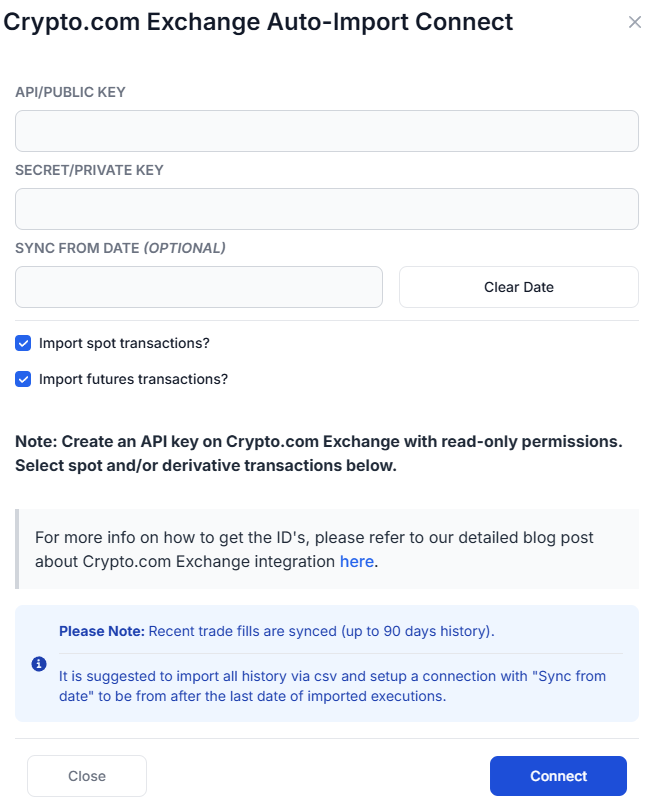
You will need to enter your API key and Secret key from the Crypto.com Exchange. You can also choose whether to import spot transactions, derivative (futures/perpetual) transactions, or both. The purpose of this blog post is to guide you to get these API keys from the Crypto.com Exchange website.
Here are the steps you need to follow:
- Log into your Crypto.com Exchange account at https://crypto.com/exchange
- Click on your profile icon in the upper-right corner of the page and navigate to Settings.
- Click on the API Keys tab.
- Click on "Create a new API key".
- Label your API key (e.g., "TradesViz").
- Important: Under permissions, make sure to enable only read-only access. The specific permission you need is:
- Can Read — this allows TradesViz to fetch your trade history.
- Complete any required two-factor authentication (2FA) verification.
- After creating the key, you will see your API Key and Secret Key. Copy both of these values immediately — the Secret Key will only be shown once.
- Go back to the TradesViz auto-import page:
- Enter the API Key in the "API/Public Key" field.
- Enter the Secret Key in the "Secret/Private Key" field.
- Optionally set a "Sync from date" if you only want trades from a specific date onwards.
- Check or uncheck the "Import spot transactions" and "Import futures transactions" checkboxes based on which asset types you trade.
- Click "Connect".
Note: This connection only gives us READ-ONLY permission to your account to access your trade history. We do not have any other permissions. We do NOT have any trading, withdrawal, or transfer permissions.
Supported instrument types
- Spot - e.g., BTC_USD, ETH_USDT
- Perpetual swaps - e.g., BTCUSD-PERP, ETHUSD-PERP
- Futures - e.g., BTCUSD-240528
All traded instruments on Crypto.com Exchange are automatically fetched — you do not need to specify individual symbols.
Sync limits
- The Crypto.com Exchange API allows fetching up to 90 days of trade history.
- If you have older trades, we recommend importing them via CSV first and then setting up the auto-sync connection with a "Sync from date" set to after your last imported trade.
You will now be able to see all your Crypto.com Exchange trades in your TradesViz account, tagged as Cryptocurrency with full charting and statistics support.
Please let us know if you have any questions or concerns about the Crypto.com Exchange auto-sync integration!